2016 KIA Optima Hybrid engine
[x] Cancel search: enginePage 29 of 466

311
Safety features of your vehicle
Seat warmer (if equipped)
The seat warmers are provided to
warm the front seats during cold
weather. With the ignition switch in
the ON position, push either of the
switches to warm the driver's seat or
the front passenger's seat.
During mild weather or under condi-
tions where the operation of the seat
warmer is not needed, keep the
switches in the OFF position.
With the seat warmer switch in the
ON position, the heating system in
the seat turns off or on automatically
depending on the seat temperature. Each time you push the button, the
temperature setting of the seat is
changed as follows :
When pressing the switch for more than 1.5 seconds with the seat
warmer operating, the seat warmer
will turn OFF.
The seat warmer defaults to the OFF position whenever the engine
start/stop button is turned on.
✽ ✽ NOTICE
Be careful not to spill liquid such as
water or beverages on the seat. If you
spill some liquid, wipe the seat with a
dry towel. Before using the seat
warmer, dry the seat completely.
OTF034014
CAUTION - Seat damage
When cleaning the seats, do
not use an organic solventsuch as paint thinner, ben-zene, alcohol and gasoline.Doing so may damage the sur-face of the heater or seats.
To prevent overheating the seat warmer, do not place any-thing on the seats that insu-lates against heat, such asblankets, cushions or seatcovers while the seat warmeris in operation.
Do not place heavy or sharp objects on seats equippedwith seat warmers. Damage tothe seat warming componentscould occur.
OFF → HIGH ( ) → LOW ( )
→
Page 30 of 466
Safety features of your vehicle
12
3
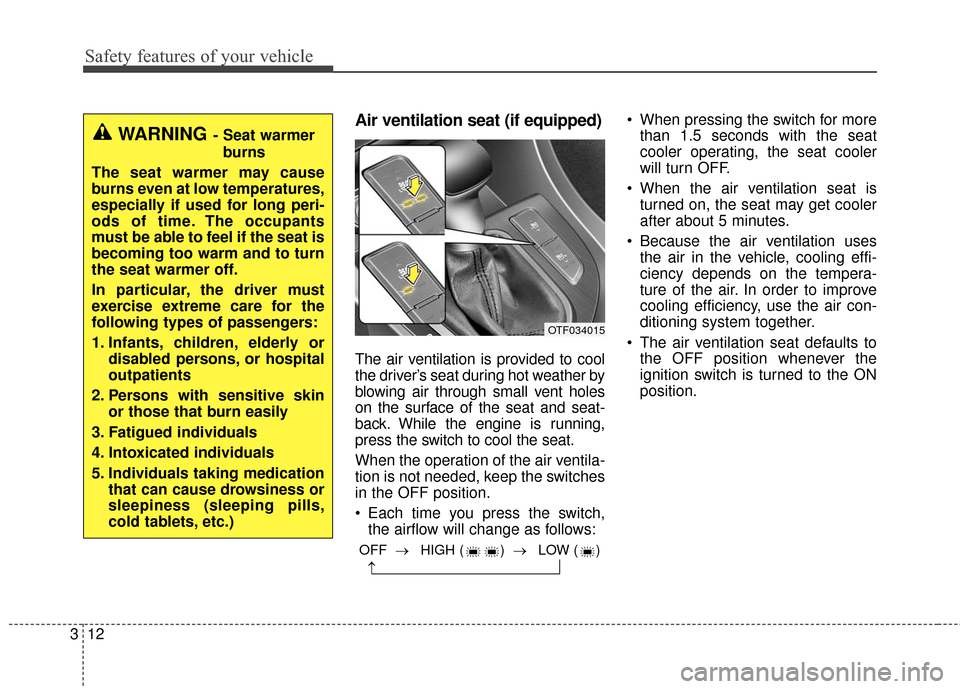
Air ventilation seat (if equipped)
The air ventilation is provided to cool
the driver’s seat during hot weather by
blowing air through small vent holes
on the surface of the seat and seat-
back. While the engine is running,
press the switch to cool the seat.
When the operation of the air ventila-
tion is not needed, keep the switches
in the OFF position.
Each time you press the switch,
the airflow will change as follows: When pressing the switch for more
than 1.5 seconds with the seat
cooler operating, the seat cooler
will turn OFF.
When the air ventilation seat is turned on, the seat may get cooler
after about 5 minutes.
Because the air ventilation uses the air in the vehicle, cooling effi-
ciency depends on the tempera-
ture of the air. In order to improve
cooling efficiency, use the air con-
ditioning system together.
The air ventilation seat defaults to the OFF position whenever the
ignition switch is turned to the ON
position.
WARNING- Seat warmer
burns
The seat warmer may cause
burns even at low temperatures,
especially if used for long peri-
ods of time. The occupants
must be able to feel if the seat is
becoming too warm and to turn
the seat warmer off.
In particular, the driver must
exercise extreme care for the
following types of passengers:
1. Infants, children, elderly or disabled persons, or hospital
outpatients
2. Persons with sensitive skin or those that burn easily
3. Fatigued individuals
4. Intoxicated individuals
5. Individuals taking medication that can cause drowsiness or
sleepiness (sleeping pills,
cold tablets, etc.)
OFF → HIGH ( ) → LOW ( )
→
OTF034015
Page 34 of 466
Safety features of your vehicle
16
3
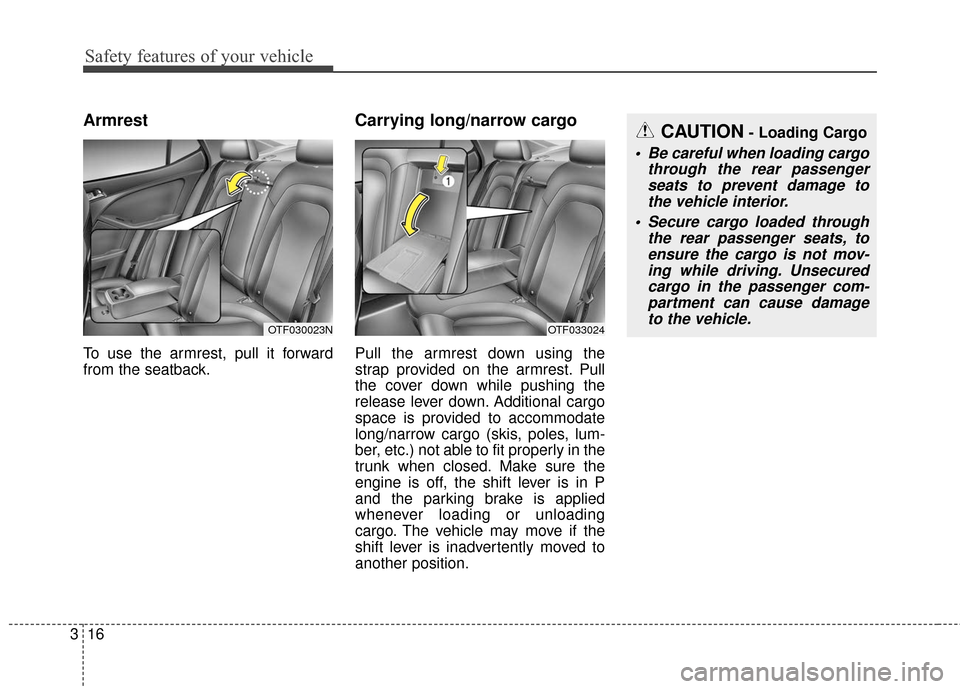
Armrest
To use the armrest, pull it forward
from the seatback.
Carrying long/narrow cargo
Pull the armrest down using the
strap provided on the armrest. Pull
the cover down while pushing the
release lever down. Additional cargo
space is provided to accommodate
long/narrow cargo (skis, poles, lum-
ber, etc.) not able to fit properly in the
trunk when closed. Make sure the
engine is off, the shift lever is in P
and the parking brake is applied
whenever loading or unloading
cargo. The vehicle may move if the
shift lever is inadvertently moved to
another position.
OTF030023NOTF033024
CAUTION- Loading Cargo
Be careful when loading cargo
through the rear passengerseats to prevent damage tothe vehicle interior.
Secure cargo loaded through the rear passenger seats, toensure the cargo is not mov-ing while driving. Unsecuredcargo in the passenger com-partment can cause damageto the vehicle.
Page 63 of 466

345
Safety features of your vehicle
When an adult is seated in the front
passenger seat, if the PASSENGER
AIR BAG “OFF” indicator is on, turn
the ignition switch to the LOCK posi-
tion and ask the passenger to sit
properly (sitting upright with the seat
back in an upright position, centered
on the seat cushion with their seat
belt on, legs comfortably extended
and their feet on the floor). Restart
the engine and have the person
remain in that position. This will allow
the system to detect the person and
to enable the passenger air bag.If the PASSENGER AIR BAG “OFF”
indicator is still on, ask the passen-
ger to move to the rear seat.
✽ ✽
NOTICE
The PASSENGER AIR BAG “OFF”
indicator illuminates for about 4 sec-
onds after the ignition switch is
turned to the ON position or after
the engine is started. If the front
passenger seat is occupied, the occu-
pant detection sensor will then clas-
sify the front passenger after several
more seconds.
B990A01O
WARNING - “AIR BAG
OFF” light
Do not allow an adult passenger
to ride in the front seat when the
PASSENGER AIR BAG “OFF”
indicator is illuminated, because
the air bag will not deploy in the
event of a crash. The driver must
instruct the passenger to reposi-
tion himself in the seat. Failure
to properly position yourself
may lead to air bag deactivation
resulting in air bag non-deploy-
ment in a collision. If the PAS-
SENGER AIR BAG “OFF” indica-
tor remains illuminated after the
passenger repositions them-
selves properly and the car is
restarted, it is recommended
that passenger move to the rear
seat because the passenger's
front air bag will not deploy.
Page 79 of 466

Features of your vehicle
44
Record your key number
The key code num-
ber is stamped on
the key code tag
attached to the key
set. Should you
lose your keys, this number will
enable an authorized Kia dealer to
duplicate the keys easily. Remove
the key code tag and store it in a safe
place. Also, record the key code
number and keep it in a safe and
handy place, but not in the vehicle. With a smart key, you can lock or
unlock a door and even start the
engine without inserting the key.
The functions of the buttons on a
smart key are similar to the remote
keyless entry. (Refer to the "Remote
keyless entry" in this chapter.)
Smart key functions
Carrying the smart key, you may lock
and unlock the vehicle doors. Also,
you may start the engine. Refer to
the following, for more details.
SMART KEY
OYDDCO2007
Page 80 of 466

45
Features of your vehicle
Locking
Pressing the button of the front out-
side door handles with all doors
closed and any door unlocked, locks
all the doors. The hazard warning
lights will blink and the chime will
sound once to indicate that all doors
are locked. The button will only oper-
ate when the smart key is within
0.7~1 m (28~40 in.) from the outside
door handle. If you want to make
sure that a door has locked or not,
you should check the door lock but-
ton inside the vehicle or pull the out-
side door handle.Even though you press the button,
the doors will not lock and the chime
will sound for 3 seconds if any of the
following occurs:
• The smart key is in the vehicle.
The ignition switch is in the ACC or
ON position.
Any door except the trunk is opened.
Unlocking
Pressing the button of the driver's out-
side door handle with all doors closed
and locked, unlocks the driver's door.
The hazard warning lights will blink
and the chime will sound twice to indi-
cate that the driver's door is unlocked.
Pressing the button in the front pas-
senger's outside door handle with all
doors closed and locked, unlocks all
the doors. The hazard warning lights
will blink and the chime will sound
twice to indicate that all doors are
unlocked. The button will only oper-
ate when the smart key is within
0.7~1 m (28~40 in.) from the outside
door handle.
Start-up
You can start the engine without
inserting the key. For detailed infor-
mation refer to "Starting the engine
with a smart key" in chapter 5.
OTF040008
Page 83 of 466
Features of your vehicle
84
Smart key precautions
If you lose your smart key, you willnot be able to start the engine. Tow
the vehicle, if necessary, and con-
tact an authorized Kia dealer.
A maximum of 2 smart keys can be registered to a single vehicle. If you
lose a smart key, you should imme-
diately take the vehicle and key to
your authorized Kia dealer to pro-
tect it from potential theft.
The smart key will not work if any of following occurs:
- The smart key is close to a radiotransmitter such as a radio sta-
tion or an airport which can inter-
fere with normal operation of the
smart key.
- The smart key near a mobile two- way radio system or a cellular
phone.
- Another vehicle’s smart key is being operated close to your
vehicle.
When the smart key does not work
correctly, open and close the door
with the mechanical key. If you
have a problem with the smart key,
contact an authorized Kia dealer. If the smart key is in close proximity
to your cell phone or smart phone,
the signal from the smart key could
be blocked by normal operation of
your cell phone or smart phone.
This is especially important when
the phone is active such as making
call, receiving calls, text messaging,
and/or sending/receiving emails.
Avoid placing the smart key and
your cell phone or smart phone in
the same pants or jacket pocket and
maintain adequate distance
between the two devices. The smart key will not work if any of
following occurs:
The ignition key is in the ignition
switch.
You exceed the operating distance limit (about 30 m [90 feet]).
The battery in the smart key is weak.
Other vehicles or objects may be blocking the signal.
The weather is extremely cold.
The smart key is close to a radio transmitter such as a radio station or
an airport which can interfere with
normal operation of the transmitter.
When the smart key does not work
properly, open and close the door
with the ignition key. If you have a
problem with the smart key, contact
an authorized Kia dealer.
CAUTION- Transmitter
Keep the smart key away from water or any liquid as it canbecome damaged and not func-tion properly.
Page 85 of 466

Features of your vehicle
10
4
The smart key is designed to give
you years of trouble-free use, how-
ever it can malfunction if exposed
to moisture or static electricity. If
you are unsure how to use or
replace the battery, contact an
authorized Kia dealer.
Using the wrong battery can cause the transmitter or smart key to mal-
function. Be sure to use the correct
battery.
An inappropriately dis- posed battery can be harm-
ful to the environment and
human health. Dispose the
battery according to your
local law(s) or regulation.Immobilizer system
Your vehicle may be equipped with
an electronic engine immobilizer sys-
tem to reduce the risk of unautho-
rized vehicle use.
Your immobilizer system is com-
prised of a small transponder in the
ignition key and electronic devices
inside the vehicle.
With the immobilizer system, when-
ever you insert your ignition key into
the ignition switch and turn it to ON,
it checks and determines and verifies
that the ignition key is valid.
If the key is determined to be valid,
the engine will start.
If the key is determined to be invalid,
the engine will not start.
CAUTION- Transmitter
damage
Do not drop, wet or expose thekeyless entry system transmit-ter to heat or sunlight.
IC WARNING
This device complies with
Industry Canada licence-
exempt RSS standard(s).
Operation is subject to the fol-
lowing two conditions: (1) this
device may not cause interfer-
ence, and (2) this device must
accept any interference, includ-
ing interference that may cause
undesired operation of the
device.