2016 KIA FORTE KOUP indicator
[x] Cancel search: indicatorPage 73 of 501

Instrument cluster . . . . . . . . . . . . . . . . . . . . . . . . . 4-55
. . . . . . . . . . . . . . . . . . . . 4-56
. . . . . . . . . . . . . . . . . . . . . . . . . 4-57
. . . . . . . . . . . . . . . . . . . . . . . . . . . . . . . . . . . . \
. 4-57
. . . . . . . . . . . . . . . . . . . . . . 4-60
LCD display . . . . . . . . . . . . . . . . . . . . . . . . . . . . . . 4-61
. . . . . . . . . . . . . . . . . . . . . . . . . . . . . . . . . 4-61
. . . . . . . . . . . . . . . . . . . . . . . . . . . . . . . . 4-62
. . . . . . . . . . . . . . . . . . . . . . . . . . . 4-63
. . . . . . . . . . . . . . . . . . . . . . . . . . . . . . . . . . . 4-\
66
. . . . . . . . . . . . . . . . . . . . . . . . . . . . 4-67
Trip computer . . . . . . . . . . . . . . . . . . . . . . . . . . . . . 4-74
. . . . . . . . . . . . . . . . . . . . . . . . . . . . . . . 4-75
. . . . . . . . . . . . . . . . . . . . . . . . . . . . . . . . . . . . \
4-76
Warning and indicator lights . . . . . . . . . . . . . . . . 4-78
. . . . . . . . . . . . . . . . . . . . . . . . . . . . . . . 4-78
. . . . . . . . . . . . . . . . . . . . . . . . . . . . . . 4-85
Parking assist system . . . . . . . . . . . . . . . . . . . . . . . 4-89
. . . . . . . . . . . . . . . . . . . . . . . . . . . . . . . . . . . 4-\
89
. . . . . . . . . . . . . . . . . . . . 4-92
. . . . . . . . . . . . . . . . . . . . . . . . . . . . . . . . 4-94
Rearview camera . . . . . . . . . . . . . . . . . . . . . . . . . . 4-95
Lighting . . . . . . . . . . . . . . . . . . . . . . . . . . . . . . . . . . 4-96\
. . . . . . . . . . . . . . . . . . . . . . . . . 4-97
. . . . . . . . . . . . . . . . . . . . . . . . . . . . . . 4-97
. . . . . . . . . . . . . . . . . . . . . . . . 4-99
. . . . . . . . . . . 4-100
. . . . . . . . . . . . . . . . . . . . . . . . . . . . . . 4-101
Wipers and washers . . . . . . . . . . . . . . . . . . . . . . . 4-101
. . . . . . . . . . . . . . . . . . . . . . . . . . . 4-102
Interior light . . . . . . . . . . . . . . . . . . . . . . . . . . . . . 4-104
. . . . . . . . . . . . . . . . . . 4-104
. . . . . . . . . . . . . . . . . . . . . . . . . . . . . . . . . . 4-10\
4
. . . . . . . . . . . . . . . . . . . . . . . . . . . . . . . . . 4-105
. . . . . . . . . . . . . . . . . . . . . . . . . . . 4-106
. . . . . . . . . . . . . . . . . . . . . . . . . . . . . 4-106
. . . . . . . . . . . . . . . . . . . . . . . . . . 4-107
Welcome system . . . . . . . . . . . . . . . . . . . . . . . . . . 4-108
. . . . . . . . . . . . . . . . . . . . . . . . . . 4-108
. . . . . . . . . . . . . . . . . 4-108
Defroster . . . . . . . . . . . . . . . . . . . . . . . . . . . . . . . . 4-109
. . . . . . . . . . . . . . . . . . . . . . . 4-109
4
Page 85 of 501

Features of your vehicle
14
4
Limp home (override) proce-
dure
When you turn the ignition switch to
the ON position, if the immobilizer
indicator ( ) goes off after blink-
ing 5 times, your transponder
equipped in the ignition key is out of
order. You cannot start the engine
without the limp home procedure. To
start the engine, you have to input
your password by using the ignition
switch. Your password is only avail-
able from an authorized Kia dealer-
ship. Contact an authorized dealer
for more information.
The following procedure is how to
input your password of “2345” as an
example.
1. Turn the ignition s witch to the ON
position. The immobilizer indicator
( ) will blink 5 times and go off
indicating the beginning of the limp
home procedure.
2. Turn the ignition switch to the ACC position. 3. To enter the first digit (in this
example “2”), turn the ignition
switch to the ON and ACC position
twice. Perform the same proce-
dure for the next digits between 3
seconds and 10 seconds (for
example, for “3”, turn the ignition
ON and ACC 3 times).
4. If all of the digits have been input successfully, you have to start the
engine within 30 seconds. If you
attempt to start the engine after 30
seconds, the engine will not start
and you will have to input your
password again.
After performing the limp home pro-
cedure, you have to see an author-
ized Kia dealer immediately to
inspect and repair your ignition key
or immobilizer system.
Page 106 of 501
435
Features of your vehicle
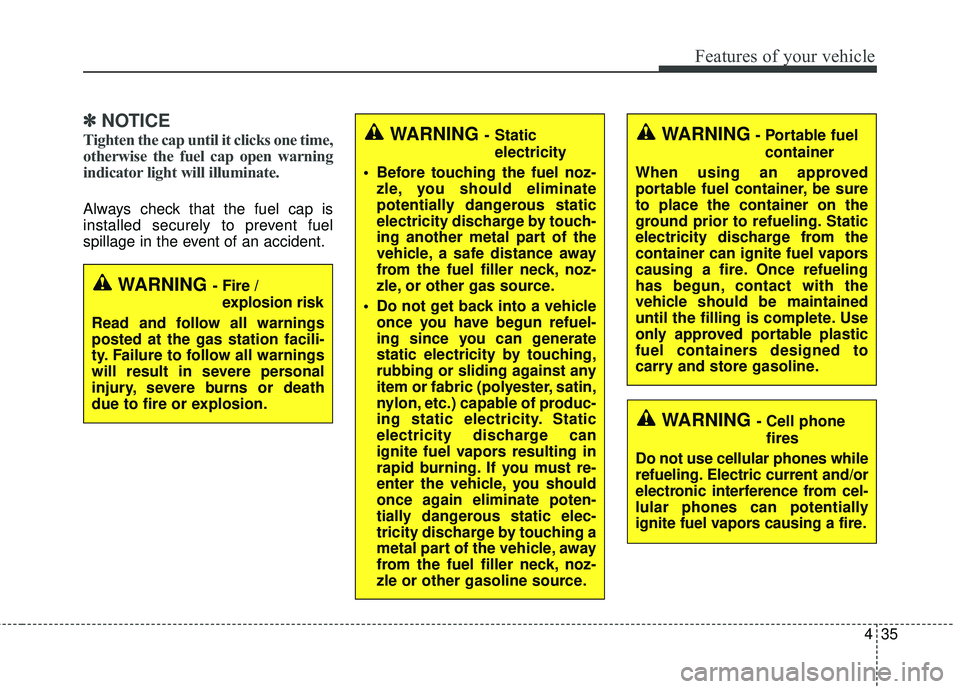
✽
✽NOTICE
Tighten the cap until it clicks one time,
otherwise the fuel cap open warning
indicator light will illuminate.
Always check that the fuel cap is
installed securely to prevent fuel
spillage in the event of an accident.
WARNING - Fire /
explosion risk
Read and follow all warnings
posted at the gas station facili-
ty. Failure to follow all warnings
will result in severe personal
injury, severe burns or death
due to fire or explosion.
WARNING - Cell phone fires
Do not use cellular phones while
refueling. Electric current and/or
electronic interference from cel-
lular phones can potentially
ignite fuel vapors causing a fire.
WARNING - Static electricity
Before touching the fuel noz- zle, you should eliminate
potentially dangerous static
electricity discharge by touch-
ing another metal part of the
vehicle, a safe distance away
from the fuel filler neck, noz-
zle, or other gas source.
Do not get back into a vehicle once you have begun refuel-
ing since you can generate
static electricity by touching,
rubbing or sliding against any
item or fabric (polyester, satin,
nylon, etc.) capable of produc-
ing static electricity. Static
electricity discharge can
ignite fuel vapors resulting in
rapid burning. If you must re-
enter the vehicle, you should
once again eliminate poten-
tially dangerous static elec-
tricity discharge by touching a
metal part of the vehicle, away
from the fuel filler neck, noz-
zle or other gasoline source.WARNING- Portable fuel
container
When using an approved
portable fuel container, be sure
to place the container on the
ground prior to refueling. Static
electricity discharge from the
container can ignite fuel vapors
causing a fire. Once refueling
has begun, contact with the
vehicle should be maintained
until the filling is complete. Use
only approved portable plastic
fuel containers designed to
carry and store gasoline.
Page 114 of 501

443
Features of your vehicle
Heated steering wheel
(if equipped)
With the ignition switch in the ON
position, pressing the heated steer-
ing wheel button warms the steering
wheel. The indicator on the button
will illuminate and notify you on the
LCD display.
To turn the heated steering wheel off,
press the button once again. The
indicator on the button will turn off
and notify you on the LCD display.
If you turn on the ignition again after
turning off your engine in half an
hour (after operating heater button),
the heating system will be main-
tained in its 'on' condition.
✽ ✽NOTICE
The heated steering wheel will turn
off automatically approximately 30
minutes after the heated steering
wheel is turned on.
CAUTION
Do not install any grip to oper-
ate the steering wheel. Thiscauses damage to the heatedsteering wheel system.
When cleaning the heated steering wheel, do not use anorganic solvent such as paintthinner, benzene, alcohol andgasoline. Doing so may dam-age the surface of the steeringwheel.
If the surface of the steering wheel is damaged by a sharpobject, damage to the heatedsteering wheel componentscould occur.
OYDDCO2029
WARNING
If the steering wheel becomes
too warm, turn the system off.
The heated steering wheel may
cause burns even at low tem-
peratures, especially if used for
long periods of time.
Page 117 of 501

Features of your vehicle
46
4
Inside rearview mirror
Adjust the rearview mirror so that the
center view through the rear window
is seen. Make this adjustment before
you start driving.
Do not place objects in the rear seat
which would interfere with your vision
through the rear window.
Day/night rearview mirror
(if equipped)
Make this adjustment before you
start driving and while the day/night
lever is in the day position.
Pull the day/night lever toward you to
reduce the glare from the headlights
of the vehicles behind you during
night driving.
Remember that you lose somerearview clarity in the night position. Electric chromic mirror with
homelink
®system (if equipped)
To operate the electric rearview mir-
ror
Press the I button (1) to turn the
automatic- dimming function on. The
mirror indicator light will illuminate.
Press the O button (2) to turn the
automatic- dimming function off. The
mirror indicator light will turn off.
* HomeLink
®is a registered trade-
mark of Johnson Controls, Inc.
MIRRORS
WARNING - Mirror
adjustment
Do not adjust the rearview mirror
while the vehicle is moving. This
could result in loss of control.
OYDDCO2031
Day NightOHD046025N
Page 118 of 501

447
Features of your vehicle
HomeLink®* Wireless Control System
Your new mirror comes with an inte-
grated Homelink
®Universal
Transceiver, which allows you to pro-
gram the mirror to activate your
garage door(s), estate gate, home
lighting, etc. The mirror actually
learns the codes from your various
existing transmitters. Retain the original transmitter for
future programming procedures (i.e.,
new vehicle purchase). It is also sug-
gested that upon the sale of the vehi-
cle, the programmed Homelink
®but-
tons be erased for security purposes
(follow step 1 in the "Programming"
portion of this text).
Programming
Your vehicle may require the ignition
switch to be turned to the ACC posi-
tion for programming and/or opera-
tion of Homelink
®. It is also recom-
mended that a new battery be
replaced in the hand-held transmitter
of the device being programmed to
Homelink
®for quicker training and
accurate transmission of the radio-
frequency.
Follow these steps to train your
Homelink
®mirror: 1.When programming the buttons for
the first time, press and hold the
left and center buttons ( , )
simultaneously until the indicator
light begins to flash after approxi-
mately 20 seconds. (This proce-
dure erases the factory-set default
codes. Do not perform this step to
program additional hand-held
transmitters.)
OHD046305N
Glare detection sensor
Indicator light
Homelink
®buttonsOHD046306N
Flashing
Page 119 of 501

Features of your vehicle
48
4
✽
✽
NOTICE
For non rolling code garage door
openers, follow steps 2 - 3.
For rolling code garage door open-
ers, follow steps 2 - 6.
For Canadian Programming, please
follow the Canadian Programming
section.
For help with determining whether
your garage is non-rolling code or
rolling code, please refer to the
garage door openers owner’s manu-
al or contact Homelink
®customer
service at 1-800-355-3515.2.Press and hold the button on the
Homelink®system you wish to train
and the button on the transmitter
while the transmitter is approxi-
mately 1 to 3 inches away from the
mirror. Do not release the buttons
until step 3 has been completed.
3.The Homelink
®indicator light will
flash, first slowly and then rapidly.
When the indicator light flashes
rapidly, both buttons may be
released. (The rapid flashing light
indicates successful programming
of the new frequency signal.)
✽ ✽ NOTICE
Some gate operators and garage
door openers may require you to
replace step #3 with the "cycling"
procedure noted in the "Canadian
Programming" section of this docu-
ment.
OHD046307N
Flashing
1-3inches
Transmitter
Page 121 of 501
Features of your vehicle
50
4
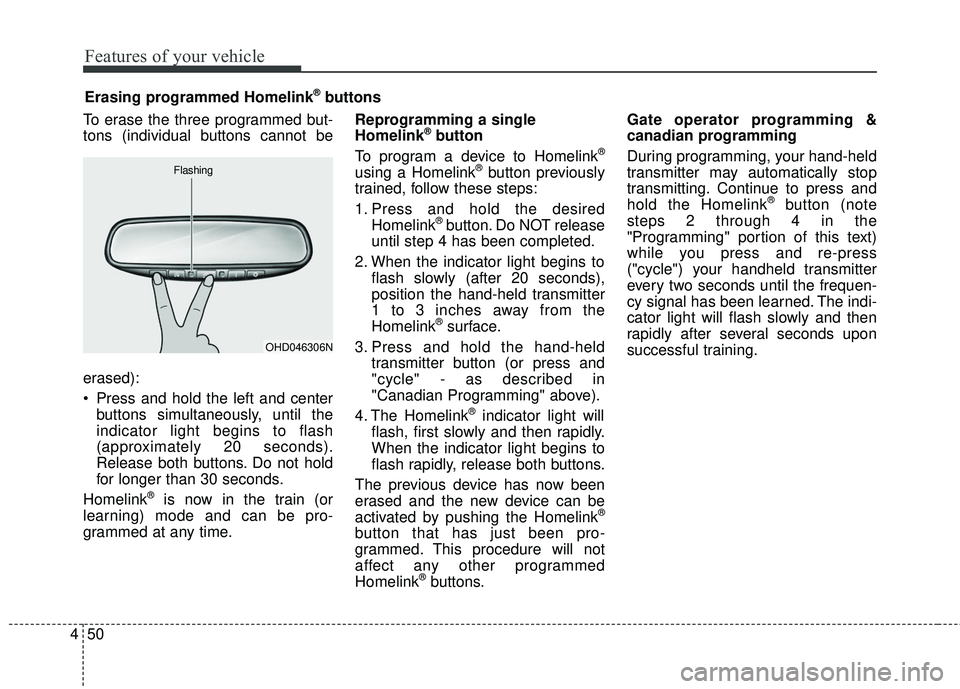
To erase the three programmed but-
tons (individual buttons cannot be
erased):
Press and hold the left and center
buttons simultaneously, until the
indicator light begins to flash
(approximately 20 seconds).
Release both buttons. Do not hold
for longer than 30 seconds.
Homelink
®is now in the train (or
learning) mode and can be pro-
grammed at any time. Reprogramming a single
Homelink
®button
To program a device to Homelink®
using a Homelink®button previously
trained, follow these steps:
1. Press and hold the desired Homelink
®button. Do NOT release
until step 4 has been completed.
2. When the indicator light begins to flash slowly (after 20 seconds),
position the hand-held transmitter
1 to 3 inches away from the
Homelink
®surface.
3. Press and hold the hand-held transmitter button (or press and
"cycle" - as described in
"Canadian Programming" above).
4. The Homelink
®indicator light will
flash, first slowly and then rapidly.
When the indicator light begins to
flash rapidly, release both buttons.
The previous device has now been
erased and the new device can be
activated by pushing the Homelink
®
button that has just been pro-
grammed. This procedure will not
affect any other programmed
Homelink
®buttons. Gate operator programming &
canadian programming
During programming, your hand-held
transmitter may automatically stop
transmitting. Continue to press and
hold the Homelink
®button (note
steps 2 through 4 in the
"Programming" portion of this text)
while you press and re-press
("cycle") your handheld transmitter
every two seconds until the frequen-
cy signal has been learned. The indi-
cator light will flash slowly and then
rapidly after several seconds upon
successful training.
Erasing programmed Homelink
®buttons
OHD046306N
Flashing