Page 146 of 501

475
Features of your vehicle
Fuel Economy
Range
The range is the estimated dis-tance the vehicle can be driven
with the remaining fuel. - Distance range : 50 ~ 9999 km or
30 ~ 9999 mi.
If the estimated distance is below 50 km (30 mi.), the trip computer
will display "---" as distance to
empty.
✽ ✽ NOTICE
• If the vehicle is not on level ground
or the battery power has been
interrupted, the distance to empty
function may not operate correct-
ly.
• The distance to empty may differ from the actual driving distance as
it is an estimate of the available
driving distance.
• The trip computer may not regis- ter additional fuel if less than 6
liters (1.6 gallons) of fuel are
added to the vehicle.
• The fuel economy and distance to empty may vary significantly
based on driving conditions, driv-
ing habits, and condition of the
vehicle.
Average Fuel Economy (2)
The average fuel economy is cal-
culated by the total driving dis-
tance and fuel consumption since
the last average fuel economy
reset.
- Fuel economy range: 0.0 ~ 99.9L/100km or MPG
The average fuel economy can be reset both manually and automati-
cally.
Manual reset
To clear the average fuel economy
manually, press the RESET button
(Type A : RESET, Type B, C : ) on
the steering wheel for more than 1
second when the average fuel econ-
omy is displayed.
OYDNDI2012C/OYDNDI2033C
OYDNDI2056C
■Type A■Type B
■ Type C
Page 147 of 501

Features of your vehicle
76
4
Automatic reset
To make the average fuel economy
be reset automatically whenever refu-
eling, select the "Auto Reset" mode in
User Setting menu of the LCD display
(Refer to "LCD Display").
Under "Auto Reset" mode, the aver-
age fuel economy will be cleared to
zero (---) when the vehicle speed
exceeds 1 km/h after refueling more
than 6 liters (1.6 gallons).
✽ ✽
NOTICE
The average fuel economy is not dis-
played for more accurate calculation
if the vehicle does not drive more
than 10 seconds or 50 meters (0.03
miles) since the ignition switch or
Engine Start/Stop button is turned
to ON.
Instant Fuel Economy (3)
This mode displays the instant fuel
economy during the last few sec-
onds when the vehicle speed is
more than 10 km/h (6.2 MPH).
- Fuel economy range: 0 ~ 30L/100km or 0 ~ 50 MPG
Trip A/B
Tripmeter (1)
The tripmeter is the total driving dis- tance since the last tripmeter reset.
- Distance range: 0.0 ~ 9999.9 km ormi.
OYDNDI2013C/OYDNDI2032C
OYDNDI2055C
■Type A■Type B
■ Type C
Page 148 of 501

477
Features of your vehicle
To reset the tripmeter, press theRESET button (T ype A : RESET,
Type B, C : ) on the steering
wheel for more than 1 second
when the tripmeter is displayed.
Average Vehicle Speed (2)
The average vehicle speed is cal- culated by the total driving dis-
tance and driving time since the
last average vehicle speed reset.
- Speed range: 0 ~ 999 km/h or MPH
To reset the average vehicle speed, press the RESET button (Type A :
RESET, Type B, C : ) on the
steering wheel for more than 1 sec-
ond when the average vehicle
speed is displayed.
✽ ✽ NOTICE
• The average vehicle speed is not dis-
played if the driving distance is less
than 50 meters (0.03 miles) or the
driving time is less than 10 seconds
since the ignition switch or Engine
Start/Stop button is turned to ON.
• Even if the vehicle is not in motion, the average vehicle speed keeps
going while the engine is running.
Elapsed Time (3)
The elapsed time is the total driv-
ing time since the last elapsed time
reset.
- Time range (hh:mm): 00:00 ~ 99:59
To reset the elapsed time, press the RESET button (T ype A :
RESET, Type B, C : ) on the
steering wheel for more than 1
second when the elapsed time is
displayed.
✽ ✽ NOTICE
Even if the vehicle is not in motion,
the elapsed time keeps going while
the engine is running.
Page 160 of 501

489
Features of your vehicle
The parking assist system assists
the driver during movement of the
vehicle by chiming if any object is
sensed within the distance of 60 cm
(23.62 in) in front or 120 cm (47 in)
behind the vehicle.This system is a supplemental sys-
tem and it is not intended to nor does
it replace the need for extreme care
and attention of the driver.
The sensing range and objects
detectable by the sensors are limit-
ed. Whenever moving pay as much
attention to what is in front of and
behind you as you would in a vehicle
without a parking assist system.
The parking assist system should
only be considered as a supplemen-
tary function. The driver must check
the front and rear view. The opera-
tional function of the parking assist
system can be affected by many fac-
tors and conditions of the surround-
ings, so the responsibility rests
always with the driver.
Operation of the parking assist
system
Operating condition
This system will activate when the
parking assist button is pressed
with the engine running.
PARKING ASSIST SYSTEM (IF EQUIPPED)
OYDECO2201CN
OYDDCO2200
Sensor
■ Rear
■Front
Sensor
OYDDCO2202
OYDDCO2228
■Type B
■Type A
Page 162 of 501

491
Features of your vehicle
This system can only sense objects
within the range and location of the
sensors;
It can not detect objects in other
areas where sensors are not
installed. Also, small or slim objects,
such as poles or objects located
between sensors may not be detect-
ed by the sensors.
Always visually check behind the
vehicle when backing up.
Be sure to inform any drivers of the
vehicle that may be unfamiliar with
the system regarding the systems
capabilities and limitations.
✽ ✽NOTICE
• The actual warning sound and indicator may differ from the illustration
according to objects or sensor status.
• Do not wash the vehicle's sensor with high pressure water.
Distance from object
Warning indicator
Warning soundWhen driving
forwardWhen driving rearward
120cm~61cm(47in ~ 24)
Front---
Rear-Buzzer beeps intermittently
60cm~31cm
(23.6in ~ 12.2)
FrontBuzzer beeps frequently
Rear-Buzzer beeps frequently
30cm
(11.8 in)
FrontBuzzer sounds continuously
Rear-Buzzer sounds continuously
Type of warning indicator and sound: with Warning sound
Page 169 of 501
Features of your vehicle
98
4
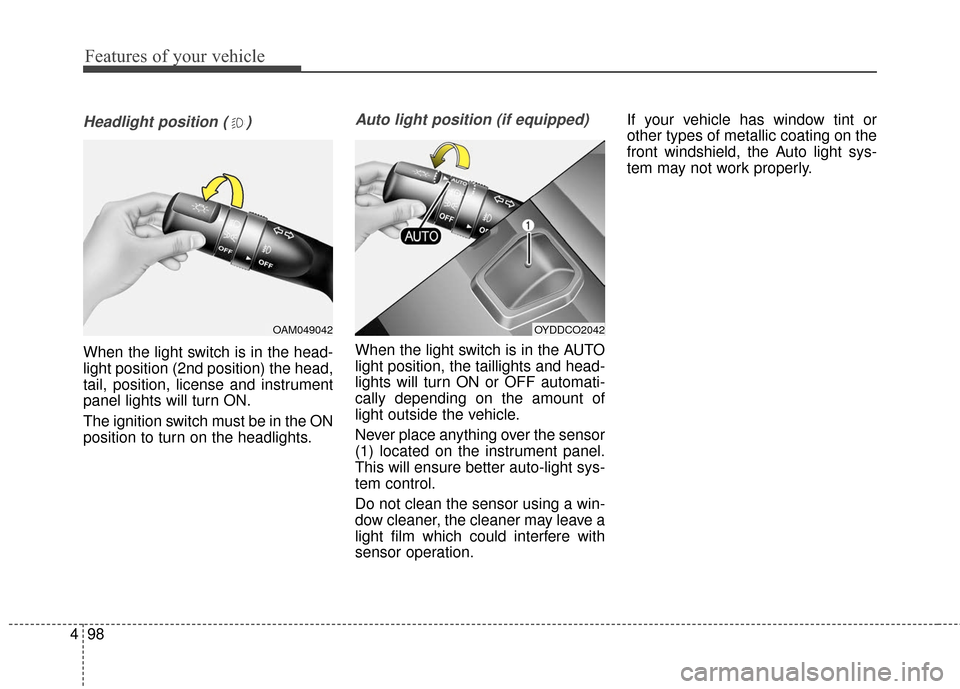
Headlight position ( )
When the light switch is in the head-
light position (2nd position) the head,
tail, position, license and instrument
panel lights will turn ON.
The ignition switch must be in the ON
position to turn on the headlights.
Auto light position (if equipped)
When the light switch is in the AUTO
light position, the taillights and head-
lights will turn ON or OFF automati-
cally depending on the amount of
light outside the vehicle.
Never place anything over the sensor
(1) located on the instrument panel.
This will ensure better auto-light sys-
tem control.
Do not clean the sensor using a win-
dow cleaner, the cleaner may leave a
light film which could interfere with
sensor operation. If your vehicle has window tint or
other types of metallic coating on the
front windshield, the Auto light sys-
tem may not work properly.
OYDDCO2042OAM049042
Page 175 of 501
Features of your vehicle
104
4
Do not use the interior lights for
extended periods when the engine is
not running.
It may cause battery discharge.Automatic turn off function
(if equipped)
The interior lights automatically turn
off approximately 20 minutes after
the ignition switch is turned off.
If your vehicle is equipped with the
theft alarm system, the interior lights
automatically turn off approximately
3 seconds after the system is in
armed stage.
Map lamp (if equipped)
Push the lens (1) to turn the map lamp
on or off. This light produces a spot
beam for convenient use as a map
lamp at night or as a personal lamp for
the driver and front passenger.
INTERIOR LIGHT
WARNING - Interior light
Do not use the interior lights
when driving in the dark. The
glare from the interior lights
may obstruct your view and
cause an accident.
OYDDCO2043
OYDDCO2044
■ Type B
■Type A
Page 176 of 501

4105
Features of your vehicle
In the DOOR position, the map
lamp and the room lamp come on
when any door is opened regard-
less of the ignition switch position.
When doors are unlocked by the
transmitter (or smart key), the map
lamp and the room lamp come on
for approximately 30 seconds as
long as any door is not open.
The map lamp and the room lamp
go out gradually after approximate-
ly 30 seconds if the door is closed.
However, if the ignition switch is
ON or all doors are locked, the
map lamp and the room lamp will
turn off immediately. If a door is
opened with the ignition switch in
the ACC or LOCK position, the
map lamp and the room lamp stays
on for about 20 minutes. However,
if a door is opened with the ignition
switch in the ON position, the map
lamp and the room lamp stays on
continuously. If the type B room
lamp switch is OFF, it doesn't work. The lights turn off even if
a door is opened.
When the lamp is
turned ON by pressing
the lens (1), the lamp
does not turn off even
if the switch (2) is in the
OFF position.
The map lamp and the room lamp stay on at all
times.Room lamp
To turn the room lamp ON or OFF,
push the switch.
If your vehicle is not equipped with a
map lamp, the room lamp will also
turn on or off as follows.
- The room lamp comes on when adoor is opened. The lamps go out
after approximately 30 seconds.
- The room lamp comes on for approximately 30 seconds when
doors are unlocked with a trans-
mitter or smart key as long as the
doors are not opened.
OMD040097