2016 KIA CEED ignition
[x] Cancel search: ignitionPage 219 of 643
Features of your vehicle
136
4
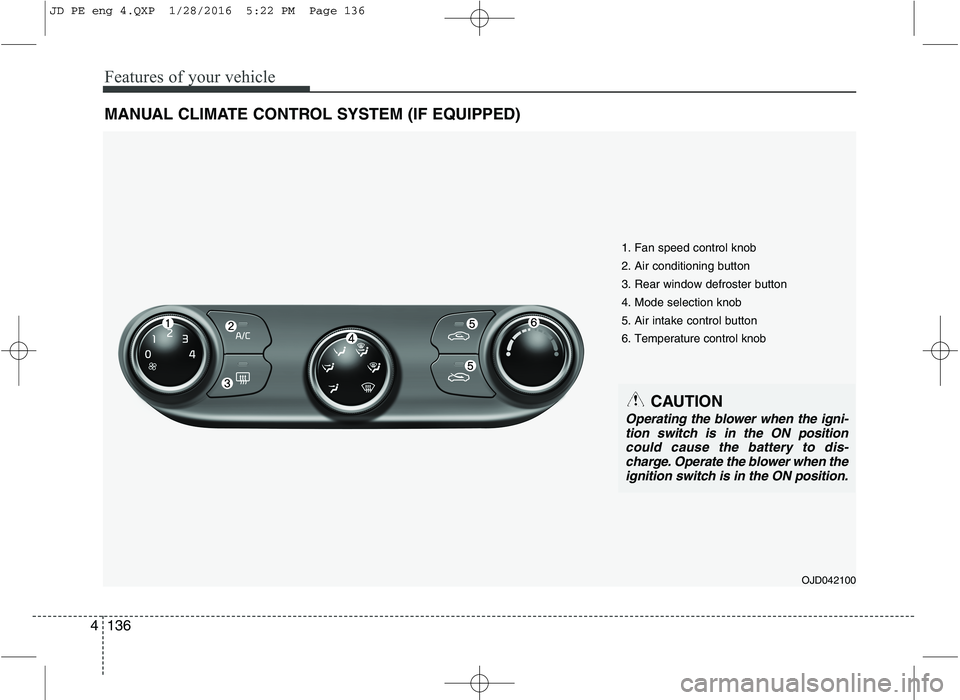
MANUAL CLIMATE CONTROL SYSTEM (IF EQUIPPED)
OJD042100
1. Fan speed control knob 2. Air conditioning button 3. Rear window defroster button4. Mode selection knob5. Air intake control button6. Temperature control knob
CAUTION
Operating the blower when the igni-
tion switch is in the ON positioncould cause the battery to dis-charge. Operate the blower when the ignition switch is in the ON position.
JD PE eng 4.QXP 1/28/2016 5:22 PM Page 136
Page 223 of 643

Features of your vehicle
140
4
Recirculated air position
With the recirculated airposition selected, air from the passenger
compartment will be
drawn through the heat-ing system and heatedor cooled according to
the function selected.
Outside (fresh) air position With the outside (fresh)air position selected, air
enters the vehicle fromoutside and is heated orcooled according to thefunction selected.
✽✽ NOTICE
Prolonged operation of the heater in the
recirculated air position (without air
conditioning selected) may cause fogging
of the windshield and side windows and
the air within the passenger compart-
ment may become stale.
In addition, prolonged use of the air con-
ditioning with the recirculated air posi-
tion selected will result in excessively dry
air in the passenger compartment.
Fan speed control
The ignition switch must be in the ON
position for fan operation.
The fan speed control knob allows you to
control the fan speed of the air flowing
from the ventilation system. To change
the fan speed, turn the knob to the right
for higher speed or left for lower speed.
Setting the fan speed control knob to the
“0” position turns off the fan.
WARNING
The continuous use of recirculat- ed air in the climate control sys-
tem may increase humidity inside
the vehicle, causing the glass to
fog and obscuring visibility.
Do not sleep in a vehicle with the air conditioning or heating sys-
tem on. It may cause serious
harm or death due to a drop in the
oxygen level and/or body temper-
ature.
The continuous use of recirculat- ed air in the climate control sys-
tem can produce drowsiness or
sleepiness, which may result in a
loss of vehicle control. Set the air
intake control to the outside
(fresh) air position as much as
possible while driving.
OJD042101
JD PE eng 4.QXP 1/28/2016 5:23 PM Page 140
Page 236 of 643

4153
Features of your vehicle
OFF mode
Press the OFF button to turn off the air
climate control system. However, you can
still operate the air intake buttons as long
as the ignition switch is in the ON posi-tion.System operation
Ventilation
1. Set the mode to the position.
2. Set the air intake control to the outside
(fresh) air position.
3. Set the temperature control to the desired position.
4. Set the fan speed control to the desired speed.
Heating
1. Set the mode to the position.
2. Set the air intake control to the outside
(fresh) air position.
3. Set the temperature control to the desired position.
4. Set the fan speed control to the desired speed.
5. If dehumidified heating is desired, turn the air conditioning system on.
If the windshield fogs up, set the mode to the or
position. Operation Tips
To keep dust or unpleasant fumes from
entering the vehicle through the venti-
lation system, temporarily set the air
intake control to the recirculated air
position. Be sure to return the control
to the fresh air position when the irrita-
tion has passed to keep fresh air in the
vehicle. This will help keep the driver
alert and comfortable.
Air for the heating/cooling system is drawn in through the grilles just ahead
of the windshield. Care should be
taken that these are not blocked by
leaves, snow, ice or other obstructions.
To prevent interior fog on the wind- shield, set the air intake control to the
fresh air position and fan speed to the
desired position, turn on the air condi-tioning system, and adjust the temper-
ature control to desired temperature.OJD042118
JD PE eng 4.QXP 1/28/2016 5:24 PM Page 153
Page 242 of 643

4159
Features of your vehicle
This indicator illuminates
when the auto defoggingsystem senses the moistureof inside the windshield and
operates.
If more moisture is in the vehicle, higher
steps operate as follow.
Step 1 : Operating the air conditioning
Step 2 : Outside air position
Step 3 : Blowing air flow toward the wind- shield
Step 4 : Increasing air flow toward the windshield
If your vehicle is equipped with the auto
defogging system, it is automatically acti-
vated when the conditions are met.
However, if you would like to cancel the
auto defogging system, press the front
defroster button 4 times within 2 seconds
while pressing the AUTO button. The
indicator will blink 3 times to notify you
that the system is cancelled. To use the
auto defogging system again, follow the
procedures mentioned above.
If the battery has been disconnected or
discharged, it resets to the auto defog-
ging status.✽✽ NOTICE
If the A/C off is manually selected while
the auto defogging system is on, the auto
defogging indicator will blink 3 times to
give notice that the A/C off can not be
selected.
When the ignition switch is in the ON
position, the clean air function turns on
automatically.
Also, the clean air function turns off auto-
matically, when the ignition switch turnsto the OFF position.
CAUTION
Do not remove the sensor cover located on the upper end of the driver side windshield glass. Damage to the system parts could
occur and may not be covered by your vehicle warranty.
OJD042129
CLEAN AIR (IF EQUIPPED)
JD PE eng 4.QXP 1/28/2016 5:24 PM Page 159
Page 270 of 643
Features of your vehicle
4187
WARNING
Do not stare at the screen while driving. Staring at the
screen for prolonged periodsof time could lead to trafficaccidents.
Do not disassemble, assem- ble, or modify the audio sys-
tem. Such acts could result in
accidents, fire, or electric
shock.
Using the phone while driving may lead to a lack of attentionof traffic conditions andincrease the likelihood of
accidents. Use the phone fea-
ture after parking the vehicle.
(Continued)(Continued)
Heed caution not to spill wateror introduce foreign objects
into the device. Such acts
could lead to smoke, fire, or
product malfunction.
Please refrain from use if the screen is blank or no sound
can be heard as these signs
may indicate product mal func-
tion. Continued use in suchconditions could lead to acci-
dents (fires, electric shock) or
product malfunctions.
Do not touch the antenna dur- ing thunder or lightening as
such acts may lead to light-
ning induced electric shock.
(Continued)(Continued)
Do not stop or park in park-ing-restricted areas to operate
the product. Such acts couldlead to traffic accidents.
Use the system with the vehi- cle ignition turned on.
Prolonged use with the igni-tion turned off could result in
battery discharge.
JD PE eng 4b (Audio).qxp 9/9/2015 5:09 PM Page 187
Page 271 of 643
Features of your vehicle
188
4
(Continued)
If you want to change the posi- tion of device installation,please inquire with your placeof purchase or service mainte-nance center. Technical expert- ise is required to install or dis-assemble the device.
Turn on the car ignition before using this device. Do not oper-ate the audio system for long periods of time with the igni-tion turned off as such opera-tions may lead to battery dis-charge.
Do not subject the device to severe shock or impact. Directpressure onto the front side ofthe monitor may cause damageto the LCD or touch screen.
(Continued)(Continued) When cleaning the device, make sure to turn off the deviceand use a dry and smoothcloth. Never use tough materi- als, chemical cloths, or sol-vents (alcohol, benzene, thin-ners, etc.) as such materials may damage the device panelor cause color/quality deterio-ration
Do not place beverages close to the audio system. Spillingbeverages may lead to systemmalfunction.
In case of product malfunc- tion, please contact your placeof purchase or After Service center.
Placing the audio system with- in an electromagnetic environ-ment may result in noise inter-ference.CAUTION
Operating the device while driving could lead to acci-dents due to a lack of atten-tion to external surroundings.First park the vehicle before operating the device.
Adjust the volume to levels that allow the driver to hearsounds from outside of thevehicle. Driving in a state where external sounds cannotbe heard may lead to acci-dents.
Pay attention to the volume setting when turning thedevice on. A sudden output ofextreme volume upon turningthe device on could lead tohearing impairment. (Adjust the volume to a suitable levelsbefore turning off the device.)
(Continued)
JD PE eng 4b (Audio).qxp 9/9/2015 5:09 PM Page 188
Page 276 of 643

Features of your vehicle
4193
(Continued)
When a Bluetooth®
Wireless
Technology mobile phone is con-
nected, a ( ) icon will appear at
the top of the screen. If a ( ) icon
is not displayed, this indicates thata Bluetooth ®
Wireless Technology
enabled device has not been con-
nected. You must connect the
device before use. For more infor-
mation on Bluetooth®
Wireless
Technology mobile phones, refer
to the “Phone Setup” section.
Pairing and connecting a Bluetooth ®
Wireless Technology
enabled mobile phone will work
only when the Bluetooth®
Wireless
Technology option within your
mobile phone has been turned on.
(Methods of turning on the
Bluetooth ®
Wireless Technology
enabled feature may differ
depending on the mobile phone.) (Continued)(Continued)
In some mobile phones, starting
the ignition while talking through
Bluetooth ®
Wireless Technology
enabled handsfree call will result
in the call becoming disconnected.
(Switch the call back to your
mobile phone when starting the
ignition.)
Some features may not be sup port-
ed in some Bluetooth®
Wireless
Technology mobile phone and
devices.
Bluetooth ®
Wireless Technology
enabled operation may be unsta-
ble depending on the communica-
tion state.
Placing the audio system within an electromagnetic environment may
result in noise interference.
JD PE eng 4b (Audio).qxp 9/9/2015 5:09 PM Page 193
Page 327 of 643

Features of your vehicle
244
4
✽✽
NOTICE - USING THE USB
DEVICE
Connect the USB device after turning on the engine. The USB
device may become damaged if it
is already connected when the
ignition is turned on. The USB
device may not operate properly if
the car ignition is turned on or off
with the USB device connected.
Heed caution to static electricity when connecting/disconnecting
USB devices.
Encoded MP3 Players will not be recognized when connected as an
external device.
When connecting an external USB device, the device may not proper-
ly recognize the USB is in some
states.
Only products formatted with byte/sectors under 64Kbyte will be
recognized.
This device recognizes USB devices formatted in FAT 12/16/32
file formats. This device does not
recognize files in NTFS file for-mat. (Continued)(Continued)
Some USB devices may not be sup-
ported due to compatibility issues.
Avoid contact between the USB connector with bodily parts or for-
eign objects.
Repeated connecting/disconnect- ing of USB devices within short
periods of time may result in prod-
uct malfunction.
A strange noise may occur when disconnecting the USB.
Make sure to connect/disconnect external USB devices with the
audio power turned off.
The amount of time required to recognize the USB device may dif-
fer depending on the type, size or
file formats stored in the USB.
Such differences in time are not
indications of malfunctions.
The device only supports USB devices used to play music files.
USB images and videos are not supported. (Continued)(Continued)
Do not use the USB I/F to charge
batteries or USB accessories that
generate heat. Such acts may lead
to worsened performance or dam-
age to the device.
The device may not recognize the USB device if separately pur-
chased USB hubs and extension
cables are being used. Connect the
USB directly with the multimedia
terminal of the vehicle.
When using mass storage USB devices with separate logical
drives, only files saved to the root
drive can be played.
Files may not properly operate if application programs are installed
to the USBs.
The device may not operate nor- mally if MP3 Players, cellular
phones, digital cameras, or other
electronic devices (USB devices
not recognized as portable disk
drives) are connected with the
device. (Continued)
JD PE eng 4b (Audio).qxp 9/9/2015 5:11 PM Page 244