Page 157 of 643
Features of your vehicle
74
4
LCD display information
Sunroof open
If driver removes the ignition key (Smart
key : turns off the engine) and opens the
driver-side door when the sunroof is not
fully closed, warning message will appear
on the LCD display. Also, the warning
chime sounds for approximately 7 sec-
onds.
Illumination intensity
The illumination intensity of the instru-
ment panel is shown when adjusting it
with the illumination control switch.
For more details, refer to “Instrument
panel illumination” in chapter 4.
Turn on "FUSE SWITCH" (mode switch)
The notice appears to inform the driver to
turn on the fuse switch in the instrument
panel under the steering wheel.
For more details, refer to “Fuses” in chap- ter 7.
■ Normal vision
■Supervision■ Normal vision
■Supervision■ Normal vision
■Supervision
OJD042240/OUM044265LOJD042079/OJD045523LOJD042078/OJD045215
JD PE eng 4.QXP 1/28/2016 5:17 PM Page 74
Page 174 of 643

491
Features of your vehicle
LCD DISPLAY WARNINGS AND INDICATORS (INSTRUMENT PANEL DISPLAY)Calendar / Clock / Outside ambi-
ent Temperature (if equipped)
The monitor will display the outside ambi-
ent temperature, date and time.
To change the date, time or temperature unit(°C °F), press the SET(2) or Temp
button for more than 1 seconds.
Then you will enter the set-up mode and
mode changes in the following order as
you press the SET (2) button less than 1second. HOUR MINUTE YEAR MONTH
DAY 12H/24H TEMPERATURE
UNIT CHANGE Escape set-up mode
Press the SET (2) button less than 1 sec- ond to select the mode and set the data
using the UP (1, ) and DOWN (1, )
button while the selected setting mode
blinks.
To cancel the SET UP mode, do one of
the following :
- Press the SET button less than 1 sec- ond in set-up temperature unit change mode
- Press the SET button more than 1 sec- ond in any set-up mode
- After 15 seconds without any key press
- Ignition is On or OFF in Set-up mode
- Battery is disconnected Door and tailgate open display
The monitor will display the correspon- ding door or tailgate that is not closed
securely.
OJD042143
OJD042142
OJD042145
OJD045534L
JD PE eng 4.QXP 1/28/2016 5:18 PM Page 91
Page 203 of 643
Features of your vehicle
120
4
Static bending light (if equipped)
While driving the corner, for your sight
and safety, the static bending light turns
on automatically. The system will operate
automatically as follows:
When vehicle speed is under 10km/h
and steering wheel angle approximate-
ly 80 degrees.
When vehicle speed is over 10km/h and steering wheel angle approximate-
ly 35 degrees.
When the vehicle is at a standstill.
When moving rearwards with one of the above conditions satisfied the lights will light up the opposite direction. Lighting control
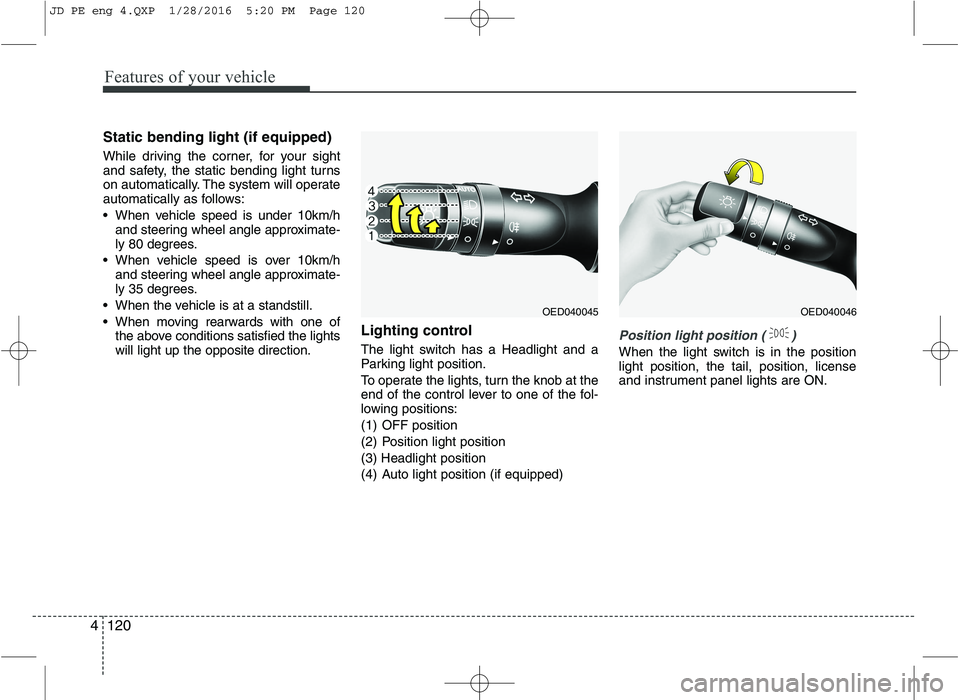
The light switch has a Headlight and a
Parking light position.
To operate the lights, turn the knob at the
end of the control lever to one of the fol-
lowing positions:
(1) OFF position
(2) Position light position(3) Headlight position
(4) Auto light position (if equipped)
Position light position ( )
When the light switch is in the position light position, the tail, position, license
and instrument panel lights are ON.
OED040045OED040046
JD PE eng 4.QXP 1/28/2016 5:20 PM Page 120
Page 204 of 643

4121
Features of your vehicle
Headlight position ( )
When the light switch is in the headlight position the head, tail, position, license
and instrument panel lights are ON.
✽✽NOTICE
The ignition switch must be in the ON
position to turn on the headlights.
Auto light/AFLS position (if equipped)
When the light switch is in the AUTO light position, the taillights and headlights will
be turned ON or OFF automaticallydepending on the amount of light outside
the vehicle.
If your vehicle is equipped with the adap-
tive front lighting system (AFLS), it will
also operate when the headlamp is ON.
OYN049201
CAUTION
Never place anything over the sensor (1) located on the instru-ment panel, this will ensure betterauto-light system control.
Do not clean the sensor using a window cleaner, the cleaner mayleave a light film which couldinterfere with sensor operation.
If your vehicle has window tint or other types of coating on the
front windshield, the Auto light system may not work properly.
OED040800
JD PE eng 4.QXP 1/28/2016 5:20 PM Page 121
Page 218 of 643

4135
Features of your vehicle
✽✽NOTICE
If you want to defrost and defog the
front windshield, refer to “Windshield
Defrosting and Defogging” in this chap-
ter.
Rear window defroster
The defroster heats the window to
remove frost, fog and thin ice from the
interior and exterior of the rear window,
while engine is running. To activate the rear window defroster,
press the rear window defroster button
located in the center facia switch
panel. The indicator on the rear win-
dow defroster button illuminates whenthe defroster is ON.
To turn off the defroster, press the rear window defroster button again.
✽✽ NOTICE
If there is heavy accumulation of snow on the rear window, brush it off before
operating the rear defroster.
The rear window defroster automati- cally turns off after approximately 20
minutes or when the ignition switch is
turned off.
Outside mirror defroster
(if equipped)
The outside mirror defroster will operate
at the same time you turn on the rear
window defroster.
Front wiper deicer (if equipped)
The front wiper deicer will operate at the
same time you turn on the rear window
defroster.
DEFROSTER
CAUTION
To prevent damage to the conduc-
tors bonded to the inside surface ofthe rear window, never use sharp instruments or window cleaners
containing abrasives to clean thewindow.
OJD042094
OJD042095
■
Manual climate control
■Automatic climate control
JD PE eng 4.QXP 1/28/2016 5:22 PM Page 135
Page 222 of 643
4139
Features of your vehicle
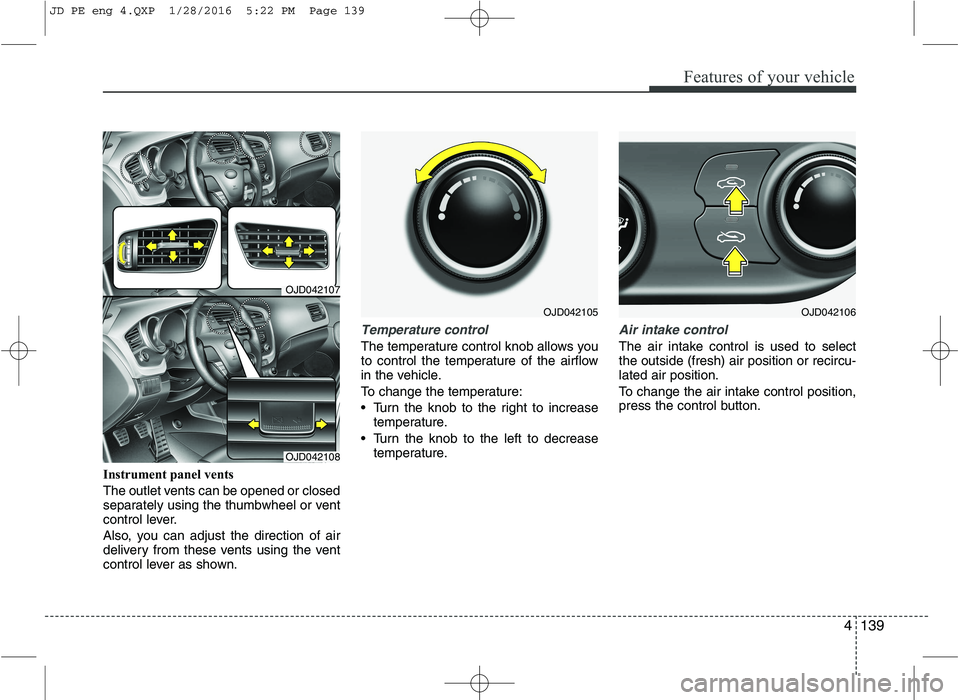
Instrument panel vents
The outlet vents can be opened or closed
separately using the thumbwheel or vent
control lever.
Also, you can adjust the direction of air
delivery from these vents using the vent
control lever as shown.
Temperature control
The temperature control knob allows you
to control the temperature of the airflow
in the vehicle.
To change the temperature:
Turn the knob to the right to increasetemperature.
Turn the knob to the left to decrease temperature.
Air intake control
The air intake control is used to select the outside (fresh) air position or recircu-lated air position.
To change the air intake control position,
press the control button.
OJD042105
OJD042107
OJD042108
OJD042106
JD PE eng 4.QXP 1/28/2016 5:22 PM Page 139
Page 230 of 643
4147
Features of your vehicle
2. Turn the temperature control knob toset the desired temperature.
✽✽ NOTICE
To turn the automatic operation off, select any button of the following:
- Mode selection button
- Front windshield defrost button
(Press the button one more time to
deselect the front windshield
defroster function. The 'AUTO' sign
will illuminate on the information
display once again.)
- Fan speed control button
The selected function will be con-
trolled manually while other functions
operate automatically.
For your convenience and to improve
the effectiveness of the climate con-
trol, use the AUTO button and set the
temperature to 22°C/71°F (23°C/73°F
-Except Europe). ✽
✽
NOTICE
Placing any object over the sensor on
the instrument panel may interfere with
the heating and cooling system.
OGD041120OJD042230
JD PE eng 4.QXP 1/28/2016 5:23 PM Page 147
Page 233 of 643
Features of your vehicle
150
4
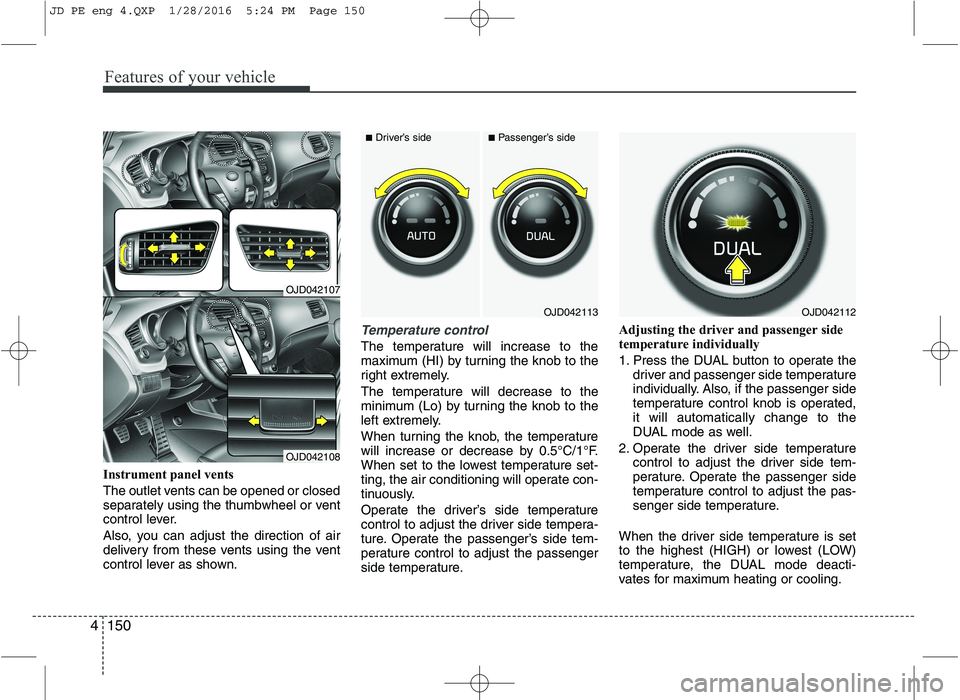
Instrument panel vents
The outlet vents can be opened or closed
separately using the thumbwheel or vent
control lever.
Also, you can adjust the direction of air
delivery from these vents using the vent
control lever as shown.
Temperature control
The temperature will increase to the
maximum (HI) by turning the knob to the
right extremely.
The temperature will decrease to the
minimum (Lo) by turning the knob to the
left extremely.
When turning the knob, the temperature
will increase or decrease by 0.5°C/1°F.
When set to the lowest temperature set-
ting, the air conditioning will operate con-
tinuously.
Operate the driver’s side temperature
control to adjust the driver side tempera-
ture. Operate the passenger’s side tem-
perature control to adjust the passenger
side temperature. Adjusting the driver and passenger side
temperature individually
1. Press the DUAL button to operate the
driver and passenger side temperature
individually. Also, if the passenger side
temperature control knob is operated,it will automatically change to the
DUAL mode as well.
2. Operate the driver side temperature control to adjust the driver side tem-
perature. Operate the passenger side
temperature control to adjust the pas-
senger side temperature.
When the driver side temperature is set
to the highest (HIGH) or lowest (LOW)
temperature, the DUAL mode deacti-
vates for maximum heating or cooling.
OJD042113
■ Driver’s side■Passenger’s side
OJD042112
OJD042107
OJD042108
JD PE eng 4.QXP 1/28/2016 5:24 PM Page 150