Page 129 of 607
WARNING
When the daytime running light system is
active, tail lights on your vehicle are not
on. It is necessary at dusk to turn on your
headlights. Failure to do so could cause
an accident injuring yourself and others.
INSTRUMENT BRIGHTNESS
CONTROL
Press the “-” button�Ato decrease the bright-
ness of instrument panel lights.
Press the “+” button
�Bto increase the bright-
ness of instrument panel lights.
TURN SIGNAL SWITCH
Turn signal
�1Move the lever up or down to signal the
turning direction. When the turn is com-
pleted, the turn signal cancels automatically.
LIC2235LIC3252
2-40Instruments and controls
Page 137 of 607
12V OUTLETS
The power outlets are for powering electrical
accessories such as cellular telephones. They
are rated at 12 volt, 120W (10A) maximum.
The instrument panel and console power outlets
are powered only when the ignition switch is in
the ACC or ON position.
The power outlet in the cargo area is powered
directly by the vehicle’s battery.
CAUTION
●The outlet and plug may be hot during
or immediately after use.
● Only certain power outlets are designed
for use with a cigarette lighter unit. Do
not use any other power outlet for an
accessory lighter. It is recommended
you visit an INFINITI retailer for addi-
tional information.
● Do not use with accessories that exceed
a 12 volt, 120W (10A) power draw.
Instrument Panel
LIC2238
Center Console
LIC2885
Cargo Area
LIC2236
POWER OUTLETS
2-48Instruments and controls
Page 140 of 607
The extended storage switch is pulled out when
in transit from the factory to the retailer. It is
located in the fuse panel to the left of the steering
wheel on the instrument panel. If any electrical
equipment does not operate, ensure the ex-
tended storage switch is pushed fully in place, as
shown.MAP POCKETSSEATBACK POCKETS
There is a seatback pocket located on the back of
the driver and passenger seats. The pockets can
be used to store maps.
ON position
LIC3268LIC2211LIC1328
STORAGE
Instruments and controls2-51
Page 148 of 607
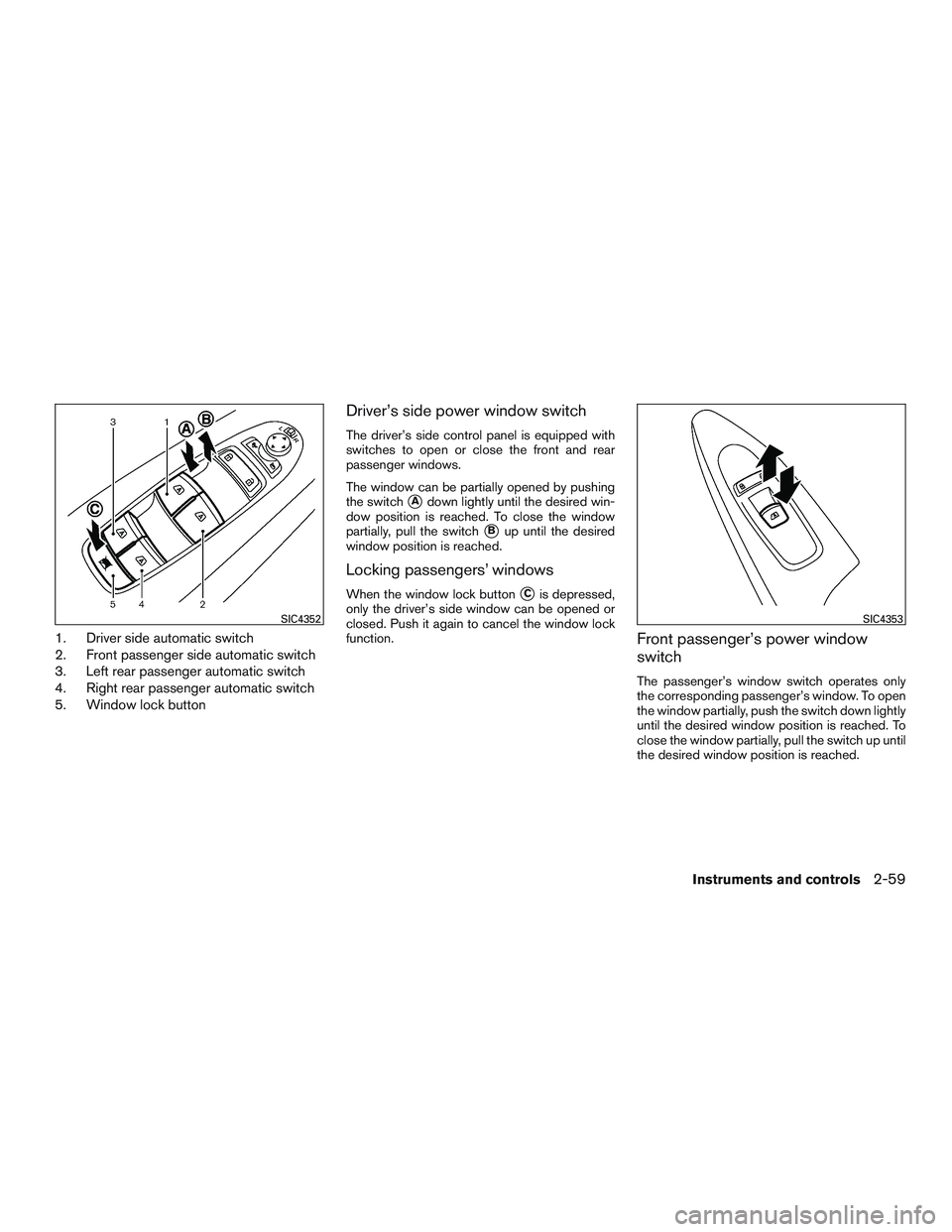
1. Driver side automatic switch
2. Front passenger side automatic switch
3. Left rear passenger automatic switch
4. Right rear passenger automatic switch
5. Window lock button
Driver’s side power window switch
The driver’s side control panel is equipped with
switches to open or close the front and rear
passenger windows.
The window can be partially opened by pushing
the switch
�Adown lightly until the desired win-
dow position is reached. To close the window
partially, pull the switch
�Bup until the desired
window position is reached.
Locking passengers’ windows
When the window lock button�Cis depressed,
only the driver’s side window can be opened or
closed. Push it again to cancel the window lock
function.
Front passenger’s power window
switch
The passenger’s window switch operates only
the corresponding passenger’s window. To open
the window partially, push the switch down lightly
until the desired window position is reached. To
close the window partially, pull the switch up until
the desired window position is reached.
SIC4352SIC4353
Instruments and controls2-59
Page 151 of 607
When closing
If the control unit detects something caught in the
moonroof as it moves to the front, the moonroof
will immediately open backward.
When tilting down
If the control unit detects something caught in the
moonroof as it tilts down, the moonroof will im-
mediately tilt up.
If the auto-reverse function malfunctions and re-
peats opening or tilting up the moonroof, keep
pushing the tilt down switch within 5 seconds
after it happens; the moonroof will fully close
gradually. Make sure nothing is caught in the
moonroof.
WARNING
●In an accident you could be thrown from
the vehicle through an open moonroof.
Always use seat belts and child
restraints.
● Do not allow anyone to stand up or
extend any portion of their body out of
the moonroof opening while the vehicle
is in motion or while the moonroof is
closing.
CAUTION
● Remove water drops, snow, ice or sand
from the moonroof before opening.
● Do not place heavy objects on the
moonroof or surrounding area.
Sunshade
Open and close the sunshade by sliding it for-
ward or backward.
If the moonroof does not close
Have your moonroof checked and repaired. It is
recommended you visit an INFINITI retailer for
this service.
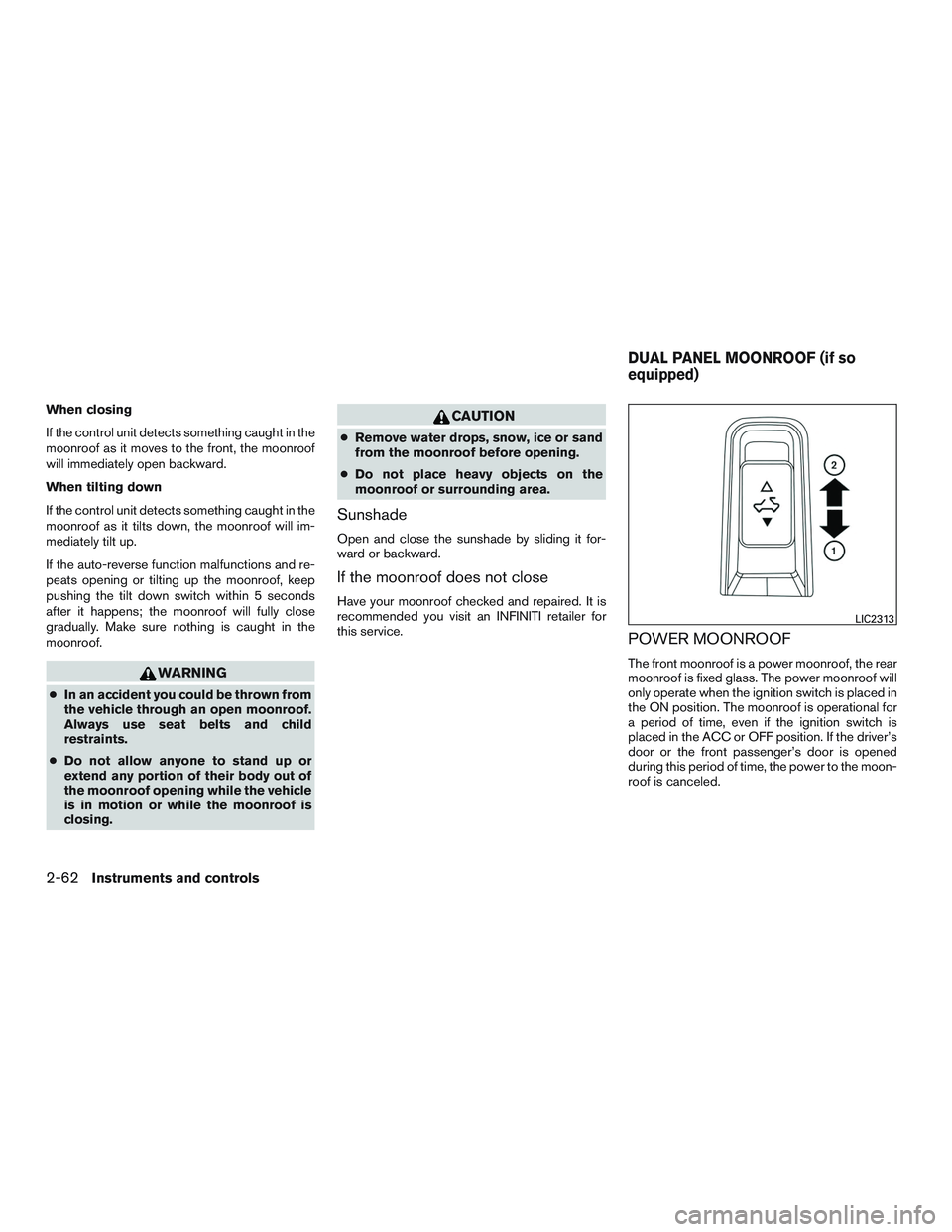
POWER MOONROOF
The front moonroof is a power moonroof, the rear
moonroof is fixed glass. The power moonroof will
only operate when the ignition switch is placed in
the ON position. The moonroof is operational for
a period of time, even if the ignition switch is
placed in the ACC or OFF position. If the driver’s
door or the front passenger’s door is opened
during this period of time, the power to the moon-
roof is canceled.
LIC2313
DUAL PANEL MOONROOF (if so
equipped)
2-62Instruments and controls
Page 172 of 607

●Doors do not lock by pushing the door
handle request switch while any door is
open. However, doors lock with the
mechanical key even if any door is
open.
● Doors do not lock with the door handle
request switch with the Intelligent Key
inside the vehicle and a beep sounds to
warn you. However, when an Intelligent
Key is inside the vehicle, doors can be
locked with another Intelligent Key.
CAUTION
● After locking the doors using the re-
quest switch, make sure that the doors
have been securely locked by operating
the door handles or the rear liftgate
opener switch.
● When locking the doors using the re-
quest switch, make sure to have the
Intelligent Key in your possession be-
fore operating the request switch to
prevent the Intelligent Key from being
left in the vehicle.
● The request switch is operational only
when the Intelligent Key has been de-
tected by the Intelligent Key system. Lockout protection
To prevent the Intelligent Key from being acci-
dentally locked in the vehicle, lockout protection
is equipped with the Intelligent Key system.
When the driver’s side door is open, the doors
are locked, and then the Intelligent Key is put
inside the vehicle and all the doors are closed;
the lock will automatically unlock and the door
buzzer sounds.
NOTE:
The doors may not lock when the Intelli-
gent Key is in the same hand that is oper-
ating the request switch to lock the door.
Put the Intelligent Key in a purse, pocket or
your other hand.
CAUTION
The lockout protection may not function
under the following conditions:
●
When the Intelligent Key is placed on
top of the instrument panel.
● When the Intelligent Key is placed in-
side the glove box or a storage bin.
● When the Intelligent Key is placed in-
side the door pockets.
● When the Intelligent Key is placed in-
side or near metallic materials.
Pre-driving checks and adjustments3-11
Page 177 of 607

Answer back horn feature
If desired, the answer back horn feature can be
deactivated using the Intelligent Key. When it is
deactivated and the LOCK
button is
pushed, the hazard indicator lights flash twice.
When the UNLOCK
button is pushed, nei-
ther the hazard indicator lights nor the horn op-
erates. NOTE:
If you change the answer back horn and
light flash feature with the Intelligent Key,
the vehicle information display screen will
show the current mode after the ignition
switch has been cycled from the OFF to the
ON position. The vehicle information dis-
play screen can also be used to change the
answer back horn mode.
To deactivate:
Press and hold the
andbuttonsfor at least 2 seconds.
The hazard indicator lights will flash three times to
confirm that the answer back horn feature has
been deactivated.
To activate: Press and hold the
andbuttonsfor at least 2 seconds once
more.
The hazard indicator lights will flash once and the
horn will sound once to confirm that the horn
beep feature has been reactivated.
Deactivating the horn beep feature does not si-
lence the horn if the alarm is triggered.
WARNING SIGNALS
To help prevent the vehicle from moving unex-
pectedly by erroneous operation of the Intelligent
Key or to help prevent the vehicle from being
stolen, a chime or buzzer sounds from inside and
outside the vehicle and a warning is displayed in
the instrument panel.
When a chime or beep sounds or a warning is
displayed, be sure to check the vehicle and the
Intelligent Key.
For additional information, refer to the “Trouble-
shooting guide” in this section and “Vehicle infor-
mation display” in the “Instruments and controls”
section of this manual.
WPD0362
3-16Pre-driving checks and adjustments
Page 182 of 607

●The I–Key indicator message is displayed in
the vehicle information display.
● The alarm sounds due to illegal entry into the
vehicle.
● Two remote vehicle starts, or a single remote
start with an extension, have already been
used.
● The vehicle is not in P (Park) .
● There is a detected registered key already
inside of the vehicle.
● The remote start function has been switched
to the OFF position in Vehicle Settings of the
vehicle information display. For additional
information, refer to “Vehicle information dis-
play” in the “Instruments and controls” sec-
tion of this manual.
The remote engine start may display a warning or
indicator in the vehicle information display. For
additional information, refer to “Vehicle informa-
tion display” in the “Instruments and controls”
section of this manual.
�1Pull the hood lock release handle located
below the driver side instrument panel. The
hood will spring up slightly.
�2Push the lever at the front of the hood to the
side as illustrated with your fingertips and
raise the hood.
When closing the hood, lower it slowly and make
sure it locks into place.
WARNING
● Make sure the hood is completely
closed and latched before driving. Fail-
ure to do so could cause the hood to fly
open and result in an accident.
● If you see steam or smoke coming from
the engine compartment, to avoid injury
do not open the hood.
LPD2061
HOOD
Pre-driving checks and adjustments3-21


