2016 INFINITI QX60 ignition
[x] Cancel search: ignitionPage 296 of 607

●A new disc may be rough on the inner and
outer edges. Remove the rough edges by
rubbing the inner and outer edges with the
side of a pen or pencil as illustrated.
STEERING WHEEL SWITCH FOR
AUDIO CONTROL
1. Menu control switch/ENTER button
2.
(back) switch
3. SOURCE switch
4. Volume control switch
The audio system can be operated using the
controls on the steering wheel.
SOURCE switch
With the ignition switch in the ACC or ON posi-
tion, push the SOURCE switch to turn the audio
system on.
Push the SOURCE switch to change the mode in
the following sequence:
Models without Navigation System
AM →FM1 →FM2 →XM1 →XM2 →XM3 →
USB/iPod®* →CD →AUX* →AM.
Models with Navigation System
AM →FM1 →FM2 →XM1 →XM2 →XM3 →
CD/DVD* →USB/iPod®* →Bluetooth® Audio*
→ AUX* →AM.
* These modes are only available when compat-
ible media storage is inserted into the device.
Volume control switch
Push the volume control switch to increase or
decrease the volume.
LHA3170
Monitor, climate, audio, phone and voice recognition systems4-99
Page 311 of 607

Your INFINITI is equipped with the Bluetooth®
Hands-Free Phone System. If you have a com-
patible Bluetooth® enabled cellular phone, you
can set up the wireless connection between your
cellular phone and the in-vehicle phone module.
With Bluetooth® wireless technology, you canmake or receive a hands-free telephone call with
your cellular phone in the vehicle.
Once your cellular phone is connected to the in-
vehicle phone module, no other phone connecting
procedure is required. Your phone is automatically
connected with the in-vehicle phone module when the ignition switch is placed in the ON position with
the previously connected cellular phone turned on
and carried in the vehicle.
You can connect up to five different Bluetooth®
cellular phones to the in-vehicle phone module.
However, you can talk on only one cellular phone
at a time.
Before using the Bluetooth® Hands-Free Phone
System, refer to the following notes.
● Set up the wireless connection between a
compatible cellular phone and the in-vehicle
phone module before using the hands-free
phone system.
●
Some Bluetooth® enabled cellular phones may
not be recognized by the in-vehicle phone mod-
ule. Visit www.infinitiusa.com/bluetooth or
www.infiniti.ca/bluetooth for a recommended
phone list and connecting instructions.
● You will not be able to use a hands-free
phone under the following conditions:
– Your vehicle is outside of the cellular ser- vice area.
– Your vehicle is in an area where it is difficult to receive a cellular signal; such
as in a tunnel, in an underground parking
garage, near a tall building or in a moun-
tainous area.
LHA3157
4-114Monitor, climate, audio, phone and voice recognition systems
Page 312 of 607

– Your cellular phone is locked to prevent itfrom being dialed.
● When the radio wave condition is not ideal
or ambient sound is too loud, it may be
difficult to hear the other person’s voice dur-
ing a call.
● Do not place the cellular phone in an area
surrounded by metal or far away from the
in-vehicle phone module to prevent tone
quality degradation and wireless connection
disruption.
● While a cellular phone is connected through
the Bluetooth® wireless connection, the
battery power of the cellular phone may dis-
charge quicker than usual. The Bluetooth®
Hands-Free Phone System cannot charge
cellular phones.
● Some cellular phones or other devices may
cause interference or a buzzing noise to
come from the audio system speakers. Stor-
ing the device in a different location may
reduce or eliminate the noise.
● Refer to the cellular phone Owner’s Manual
regarding the telephone charges, cellular
phone antenna and body, etc. ●
For additional information, refer to “Trouble-
shooting guide” in this section. You can also
visit www.infinitiusa.com/bluetooth or
www.infiniti.ca/bluetooth for troubleshoot-
ing help.
REGULATORY INFORMATION
FCC Regulatory information
– CAUTION: To maintain compliance with FCC’s RF exposure guidelines, use only the
supplied antenna. Unauthorized antenna,
modification, or attachments could damage
the transmitter and may violate FCC regula-
tions.
– Operation is subject to the following two con- ditions:
1. This device may not cause interference and
2. this device must accept any interference, including interference that may cause unde-
sired operation of the device.
IC Regulatory information
– Operation is subject to the following two con- ditions: (1) this device may not cause interfer-
ence, and (2) this device must accept any
interference, including interference that may
cause undesired operation of the device. – This Class B digital apparatus meets all re-
quirements of the Canadian Interference-
Causing Equipment Regulations.
BLUETOOTH® is a
trademark owned by
Bluetooth SIG, Inc.
and licensed to
Visteon.
USING THE SYSTEM
The INFINITI Voice Recognition system allows
hands-free operation of the Bluetooth® Phone
System.
If the vehicle is in motion, some commands may
not be available so full attention may be given to
vehicle operation.
Initialization
When the ignition switch is placed in the ON
position, INFINITI Voice Recognition is initialized,
which takes a few seconds. If the
button is
pressed before the initialization completes, the
system will announce “Hands-free phone system
not ready” and will not react to voice commands.
Monitor, climate, audio, phone and voice recognition systems4-115
Page 321 of 607
VOICE ADAPTATION (VA) MODE
Voice Adaptation (VA) allows up to two out-of-
dialect users to train the system to improve rec-
ognition accuracy. By repeating a number of
commands, the users can create a voice model of
their own voice that is stored in the system. The
system is capable of storing a different VA model
for each connected phone.
Training procedure
The procedure for training a voice is as follows.1. Position the vehicle in a reasonably quiet outdoor location.
2. Sit in the driver’s seat with the engine run- ning, the parking brake on, and the transmis-
sion in P (Park) .
3. Press and hold the
button for approxi-
mately 5 seconds.
4. The system announces: “Press the PHONE/SEND (
) button for the
hands-free phone system to enter the voice
adaptation mode or press the PHONE/END
(
) button to select a different lan-
guage.” 5. Press the
button.
For information on selecting a different lan-
guage, refer to “Choosing a language” in this
section.
6. Voice memory A or memory B is selected automatically. If both memory locations are
already in use, the system will prompt you to
overwrite one. Follow the instructions pro-
vided by the system.
7. When preparation is complete and you are ready to begin, press the
button.
8. The VA mode will be explained. Follow the instructions provided by the system.
9. When training is finished, the system will tell you an adequate number of phrases have
been recorded.
10. The system will announce that voice adap- tation has been completed and the system is
ready.
The VA mode will stop if:
● The
button is pressed for approxi-
mately 5 seconds in VA mode.
● The vehicle begins moving during VA mode.
● The ignition switch is placed in the OFF or
LOCK position.
Training phrases
During the VA mode, the system instructs the
trainer to say the following phrases. The system
will prompt you for each phrase.
● phonebook transfer entry
● dial three oh four two nine
● delete call back number
● incoming
● transfer entry
● eight pause nine three two pause seven
● delete all entries
● call seven two four zero nine
● phonebook delete entry
● next entry
● dial star two one seven oh
● yes
● no
● select
● missed
● dial eight five six nine two
● Bluetooth on
4-124Monitor, climate, audio, phone and voice recognition systems
Page 325 of 607
phone module when the ignition switch is placed
in the ON position with the connected cellular
phone turned on and carried in the vehicle.
You can register up to five different Bluetooth®
cellular phones to the in-vehicle phone module.
However, you can talk on only one cellular phone
at a time.
INFINITI Voice Recognition system supports the
phone commands, so dialing a phone number
using your voice is possible. For additional infor-
mation, refer to “INFINITI Voice Recognition Sys-
tem” in this section.
Before using the Bluetooth® Hands-Free Phone
System, refer to the following notes.● Set up the wireless connection between a
cellular phone and the in-vehicle phone
module before using the hands-free phone
system.
● Some Bluetooth® enabled cellular phones
may not be recognized by the in-vehicle
phone module. Please visit
www.infinitiusa.com/bluetooth or
www.infiniti.ca/bluetooth for a recom-
mended phone list and connecting.
● You will not be able to use a hands-free
phone under the following conditions: – Your vehicle is outside of the cellular ser-
vice area.
– Your vehicle is in an area where it is difficult to receive cellular signal; such as
in a tunnel, in an underground parking
garage, near a tall building or in a moun-
tainous area.
– Your cellular phone is locked to prevent it from being dialed.
● When the radio wave condition is not ideal
or ambient sound is too loud, it may be
difficult to hear the other person’s voice dur-
ing a call.
● Immediately after the ignition switch is
placed in the ON position, it may be impos-
sible to receive a call for a short period of
time.
● Do not place the cellular phone in an area
surrounded by metal or far away from the
in-vehicle phone module to prevent tone
quality degradation and wireless connection
disruption.
● While a cellular phone is connected through
the Bluetooth® wireless connection, the
battery power of the cellular phone may dis-
charge quicker than usual. The Bluetooth®
Hands-Free Phone System cannot charge
cellular phones. ●
Some cellular phones or other devices may
cause interference or a buzzing noise to
come from the audio system speakers. Stor-
ing the device in a different location may
reduce or eliminate the noise.
● Refer to the cellular phone owner’s manual
regarding the telephone charges, cellular
phone antenna and body, etc.
● The signal strength display on the monitor
will not coincide with the signal strength
display of some cellular phones.
● If reception between callers is unclear, ad-
justing the incoming or outgoing call volume
may improve the clarity. For additional infor-
mation, refer to “Call volume” in this section.
● For additional information, refer to
www.infinitiusa.com/bluetooth
www.infiniti.ca/bluetooth for troubleshoot-
ing help.
REGULATORY INFORMATION
FCC Regulatory information
– CAUTION: To maintain compliance with FCC’s RF exposure guidelines, use only the
supplied antenna. Unauthorized antenna,
modification, or attachments could damage
the transmitter and may violate FCC regula-
tions.
4-128Monitor, climate, audio, phone and voice recognition systems
Page 339 of 607
USING THE SYSTEM
Initialization
When the ignition switch is placed in the ON
position, INFINITI Voice Recognition is initialized,
which takes a few seconds. When completed,
the system is ready to accept voice commands. If
the
switch is pressed before the initializa-
tion completes, voice commands will not be ac-
cepted. Please wait until the INFINITI Voice Rec-
ognition initialization is completed.
BEFORE STARTING
To get the best recognition performance from
Voice Recognition, observe the following:
● The interior of the vehicle should be as quiet
as possible. Close the windows to eliminate
the surrounding noises (traffic noise and vi-
bration sounds, etc.) , which may prevent the
system from correctly recognizing the voice
commands.
● Wait until the tone sounds before speaking a
command.
● Speak in a natural conversational voice with-
out pausing between words.
● If the air conditioner is set to “Auto”, the fan
speed is automatically lowered so that your
commands can be recognized more easily.
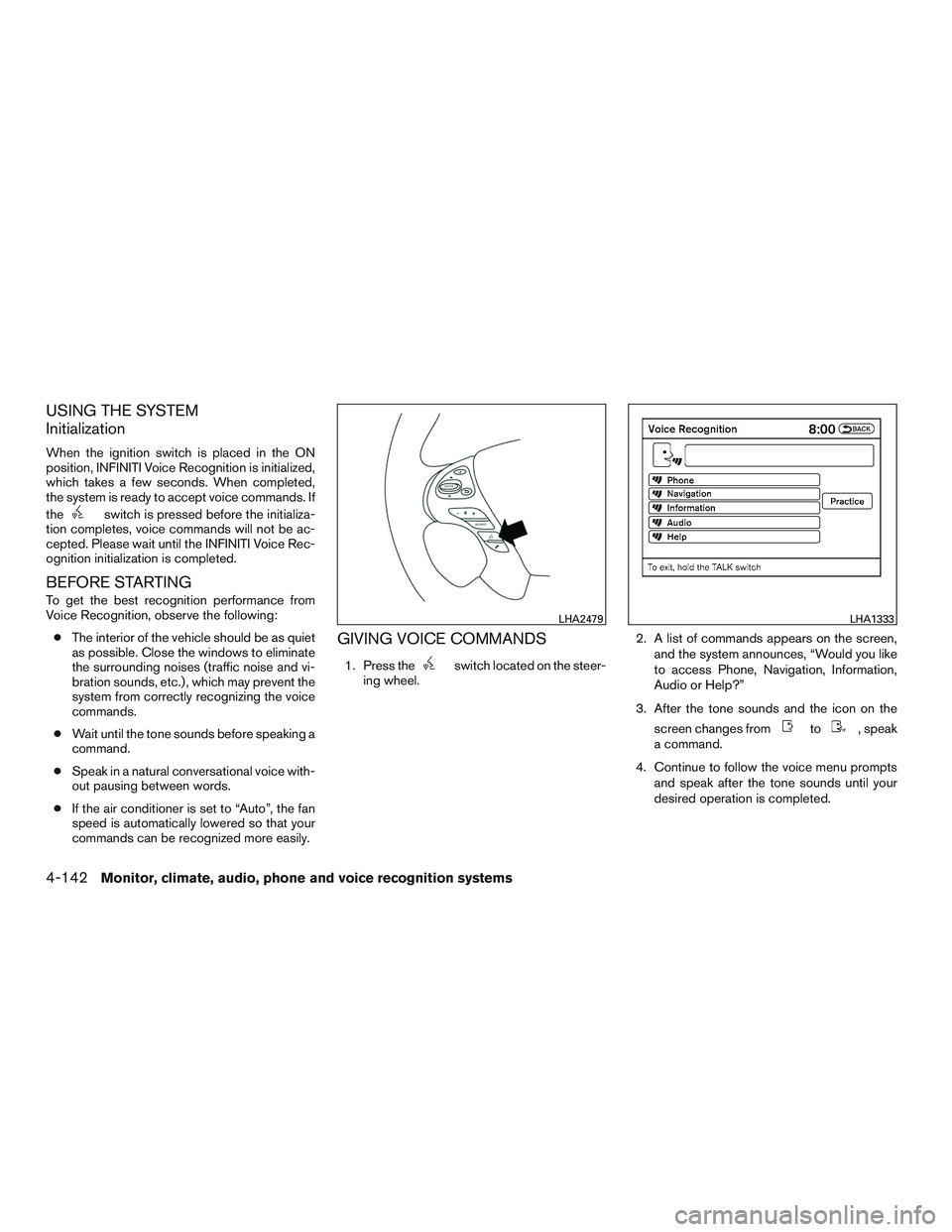
GIVING VOICE COMMANDS
1. Press theswitch located on the steer-
ing wheel. 2. A list of commands appears on the screen,
and the system announces, “Would you like
to access Phone, Navigation, Information,
Audio or Help?”
3. After the tone sounds and the icon on the screen changes from
to, speak
a command.
4. Continue to follow the voice menu prompts and speak after the tone sounds until your
desired operation is completed.
LHA2479LHA1333
4-142Monitor, climate, audio, phone and voice recognition systems
Page 349 of 607

USING THE SYSTEM
Initialization
When the ignition switch is placed in the ON
position, INFINITI Voice Recognition is initialized,
which takes a few seconds. When completed,
the system is ready to accept voice commands. If
the
switch is pressed before the initializa-
tion completes, the display will show the mes-
sage: “System not ready” or a beep sounds.
Before starting
To get the best performance from INFINITI Voice
Recognition, observe the following:
● Keep the interior of the vehicle as quiet as
possible. Close the windows to eliminate the
surrounding noises (traffic noises, vibration
sounds, etc.) , which may prevent the system
from recognizing the voice commands cor-
rectly.
● When the climate control is in the AUTO
mode, the fan speed decreases automati-
cally for easy recognition.
● Wait until a tone sounds before speaking a
command.
● Speak in a natural voice without pausing
between words.
Giving voice commands
1. Press and release thebutton located
on the steering wheel. 2. A list of commands appears on the screen,
and the system announces, “Please say a
command from the displayed list or say Help
to show all commands.”
3. After the tone sounds and the icon on the screen changes from
to, speak
a command.
4. Once a command is recognized, the system will announce the recognized command and
perform the requested action.
If the command is not recognized, the sys-
tem repeats the announcement. Repeat the
command in a clear voice after the tone.
LHA2479LHA1345
4-152Monitor, climate, audio, phone and voice recognition systems
Page 353 of 607

5 Starting and driving
Precautions when starting and driving................5-4
Exhaust gas (carbon monoxide) ..................5-4
Three-way catalyst ..............................5-4
Tire Pressure Monitoring System (TPMS) ..........5-5
On-pavement and off-road driving
precautions ....................................5-9
Avoiding collision and rollover . . ..................5-9
Off-road recovery ...............................5-9
Rapid air pressure loss ......................... 5-10
Drinking alcohol/drugs and driving ...............5-10
Driving safety precautions ......................5-11
Intelligent All-Wheel Drive (AWD) driving
safety precautions (if so equipped) ..............5-12
Push-Button Ignition Switch .......................5-13
Operating range ............................... 5-14
Push-button ignition switch positions . . . .........5-14
Emergency engine shut off .....................5-15
INFINITI Intelligent Key battery discharge .........5-15
INFINITI Vehicle Immobilizer System .............5-16
Before starting the engine ......................... 5-16
Starting the engine ............................... 5-17
Remote start (if so equipped) ...................5-17
Driving the vehicle ................................ 5-18Continuously Variable Transmission (CVT)
........5-18
Parking brake .................................... 5-22
INFINITI Drive Mode Selector ......................5-23
Standard mode ................................ 5-23
Sport mode ................................... 5-23
Snow mode ................................... 5-23
ECO mode ................................... 5-24
Lane Departure Warning (LDW) (if so equipped) .....5-26
LDW system operation ......................... 5-27
How to enable/disable the LDW system .........5-28
LDW system limitations ........................ 5-29
System temporarily unavailable ..................5-30
System maintenance ........................... 5-30
Lane Departure Prevention (LDP) (if so equipped) ....5-31
LDP system operation .......................... 5-32
How
to enable/disable the LDP system ..........5-33
LDP system limitations ......................... 5-34
System temporarily unavailable ..................5-35
System maintenance ........................... 5-36
Blind Spot Warning (BSW) (if so equipped) .........5-37
BSW system operation ........................ 5-39
How to enable/disable the BSW system .........5-40
BSW system limitations ........................ 5-40