2016 HYUNDAI VELOSTER TURBO smart key
[x] Cancel search: smart keyPage 88 of 406

411
Features of your vehicle
Battery replacement
A smart key battery should last for sever-
al years, but if the smart key is not work-
ing properly, try replacing the battery with
a new one. If you are unsure how to use
your smart key or replace the battery,
contact an authorized HYUNDAI dealer.
✽NOTICE
The circuit inside the smart key can
have a problem if exposed to moisture
or static electricity. If you are unsure
how to use your smart key or replace the
battery, contact an authorized
HYUNDAI dealer.
1. Pry open the rear cover of the smart
key.
2. Replace the battery with a new battery
(CR2032). When replacing the battery,
make sure the battery position.
3. Install the battery in the reverse order
of removal.
CAUTION
• The smart key is designed to give
you years of trouble-free use, how-
ever it can malfunction if exposed
to moisture or static electricity. If
you are unsure how to use or
replace the battery, contact an
authorized HYUNDAI dealer.
• Using the wrong battery can
cause the smart key to malfunc-
tion. Be sure to use the correct
battery.
• To avoid damaging the smart key,
don't drop it, get it wet, or expose
it to heat or sunlight.
WARNING
An inappropriately dis-
posed battery can be harm-
ful to the environment and
human health.
Dispose the battery according to
your local law(s) or regulation.
OBH048004
IC WARNING
This device complies with Industry
Canada licence-exempt RSS stan-
dard(s).
Operation is subject to the follow-
ing two conditions: (1) this device
may not cause interference, and (2)
this device must accept any inter-
ference, including interference that
may cause undesired operation of
the device.
Page 90 of 406
413
Features of your vehicle
Transmitter precautions
✽NOTICE
The transmitter will not work if any of
following occur:
• The ignition key is in ignition switch.
• You exceed the operating distance
limit (about 30 m [90 feet]).
• The battery in the transmitter is
weak.
• Other vehicles or objects may be
blocking the signal.
• The weather is extremely cold.
• The transmitter is close to a radio
transmitter such as a radio station or
an airport which can interfere with
normal operation of the transmitter.
When the transmitter does not work
correctly, open and close the door with
the ignition key. If you have a problem
with the transmitter, contact an author-
ized HYUNDAI dealer.
(Continued)(Continued)
• If the transmitter is in close proximity
to your cell phone or smart phone, the
signal from the transmitter could be
blocked by normal operation of your
cell phone or smart phone. This is
especially important when the phone
is active such as making call, receiving
calls, text messaging, and/or send-
ing/receiving emails. Avoid placing the
transmitter and your cell phone or
smart phone in the same pants or
jacket pocket and maintain adequate
distance between the two devices.
This device complies with Industry
Canada Standard RSS-210.
Operation is subject to the following two
conditions:
1. This device may not cause harmful
interference, and
2. This device must accept any interfer-
ence received, including interference
that may cause undesired operation.
CAUTION
Keep the transmitter away from
water or any liquid. If the keyless
entry system is inoperative due to
exposure to water or liquids, it will
not be covered by your manufactur-
er’s vehicle warranty.
WARNING
Changes or modifications not
expressly approved by the party
responsible for compliance could
void the user’s authority to operate
the equipment. If the keyless entry
system is inoperative due to
changes or modifications not
expressly approved by the party
responsible for compliance, it will
not be covered by your manufactur-
er’s vehicle warranty.
Page 92 of 406
415
Features of your vehicle
THEFT-ALARM SYSTEM
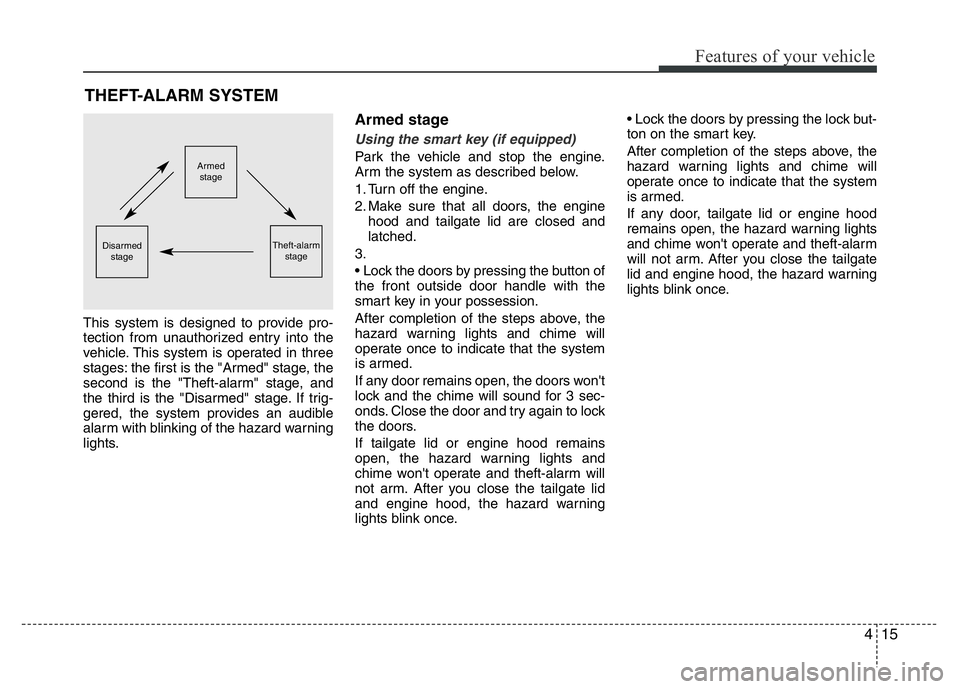
This system is designed to provide pro-
tection from unauthorized entry into the
vehicle. This system is operated in three
stages: the first is the "Armed" stage, the
second is the "Theft-alarm" stage, and
the third is the "Disarmed" stage. If trig-
gered, the system provides an audible
alarm with blinking of the hazard warning
lights.
Armed stage
Using the smart key (if equipped)
Park the vehicle and stop the engine.
Arm the system as described below.
1. Turn off the engine.
2. Make sure that all doors, the engine
hood and tailgate lid are closed and
latched.
3.
• Lock the doors by pressing the button of
the front outside door handle with the
smart key in your possession.
After completion of the steps above, the
hazard warning lights and chime will
operate once to indicate that the system
is armed.
If any door remains open, the doors won't
lock and the chime will sound for 3 sec-
onds. Close the door and try again to lock
the doors.
If tailgate lid or engine hood remains
open, the hazard warning lights and
chime won't operate and theft-alarm will
not arm. After you close the tailgate lid
and engine hood, the hazard warning
lights blink once.• Lock the doors by pressing the lock but-
ton on the smart key.
After completion of the steps above, the
hazard warning lights and chime will
operate once to indicate that the system
is armed.
If any door, tailgate lid or engine hood
remains open, the hazard warning lights
and chime won't operate and theft-alarm
will not arm. After you close the tailgate
lid and engine hood, the hazard warning
lights blink once.Armed
stage
Theft-alarm
stageDisarmed
stage
Page 94 of 406
417
Features of your vehicle
Theft-alarm stage
The alarm will be activated if any of the
following occurs while the system is
armed.
• A door is opened without using the
transmitter (or smart key or mechani-
cal key).
• The tailgate is opened without using
the transmitter (or smart key).
• The engine hood is opened.
The horn will sound and the hazard
warning lights will blink continuously for
approximately 30 seconds. The alarm will
repeat once more unless the system is
disarmed. To turn off the system, unlock
the doors with the mechanical key or
transmitter or smart key.
Opening the tailgate with the
alarm armed (if equipped)
When the alarm is armed, the alarm will
not sound if the tailgate lid is opened with
the transmitter (or smart key).
Once the tailgate is opened and then
closed, the tailgate will be locked auto-
matically and the system will be armed
again.
Also, if any of the doors or hood is
opened while the tailgate lid is open and
the alarm is armed, the alarm will sound.
Disarmed stage
Using the smart key (if equipped)
The system will be disarmed when the
doors are unlocked by pressing the
unlock button on the smart key or press-
ing the lock/unlock button of the front out-
side door handle with the smart key in
your possession.
After unlocking the doors, the hazard
warning lights and chime will operate
twice to indicate that the system is dis-
armed.
After unlocking the doors, if any door is
not opened within 30 seconds, the sys-
tem will be rearmed.
Using the transmitter (if equipped)
The system will be disarmed when the
doors are unlocked by pressing the
unlock button on the transmitter.
After unlocking the doors, the hazard
warning lights will blink twice to indicate
that the system is disarmed.
After unlocking the doors, if any door is
not opened within 30 seconds, the sys-
tem will be rearmed.
Page 96 of 406
419
Features of your vehicle
Operating door locks from out-
side the vehicle
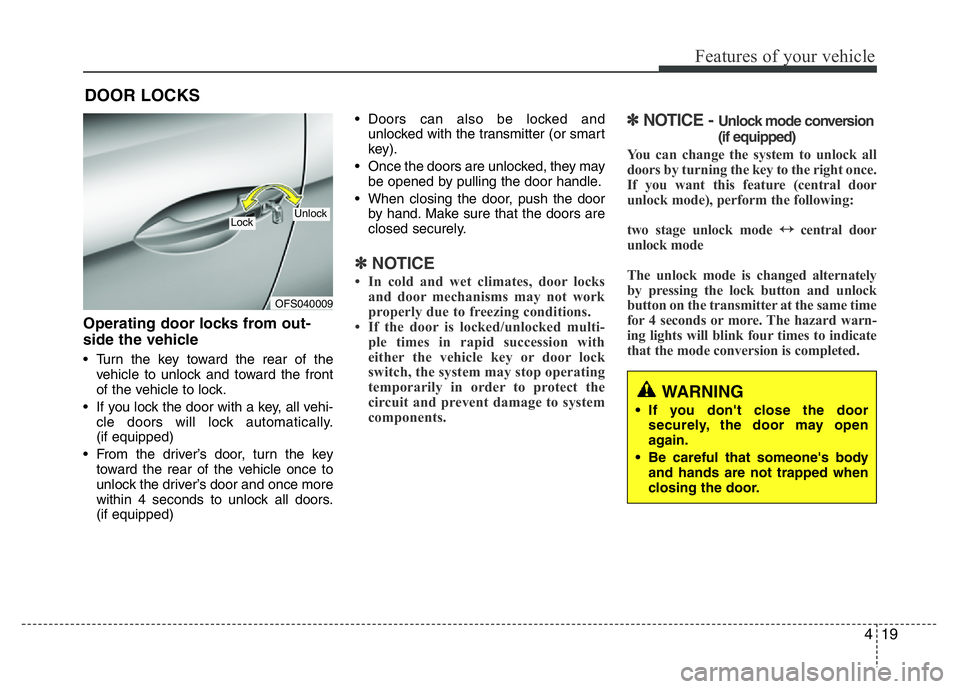
• Turn the key toward the rear of the
vehicle to unlock and toward the front
of the vehicle to lock.
• If you lock the door with a key, all vehi-
cle doors will lock automatically.
(if equipped)
• From the driver’s door, turn the key
toward the rear of the vehicle once to
unlock the driver’s door and once more
within 4 seconds to unlock all doors.
(if equipped)• Doors can also be locked and
unlocked with the transmitter (or smart
key).
• Once the doors are unlocked, they may
be opened by pulling the door handle.
• When closing the door, push the door
by hand. Make sure that the doors are
closed securely.
✽NOTICE
• In cold and wet climates, door locks
and door mechanisms may not work
properly due to freezing conditions.
• If the door is locked/unlocked multi-
ple times in rapid succession with
either the vehicle key or door lock
switch, the system may stop operating
temporarily in order to protect the
circuit and prevent damage to system
components.
✽NOTICE - Unlock mode conversion
(if equipped)
You can change the system to unlock all
doors by turning the key to the right once.
If you want this feature (central door
unlock mode), perform the following:
two stage unlock mode
↔central door
unlock mode
The unlock mode is changed alternately
by pressing the lock button and unlock
button on the transmitter at the same time
for 4 seconds or more. The hazard warn-
ing lights will blink four times to indicate
that the mode conversion is completed.
DOOR LOCKS
WARNING
• If you don't close the door
securely, the door may open
again.
• Be careful that someone's body
and hands are not trapped when
closing the door.
OFS040009
UnlockLock
Page 97 of 406
Features of your vehicle
20 4
In case of an emergency
If the power door lock switch does not
operate electrically, the only way to lock
the door(s) is with the ignition key from
the outside key hole.
Doors without the outside key hole, you
can lock the door as follows:
1. Open the door.
2. Lock doors by pushing each lock but-
ton.
3. Close the door securely.
Once the tailgate is closed when the
power door lock switch does not operate
electrically, you will not be able to open
the tailgate.
✽NOTICE
Always remove the ignition key, engage
the parking brake, close all windows
and lock all doors when leaving your
vehicle unattended.
Operating door locks from inside
the vehicle
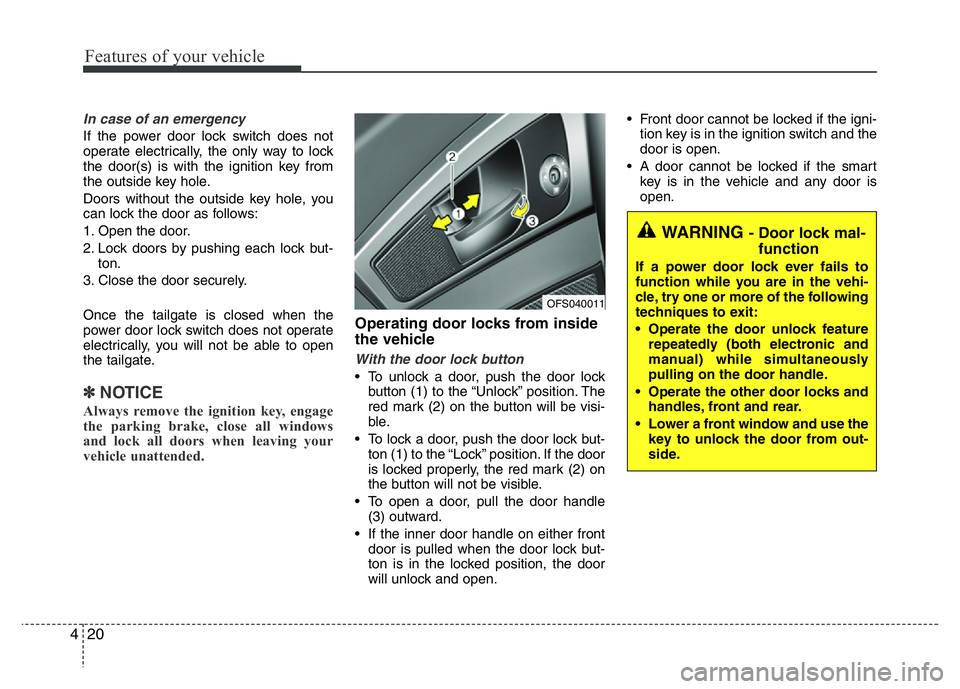
With the door lock button
• To unlock a door, push the door lock
button (1) to the “Unlock” position. The
red mark (2) on the button will be visi-
ble.
• To lock a door, push the door lock but-
ton (1) to the “Lock” position. If the door
is locked properly, the red mark (2) on
the button will not be visible.
• To open a door, pull the door handle
(3) outward.
• If the inner door handle on either front
door is pulled when the door lock but-
ton is in the locked position, the door
will unlock and open.• Front door cannot be locked if the igni-
tion key is in the ignition switch and the
door is open.
• A door cannot be locked if the smart
key is in the vehicle and any door is
open.
WARNING - Door lock mal-
function
If a power door lock ever fails to
function while you are in the vehi-
cle, try one or more of the following
techniques to exit:
• Operate the door unlock feature
repeatedly (both electronic and
manual) while simultaneously
pulling on the door handle.
• Operate the other door locks and
handles, front and rear.
• Lower a front window and use the
key to unlock the door from out-
side.
OFS040011
Page 98 of 406
421
Features of your vehicle
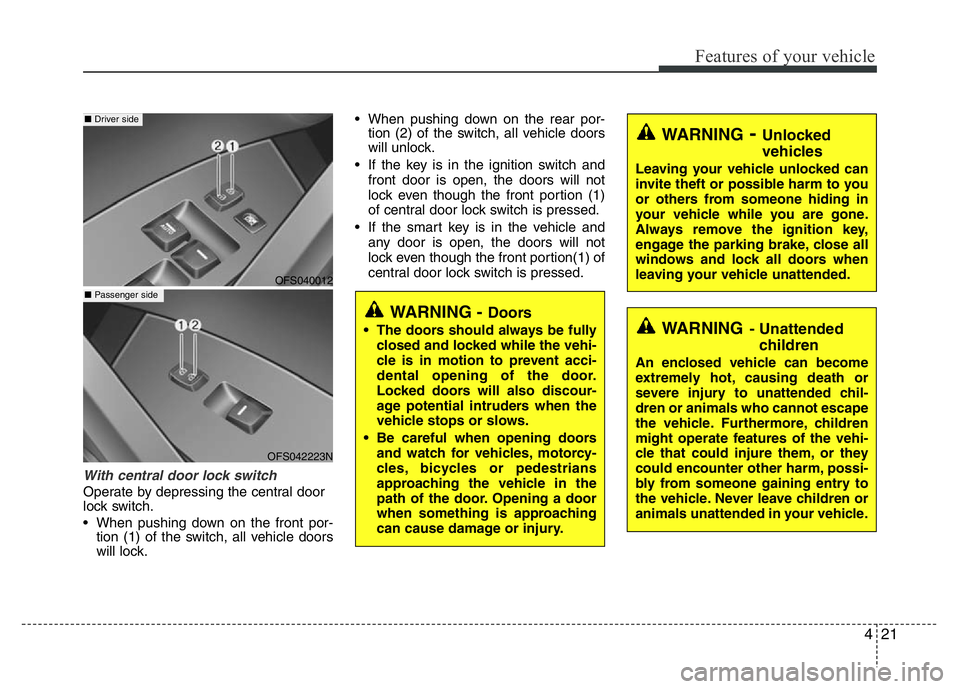
With central door lock switch
Operate by depressing the central door
lock switch.
• When pushing down on the front por-
tion (1) of the switch, all vehicle doors
will lock.• When pushing down on the rear por-
tion (2) of the switch, all vehicle doors
will unlock.
• If the key is in the ignition switch and
front door is open, the doors will not
lock even though the front portion (1)
of central door lock switch is pressed.
• If the smart key is in the vehicle and
any door is open, the doors will not
lock even though the front portion(1) of
central door lock switch is pressed.
WARNING- Unlocked
vehicles
Leaving your vehicle unlocked can
invite theft or possible harm to you
or others from someone hiding in
your vehicle while you are gone.
Always remove the ignition key,
engage the parking brake, close all
windows and lock all doors when
leaving your vehicle unattended.
WARNING- Unattended
children
An enclosed vehicle can become
extremely hot, causing death or
severe injury to unattended chil-
dren or animals who cannot escape
the vehicle. Furthermore, children
might operate features of the vehi-
cle that could injure them, or they
could encounter other harm, possi-
bly from someone gaining entry to
the vehicle. Never leave children or
animals unattended in your vehicle.
WARNING - Doors
• The doors should always be fully
closed and locked while the vehi-
cle is in motion to prevent acci-
dental opening of the door.
Locked doors will also discour-
age potential intruders when the
vehicle stops or slows.
• Be careful when opening doors
and watch for vehicles, motorcy-
cles, bicycles or pedestrians
approaching the vehicle in the
path of the door. Opening a door
when something is approaching
can cause damage or injury.
OFS040012
OFS042223N
■ Driver side
■ Passenger side
Page 101 of 406
Features of your vehicle
24 4
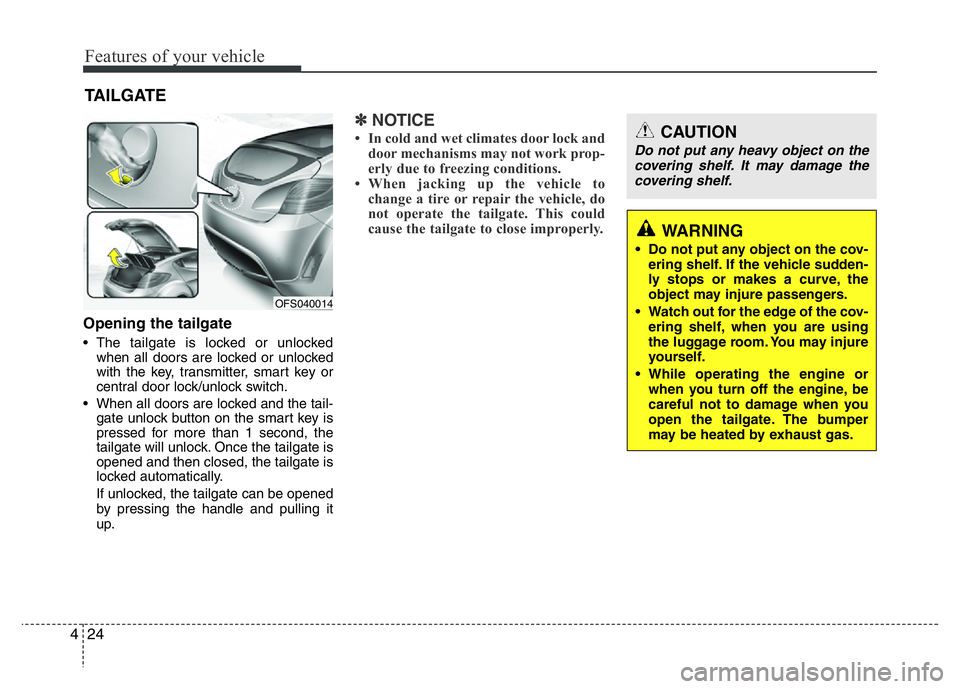
Opening the tailgate
• The tailgate is locked or unlocked
when all doors are locked or unlocked
with the key, transmitter, smart key or
central door lock/unlock switch.
• When all doors are locked and the tail-
gate unlock button on the smart key is
pressed for more than 1 second, the
tailgate will unlock. Once the tailgate is
opened and then closed, the tailgate is
locked automatically.
If unlocked, the tailgate can be opened
by pressing the handle and pulling it
up.
✽NOTICE
• In cold and wet climates door lock and
door mechanisms may not work prop-
erly due to freezing conditions.
• When jacking up the vehicle to
change a tire or repair the vehicle, do
not operate the tailgate. This could
cause the tailgate to close improperly.
TAILGATE
OFS040014
WARNING
• Do not put any object on the cov-
ering shelf. If the vehicle sudden-
ly stops or makes a curve, the
object may injure passengers.
• Watch out for the edge of the cov-
ering shelf, when you are using
the luggage room. You may injure
yourself.
• While operating the engine or
when you turn off the engine, be
careful not to damage when you
open the tailgate. The bumper
may be heated by exhaust gas.
CAUTION
Do not put any heavy object on the
covering shelf. It may damage the
covering shelf.