Page 2 of 20
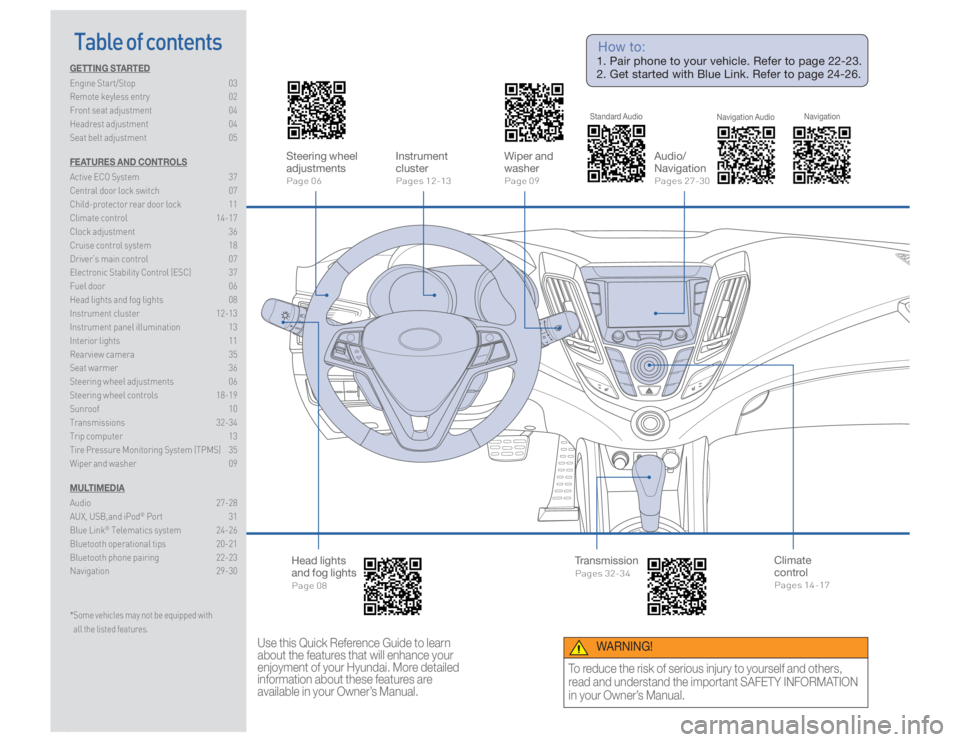
Table of contents
GETTING STARTED
Engine Start/Stop 03
Remote keyless entry 02
Front seat adjustment 04
Headrest adjustment 04
Seat belt adjustment 05
FEATURES AND CONTROLS
Active ECO System 37
Central door lock switch 07
Child-protector rear door lock 11
Climate control 14-17
Clock adjustment 36
Cruise control system 18
Driver’s main control 07
Electronic Stability Control (ESC) 37
Fuel door 06
Head lights and fog lights 08
Instrument cluster 12-13
Instrument panel illumination 13
Interior lights 11
Rearview camera 35
Seat warmer 36
Steering wheel adjustments 06
Steering wheel controls 18-19
Sunroof 10
Transmissions 32-34
Trip computer 13
Tire Pressure Monitoring System (TPMS) 35
Wiper and washer 09
MULTIMEDIA
Audio 27-28
AUX, USB,and iPod
® Port 31
Blue Link
® Telematics system 24-26
Bluetooth operational tips 20-21
Bluetooth phone pairing 22-23
Navigation 29-30
* Some vehicles may not be equipped with
all the listed features. Steering wheel
adjustments
Page 06
Head lights
and fog lights
Page 08 Audio/
Navigation
Pages 27-30 Wiper and
washer
Page 09
Climate
control
Pages 14-17Instrument
cluster
Pages 12-13
Transmission
Pages 32-34Use this Quick Reference Guide to learn
about the features that will enhance your
enjoyment of your Hyundai. More detailed
information about these features are
available in your Owner’s Manual. How to:
1. Pair phone to your vehicle. Refer to page 22-23.
2. Get started with Blue Link. Refer to page 24-26.
WARNING!
To reduce the risk of serious injury to yourself and others,
read and understand the important SAFETY INFORMATION
in your Owner’s Manual. Standard Audio
Navigation Audio Navigation
Page 4 of 20
GETTING STARTED
VELOSTER TURBO 0504
HYUNDAI GETTING STARTED
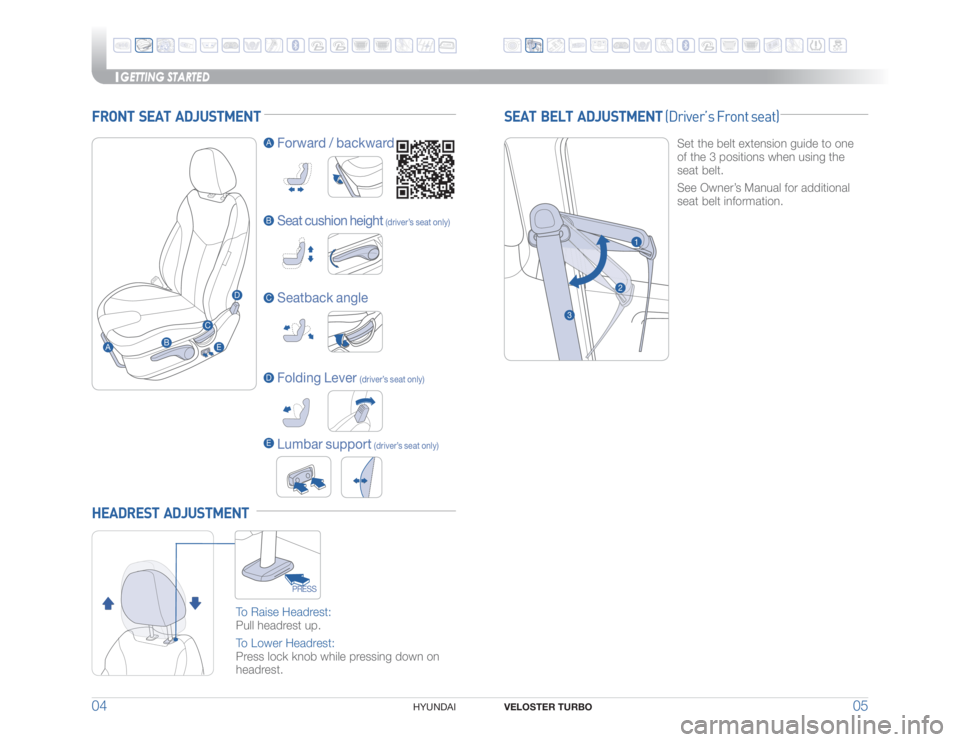
FRONT SEAT ADJUSTMENT
A
B
B Forward / backward
Seat cushion height
(driver’s seat only)Seatback angle
Folding Lever
(driver’s seat only)C
C
A
DDHEADREST ADJUSTMENT
5P�3BJTF�)FBESFTU�
Pull headrest up.
5P�-PXFS�)FBESFTU�
Press lock knob while pressing down on
headrest.
PRESSSEAT BELT ADJUSTMENT (Driver’s Front seat)
Set the belt extension guide to one
of the 3 positions when using the
seat belt.
See Owner’s Manual for additional
seat belt information.
1
2
3Lumbar support
(driver’s seat only)E
E
ENGINESTAR T
STOP
Page 20 of 20
VELOSTER TURBO 37FEATURES AND CONTROLS
36
HYUNDAI ☐ CONFIRM “GOOD BATTERY” USING GR8 AND STAPLE
TEST TICKET HERE
☐ SET TIRE PRESURE LF RF RR LR
☐ VERIFY VEHICLE IS CLEAN, IN GOOD CONDITION,
FREE OF CHIPS AND SCRATCHES · CLEAN WINDSHIELD
AND BACK WINDOW
☐ ENSURE FLOORMATS ARE SNAPPED INTO PLACE BEFORE DELIVERY
��4BMFT�$POTVMUBOU� %BUF ��4BMFT�.BOBHFS� %BUF
��$VTUPNFS� � � %BUF
Email @VELOSTER TURBO CUSTOMER DELIVERY CHECK LIST
HYUNDAI OWNER DEALERSHIP NAME
SALES CONSULTANT DATE
VIN PREVIOUS VEHICLE
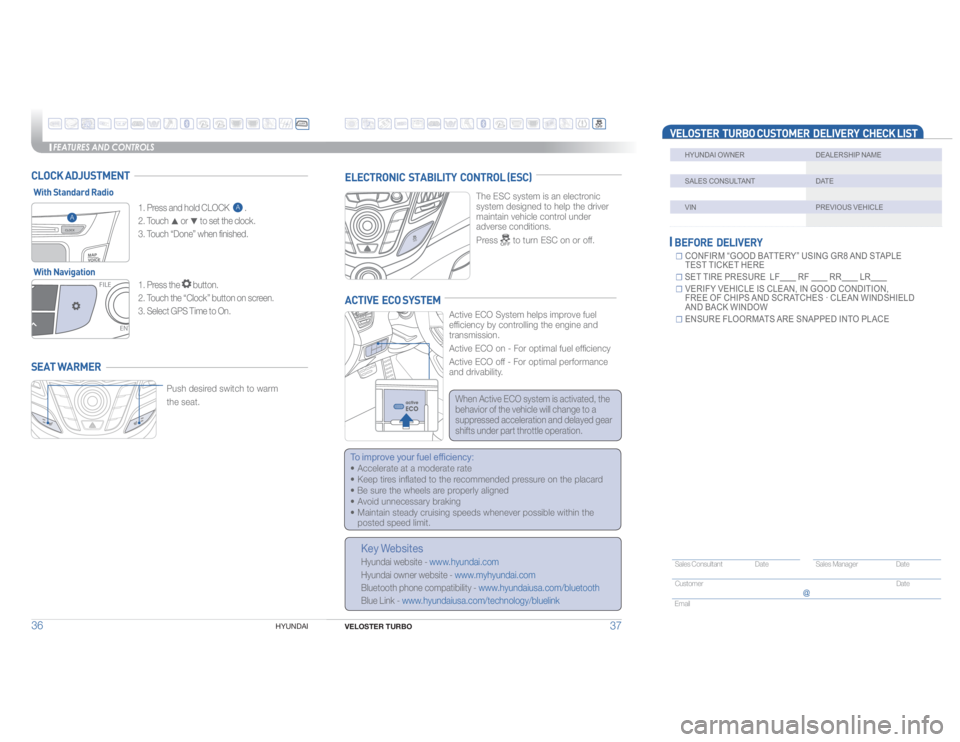
Push desired switch to warm
the seat.SEAT WARMER CLOCK ADJUSTMENT
ELECTRONIC STABILITY CONTROL (ESC)
5IF�&4$�TZTUFN�JT�BO�FMFDUSPOJD�� �
system designed to help the driver
maintain vehicle control under
adverse conditions.
Press �UP�UVSO�&4$�PO�PS�PGG�
ACTIVE ECO SYSTEM
"DUJWF�&$0�4ZTUFN�IFMQT�JNQSPWF�GVFM��
efficiency by controlling the engine and
transmission.
"DUJWF�&$0�PO���'PS�PQUJNBM�GVFM�FGmDJFODZ
"DUJWF�&$0�PGG���'PS�PQUJNBM�QFSGPSNBODF�
and drivability.
To improve your fuel efficiency:
t�"DDFMFSBUF�BU�B�NPEFSBUF�SBUF
t�,FFQ�UJSFT�JOnBUFE�UP�UIF�SFDPNNFOEFE�QSFTTVSF�PO�UIF�QMBDBSE
t�#F�TVSF�UIF�XIFFMT�BSF�QSPQFSMZ�BMJHOFE
t�"WPJE�VOOFDFTTBSZ�CSBLJOH
t�.BJOUBJO�TUFBEZ�DSVJTJOH�TQFFET�XIFOFWFS�QPTTJCMF�XJUIJO�UIF�
posted speed limit.Key Websites
Hyundai website - www.hyundai.com
Hyundai owner website - www.myhyundai.com
Bluetooth phone compatibility - www.hyundaiusa.com/bluetooth
Blue Link - www.hyundaiusa.com/technology/bluelink ���� �8IFO�"DUJWF�&$0�TZTUFN�JT�BDUJWBUFE
�UIF�
behavior of the vehicle will change to a
suppressed acceleration and delayed gear
shifts under part throttle operation.
A
ENGINESTAR T
STOPWith Standard Radio
With Navigation
1. Press the button.
���5PVDI�UIF�i$MPDLw�CVUUPO�PO�TDSFFO�
3. Select GPS Time to On.
FILE
ENT
MAP
VOICE���1SFTT�BOE�IPME�$-0$,��
A .
2. Touch -¸ or -¼ to set the clock.
���5PVDI�i%POFw�XIFO�GJOJTIFE�
A