Page 420 of 642
5-36
Driving your vehicle
The ESC OFF indicator light comes
on when the ESC is turned off. Driving with wheels and tires with
different sizes may cause the ESC
system to malfunction. Before
replacing tires, make sure all fourtires and wheels are the same
size. Never drive the vehicle with
different sized tires and wheelsinstalled.ESC OFF usage
When Driving
The ESC OFF mode should only be
used briefly to help free the vehicle if
stuck in snow or mud by temporarily
stopping operation of the ESC to
maintain wheel torque.
To turn ESC off while driving, press
the ESC OFF button while driving on
a flat road surface.To prevent damage to the trans-mission:
Do not allow wheel(s) of one
axle to spin excessively while
the ESC, ABS, and parking brake
warning lights are displayed.
The repairs would not be cov-
ered by the vehicle warranty.
Reduce engine power and do
not spin the wheel(s) excessive-
ly while these lights are dis-
played.
When operating the vehicle on a dynamometer, make sure theESC is turned off (ESC OFF lightilluminated).
Information
Turning the ESC off does not affect
ABS or standard brake system opera-
tion.
i
NOTICE
NOTICE
When the ESC is blinking, this indicates the ESC is active:
Drive slowly and NEVER attempt
to accelerate. NEVER turn theESC off while the ESC indicator
light is blinking or you may lose
control of the vehicle resulting inan accident.
WARNING
Page 422 of 642
5-38
Driving your vehicle
VSM OFF condition
To cancel VSM operation, press the
ESC OFF button. ESC OFF indicator
light ( ) will illuminate.
To turn on VSM, press the ESC OFF
button again. The ESC OFF indicatorlight will go out.
Driving with wheels and tires with dif-
ferent sizes may cause the ESC sys-
tem to malfunction. Before replacing
tires, make sure all four tires and
wheels are the same size. Never
drive the vehicle with different sizedtires and wheels installed.
Hill-Start Assist Control (HAC)
The Hill-Start Assist Control (HAC)
helps prevent the vehicle from rolling
backwards when starting a vehicle
from a stop on a hill. The system
operates the brakes automatically for
approximately 2 seconds and releas-
es the brake after 2 seconds or when
the accelerator pedal is depressed. The HAC does not operate when
the shift lever is in P (Park) or N(Neutral)
The HAC activates even though the ESC (Electronic Stability
Control) is off but does not acti-
vate when the ESC has malfunc-tioned.
NOTICE
If ESC indicator light ( ) or EPS
warning light ( ) stays on, your
vehicle may have a malfunction
with the VSM system. When the
warning light illuminates, have
your vehicle checked by an
authorized HYUNDAI dealer as
soon as possible.
WARNING
Always be ready to depress the
accelerator pedal when starting
off on a incline. The HAC activates
only for approximately 2 seconds.
WARNING
Page 424 of 642
5-40
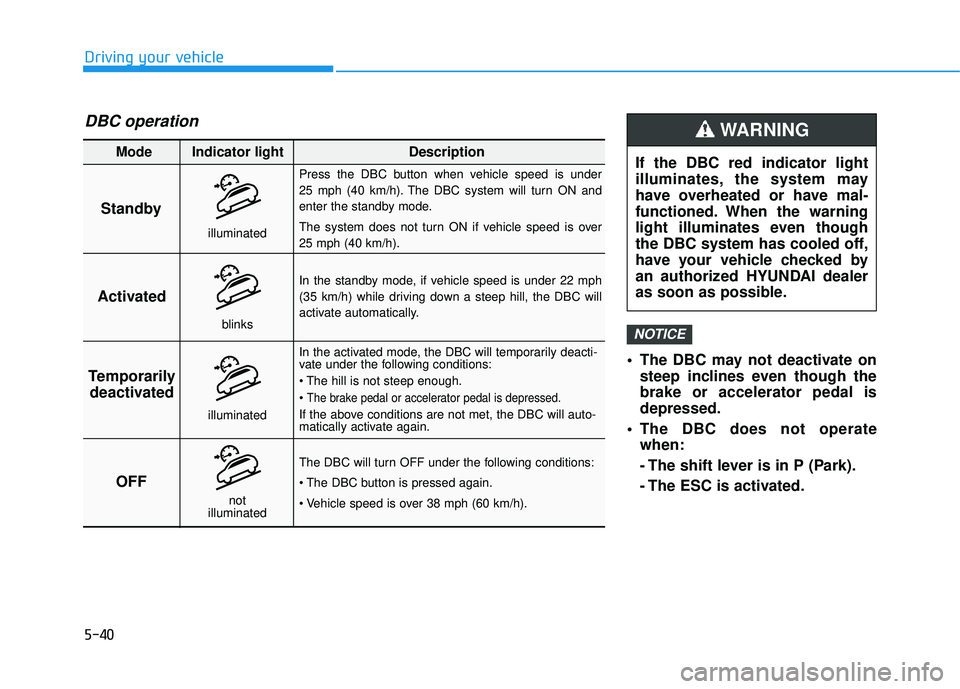
The DBC may not deactivate onsteep inclines even though the brake or accelerator pedal isdepressed.
The DBC does not operate when:
- The shift lever is in P (Park).
- The ESC is activated.
NOTICE
Driving your vehicle
Standby Press the DBC button when vehicle speed is under
25 mph (40 km/h). The DBC system will turn ON and
enter the standby mode.
The system does not turn ON if vehicle speed is over 25 mph (40 km/h).
In the standby mode, if vehicle speed is under 22 mph
(35 km/h) while driving down a steep hill, the DBC will
activate automatically.
In the activated mode, the DBC will temporarily deacti-
vate under the following conditions:
The brake pedal or accelerator pedal is depressed.
If the above conditions are not met, the DBC will auto-
matically activate again.
The DBC will turn OFF under the following conditions:
Activated
Temporarily deactivated
OFF
Mode Indicator light Description
blinks
illuminated
not
illuminated
illuminated
DBC operation
If the DBC red indicator light
illuminates, the system may
have overheated or have mal-
functioned. When the warning
light illuminates even though
the DBC system has cooled off,
have your vehicle checked by
an authorized HYUNDAI dealer
as soon as possible.
WARNING
Page 427 of 642
5-43
Driving your vehicle
AWD operation
5
If AWD warning light ( ) stays on the instrument cluster, your vehicle may have a malfunction with the
AWD system. When the AWD warning light ( ) illuminates have your vehicle checked by an authorized
HYUNDAI dealer as soon as possible.
WARNING
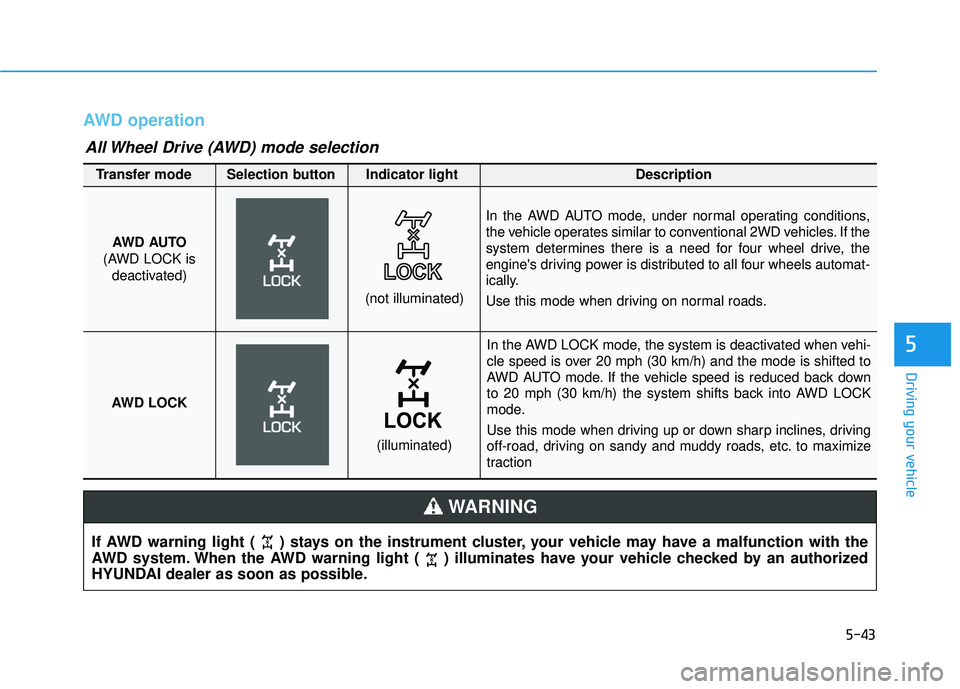
In the AWD LOCK mode, the system is deactivated when vehi-
cle speed is over 20 mph (30 km/h) and the mode is shifted to
AWD AUTO mode. If the vehicle speed is reduced back down
to 20 mph (30 km/h) the system shifts back into AWD LOCK
mode.
Use this mode when driving up or down sharp inclines, driving
off-road, driving on sandy and muddy roads, etc. to maximize
traction
AWD AUTO
(AWD LOCK is deactivated)
(not illuminated)
Transfer mode Selection button Indicator light Description
In the AWD AUTO mode, under normal operating conditions,
the vehicle operates similar to conventional 2WD vehicles. If the
system determines there is a need for four wheel drive, the
engine's driving power is distributed to all four wheels automat-
ically.
Use this mode when driving on normal roads.
AWD LOCK
(illuminated)
All Wheel Drive (AWD) mode selection
Page 433 of 642
5-49
Driving your vehicle
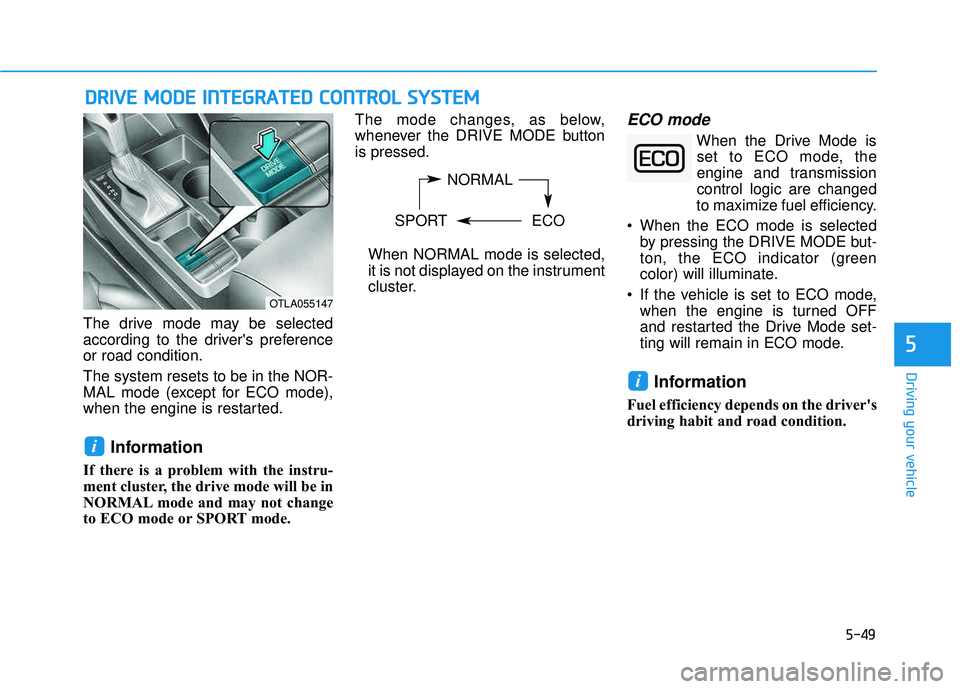
The drive mode may be selected
according to the driver's preferenceor road condition. The system resets to be in the NOR-
MAL mode (except for ECO mode),
when the engine is restarted.
Information
If there is a problem with the instru-
ment cluster, the drive mode will be in
NORMAL mode and may not change
to ECO mode or SPORT mode. The mode changes, as below,
whenever the DRIVE MODE buttonis pressed.
When NORMAL mode is selected,
it is not displayed on the instrument
cluster.
ECO mode
When the Drive Mode isset to ECO mode, the
engine and transmissioncontrol logic are changed
to maximize fuel efficiency.
When the ECO mode is selected by pressing the DRIVE MODE but-
ton, the ECO indicator (green
color) will illuminate.
If the vehicle is set to ECO mode, when the engine is turned OFF
and restarted the Drive Mode set-
ting will remain in ECO mode.
Information
Fuel efficiency depends on the driver's
driving habit and road condition.
i
i
DDRRIIVV EE MM OODDEE IINN TTEEGG RRAA TTEEDD CC OO NNTTRR OO LL SS YY SSTT EEMM
5
NORMAL
SPORT ECO
OTLA055147
Page 434 of 642
5-50
When the ECO mode is activated:
The acceleration response may beslightly reduced as the accelerator
pedal is depressed moderately.
The air conditioner performance may be limited.
The shift pattern of the automatic transmission or dual clutch trans-
mission may change.
The engine noise may get louder.
The above situations are normal conditions when the ECO mode is
activated to improve fuel efficiency. Limitation of the ECO mode oper-ation:
If the following conditions occur while
the ECO mode is operating, the sys-
tem operation is limited even thoughthere is no change in the ECO indi-
cator.
When the coolant temperature is
low: The system will be limited until
engine performance becomes nor-mal.
When driving up a hill:
The system will be limited to gain
power when driving uphill because
engine torque is restricted.
When driving the vehicle with the automatic transmission or the dual
clutch transmission gear shift lever
in manual shift mode. The system will be limited accord- ing to the shift location.SPORT mode
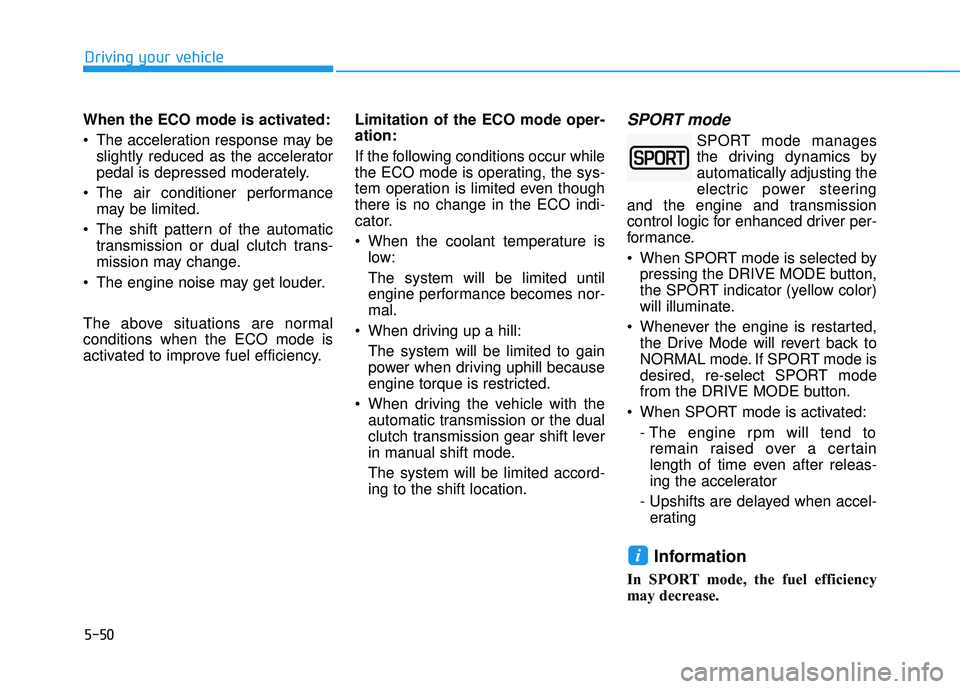
SPORT mode manages
the driving dynamics byautomatically adjusting the
electric power steering
and the engine and transmission
control logic for enhanced driver per-
formance.
When SPORT mode is selected by pressing the DRIVE MODE button,
the SPORT indicator (yellow color)
will illuminate.
Whenever the engine is restarted, the Drive Mode will revert back to
NORMAL mode. If SPORT mode is
desired, re-select SPORT mode
from the DRIVE MODE button.
When SPORT mode is activated: - The engine rpm will tend toremain raised over a certain
length of time even after releas-
ing the accelerator
- Upshifts are delayed when accel- erating
Information
In SPORT mode, the fuel efficiency
may decrease.
i
Driving your vehicle
Page 436 of 642
5-52
BSD (Blind Spot Detection) /
LCA (Lane Change Assist)
Operating conditions
To operate:
Press the BSD switch with the igni-
tion switch in the ON position.
The indicator on the BSD switch will
illuminate. When the vehicle speed
exceeds 20 mph (30 km/h), the sys-
tem will be activated.To cancel:
Press the BSD switch again. The
indicator on the switch will go off.
When the system is not used, turn the
system off by turning off the switch.
Information
If the Engine Start/Stop button is
pressed OFF and then ON again, the
BSD system returns to the previous
state.
When the system is turned on, the warning light will illuminate for 3
seconds on the outer side view mir-
ror. The system will activate when:
1. The system is on.
2. The vehicle speed is above about
20 mph (30 km/h).
3. An oncoming vehicle is detected in the blind spot area.
i
Driving your vehicle
OTL055028
Page 456 of 642
5-72
Driving your vehicle
LDWS Operation
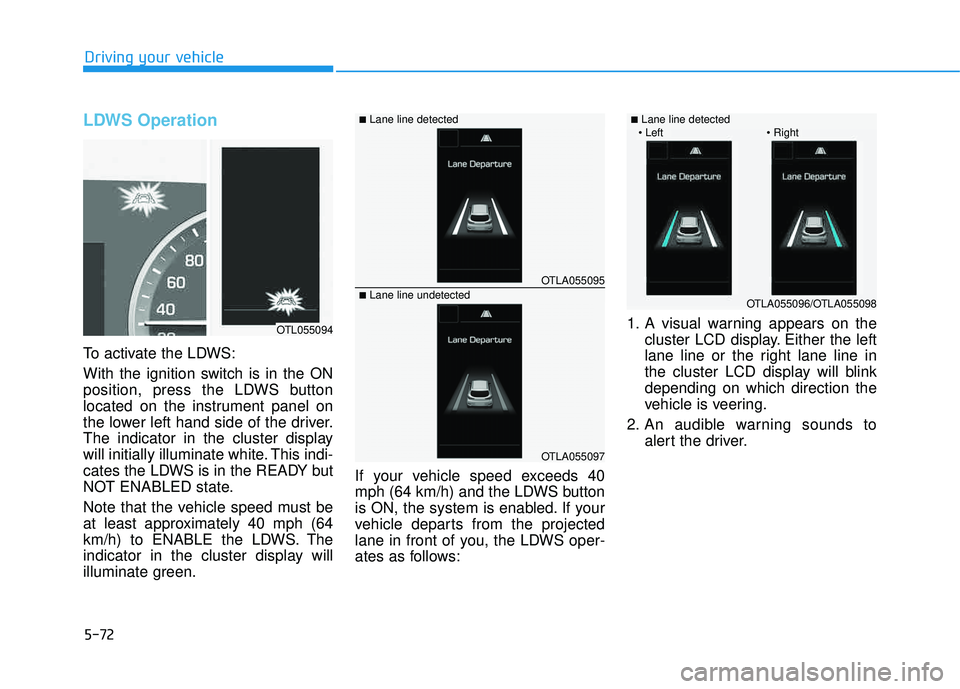
To activate the LDWS:
With the ignition switch is in the ON
position, press the LDWS button
located on the instrument panel on
the lower left hand side of the driver.
The indicator in the cluster display
will initially illuminate white. This indi-
cates the LDWS is in the READY but
NOT ENABLED state.
Note that the vehicle speed must be
at least approximately 40 mph (64
km/h) to ENABLE the LDWS. The
indicator in the cluster display will
illuminate green.If your vehicle speed exceeds 40
mph (64 km/h) and the LDWS button
is ON, the system is enabled. If your
vehicle departs from the projected
lane in front of you, the LDWS oper-
ates as follows:1. A visual warning appears on the
cluster LCD display. Either the left
lane line or the right lane line in
the cluster LCD display will blinkdepending on which direction the
vehicle is veering.
2. An audible warning sounds to alert the driver.
OTLA055095
OTLA055097
■Lane line detected
■Lane line undetected
OTL055094
OTLA055096/OTLA055098
■Lane line detected