2016 Hyundai Sonata brake light
[x] Cancel search: brake lightPage 16 of 504
1-5
Your vehicle at a glance
1
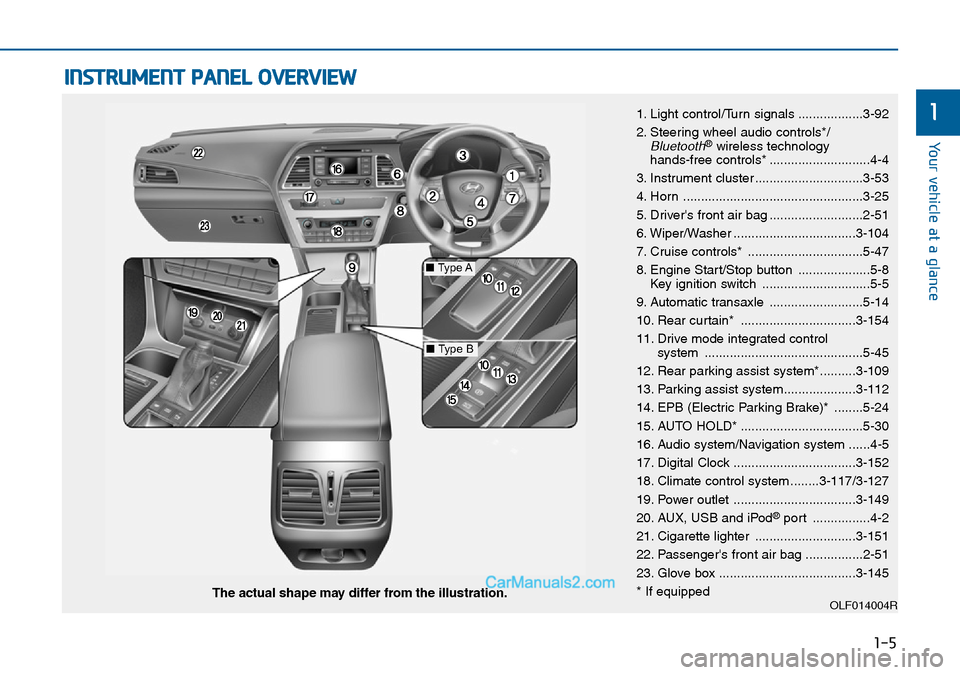
INSTRUMENT PANEL OVERVIEW
1. Light control/Turn signals ..................3-92
2. Steering wheel audio controls*/
Bluetooth®wireless technology
hands-free controls* ............................4-4
3. Instrument cluster ..............................3-53
4. Horn ..................................................3-25
5. Driver's front air bag ..........................2-51
6. Wiper/Washer ..................................3-104
7. Cruise controls* ................................5-47
8. Engine Start/Stop button ....................5-8
Key ignition switch ..............................5-5
9. Automatic transaxle ..........................5-14
10. Rear curtain* ................................3-154
11. Drive mode integrated control
system ............................................5-45
12. Rear parking assist system*..........3-109
13. Parking assist system....................3-112
14. EPB (Electric Parking Brake)* ........5-24
15. AUTO HOLD* ..................................5-30
16. Audio system/Navigation system ......4-5
17. Digital Clock ..................................3-152
18. Climate control system ........3-117/3-127
19. Power outlet ..................................3-149
20. AUX, USB and iPod
®port ................4-2
21. Cigarette lighter ............................3-151
22. Passenger's front air bag ................2-51
23. Glove box ......................................3-145
* If equipped
OLF014004RThe actual shape may differ from the illustration.
■Type A
■Type B
Page 126 of 504
3-42
Convenient features of your vehicle
Bonnet
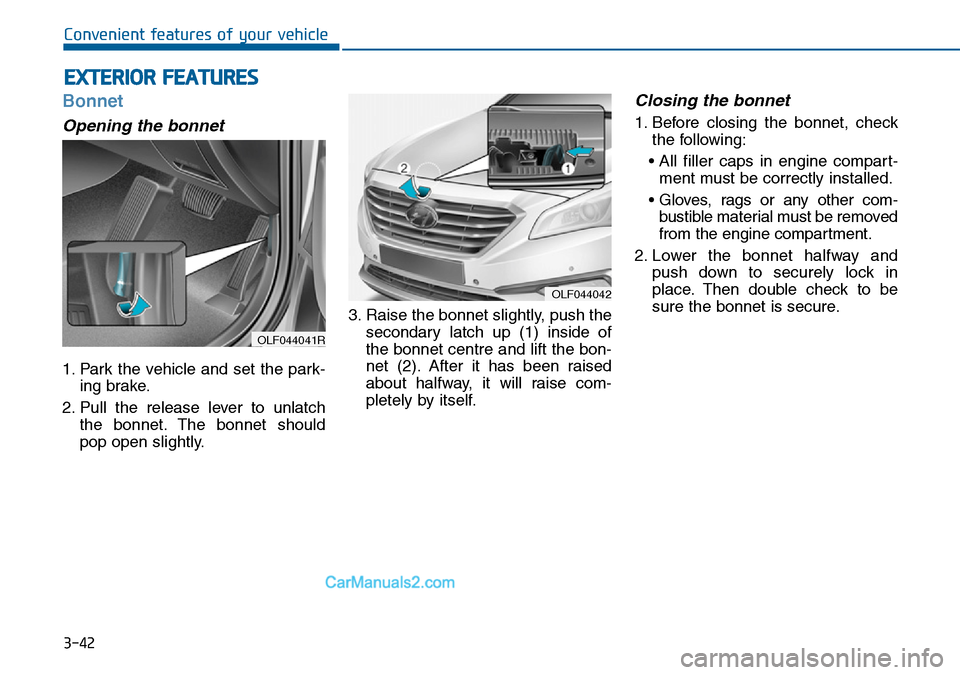
Opening the bonnet
1. Park the vehicle and set the park-
ing brake.
2. Pull the release lever to unlatch
the bonnet. The bonnet should
pop open slightly.3. Raise the bonnet slightly, push the
secondary latch up (1) inside of
the bonnet centre and lift the bon-
net (2). After it has been raised
about halfway, it will raise com-
pletely by itself.
Closing the bonnet
1. Before closing the bonnet, check
the following:
• All filler caps in engine compart-
ment must be correctly installed.
• Gloves, rags or any other com-
bustible material must be removed
from the engine compartment.
2. Lower the bonnet halfway and
push down to securely lock in
place. Then double check to be
sure the bonnet is secure.
EXTERIOR FEATURES
OLF044042
OLF044041R
Page 135 of 504
3-51
Convenient features of your vehicle
3
(Continued)
•When refuelling, always move
the shift lever to the P (Park)
position (for automatic
transaxle) or first gear or R
(Reverse, for manual
transaxle), set the parking
brake, and place the ignition
switch to the LOCK/OFF posi-
tion. Sparks produced by
electrical components related
to the engine can ignite fuel
vapours causing a fire.
•When using an approved
portable fuel container, be sure
to place the container on the
ground prior to refuelling. Static
electricity discharge from the
container can ignite fuel
vapours causing a fire. Once
refuelling has begun, contact
between your bare hand and
the vehicle should be main-
tained until the filling is com-
plete.
(Continued)
(Continued)
•If pressurized fuel sprays out,
it can cover your clothes or
skin and thus subject you to
the risk of fire and burns.
Always remove the fuel cap
carefully and slowly. If the cap
is venting fuel or if you hear a
hissing sound, wait until the
condition stops before com-
pletely removing the cap.
•Always check that the fuel cap
is installed securely to pre-
vent fuel spillage in the event
of an accident.
(Continued)
•Use only approved portable
plastic fuel containers designed
to carry and store petrol.
•Do not use matches or a
lighter and do not smoke or
leave a lit cigarette in your
vehicle whilst at a gas station,
especially during refuelling.
•Do not over-fill or top-off your
vehicle tank, which can cause
petrol spillage.
•If a fire breaks out during refu-
elling, leave the vicinity of the
vehicle, and immediately con-
tact the manager of the gas
station and then contact the
local fire department. Follow
any safety instructions they
provide.
(Continued)
Page 156 of 504
3-72
Convenient features of your vehicle
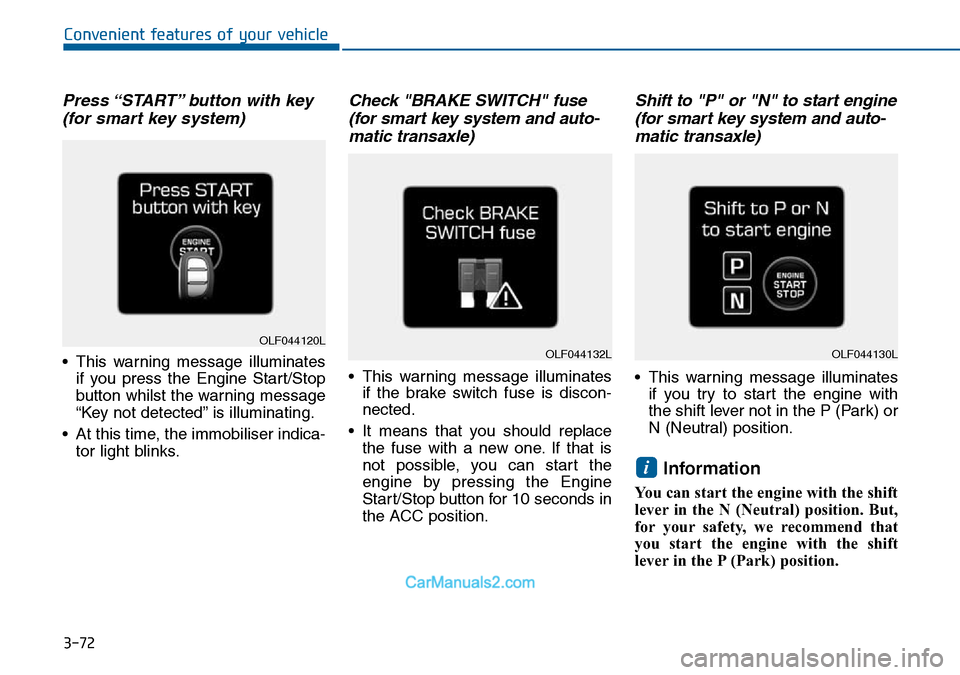
Press “START” button with key
(for smart key system)
• This warning message illuminates
if you press the Engine Start/Stop
button whilst the warning message
“Key not detected” is illuminating.
• At this time, the immobiliser indica-
tor light blinks.
Check "BRAKE SWITCH" fuse
(for smart key system and auto-
matic transaxle)
• This warning message illuminates
if the brake switch fuse is discon-
nected.
• It means that you should replace
the fuse with a new one. If that is
not possible, you can start the
engine by pressing the Engine
Start/Stop button for 10 seconds in
the ACC position.
Shift to "P" or "N" to start engine
(for smart key system and auto-
matic transaxle)
• This warning message illuminates
if you try to start the engine with
the shift lever not in the P (Park) or
N (Neutral) position.
Information
You can start the engine with the shift
lever in the N (Neutral) position. But,
for your safety, we recommend that
you start the engine with the shift
lever in the P (Park) position.
i
OLF044120LOLF044132LOLF044130L
Page 166 of 504
3-82
Convenient features of your vehicle
Parking Brake & Brake
Fluid Warning Light
This warning light illuminates:
• Once you set the ignition switch or
the Engine Start/Stop button to the
ON position.
- It illuminates for approximately 3
seconds
- It remains on if the parking brake
is applied.
• When the parking brake is applied.
• When the brake fluid level in the
reservoir is low.
- If the warning light illuminates
with the parking brake released, it
indicates the brake fluid level in
reservoir is low.
If the brake fluid level in the reser-
voir is low:
1. Drive carefully to the nearest safe
location and stop your vehicle.
2. With the engine stopped, check the
brake fluid level immediately and
add fluid as required (For more
details, refer to “Brake Fluid” in
chapter 7). Then check all brake
components for fluid leaks. If any
leak in the brake system is still
found, the warning light remains
on, or the brakes do not operate
properly, do not drive the vehicle.
In this case, we recommend that
you have the vehicle towed to an
authorised HYUNDAI dealer and
inspected.
Dual-diagonal braking system
Your vehicle is equipped with dual-
diagonal braking systems. This
means you still have braking on two
wheels even if one of the dual sys-
tems should fail.
With only one of the dual systems
working, more than normal pedal
travel and greater pedal pressure are
required to stop the vehicle.
Also, the vehicle will not stop in as
short a distance with only a portion
of the brake system working.
If the brakes fail whilst you are driv-
ing, shift to a lower gear for addition-
al engine braking and stop the vehi-
cle as soon as it is safe to do so.
Page 167 of 504
3-83
Convenient features of your vehicle
3
Anti-lock Brake System
(ABS) Warning Light
This warning light illuminates:
• Once you set the ignition switch or
the Engine Start/Stop button to the
ON position.
- It illuminates for approximately 3
seconds and then goes off.
• When there is a malfunction with
the ABS (The normal braking sys-
tem will still be operational without
the assistance of the anti-lock
brake system).
In this case, we recommend that
you have the vehicle inspected by
an authorised HYUNDAI dealer.
Electronic Brake force
Distribution (EBD)
System Warning Light
These two warning lights illuminate
at the same time whilst driving:
• When the ABS and regular brake
system may not be working nor-
mally.
In this case, we recommend that
you have the vehicle inspected by
an authorised HYUNDAI dealer.
Parking Brake & Brake Fluid
Warning Light
Driving the vehicle with a warn-
ing light ON is dangerous. If the
Parking Brake & Brake Fluid
Warning Light illuminates with
the parking brake released, it
indicates that the brake fluid
level is low.
In this case, we recommend
that you have the vehicle
inspected by an authorised
HYUNDAI dealer.
WARNING
Page 168 of 504
3-84
Convenient features of your vehicle
Information - Electronic
Brake force Distribution (EBD)
System Warning Light
When the ABS Warning Light is on or
both ABS and Parking Brake & Brake
Fluid Warning Lights are on, the
speedometer, odometer, or tripmeter
may not work. Also, the EPS Warning
Light may illuminate and the steering
effort may increase or decrease.
In this case, we recommend you have
the vehicle inspected by an authorised
HYUNDAI dealer as soon as possible.Electric Parking Brake
(EPB) Warning Light
(if equipped)
This warning light illuminates:
• Once you set the ignition switch or
the Engine Start/Stop button to the
ON position.
- It illuminates for approximately 3
seconds and then goes off.
• When there is a malfunction with
the EPB.
In this case, we recommend that
you have the vehicle inspected by
an authorised HYUNDAI dealer.
Information - Electric Parking
Brake (EPB) Warning Light
The Electric Parking Brake (EPB)
Warning Light may illuminate when
the Electronic Stability control (ESC)
Indicator Light comes on to indicate
that the ESC is not working properly
(This does not indicate malfunction of
the EPB).i
i
Electronic Brake force
Distribution (EBD) System
Warning Light
When both ABS and Parking
Brake & Brake Fluid Warning
Lights are on, the brake system
will not work normally and you
may experience an unexpected
and dangerous situation during
sudden braking.
In this case, avoid high speed
driving and abrupt braking.
We recommend you have the
vehicle inspected by an autho-
rised HYUNDAI dealer as soon
as possible.
WARNINGEPB
Page 175 of 504
![Hyundai Sonata 2016 Owners Manual - RHD (UK, Australia) 3-91
Convenient features of your vehicle
3
AUTO HOLD Indicator
Light (if equipped)
This indicator light illuminates:
• [White] When you activate the auto
hold system by pressing the AUTO
HOLD button](/manual-img/35/16787/w960_16787-174.png "Hyundai Sonata 2016 Owners Manual - RHD (UK, Australia) 3-91
Convenient features of your vehicle
3
AUTO HOLD Indicator
Light (if equipped)
This indicator light illuminates:
• [White] When you activate the auto
hold system by pressing the AUTO
HOLD button")
3-91
Convenient features of your vehicle
3
AUTO HOLD Indicator
Light (if equipped)
This indicator light illuminates:
• [White] When you activate the auto
hold system by pressing the AUTO
HOLD button.
• [Green] When you stop the vehicle
completely by depressing the
brake pedal with the auto hold sys-
tem activated.
• [Yellow] When there is a malfunc-
tion with the auto hold system.
In this case, we recommend that
you have the vehicle inspected by
an authorised HYUNDAI dealer.
For more details, refer to “Auto
Hold” in chapter 5.
SPORT Mode Indicator
Light (if equipped)
This indicator light illuminates
• When you select "SPORT" mode
as drive mode.
For more details, refer to "Drive
Mode Integrated Control System"
in chapter 5.
ECO Mode Indicator
Light (if equipped)
This indicator light illuminates:
• When you select “ECO” mode as
drive mode.
For more details, refer to “Drive
Mode Integrated Control System”
in chapter 5.
AUTO
HOLDSPORTECO
Do not watch the ECO indicator
light whilst driving. This will dis-
tract you and may cause an
accident that results in severe
personal injury.
WARNING