Page 186 of 708
3-91
Convenient features of your vehicle
3
Information mode
This mode displays the service inter-
val (mileage and days).
For the setting of the service inter-
val, refer to "User Settings Mode"
of the LCD display.
Warning Message
If one of followings occurs, warning
messages will be displayed in the infor-
mation mode for about 10 seconds.
- Malfunction of the Forward CollisionWarning System (FCWS)
- Malfunction of the Smart Cruise Control (SCC)
- Malfunction of the Lane Departure Warning System (LDWS)
- Malfunction of the Blind Spot Detection (BSD)
- Low washer fluid Service Interval
Service in
It calculates and displays the mainte-
nance schedule (mileage or days),
as set in the system.
When the set mileages or days
passed, "Service in" message is dis-
played for several seconds each time
the Engine Start/Stop button is
turned ON.
OLFH045179N/OLFH045180N
■
Type A ■Type B
Page 193 of 708
3-98
Convenient features of your vehicle
Trip computer
The trip computer is a driving infor-
mation system controlled by a micro-
computer. This displays driving-relat-
ed information.
Information
Some driving information, stored in
the trip computer (i.e. average vehicle
speed) is reset when the battery is dis-
connected
One time driving informationmode
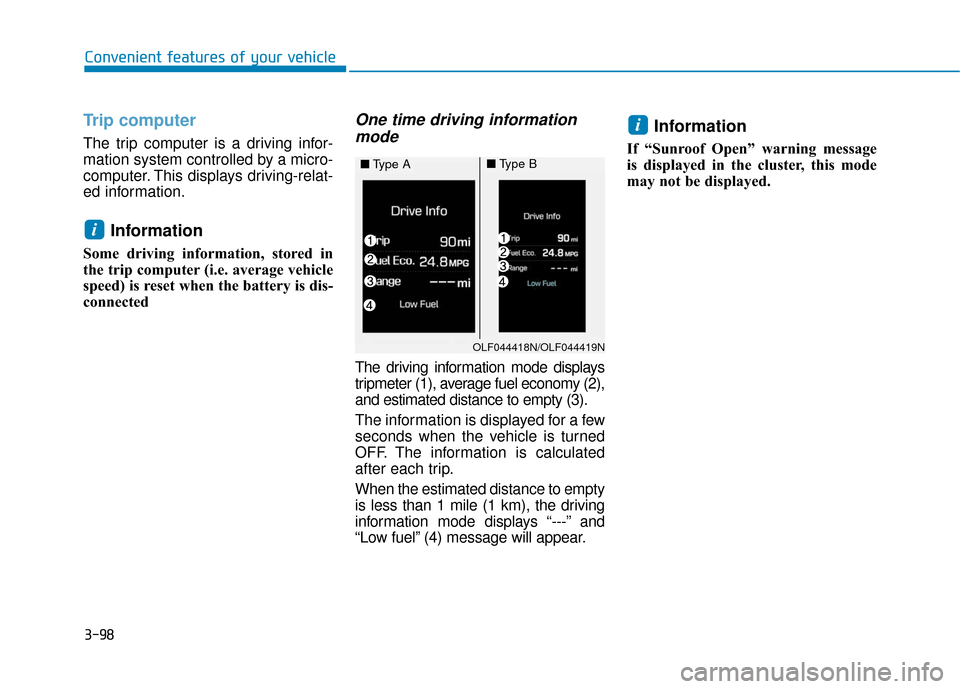
The driving information mode displays
tripmeter (1), average fuel economy (2),
and estimated distance to empty (3).
The information is displayed for a few
seconds when the vehicle is turned
OFF. The information is calculated
after each trip.
When the estimated distance to empty
is less than 1 mile (1 km), the driving
information mode displays “---” and
“Low fuel” (4) message will appear.
Information
If “Sunroof Open” warning message
is displayed in the cluster, this mode
may not be displayed.
i
i
OLF044418N/OLF044419N
■ Type A■Type B
Page 194 of 708
3-99
Convenient features of your vehicle
3
Trip modesTrip A/B
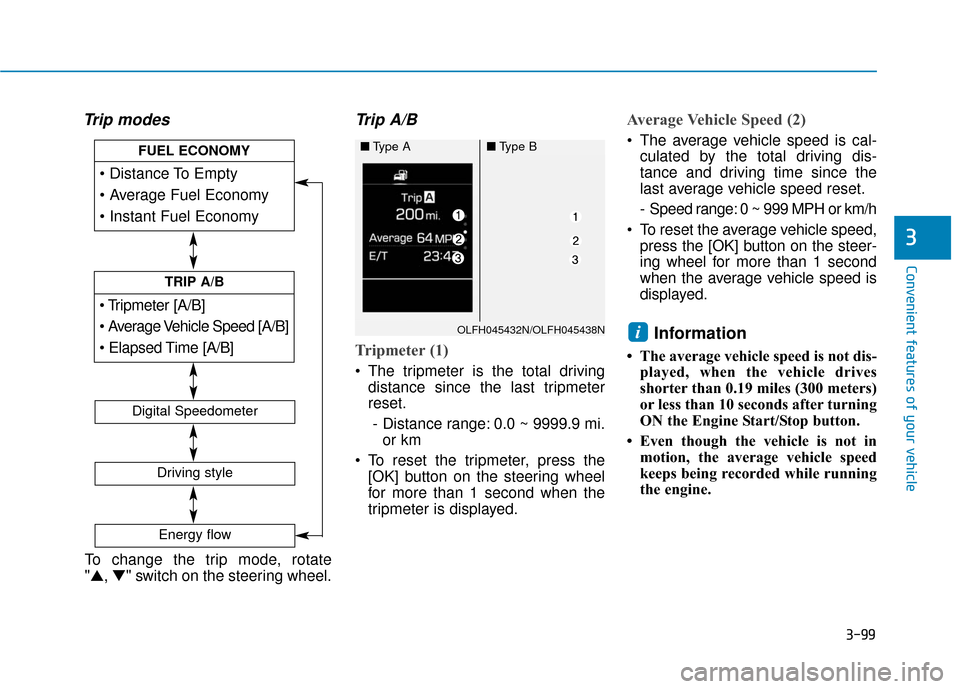
Tripmeter (1)
The tripmeter is the total driving
distance since the last tripmeter
reset.
- Distance range: 0.0 ~ 9999.9 mi. or km
To reset the tripmeter, press the [OK] button on the steering wheel
for more than 1 second when the
tripmeter is displayed.
Average Vehicle Speed (2)
The average vehicle speed is cal-culated by the total driving dis-
tance and driving time since the
last average vehicle speed reset.
- Speed range: 0 ~ 999 MPH or km/h
To reset the average vehicle speed, press the [OK] button on the steer-
ing wheel for more than 1 second
when the average vehicle speed is
displayed.
Information
• The average vehicle speed is not dis- played, when the vehicle drives
shorter than 0.19 miles (300 meters)
or less than 10 seconds after turning
ON the Engine Start/Stop button.
• Even though the vehicle is not in motion, the average vehicle speed
keeps being recorded while running
the engine.
i
[A/B]
TRIP A/B
FUEL ECONOMY
Digital Speedometer
Driving style
Energy flow
OLFH045432N/OLFH045438N
■Type A■Type B
To change the trip mode, rotate
"▲, ▼" switch on the steering wheel.
Page 196 of 708
3-101
Convenient features of your vehicle
3
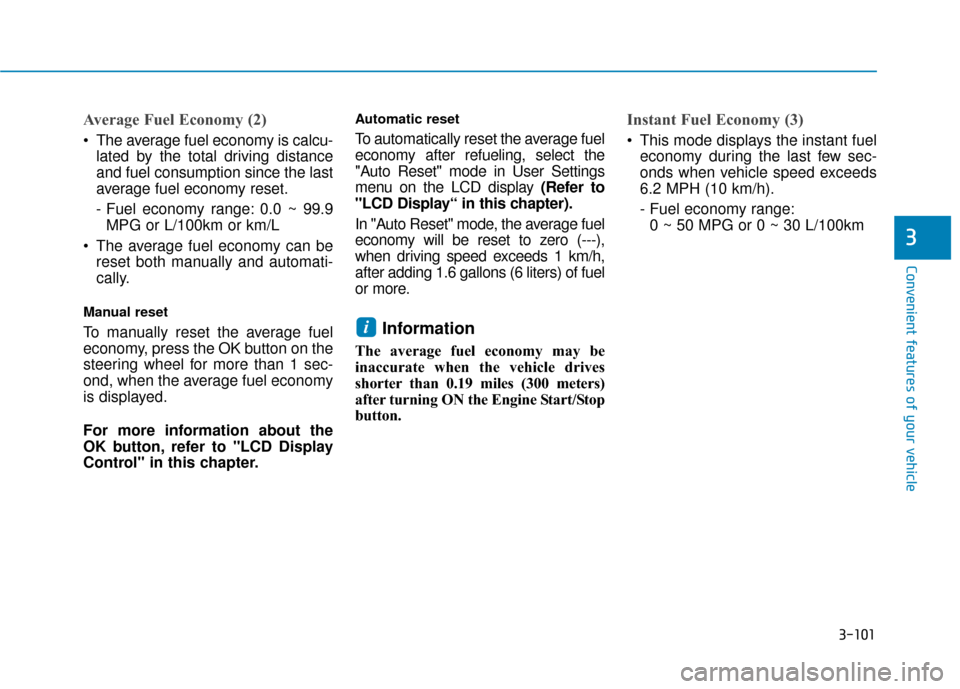
Average Fuel Economy (2)
The average fuel economy is calcu-lated by the total driving distance
and fuel consumption since the last
average fuel economy reset.
- Fuel economy range: 0.0 ~ 99.9MPG or L/100km or km/L
The average fuel economy can be reset both manually and automati-
cally.
Manual reset
To manually reset the average fuel
economy, press the OK button on the
steering wheel for more than 1 sec-
ond, when the average fuel economy
is displayed.
For more information about the
OK button, refer to "LCD Display
Control" in this chapter.
Automatic reset
To automatically reset the average fuel
economy after refueling, select the
"Auto Reset" mode in User Settings
menu on the LCD display (Refer to
"LCD Display“ in this chapter).
In "Auto Reset" mode, the average fuel
economy will be reset to zero (---),
when driving speed exceeds 1 km/h,
after adding 1.6 gallons (6 liters) of fuel
or more.
Information
The average fuel economy may be
inaccurate when the vehicle drives
shorter than 0.19 miles (300 meters)
after turning ON the Engine Start/Stop
button.
Instant Fuel Economy (3)
This mode displays the instant fueleconomy during the last few sec-
onds when vehicle speed exceeds
6.2 MPH (10 km/h).
- Fuel economy range:0 ~ 50 MPG or 0 ~ 30 L/100km
i
Page 197 of 708
3-102
Convenient features of your vehicle
Digital Speedometer
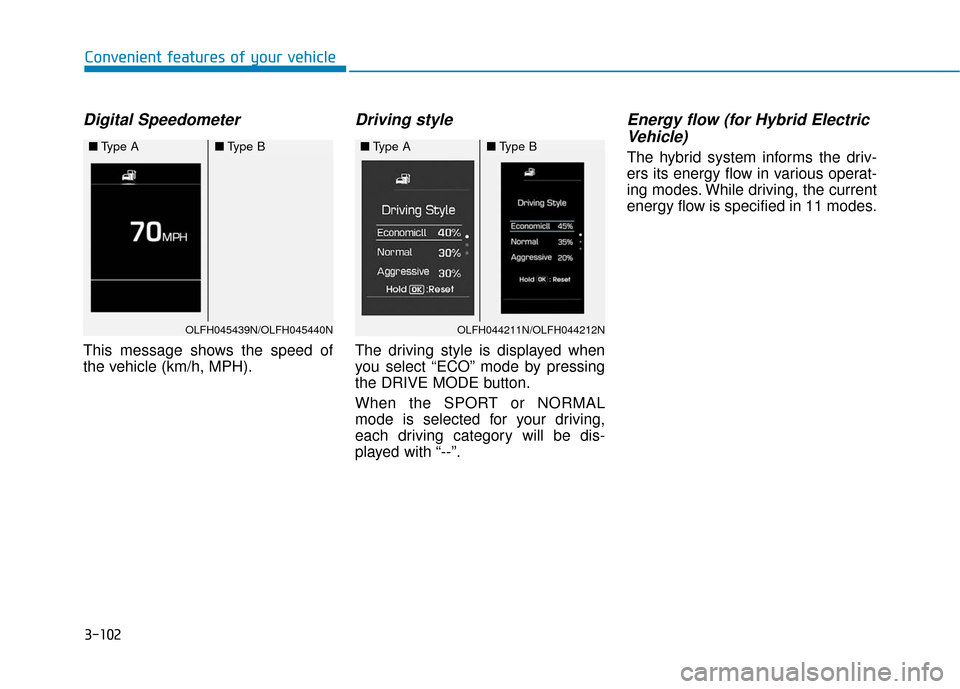
This message shows the speed of
the vehicle (km/h, MPH).
Driving style
The driving style is displayed when
you select “ECO” mode by pressing
the DRIVE MODE button.
When the SPORT or NORMAL
mode is selected for your driving,
each driving category will be dis-
played with “--”.
Energy flow (for Hybrid ElectricVehicle)
The hybrid system informs the driv-
ers its energy flow in various operat-
ing modes. While driving, the current
energy flow is specified in 11 modes.
OLFH045439N/OLFH045440N
■ Type A■Type B
OLFH044211N/OLFH044212N
■Type A■Type B
Page 208 of 708
3-113
Convenient features of your vehicle
3
Battery saver function
The purpose of this feature is to pre-
vent the battery from being dis-
charged. The system automatically
turns off the parking lamp when the
driver turns the engine off and opens
the driver-side door.
With this feature, the parking lamps
will turn off automatically if the driver
parks on the side of road at night.
If necessary, to keep the lamps on
when the engine is turned off, perform
the following:
1) Open the driver-side door.
2) Turn the parking lamps OFF andON again using the light switch on
the steering column.
Headlamp delay function (if equipped)
If engine Start/Stop button is in the
ACC or OFF position with the head-
lamps ON, the headlamps (and/or
parking lamps) remain on for about 5
minutes. However, if the driver’s door
is opened and closed, the headlamps
are turned off after 15 seconds.
However, with the engine off if the dri-
ver’s door is opened and closed, the
headlamps (and/or parking lamps)
are turned off after 15 seconds.
The headlamps (and/or parking
lamps) can be turned off by pressing
the lock button on the smart key
twice or turning the light switch to the
OFF or AUTO position. However, if
you turn the light switch to the AUTO
position when it is dark outside, the
headlamps will not be turned off.
You can activate or deactivate the
Headlamp Delay function from the
User Settings Mode (Light) on the
LCD display.
For more information, refer to the
"LCD Display" section in this
chapter. If the driver gets out of the vehicle
through other doors (except dri-
ver’s door), the battery saver func-
tion does not operate and the
headlamp delay function does not
turn off automatically. Therefore, It
causes the battery to be dis-
charged. In this case, make sure
to turn off the lamp before getting
out of the vehicle.
NOTICE
Page 210 of 708
3-115
Convenient features of your vehicle
3
Welcome System (if equipped)
Welcome light
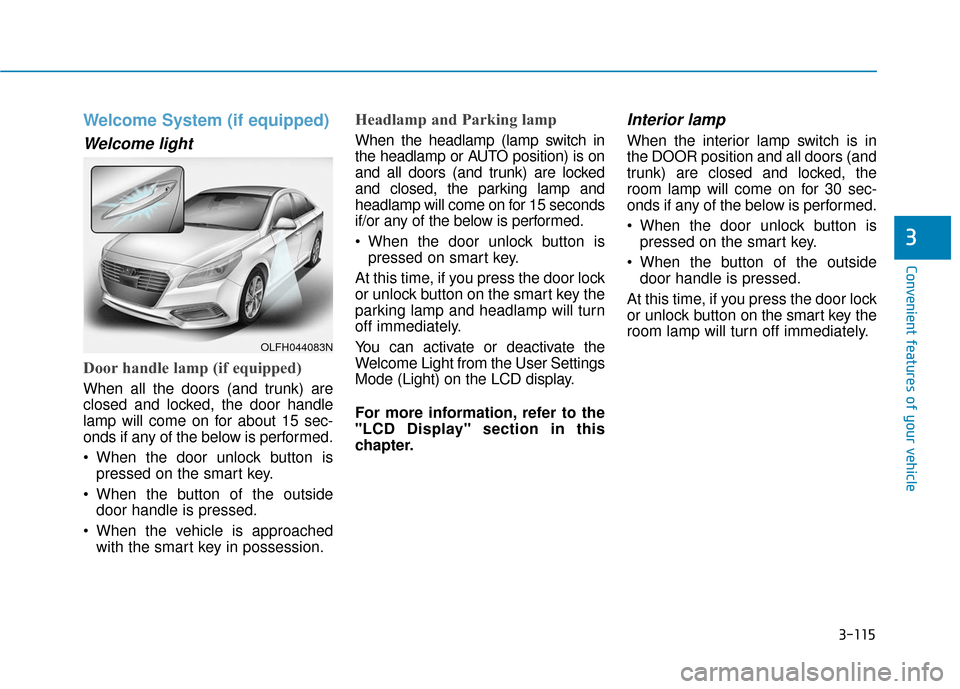
Door handle lamp (if equipped)
When all the doors (and trunk) are
closed and locked, the door handle
lamp will come on for about 15 sec-
onds if any of the below is performed.
When the door unlock button ispressed on the smart key.
When the button of the outside door handle is pressed.
When the vehicle is approached with the smart key in possession.
Headlamp and Parking lamp
When the headlamp (lamp switch in
the headlamp or AUTO position) is on
and all doors (and trunk) are locked
and closed, the parking lamp and
headlamp will come on for 15 seconds
if/or any of the below is performed.
When the door unlock button ispressed on smart key.
At this time, if you press the door lock
or unlock button on the smart key the
parking lamp and headlamp will turn
off immediately.
You can activate or deactivate the
Welcome Light from the User Settings
Mode (Light) on the LCD display.
For more information, refer to the
"LCD Display" section in this
chapter.
Interior lamp
When the interior lamp switch is in
the DOOR position and all doors (and
trunk) are closed and locked, the
room lamp will come on for 30 sec-
onds if any of the below is performed.
When the door unlock button is pressed on the smart key.
When the button of the outside door handle is pressed.
At this time, if you press the door lock
or unlock button on the smart key the
room lamp will turn off immediately.
OLFH044083N
Page 222 of 708
3-127
Convenient features of your vehicle
3
A
AU
U T
TO
O M
M A
AT
TI
IC
C
C
C L
LI
IM
M A
AT
TE
E
C
C O
O N
NT
TR
R O
O L
L
S
S Y
Y S
ST
T E
EM
M
OLFH044531K
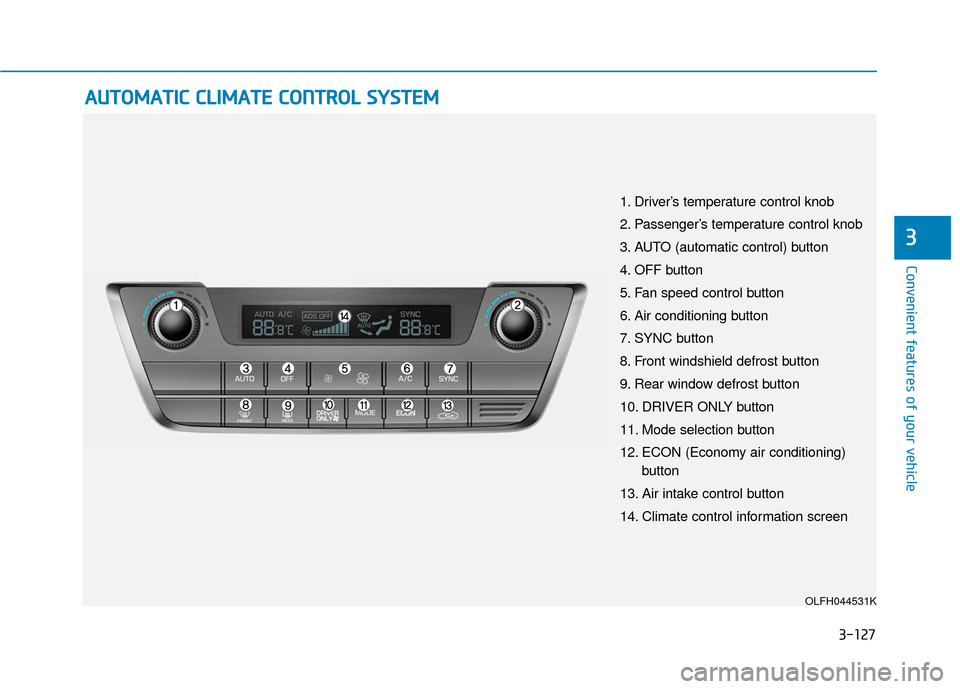
1. Driver’s temperature control knob
2. Passenger’s temperature control knob
3. AUTO (automatic control) button
4. OFF button
5. Fan speed control button
6. Air conditioning button
7. SYNC button
8. Front windshield defrost button
9. Rear window defrost button
10. DRIVER ONLY button
11. Mode selection button
12. ECON (Economy air conditioning)
button
13. Air intake control button
14. Climate control information screen