Page 240 of 308
28
Bluetooth Audio Mode
i Information
Artist info and Title may not be supported by mobile phone
Bluetooth Audio
Features Description
Mode
Displays current operating mode
Phone Name Displays name of connected phone
Artist InfoName of current artist
TitleName of current song
Previous
File
!Ÿ
If play time is less than 3 seconds, moves to the previous file
!Ÿ
If play time is over than 3 seconds, plays the current file from
the beginning
This function may differ depending on the model of mobile-
phone
Play/Pause Plays/Pauses Bluetooth Audio
Next FileMoves to the next file
ConnectionsMoves to the Bluetooth Settings screen. You can pair a new
device or change/delete paired device(s)
SoundHound
Runs the SoundHound feature.
For more detailed feature, please refer to SoundHound section in Info part.
SEEK/TRACK
Plays the previous/next file
TUNE �TUNE is not supported.
)@-'��.:@(���<64"@/>�23(�JOEE����� .:@(���<64"@/>�23(�JOEE����� ������������� ß
y��������� ������������
Page 243 of 308

31
Bluetooth
Bluetooth Connection
Pairing a New Device
Before you can use the Bluetooth
feature, you must first pair/connect
your mobile phone to your car.
Up to 5 Bluetooth devices can be
paired.
Only one Bluetooth device can be
connected at a time.
Pairing a New Device by Selecting
Phone/Call
Select PHONE key in the head unit
or
key in the steering wheel
remote control. ▶
Select
Yes. ▶
Pair your car after your mobile phone
detects the Bluetooth device. ▶
Enter the passkey or accept the
authorization popup. ▶
Connect
Bluetooth.
Pairing a New Device Through the
Phone Settings
Select SETUP key in the head
unit. ▶
Select
Phone. ▶
Select
Bluetooth Connection. ▶
Select Add New.
▶ Pair your car after your mobile
phone detects the Bluetooth device.
▶ Enter the passkey or accept the
authorization popup. ▶
Connect
Bluetooth.
The default passkey is 0000.
The device name above is an exam-
ple. Check the actual information on
the product.
Connecting Bluetooth
Devices
Connects the Bluetooth devices that
you add.
Connecting Devices by Selecting
Phone/Call
Select PHONE key in the head unit
or
key in the steering wheel
remote control. ▶
Select the name
of the device to connect. ▶
Connect
Bluetooth.
)@-'��.:@(���<64"@/>�23(�JOEE����� .:@(���<64"@/>�23(�JOEE����� ������������� ß
y��������� ������������
Page 244 of 308

32
Connecting Devices Through the
Phone Settings
Select SETUP key in the head
unit. ▶
Select
Phone.▶
Select
Bluetooth Connection.▶
Select the
name of the device to connect. ▶
Connect Bluetooth.
Dial
Dials a call after the Bluetooth
devices are connected.
!Ÿ
Select
PHONE key in the head
unit or
key in the steering
wheel remote control. Select
All Menus from the full screen dis-
play ▶
Phone.
Information
Some types of mobile phones may not
support the Speed Dial function.
Bluetooth
Name Description
Keypad Use the keypad to
enter the phone num-
ber that you want to
call. Press and hold
the last number of
a speed dial to dial
a number that you
added to the Speed
Dial list in the phone
Delete
Delete the numbers
that you entered.
SettingsMoves to a screen of
Phone Settings.
CallMakes a call after
you dial a number
and select CALL. If
the number is listed
in Dialed Calls, you
can select the number
and press CALL to
automatically dial that
number again.
)@-'��.:@(���<64"@/>�23(�JOEE�����
.:@(���<64"@/>�23(�JOEE����� ������������� ß
y��������� ������������
Page 246 of 308
34
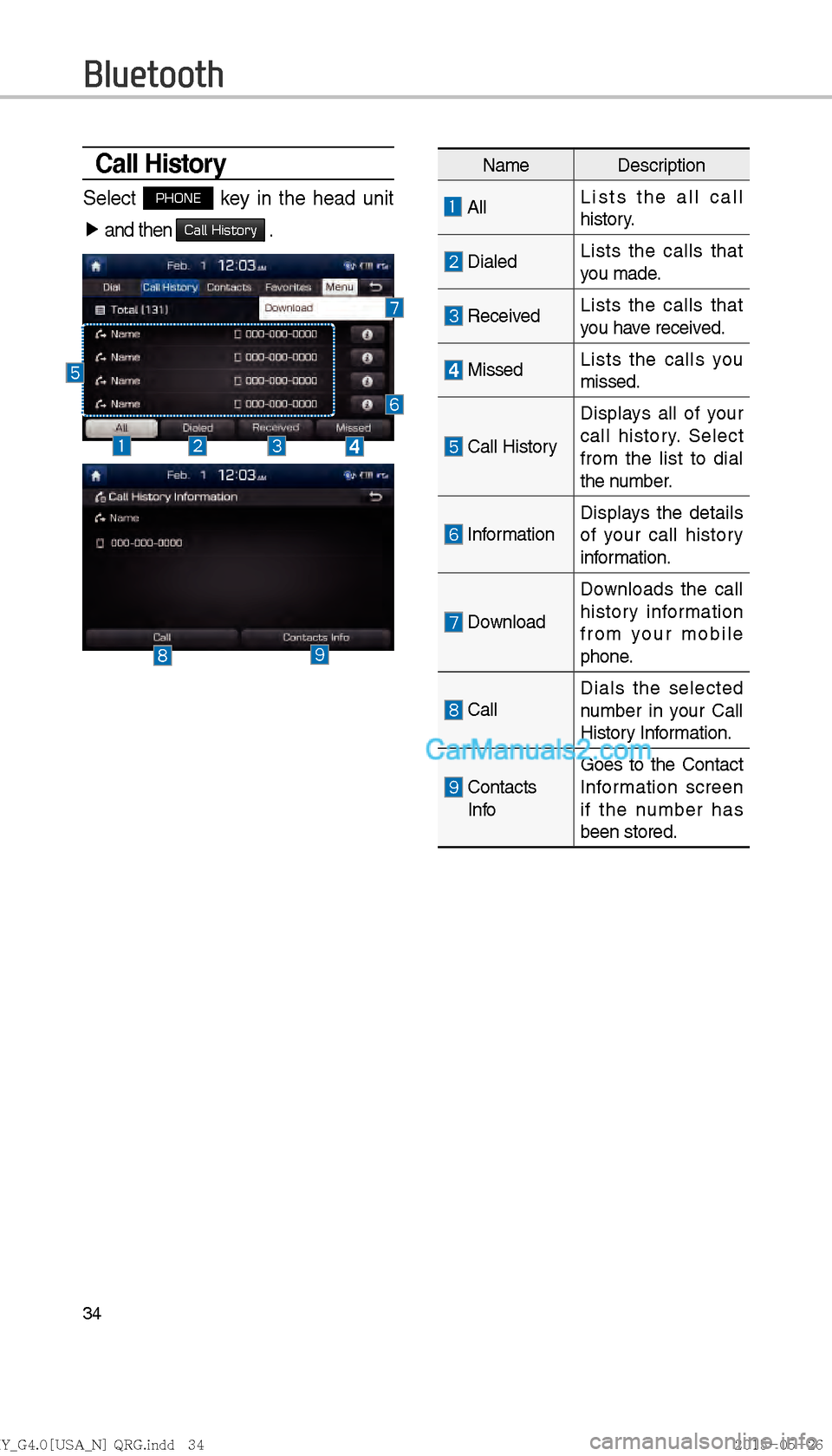
Call History
Select PHONE key in the head unit
▶ and then
Call History .
Bluetooth
Name Description
All Lists the all call
history.
DialedLists the calls that
you made.
Received Lists the calls that
you have received.
Missed
Lists the calls you
missed.
Call HistoryDisplays all of your
call history. Select
from the list to dial
the number.
Information
Displays the details
of your call history
information.
DownloadDownloads the call
history information
from your mobile
phone.
Call
Dials the selected
number in your Call
History Information.
Contacts
Info Goes to the Contact
Information screen
if the number has
been stored.
)@-'��.:@(���<64"@/>�23(�JOEE�����
.:@(���<64"@/>�23(�JOEE����� ������������� ß
y��������� ������������
Page 252 of 308

40
Voice Commands
Types of Commands
Voice recognition commands are classified as “Global Commands” and “Local
Commands.”
1. Global Commands ("J
): Commands that can be used immediately after acti-
vating voice recognition.
2. Local Commands (
!¹): Commands that can be used when a multimedia,
navigation, or Bluetooth call is running, or displayed on the screen, after
activating voice recognition.
Call Commands
* Check the following before using call commands :
1. Voice commands related to phone calls can be used after connecting a
Bluetooth device.
2. T
o call a person, for example “Call ” whose name is listed in
Contacts, you must first download the Contacts list. For details on down-
loading contacts, see “Part 3. Using Bluetooth > Chapter 3. Bluetooth Phone
> 3.10 Contacts”.
3. After downloading the Bluetooth contacts, it will take some time to convert the Contacts into voice data during which time you cannot make a call by
name yet. The time it takes to convert voice data may vary depending on
the number of Contacts do
wnloaded on the phone.
Voice Recognition
)@-'��.:@(���<64"@/>�23(�JOEE����� .:@(���<64"@/>�23(�JOEE����� ������������� ß
y��������� ������������
Page 257 of 308

45
Media Commands
* Check the following before you use media commands.
1.
If no media is connected or if no playable files exist at the time when you use these
commands, a voice message will tell you that this is not available.
2. If you say the name of the media that is currently playing again, then that media will continue playing.
e.g.) Saying “USB” while USB content is playing.
Command Operation
"J Music Continues the last media you played.
"J iPod Plays the iPod currently connected. This will work the
same when an iPhone is connected. If a USB is con-
nected, then it will be played instead of the iPod.
"J USB Plays the music on the USB currently connected.
If an iPod is connected, then the iPod will be played
instead of the USB.
"J Bluetooth Audio Plays the music on the Bluetooth phone currently connected.
This may not be supported depending on the Bluetooth
connection status.
"J AUX Plays external devices that are currently connected.
"J My Music Plays My Music files stored in the system.
"J Pandora Radio Plays Pandora Radio that is currently connected.
1. Audio CD Command
Command Operation
!¹ Play Plays a paused track.
Maintains the current settings during playback.
!¹ Pause Pauses a track that is currently playing.
Maintains current settings while paused during playback.
!¹ Track <1~99> Plays a desired track number.
!¹ Shuffle Plays tracks or files randomly.
Maintains current settings during shuffled playback.
!¹ Shuffle Off Cancels Shuffle and plays tracks sequentially.
Maintains current settings during sequential playback.
!¹ Repeat Plays the current track repeatedly.
Maintains the current settings during repeat playback.
!¹ Repeat Off Cancels Repeat and plays multiple tracks or files.
Maintains current settings during multiple track playback.
)@-'��.:@(���<64"@/>�23(�JOEE�����
.:@(���<64"@/>�23(�JOEE����� ������������� ß
y��������� ������������
Page 258 of 308

46
Voice Recognition
2. MP3 CD / USB Music / iPod / My Music Command
CommandOperation
!¹ Play Plays a selected file.
Maintains the current settings during playback.
!¹ Pause Pauses a file that is playing.
Maintains current settings while paused during playback.
!¹ Shuffle Plays tracks or files randomly.
Maintains current settings during shuffled playback.
!¹ Shuffle Off Cancels Shuffle and plays tracks sequentially.
Maintains current settings during sequential playback.
!¹ Repeat Plays the current track or file repeatedly.
Maintains the current settings during repeat playback.
!¹ Repeat Off Cancels Repeat and plays multiple tracks or files.
Maintains current settings during multiple track playback.
3. Pandora Radio command
4. Bluetooth audio / AUX command
For Bluetooth audio and external devices (AUX), local commands are unavail-
able, including Play, Pause, Repeat and Shuffle.
Command Operation
!¹ Skip Moves to the next track.
!¹ Thumbs up If you like the genre of the music currently playing, say
“Thumbs up” so that more similar music will play.
!¹ Thumbs down If you don’t like the music currently playing, say “Thumbs
down” to minimize the number of playbacks of similar
genre music.
)@-'��.:@(���<64"@/>�23(�JOEE�����
.:@(���<64"@/>�23(�JOEE����� ������������� ß
y��������� ������������
Page 260 of 308

48
Siri Eyes Free
How to start Siri
If you want to use Siri, you have
to connect your iOS device to
Multimedia system through
Bluetooth.
(Please check whether your iOS
device supports Siri and turning Siri
On)
Then you can use Siri while pressing
and holding
key on the
steering wheel.
How to use Siri
When you access the Siri screen
while pressing and holding
key on the steering wheel, you can
press
Speak button and then you
can speak what you want. Please
see the Multimedia system only sup-
ports “Phone” related functions.
Other functions will be performed in
your iOS device. If you press voice
key quickly, Siri would re-start. If you
hold down voice key, Siri would be
terminated and the screen would go
back to the previous screen. Eyes-
Free mode would be activated auto-
matically while you are driving. When
shifting gears into P or putting the
Parking break on, Eyes-Free mode
would be deactivated automatically.
i Information
Functions and feedbacks from voice
commands via Siri are ex
ecuted in
iOS device. If iOS version changed,
functions and feedbacks can be
changed according to iOS device.
Voice Recognition
)@-'��.:@(���<64"@/>�23(�JOEE����� .:@(���<64"@/>�23(�JOEE����� ������������� ß
y��������� ������������