Page 58 of 308

2-34 I AV
iPodFeaturesDescription
Previous FileIf button is pressed (less than 0.8 seconds):
Moves to the previous file or play the current file
from the beginning (Depends on the play time)
!Ÿ
If play time is less than 3 seconds, moves to
previous file
!Ÿ
If play time is over than 3 seconds, play the
current file from the beginning
If button is pressed (over than 0.8 seconds) it
rewinds the track.
Play/Pause Plays/pauses the current file
Next File
!Ÿ
If button is pressed (less than 0.8 seconds),
Moves to the next file
!Ÿ
If button is pressed (over than 0.8 seconds), it
does fast-forward the track.
Repeat Repeats the current file
Press the Repeat button to switch between repeat-
ing 1 track , and turning repeat off
Shuffle Plays files in random order
When pressing
Shuffle button, it changes to
shuffle category →
deactivate shuffle then
repeat
!Ÿ
Shuffle Category: Shuffle song in the current
category
Back Button Move to home/previous mode screen
SoundHoundRuns the SoundHound feature.
For more detailed feature, please refer to
SoundHound section in Info part.
Features
Description
Mode
Displays current operating mode
Song IndexShows the current song/total songs
Repeat/ShuffleFrom Repeat/Shuffle, displays the current oper-
ating function
Play Time
Displays the current play time/total play time
Song InfoDisplays the artist/song title/album info
ListMoves to the list screen
)@-'��.:@(���<64"@/>�1BSU��JOEE������� )@-'��.:@(���<64"@/>�1BSU��JOEE������� �������������
Page 60 of 308

2-36 I AV
FeaturesDescription
Category Name
Displays the category name
Category ListDisplays the contents of selected category
If there are many items in the list, items are
added in order and the scroll bar on the right
is adjusted accordingly.
Back Button Converts to basic mode screen
Upper FolderMoves to Upper Folder
Search MenuSearch tracks by the list type. Search songs
according to Playlist, Artist, Song, Album, and
Genre. If access the search menu while playing a
track, it moves to the previous search mode.
SEEK/TRACK If button is pressed (less than 0.8 seconds)
moves to previous/next file or play the current
song from the beginning
!Ÿ
If play time is less than 3 seconds, moves to
previous/next file
!Ÿ
If play time is over than 3 seconds, plays the
current file from the beginning
If button is pressed (over than 0.8 seconds) it will
rewind/fast-forward the track.
TUNE Turn the
�
TUNE knob to search a desired
track. If the desired track is displayed, press
the
� TUNE knob to play the track.
If you do not anything with the knob for 5 sec-
onds, the � TUNE knob search will be termi-
nated.
)@-'��.:@(���<64"@/>�1BSU��JOEE������� )@-'��.:@(���<64"@/>�1BSU��JOEE������� �������������
Page 62 of 308
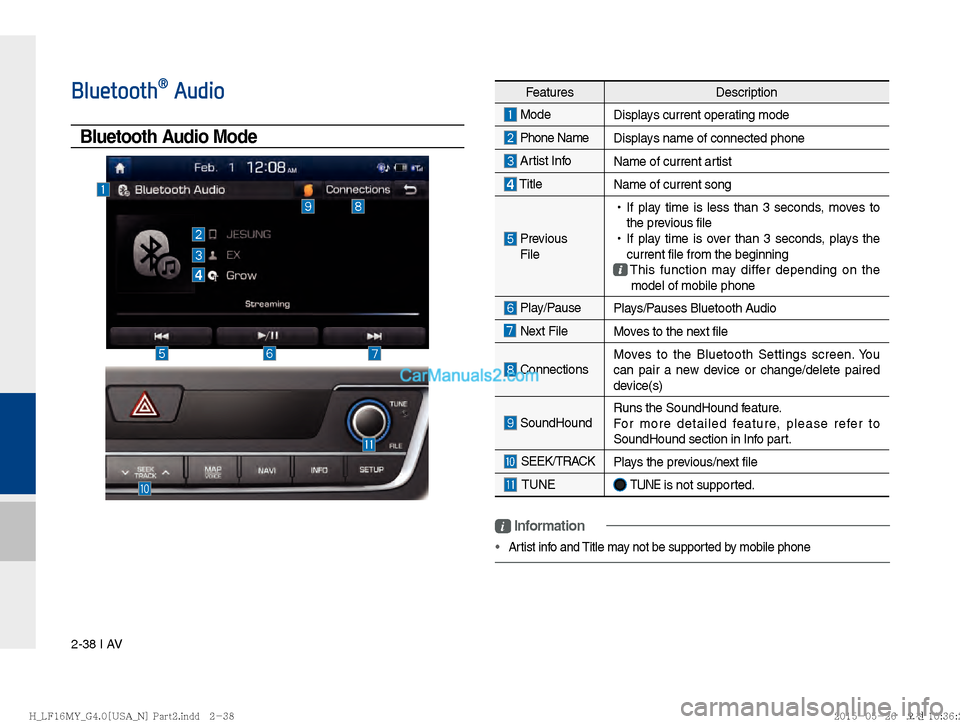
2-38 I AV
FeaturesDescription
Mode
Displays current operating mode
Phone Name Displays name of connected phone
Artist InfoName of current artist
TitleName of current song
Previous
File
!Ÿ
If play time is less than 3 seconds, moves to
the previous file
!Ÿ
If play time is over than 3 seconds, plays the
current file from the beginning
This function may differ depending on the
model of mobile phone
Play/Pause Plays/Pauses Bluetooth Audio
Next FileMoves to the next file
ConnectionsMoves to the Bluetooth Settings screen. You
can pair a new device or change/delete paired
device(s)
SoundHound
Runs the SoundHound feature.
For more detailed feature, please refer to
SoundHound section in Info part.
SEEK/TRACK
Plays the previous/next file
TUNE �TUNE is not supported.
Bluetooth® Audio
Bluetooth Audio Mode
i Information
Artist info and Title may not be supported by mobile phone
)@-'��.:@(���<64"@/>�1BSU��JOEE������� )@-'��.:@(���<64"@/>�1BSU��JOEE������� �������������
Page 64 of 308

2-40 I AV
My MusicFeaturesDescription
Previous FileIf button is pressed (less than 0.8 seconds):
Moves to the previous file or play the current file
from the beginning (Depends on the play time)
!Ÿ
If play time is less than 3 seconds, moves to
previous file
!Ÿ
If play time is over than 3 seconds, play the
current file from the beginning
If button is pressed (over than 0.8 seconds) it
rewinds the track
Play/Pause Plays/pauses the current file
Next File
!Ÿ
If button is pressed (less than 0.8 seconds):
Moves to the next file
!Ÿ
If button is pressed (over than 0.8 seconds) it
will fast-forward the file
Repeat Repeats the current file
!Ÿ
If select the song in the file tab on the list
screen : Press the
Repeat button to switch
between repeating one song and turn-
ing repeat off.
!Ÿ
If select the song in the other tabs (Playlist,
Artist, Song, Album, Genre) on the list screen
: Press the
Repeat button to switch between
repeating one song and turning repeat
off
Features Description
Mode
Displays current operating mode
File IndexShows the current file/total files
Repeat/
Shuffle/Scan From Repeat/Shuffle/Scan, displays the current
operating function
Play Time
Displays the current play time/total play time
Song InfoDisplays the information about the current track
!Ÿ
When a track in the file tab on the list screen
is selected : Displays file, artist, title, album
info
!Ÿ
When a track in the other tab on the list
screen is selected : Displays artist, title, album
info
List Moves to the list screen
)@-'��.:@(���<64"@/>�1BSU��JOEE������� )@-'��.:@(���<64"@/>�1BSU��JOEE������� �������������
Page 66 of 308

2-42 I AV
FeaturesDescription
Folder/
Category Name Displays folder/category name in the list
Current Song Displays current playing file name
Back ButtonConverts to basic mode screen
Upper Folder
Moves to Root Folder
Features Description
Menu
!Ÿ
Add to Playlist : Adds the current track to the
Playlist : Playlist is placed on the left tab in the
list (Maximum 100 files) Select a track and press
“Add to Playlist” to add the track in the playlist
!Ÿ
Delete from Playlist : Select a track from the
playlist and press “Delete from Playlist” to
delete the track in the playlist
!Ÿ
Delete Files : Deletes files from My Music
If delete file from My Music, the information
related to song also deleted in the list.
!Ÿ
Now Playing : When moving to a different list
screen, moves to the list page where the cur-
rent file is located (Becomes disabled when
the current list includes the current file
Search Menu Search tracks by the list type. Search songs accord-
ing to Playlist, Artist, Song, Album, and Genre. If access the search menu while playing a
track, it moves to the previous search mode.
SEEK/ TRACK If button is pressed (less than 0.8 seconds)
moves to previous/next file or play the current
song from the beginning
!Ÿ
If play time is less than 3 seconds, moves to
previous/next file
!Ÿ
If play time is over than 3 seconds, plays the
current file from the beginning
If button is pressed (over than 0.8 seconds) it will
rewind/fast-forward the track
TUNE Turn the
�
TUNE knob to move the focus to pre-
vious/next file. If the file you want to play is dis-
played, press
� TUNE knob to play the track. If the �
TUNE knob is not pressed within 5
seconds of searching tracks, Tune search
will be terminated.
)@-'��.:@(���<64"@/>�1BSU��JOEE������� )@-'��.:@(���<64"@/>�1BSU��JOEE������� �������������
Page 137 of 308
Starting/Ending and Setting Voice Recognition I 6-3
06
Starting/Ending and Setting
Voice Recognition
Starting Voice Recognition
Press the key briefly (less than 0.8
seconds) on the steering wheel control to
activate voice recognition.
Ending Voice Recognition
1. Select “Exit” to the left of the bottom to end voice recognition.
2. Press and hold (over 0.8 seconds) the
key on the steering wheel con-
trol to end voice recognition.
Quick Run of Voice
Recognition (Manual Mode)
Usually, you are supposed to say a com-
mand to execute the desired operation
after the voice guidance. However, it takes
a little time to wait for the voice guidance.
If you would like to activate the desired
operation more quickly, you can just touch
the commands displayed on the screen.
This feature is useful when you feel the
voice guidance is too long or voice com-
mands do not work as you desired.
)@-'��.:@(���<64"@/>�1BSU��JOEE������ )@-'��.:@(���<64"@/>�1BSU��JOEE������ �������������
Page 138 of 308
6-4 I Voice Recognition
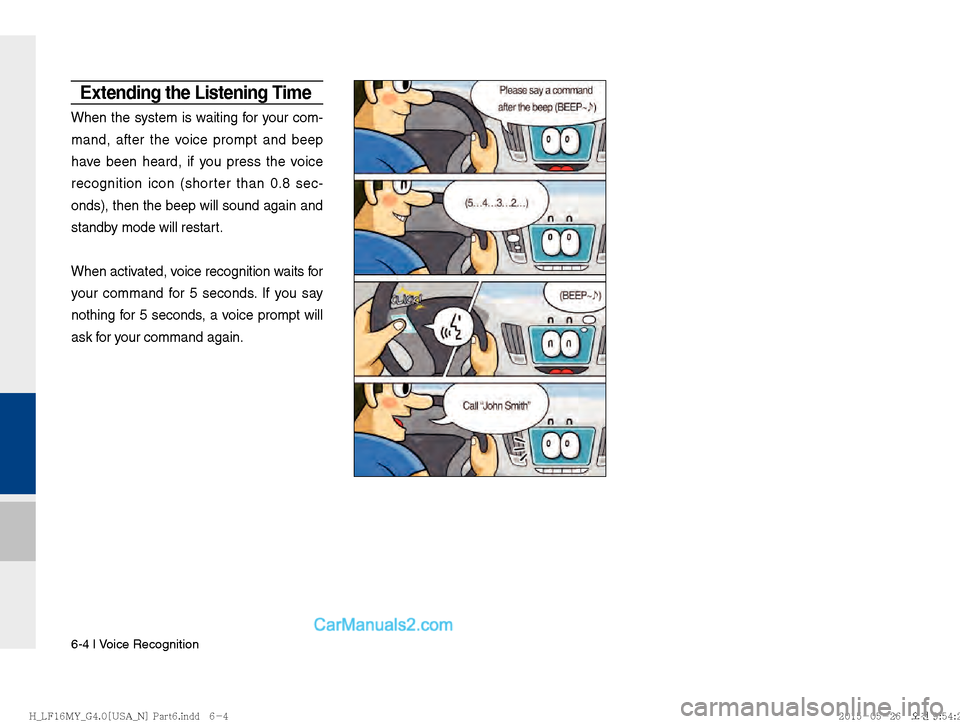
Extending the Listening Time
When the system is waiting for your com-
mand, after the voice prompt and beep
have been heard, if you press the voice
recognition icon (shorter than 0.8 sec-
onds), then the beep will sound again and
standby mode will restart.
When activated, voice recognition waits for
your command for 5 seconds. If you say
nothing for 5 seconds, a voice prompt will
ask for your command again.
)@-'��.:@(���<64"@/>�1BSU��JOEE������ )@-'��.:@(���<64"@/>�1BSU��JOEE������ �������������
Page 139 of 308
Starting/Ending and Setting Voice Recognition I 6-5
06
Skipping Prompt Messages
When you hear the prompt message,
press the voice recognition icon on the
steering wheel remote control to skip the
message and go directly to
listening mode
to sa y your command.
This results in f
aster operation when
you feel the message is too long or you
already know the command to use.
Adjusting Voice
Recognition Volume
During voice recognition, rotate the vol-
ume knob to adjust the message volume.
)@-'��.:@(���<64"@/>�1BSU��JOEE������ )@-'��.:@(���<64"@/>�1BSU��JOEE������ �������������