Page 112 of 308
5-26 I Navigation
Route Setting
After searching the destination, set a
route.
While the destination is set, the buttons
Change Destination and Add Waypoint appear.
Press each button to change a destination or
add a waypoint.
Destination Setting(Change)
After searching the destination, press the
Set as Destination button to set the location
as a destination and search a route.
All Routes
When the alternative routes option is
enabled in navigation setting, two routing
options are displayed based on faster time
and shorter distance.
!Ÿ
Faster Time : Select time-optimized
route, being the fastest roads.
!Ÿ
Shorter Distance : Select short distance,
irrespective of how fast or slow progress will
be calculated.
)@-'��.:@(���<64"@/>�1BSU��JOEE������� )@-'��.:@(���<64"@/>�1BSU��JOEE������� �������������
Page 113 of 308
Search I 5-27
05
NameDescription
Display total distance,
travel time. Select the
desired route.
Start GuidanceStart the guidance
with the route.
Route OptionsChange the route
option.
Route PreviewPreview turn-by-turn
list.
Edit RouteEdit the route.
TotalDisplay total distance
of the route
Freeway Display length of
freeway on the route
Toll Road Display length of toll
road on the route
FerryDisplay length of Ferry
route on the route
The route will be calculated using the
option “Faster Time” by default.
Alternative routes can be suggested if
necessary,
SETUP head unit key.
▶
Navigation
Icon ▶
Route ▶
Alternative :
ON
Adding Waypoint
Press the Add Waypoint button to set the
position as a waypoint and search the
route.
)@-'��.:@(���<64"@/>�1BSU��JOEE������� )@-'��.:@(���<64"@/>�1BSU��JOEE������� �������������
Page 115 of 308
Search I 5-29
05
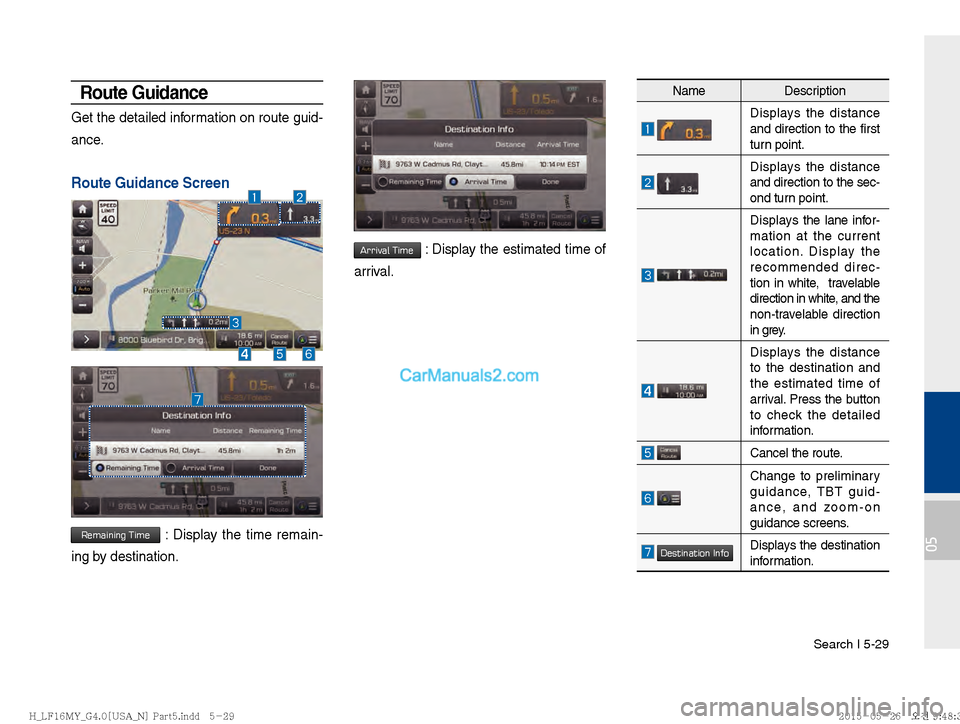
Route Guidance
Get the detailed information on route guid-
ance.
Route Guidance Screen
Remaining Time : Display the time remain-
ing by destination.
Arrival Time : Display the estimated time of
arrival.
Name Description
Displays the distance
and direction to the first
turn point.
Displays the distance
and direction to the sec-
ond turn point.
Displays the lane infor-
mation at the current
location. Display the
recommended direc-
tion in white, travelable
direction in white, and the
non-travelable direction
in grey.
Displays the distance
to the destination and
the estimated time of
arrival. Press the button
to check the detailed
information.
Cancel the route.
Change to preliminary
guidance, TBT guid-
ance, and zoom-on
guidance screens.
Destination InfoDisplays the destination
information.
)@-'��.:@(���<64"@/>�1BSU��JOEE������� )@-'��.:@(���<64"@/>�1BSU��JOEE������� �������������
Page 118 of 308
5-32 I Navigation
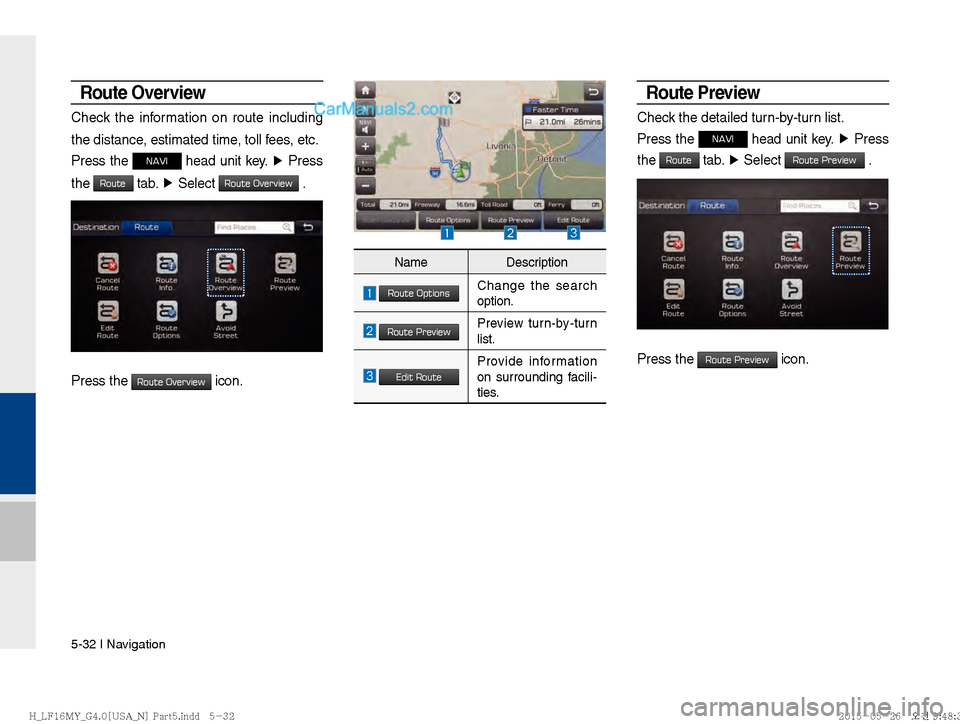
Route Overview
Check the information on route including
the distance, estimated time, toll fees, etc.
Press the
NAVI head unit key. ▶
Press
the
Route tab. ▶
Select Route Overview .
Press the Route Overview icon.
Route Preview
Check the detailed turn-by-turn list.
Press the
NAVI head unit key. ▶
Press
the
Route tab. ▶
Select Route Preview .
Press the Route Preview icon.
Name Description
Route OptionsChange the search
option.
Route PreviewPreview turn-by-turn
list.
Edit RouteProvide information
on surrounding facili-
ties.
)@-'��.:@(���<64"@/>�1BSU��JOEE������� )@-'��.:@(���<64"@/>�1BSU��JOEE������� �������������
Page 121 of 308
Navigation Settings I 5-35
05
Navigation Settings
General
Change general settings.
Press the GPS Information to display the
detail GPS satellites information
Display
Change the display environment settings.
Change the map colors and the route
guidance line colors.
Change the vehicle symbol.
Name Description
Change the unit of mile, km .
Press the
On, Off button to
change the previous destination
view setting when starting the
navigation.
Check the GPS information.
Press the Default Settings button
to initialize.
Name Description
ReceivingActive when current posi-
tion is being calculated
SpeedDisplay current speed of
the vehicle
LocationDisplay current position of
the vehicle
ElevationDisplay current elevation
of the vehicle
Time
Display time
DateDisplay date
)@-'��.:@(���<64"@/>�1BSU��JOEE������� )@-'��.:@(���<64"@/>�1BSU��JOEE������� �������������
Page 122 of 308

5-36 I Navigation
Guidance
Change the guidance setting.
Route
Change the route setting.
Press the On or Off button to change
the
Alternative Routes setting.
!Ÿ
Alternative on : Alternative routes will
be suggested(depending on the route
preference between “Faster time” and
“Shorter Distance”
NOTICE
Alternative routes can be shown only while
the vehicle is not moving.
!Ÿ
Alternative off : No alternative routes will
be suggested. Guidance will start right
after calculating with the route prefer-
ence (Faster time or Shorter distance)
Tr a f fi c
Change the traffic information setting.
Press the On or Off button to change the
settings.
!Ÿ
Show Traffic Information On/Off : Select
whether to display traffic information or
not
!Ÿ
Traffic Event Pop-up Freeway On/Off :
Select whether to display Pop-up mes-
sage for traffic information on freeway
!Ÿ
Traffic Event Pop-up Surface Road On/
Off : Select whether to display Pop-up
message for traffic information on sur-
face road.Name Description
Set the frequency of guidance
Route guidance is given less fre-
quently.
Guidance will be provided fre-
quently
Change whether to turn Curve
Alert on and off
Change whether to show speed
limit by pressing on and off
)@-'��.:@(���<64"@/>�1BSU��JOEE������� )@-'��.:@(���<64"@/>�1BSU��JOEE�������
�������������
Page 126 of 308

THE PRODUCT MAY INCLUDE ENFORCEMENT TECHNOLOGY DESIGNED TO PREVENT (i) UNAUTHORIZED COPYING OF
THE PRODUCT ONTO PHYSICAL STORAGE MEDIA OR VIA TRANSFER OVER THE INTERNET OR OTHER ELECTRONIC
COMMUNICATION MEANS AND/OR (ii) ILLEGAL USAGE OF THE PRODUCT OTHER THAN BY A SPECIFICALLY AHTORIZED
DEVICE. YOU AGREE THAT COMPANY MAY USE THESE MEASURES TO PROTECT COMPANY AND THE LICENSORS AGAINST
COPYRIGHT INFRINGEMENT.
Uploads. The Product may provide functionality through which you are able to upload certain information about your use of the Product
(collectively, “Uploads”) to COMPANY’s servers or receive other services from COMPANY (collectively, the “Services”). If you us e such
functionality, you authorize COMPANY to retain your Uploads on its servers. COMPANY will have no obligation to provide any Serv ices,
may change the form and nature of any Services at any time with or without notice to you, will have no liability whatsoever to you for any
failure of the Product or Services to transmit your Uploads to or from COMPANY’s servers, may cease providing any Services at any time
with or without notice to you, and will have no obligation to retain your Uploads (or any other materials you may provide to COMPANY) on
its servers or return your Uploads (or any other materials you may provide to COMPANY) to you before deleting them from its servers.
Storage. The Product may provide functionality through which you are able to store information (such as images) on the device on which
you are using the Product. COMPANY will have no liability whatsoever to you or any third party for any failure of the Product to store any
such information on such device.
)@-'��.:@(���<64"@/>�1BSU��JOEE������� )@-'��.:@(���<64"@/>�1BSU��JOEE������� �������������
Page 156 of 308

6-22 I Voice Recognition
Siri Eyes Free
How to start Siri
If you want to use Siri, you have to con-
nect your iOS device to Multimedia system
through Bluetooth.
(Please check whether your iOS device
supports Siri and turning Siri On)
Then you can use Siri while pressing and
holding
key on the steering wheel.
How to use Siri
When you access the Siri screen while
pressing and holding
key on the
steering wheel, you can press
Speak but-
ton and then you can speak what you
want. Please see the Multimedia system
only supports “Phone” related functions.
Other functions will be performed in your
iOS device. If you press voice key quickly,
Siri would re-start. If you hold down voice
key, Siri would be terminated and the
screen would go back to the previous
screen. Eyes-Free mode would be acti-
vated automatically while you are driving.
When shifting gears into P or putting the
Parking break on, Eyes-Free mode would
be deactivated automatically.
i Information
Functions and feedbacks from voice
commands via Siri are ex
ecuted in iOS
device. If iOS version changed, functions and
feedbacks can be changed according to iOS
device.
)@-'��.:@(���<64"@/>�1BSU��JOEE������� )@-'��.:@(���<64"@/>�1BSU��JOEE������� �������������