Page 24 of 759
Safety features of your vehicle
43
WARNING - Rear
seatbacks
The rear seatback must be securely latched. If not, pas-
sengers and objects could be
thrown forward resulting in
serious injury or death in the
event of a sudden stop or col-
lision.
No passenger should ride in the cargo area or sit or lie on
folded seatbacks while the
vehicle is moving. All passen-
gers must be properly seated
in seats and restrained prop-
erly while riding.
When resetting the seatback to the upright position, make
sure it is securely latched by
pushing it forward and rear-
wards.
To avoid the possibility of burns, do not remove the car-
pet in the cargo area. Emission
control devices beneath this
floor generate high tempera-
tures.
(Continued)(Continued)
Luggage and other cargoshould be laid flat in the cargo
area or on the folded rear
seatback. If objects are large,
heavy, or must be piled, they
must be secured. Under no
circumstances should cargo
be piled higher than the seat-
backs. Failure to follow these
warnings could result in seri-
ous injury or death in the
event of a sudden stop, colli-
sion or rollover.
WARNING
After adjusting the seat, always
check that it is securely locked
into place by attempting to
move the seat forward or
reverse without using the lock
release lever. Sudden or unex-
pected movement of the dri-
ver's seat could cause you to
lose control of the vehicle
resulting in an accident.
WARNING
Do not adjust the seat whilewearing seat belts. Moving the
seat cushion forward may
cause strong pressure on the
abdomen.
Use extreme caution so that hands or other objects are not
caught in the seat mechanisms
while the seat is moving.
Do not place a cigarette lighter on the floor or seat.
When you operate the seat,
gas may exit out of the lighter
and cause a fire.
Use extreme caution when picking small objects trapped
under the seats or between
the seat and the center con-
sole. Your hands might be cut
or injured by the sharp edges
of the seats mechanism.
Page 127 of 759
Features of your vehicle
30
4
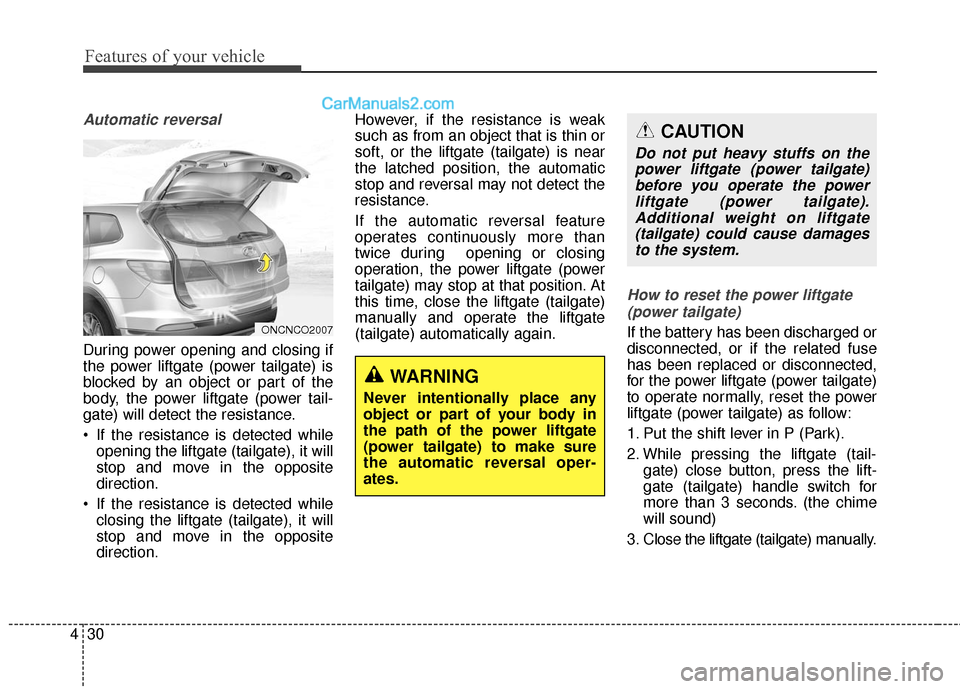
Automatic reversal
During power opening and closing if
the power liftgate (power tailgate) is
blocked by an object or part of the
body, the power liftgate (power tail-
gate) will detect the resistance.
If the resistance is detected while
opening the liftgate (tailgate), it will
stop and move in the opposite
direction.
If the resistance is detected while closing the liftgate (tailgate), it will
stop and move in the opposite
direction. However, if the resistance is weak
such as from an object that is thin or
soft, or the liftgate (tailgate) is near
the latched position, the automatic
stop and reversal may not detect the
resistance.
If the automatic reversal feature
operates continuously more than
twice during opening or closing
operation, the power liftgate (power
tailgate) may stop at that position. At
this time, close the liftgate (tailgate)
manually and operate the liftgate
(tailgate) automatically again.
How to reset the power liftgate
(power tailgate)
If the battery has been discharged or
disconnected, or if the related fuse
has been replaced or disconnected,
for the power liftgate (power tailgate)
to operate normally, reset the power
liftgate (power tailgate) as follow:
1. Put the shift lever in P (Park).
2. While pressing the liftgate (tail- gate) close button, press the lift-
gate (tailgate) handle switch for
more than 3 seconds. (the chime
will sound)
3. Close the liftgate (tailgate) manually.
WARNING
Never intentionally place any
object or part of your body in
the path of the power liftgate
(power tailgate) to make sure
the automatic reversal oper-
ates.
ONCNCO2007
CAUTION
Do not put heavy stuffs on the power liftgate (power tailgate)before you operate the powerliftgate (power tailgate).Additional weight on liftgate(tailgate) could cause damagesto the system.
Page 135 of 759
Features of your vehicle
38
4
Auto up/down window (front seat)
(if equipped)
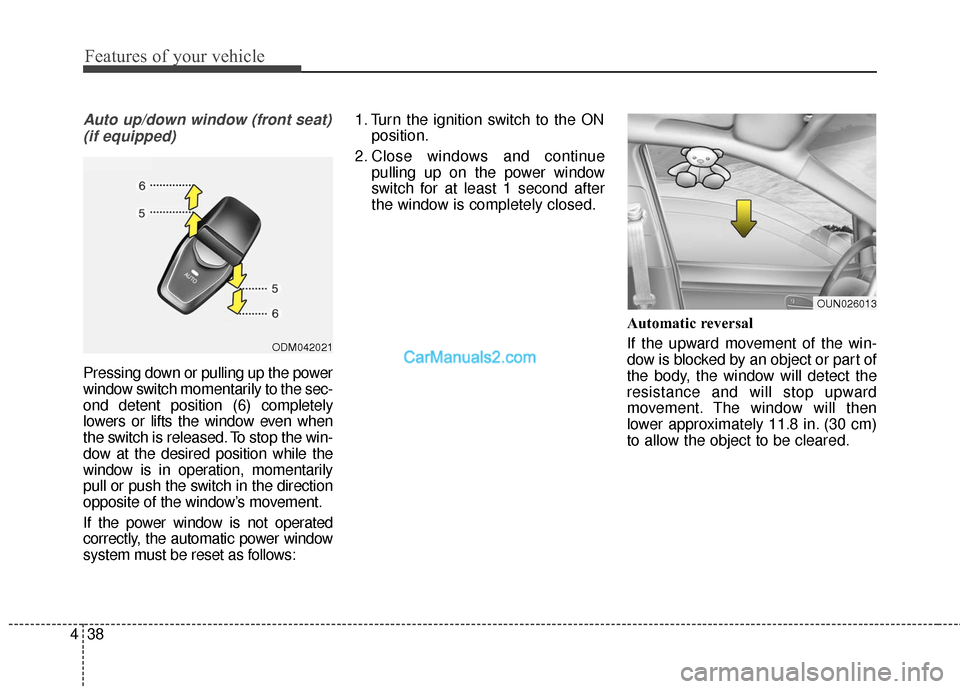
Pressing down or pulling up the power
window switch momentarily to the sec-
ond detent position (6) completely
lowers or lifts the window even when
the switch is released. To stop the win-
dow at the desired position while the
window is in operation, momentarily
pull or push the switch in the direction
opposite of the window’s movement.
If the power window is not operated
correctly, the automatic power window
system must be reset as follows: 1. Turn the ignition switch to the ON
position.
2. Close windows and continue pulling up on the power window
switch for at least 1 second after
the window is completely closed.
Automatic reversal
If the upward movement of the win-
dow is blocked by an object or part of
the body, the window will detect the
resistance and will stop upward
movement. The window will then
lower approximately 11.8 in. (30 cm)
to allow the object to be cleared.
ODM042021
OUN026013
Page 149 of 759
Features of your vehicle
52
4
Resetting the sunroof
Sunroof needs to be reset if (in the
followings)
- Battery is discharged or discon-
nected or the related fuse has been
replaced or disconnected.
- The one-touch sliding function of the sunroof does not normally oper-
ate.
1.Turn the ignition switch to the ON position.
2.Close the sunshade and sunroof completely if opened.
3.Release the sunroof control lever.
4.Push the sunroof control lever for- ward in the direction of close
(about 10 seconds) until the sun-
roof moves a little. Then, release
the lever. 5.Push the sunroof control lever for-
ward in the direction of close, until
the sunroof operates as follows
again:
The sunshade and sunroof glass
slide open → The sunroof glass
slide close → The sunshade close
Then, release the lever.
When this is complete, the sunroof
system has been reset.
✽ ✽ NOTICE
If you do not reset the sunroof, it
may not work properly.
Page 169 of 759
Features of your vehicle
72
4
Instrument Cluster Control
Adjusting Instrument Cluster
Illumination
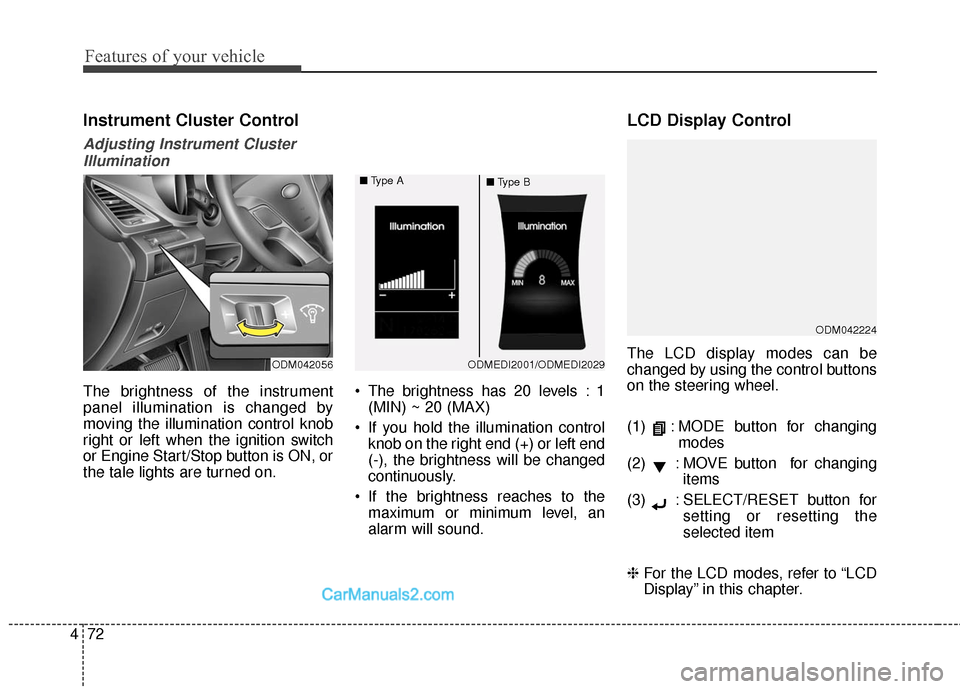
The brightness of the instrument
panel illumination is changed by
moving the illumination control knob
right or left when the ignition switch
or Engine Start/Stop button is ON, or
the tale lights are turned on. The brightness has 20 levels : 1
(MIN) ~ 20 (MAX)
If you hold the illumination control knob on the right end (+) or left end
(-), the brightness will be changed
continuously.
If the brightness reaches to the maximum or minimum level, an
alarm will sound.
LCD Display Control
The LCD display modes can be
changed by using the control buttons
on the steering wheel.
(1) : MODE button for changing modes
(2) : MOVE button for changing items
(3) : SELECT/RESET button for setting or resetting the
selected item
❈ For the LCD modes, refer to “LCD
Display” in this chapter.
ODM042224
ODM042056ODMEDI2001/ODMEDI2029
■
Type A
■Type B
Page 175 of 759

Features of your vehicle
78
4
Service Mode
Service Interval
Service in
It calculates and displays when you
need a scheduled maintenance
service (mileage or days).
If the remaining mileage or time
reaches 900 mi. (1,500 km) or 30
days, "Service in" message is dis-
played for several seconds each time
you set the ignition switch or Engine
Start/Stop Button to the ON position. Service required
If you do not have your vehicle serv-
iced according to the already inputted
service interval, “Service required”
message is displayed for several sec-
onds each time you set the ignition
switch or Engine Start/Stop Button to
the ON position (The mileage and
time changes to "---").
To reset the service interval to the
mileage and days you inputted before:
- Press the SELECT/RESET button
for more than 1 second. Service in OFF
If the service interval is not set,
“Service in OFF” message is dis-
played on the LCD display.
✽ ✽
NOTICE
If any of the following conditions
occurs, the mileage and days may be
incorrect.
- The battery cable is disconnected.
- The fuse switch is turned off.
- The battery is discharged.
OANNDI2066/OANNDI2070
■
Type A
■Type BODMEDI2067/ODMEDI2071
■
Type A
■Type BODMEDI2068/ODMEDI2072
■
Type A
■Type B
Page 178 of 759

481
Features of your vehicle
Settings
Temperature Unit
Convert the temperature unit from °C
to °F or from °F to °C.
Welcome Sound
If this item is checked, the welcome
sound function will be activated.
Shift Indicator (if equipped)
If this item is checked, the shift indi-
cator function will be activated.
For more details, refer to “Instrument
Cluster” in this chapter.
Seat Easy Access (if equipped)
If this item is checked, the driver’s
seat will automatically move forward
or rearward for the driver to enter or
exit the vehicle comfortably.Tire Pressure Unit (if equipped)
Choose the tire pressure unit.
(psi, kPa, Bar)
AVG Fuel Eco Reset
Auto Reset:
The average fuel economy will
reset automatically when refueling.
Manual Reset: The average fuel economy will not
reset automatically whenever refu-
eling.
For more details, refer to “Trip
Computer” in this chapter.
Service Interval
On this mode, you can activate the
service interval function with mileage
(mi. or km) and period (months).
OANNDI2065/OANNDI2069
■
Type A
■Type B
Page 186 of 759
489
Features of your vehicle
Overview
Description
The trip computer is a microcomput-
er-controlled driver information sys-
tem that displays information related
to driving.
✽ ✽NOTICE
Some driving information stored in
the trip computer (for example
Average Vehicle Speed) resets if the
battery is disconnected.
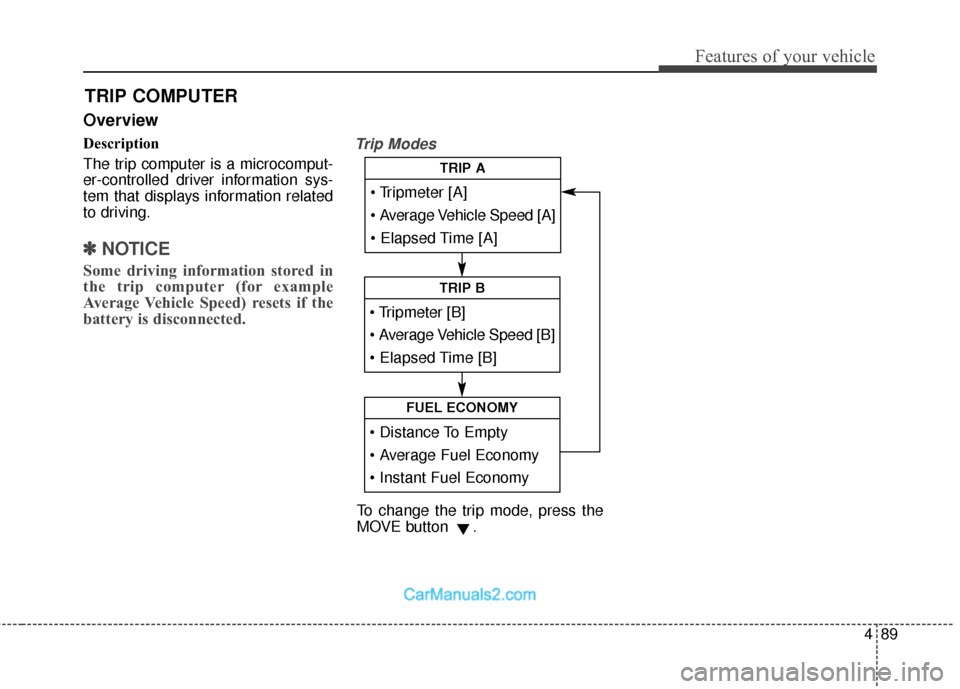
Trip Modes
TRIP COMPUTER
Average Vehicle Speed [A]
TRIP A
TRIP B
FUEL ECONOMY
To change the trip mode, press the
MOVE button .