2016 Hyundai Santa Fe ECO
[x] Cancel search: ECOPage 13 of 759
Introduction
61
This vehicle is equipped with an
event data recorder (EDR). The
main purpose of an EDR is to
record, in certain crash or near
crash-like situations, such as an
air bag deployment or hitting a
road obstacle, data that will assist
in understanding how a vehicle's
systems performed. The EDR is
designed to record data related to
vehicle dynamics and safety sys-
tems for a short period of time,
typically 30 seconds or less. The
EDR in this vehicle is designed to
record such data as:
How various systems in yourvehicle were operating;
Whether or not the driver and passenger safety belts were
buckled/fastened;
How far (if at all) the driver was depressing the accelerator
and/or brake pedal; and,
How fast the vehicle was travel- ing. These data can help provide a bet-
ter understanding of the circum-
stances in which crashes and
injuries occur. NOTE: EDR data are
recorded by your vehicle only if a
non-trivial crash situation occurs;
no data are recorded by the EDR
under normal driving conditions
and no personal data (e.g., name,
gender, age, and crash location)
are recorded. However, other par-
ties, such as law enforcement,
could combine the EDR data with
the type of personally identifying
data routinely acquired during a
crash investigation.
To read data recorded by an EDR,
special equipment is required, and
access to the vehicle or the EDR is
needed. In addition to the vehicle
manufacturer, other parties, such
as law enforcement, that have the
special equipment, can read the
information if they have access to
the vehicle or the EDR.
VEHICLE DATA COLLECTION AND EVENT DATA RECORDERS
Page 17 of 759
Your vehicle at a glance
42
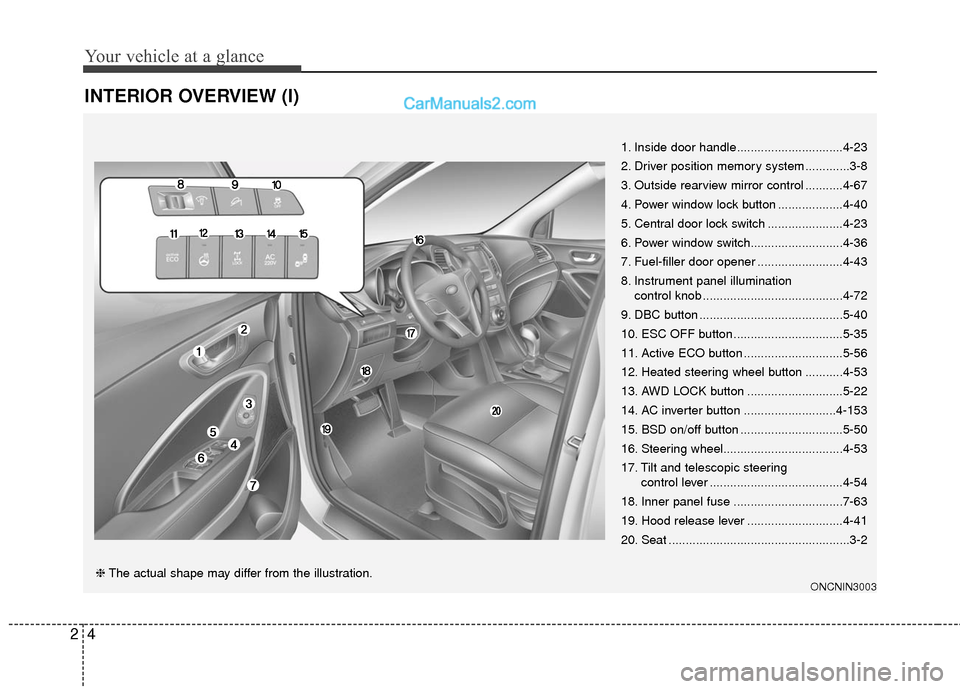
INTERIOR OVERVIEW (I)
1. Inside door handle...............................4-23
2. Driver position memory system .............3-8
3. Outside rearview mirror control ...........4-67
4. Power window lock button ...................4-40
5. Central door lock switch ......................4-23
6. Power window switch...........................4-36
7. Fuel-filler door opener .........................4-43
8. Instrument panel illumination control knob .........................................4-72
9. DBC button ..........................................5-40
10. ESC OFF button ................................5-35
11. Active ECO button .............................5-56
12. Heated steering wheel button ...........4-53
13. AWD LOCK button ............................5-22
14. AC inverter button ...........................4-153
15. BSD on/off button ..............................5-50
16. Steering wheel...................................4-53
17. Tilt and telescopic steering control lever .......................................4-54
18. Inner panel fuse ................................7-63
19. Hood release lever ............................4-41
20. Seat .....................................................3-2
ONCNIN3003❈ The actual shape may differ from the illustration.
Page 23 of 759
33
Safety features of your vehicle
WARNING -Loose
objects
Loose objects in the driver’s
foot area could interfere with
the operation of the foot pedals,
possibly causing an accident.
Do not place anything under the
front seats.WARNING -Driver
responsibility for passengers
Riding in a vehicle with the
seatback reclined could lead to
serious or fatal injury in an acci-
dent. If a seat is reclined during
an accident, the occupant’s
hips may slide under the lap
portion of the seat belt, apply-
ing great force to the unprotect-
ed abdomen. Serious or fatal
internal injuries could result.
The driver must advise the pas-
senger to keep the seatback in
an upright position whenever
the vehicle is in motion.
WARNING - Uprighting
seat
When you return the seatback
to its upright position, hold the
seatback and return it slowly
and be sure there are no other
occupants around the seat. If
the seatback is returned with-
out being held and controlled,
the back of the seat could
spring forward resulting in acci-
dental injury to a person struck
by the seatback.
WARNING
Occupants should never sit on
seat cushions. The passenger's
hips may slide under the lap
portion of the seat belt during
an accident or a sudden stop.
Serious or fatal internal injuries
could result because the seat
belt cannot operate normally.
WARNING - Driver’s seat
To avoid serious injury or death:
Never attempt to adjust the seat while the vehicle is mov-
ing. This could result in loss
of control, and an accident
causing death, serious injury,
or property damage.
Do not allow anything to inter- fere with the normal position
of the seatback. Storing items
against a seatback or in any
other way interfering with
proper locking of a seatback
could result in serious or fatal
injury in a sudden stop or col-
lision.
In order to avoid unnecessary and perhaps severe air bag
injuries, always sit as far back
as possible from the steering
wheel while maintaining com-
fortable control of the vehicle.
We recommend that your
chest be at least 10 inches
(250 mm) away from the steer-
ing wheel.
Page 28 of 759

Safety features of your vehicle
83
4-way lumbar support (for driver’s seat, if equipped)
The lumbar support can be adjusted
by pressing the switch.
1. Press the front portion (1) of the switch to increase support, or the
rear portion (2) of the switch, to
decrease support.
2. Release the switch once it reach- es the desired position.
3. Press the upper portion (3) of the switch to move the support posi-
tion up, or press the lower portion
(4) of the switch, to move the sup-
port position down.
4. Release the switch once it reach- es the desired position.
Driver position memory system
(if equipped, for power seat)
A driver position memory system is
provided to store and recall the driv-
er seat and outside rearview mirror
position with a simple button opera-
tion. By saving the desired position
into the system memory, different
drivers can reposition the driver seat
based upon their driving preference.
If the battery is disconnected, the posi-
tion memory will be erased and the
driving position should be restored in
the system.
Storing positions into memory
using the buttons on the door
Storing driver’s seat positions
1. Shift the shift lever into P or N while the engine start/stop button
is ON or ignition switch ON.
2. Adjust the driver’s seat and out- side rearview mirror to a position
that is comfortable for the driver.
3. Press SET button on the control panel. The system will beep once.
4. Press one of the memory buttons (1 or 2) within 5 seconds after
pressing the SET button. The sys-
tem will beep twice when memory
has been successfully stored.ONCESA2008
WARNING
Never attempt to operate the
driver position memory system
while the vehicle is moving.
This could result in loss of con-
trol, and an accident causing
death, serious injury, or property
damage.
ODM042335
Page 30 of 759
Safety features of your vehicle
10
3
Headrest
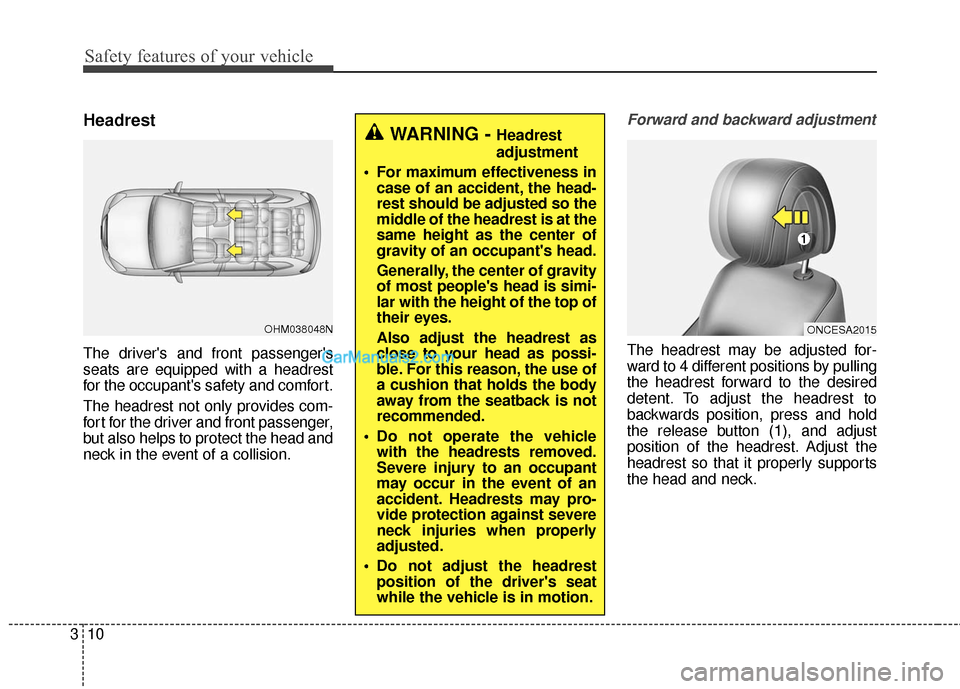
The driver's and front passenger's
seats are equipped with a headrest
for the occupant's safety and comfort.
The headrest not only provides com-
fort for the driver and front passenger,
but also helps to protect the head and
neck in the event of a collision.
Forward and backward adjustment
The headrest may be adjusted for-
ward to 4 different positions by pulling
the headrest forward to the desired
detent. To adjust the headrest to
backwards position, press and hold
the release button (1), and adjust
position of the headrest. Adjust the
headrest so that it properly supports
the head and neck.
WARNING - Headrest
adjustment
For maximum effectiveness in case of an accident, the head-
rest should be adjusted so the
middle of the headrest is at the
same height as the center of
gravity of an occupant's head.
Generally, the center of gravity
of most people's head is simi-
lar with the height of the top of
their eyes.
Also adjust the headrest as
close to your head as possi-
ble. For this reason, the use of
a cushion that holds the body
away from the seatback is not
recommended.
Do not operate the vehicle with the headrests removed.
Severe injury to an occupant
may occur in the event of an
accident. Headrests may pro-
vide protection against severe
neck injuries when properly
adjusted.
Do not adjust the headrest position of the driver's seat
while the vehicle is in motion.
OHM038048NONCESA2015
Page 37 of 759
317
Safety features of your vehicle
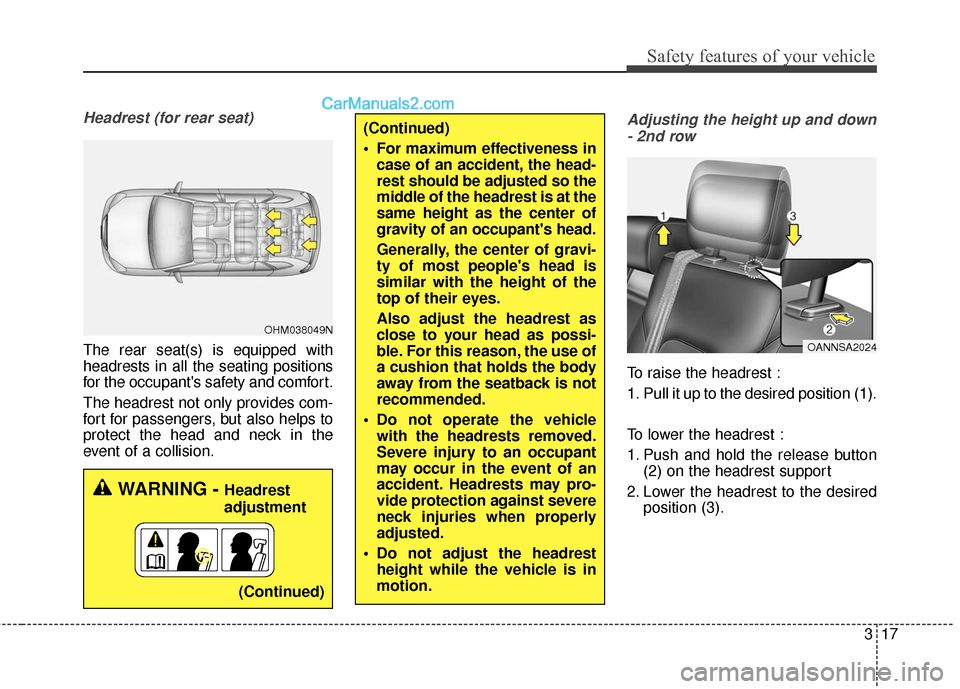
Headrest (for rear seat)
The rear seat(s) is equipped with
headrests in all the seating positions
for the occupant's safety and comfort.
The headrest not only provides com-
fort for passengers, but also helps to
protect the head and neck in the
event of a collision.
Adjusting the height up and down- 2nd row
To raise the headrest :
1. Pull it up to the desired position (1).
To lower the headrest :
1. Push and hold the release button (2) on the headrest support
2. Lower the headrest to the desired position (3).
WARNING - Headrest
adjustment
(Continued)
OHM038049N
OANNSA2024
(Continued)
For maximum effectiveness incase of an accident, the head-
rest should be adjusted so the
middle of the headrest is at the
same height as the center of
gravity of an occupant's head.
Generally, the center of gravi-
ty of most people's head is
similar with the height of the
top of their eyes.
Also adjust the headrest as
close to your head as possi-
ble. For this reason, the use of
a cushion that holds the body
away from the seatback is not
recommended.
Do not operate the vehicle with the headrests removed.
Severe injury to an occupant
may occur in the event of an
accident. Headrests may pro-
vide protection against severe
neck injuries when properly
adjusted.
Do not adjust the headrest height while the vehicle is in
motion.
Page 48 of 759
Safety features of your vehicle
28
3
Seat belt warning (for driver’s seat)
The driver's seat belt warning light
and chime will activate to the follow-
ing table when the ignition switch is
in "ON" position.
WARNING
No modifications or additions
should be made by the user
which will either prevent the
seat belt adjusting devices
from operating to remove
slack, or prevent the seat belt
assembly from being adjusted
to remove slack.
When you fasten the seat belt, be careful not to latch the seat
belt in the buckles of another.
It's very dangerous and you
may not be protected by the
seat belt properly.
Do not unfasten the seat belt and do not fasten and unfas-
ten the seat belt repeatedly
while driving. This could result
in loss of control, and an acci-
dent causing death, serious
injury, or property damage.
Make sure there is nothing in the buckle. The seat belt may
not be fastened securely.
1GQA2083
(Continued)
Care should be taken to avoid
contamination of the webbing
with polishes, oils and chemi-
cals and particularly battery
acid. Cleaning may safely be
carried out using mild soap and
water. The belt should be
replaced if webbing becomes
frayed, contaminated or dam-
aged. It is essential to replace
the entire assembly after it has
been worn in a severe impact
even if damage to the assembly
is not obvious. Belts should not
be worn with straps twisted.
Each seat belt assembly must
only be used by one occupant;
it is dangerous to put a belt
around a child being carried on
the occupant's lap.
Page 49 of 759
329
Safety features of your vehicle
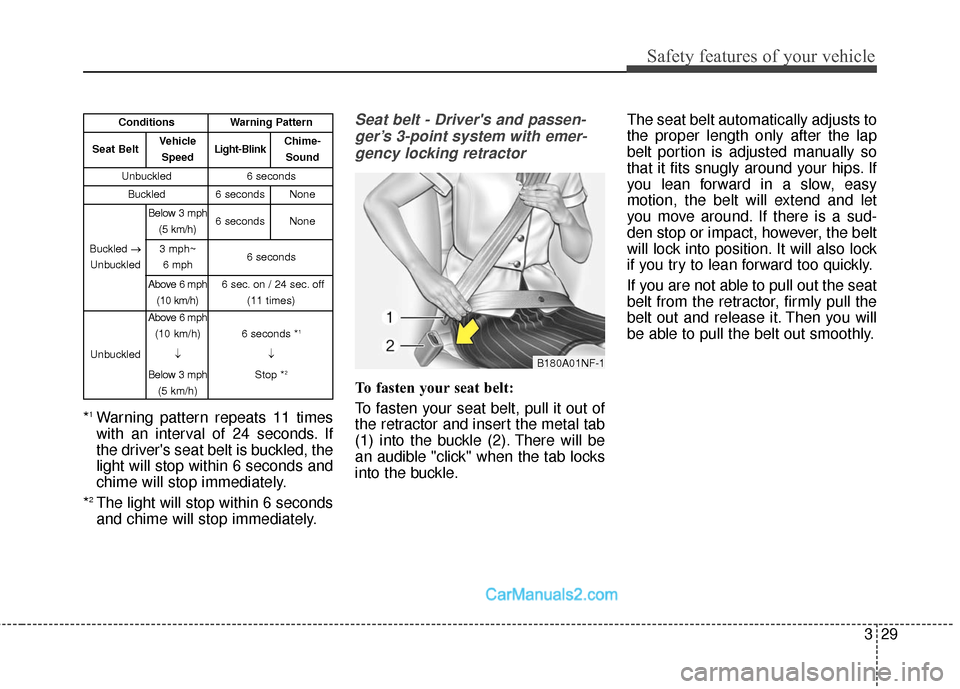
*1Warning pattern repeats 11 times
with an interval of 24 seconds. If
the driver's seat belt is buckled, the
light will stop within 6 seconds and
chime will stop immediately.
*
2The light will stop within 6 seconds
and chime will stop immediately.
Seat belt - Driver's and passen- ger’s 3-point system with emer-gency locking retractor
To fasten your seat belt:
To fasten your seat belt, pull it out of
the retractor and insert the metal tab
(1) into the buckle (2). There will be
an audible "click" when the tab locks
into the buckle. The seat belt automatically adjusts to
the proper length only after the lap
belt portion is adjusted manually so
that it fits snugly around your hips. If
you lean forward in a slow, easy
motion, the belt will extend and let
you move around. If there is a sud-
den stop or impact, however, the belt
will lock into position. It will also lock
if you try to lean forward too quickly.
If you are not able to pull out the seat
belt from the retractor, firmly pull the
belt out and release it. Then you will
be able to pull the belt out smoothly.
B180A01NF-1
ConditionsWarning Pattern
Seat BeltVehicle
SpeedLight-BlinkChime-Sound
Unbuckled6 seconds
Buckled6 secondsNone
Buckled →
Unbuckled
Below 3 mph (5 km/h)6 secondsNone
3 mph~6 mph6 seconds
Above 6 mph (10 km/h)6 sec. on / 24 sec. off (11 times)
Unbuckled
Above 6 mph(10 km/h)
↓
Below 3 mph (5 km/h)
6 seconds *1
↓
Stop *
2