2016 HYUNDAI IX35 display
[x] Cancel search: displayPage 150 of 550
465
Features of your vehicle
Type B (if equipped)
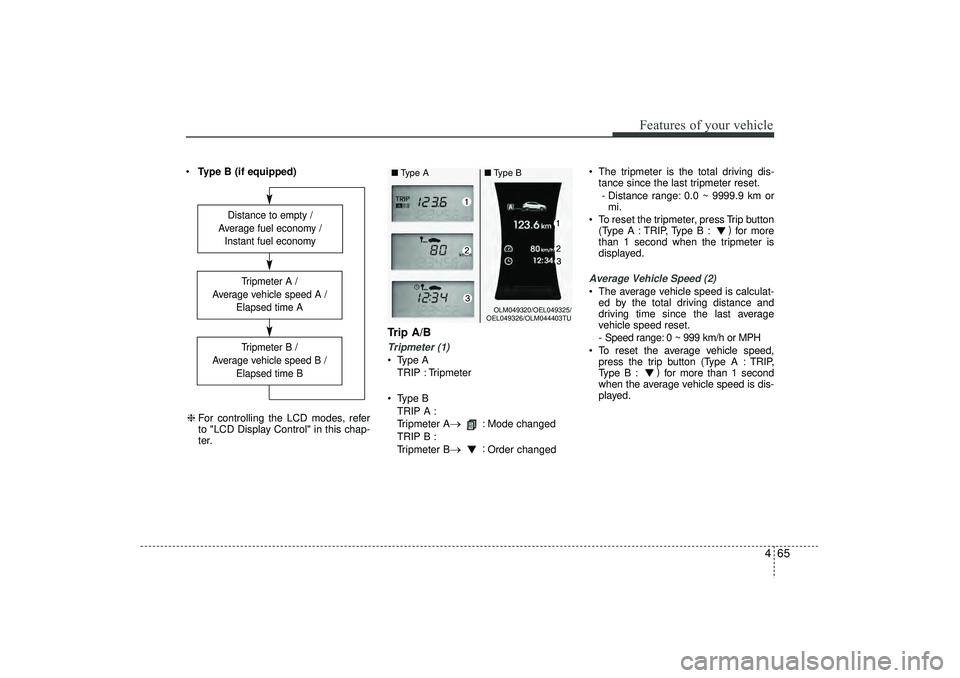
Trip A/BTripmeter (1) Type A
TRIP : Tripmeter
Type B TRIP A :
Tripmeter A
→
: Mode changed
TRIP B :
Tripmeter B
→
: Order changed The tripmeter is the total driving dis-
tance since the last tripmeter reset.
- Distance range: 0.0 ~ 9999.9 km or mi.
To reset the tripmeter, press Trip button (Type A : TRIP, Type B : )
for more
than 1 second when the tripmeter is
displayed.
Average Vehicle Speed (2) The average vehicle speed is calculat- ed by the total driving distance and
driving time since the last average
vehicle speed reset.
- Speed range: 0 ~ 999 km/h or MPH
To reset the average vehicle speed, press the trip button (Type A : TRIP,
Type B : )
for more than 1 second
when the average vehicle speed is dis-
played.
Distance to empty /
Average fuel economy / Instant fuel economy
Tripmeter B /
Average vehicle speed B / Elapsed time BTripmeter A /
Average vehicle speed A / Elapsed time A
❈For controlling the LCD modes, refer
to "LCD Display Control" in this chap-
ter.
OLM049320/OEL049325/
OEL049326/OLM044403TU
■ Type A ■Type B
EL(FL) UK 4A.QXP 2/9/2015 9:05 PM Page 65
Page 151 of 550
Features of your vehicle66
4✽
✽
NOTICE• The average vehicle speed is not dis-
played if the driving distance is less
than 300 meters (0.186 miles) or the
driving time is less than 10 seconds
since the ignition switch or Engine
Start/Stop button is turned to ON.
• Even if the vehicle is not in motion, the average vehicle speed keeps going
whilst the engine is running.Elapsed Time (3) The elapsed time is the total driving
time since the last elapsed time reset.
- Time range (hh:mm): 00:00 ~ 99:59
To reset the elapsed time, press the trip button (Type A : TRIP, Type B : )
for more than 1 second when the
elapsed time is displayed.✽ ✽ NOTICEEven if the vehicle is not in motion, the
elapsed time keeps going whilst the
engine is running.
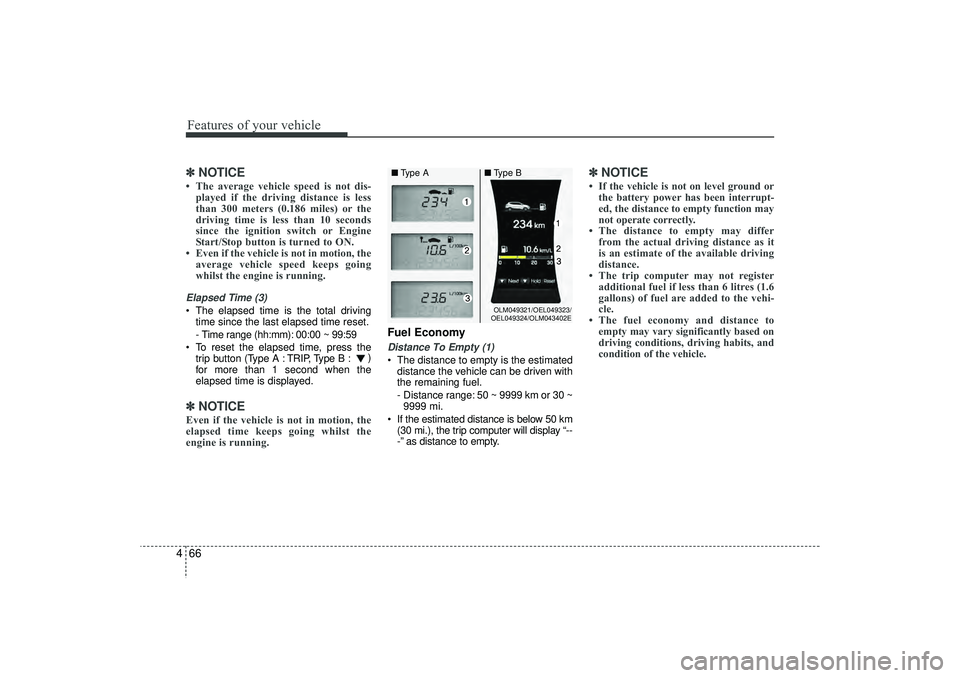
Fuel EconomyDistance To Empty (1) The distance to empty is the estimated
distance the vehicle can be driven with
the remaining fuel.
- Distance range: 50 ~ 9999 km or 30 ~9999 mi.
If the estimated distance is below 50 km (30 mi.), the trip computer will display “--
-” as distance to empty.
✽ ✽ NOTICE• If the vehicle is not on level ground or
the battery power has been interrupt-
ed, the distance to empty function may
not operate correctly.
• The distance to empty may differ from the actual driving distance as it
is an estimate of the available driving
distance.
• The trip computer may not register additional fuel if less than 6 litres (1.6
gallons) of fuel are added to the vehi-
cle.
• The fuel economy and distance to empty may vary significantly based on
driving conditions, driving habits, and
condition of the vehicle.
OLM049321/OEL049323/
OEL049324/OLM043402E
■ Type A ■Type B
EL(FL) UK 4A.QXP 2/9/2015 9:05 PM Page 66
Page 152 of 550
467
Features of your vehicle
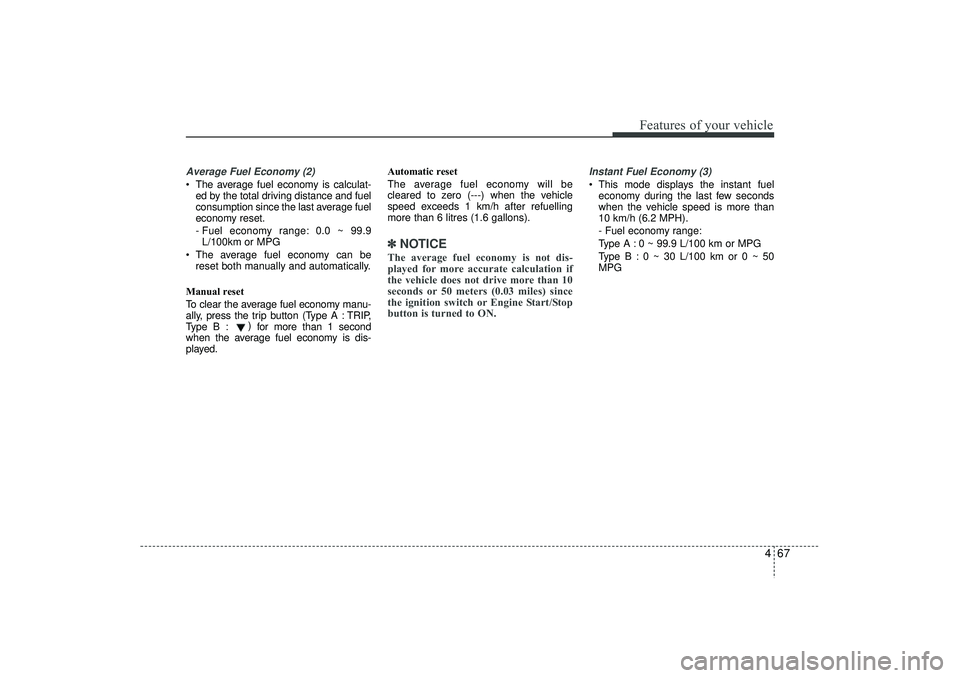
Average Fuel Economy (2) The average fuel economy is calculat-ed by the total driving distance and fuel
consumption since the last average fuel
economy reset.
- Fuel economy range: 0.0 ~ 99.9L/100km or MPG
The average fuel economy can be reset both manually and automatically.
Manual reset
To clear the average fuel economy manu-
ally, press the trip b utton (Type A : TRIP,
Type B : )
for more than 1 second
when the average fuel economy is dis-
played. Automatic reset
The average fuel economy will be
cleared to zero (---) when the vehicle
speed exceeds 1 km/h after refuelling
more than 6 litres (1.6 gallons).
✽ ✽
NOTICEThe average fuel economy is not dis-
played for more accurate calculation if
the vehicle does not drive more than 10
seconds or 50 meters (0.03 miles) since
the ignition switch or Engine Start/Stop
button is turned to ON.
Instant Fuel Economy (3) This mode displays the instant fuel
economy during the last few seconds
when the vehicle speed is more than
10 km/h (6.2 MPH).
- Fuel economy range:
Type A : 0 ~ 99.9 L/100 km or MPG
Type B : 0 ~ 30 L/100 km or 0 ~ 50
MPG
EL(FL) UK 4A.QXP 2/9/2015 9:05 PM Page 67
Page 159 of 550
Features of your vehicle74
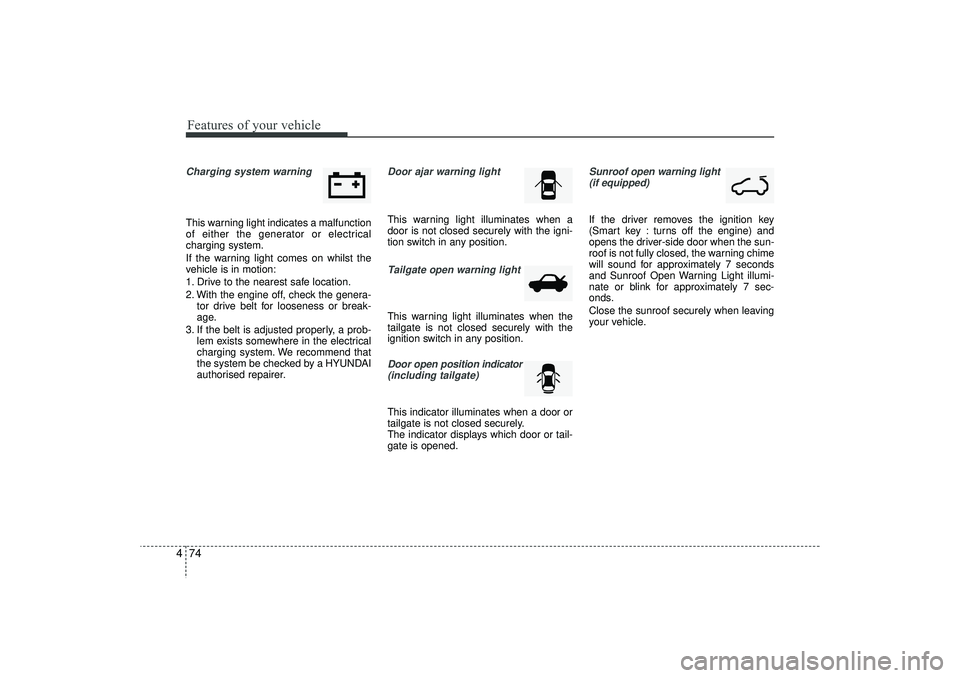
4Charging system warning This warning light indicates a malfunction
of either the generator or electrical
charging system.
If the warning light comes on whilst the
vehicle is in motion:
1. Drive to the nearest safe location.
2. With the engine off, check the genera-
tor drive belt for looseness or break-
age.
3. If the belt is adjusted properly, a prob- lem exists somewhere in the electrical
charging system. We recommend that
the system be checked by a HYUNDAI
authorised repairer.
Door ajar warning lightThis warning light illuminates when a
door is not closed securely with the igni-
tion switch in any position.Tailgate open warning lightThis warning light illuminates when the
tailgate is not closed securely with the
ignition switch in any position.Door open position indicator
(including tailgate)This indicator illuminates when a door or
tailgate is not closed securely.
The indicator displays which door or tail-
gate is opened.
Sunroof open warning light (if equipped)If the driver removes the ignition key
(Smart key : turns off the engine) and
opens the driver-side door when the sun-
roof is not fully closed, the warning chime
will sound for approximately 7 seconds
and Sunroof Open Warning Light illumi-
nate or blink for approximately 7 sec-
onds.
Close the sunroof securely when leaving
your vehicle.
EL(FL) UK 4A.QXP 2/9/2015 9:05 PM Page 74
Page 170 of 550
485
Features of your vehicle
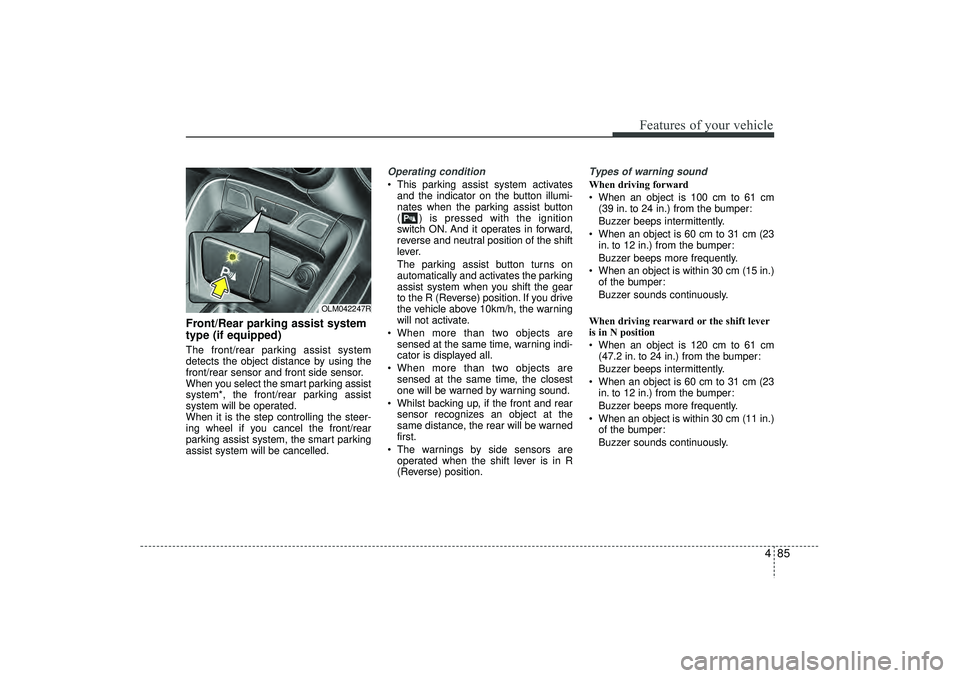
Front/Rear parking assist system
type (if equipped)The front/rear parking assist system
detects the object distance by using the
front/rear sensor and front side sensor.
When you select the smart parking assist
system*, the front/rear parking assist
system will be operated.
When it is the step controlling the steer-
ing wheel if you cancel the front/rear
parking assist system, the smart parking
assist system will be cancelled.
Operating condition This parking assist system activatesand the indicator on the button illumi-
nates when the parking assist button
( ) is pressed with the ignition
switch ON. And it operates in forward,
reverse and neutral position of the shift
lever.
The parking assist button turns on
automatically and activates the parking
assist system when you shift the gear
to the R (Reverse) position. If you drive
the vehicle above 10km/h, the warning
will not activate.
When more than two objects are sensed at the same time, warning indi-
cator is displayed all.
When more than two objects are sensed at the same time, the closest
one will be warned by warning sound.
Whilst backing up, if the front and rear sensor recognizes an object at the
same distance, the rear will be warned
first.
The warnings by side sensors are operated when the shift lever is in R
(Reverse) position.
Types of warning soundWhen driving forward
When an object is 100 cm to 61 cm (39 in. to 24 in.) from the bumper:
Buzzer beeps intermittently.
When an object is 60 cm to 31 cm (23 in. to 12 in.) from the bumper:
Buzzer beeps more frequently.
When an object is within 30 cm (15 in.) of the bumper:
Buzzer sounds continuously.
When driving rearward or the shift lever
is in N position
When an object is 120 cm to 61 cm (47.2 in. to 24 in.) from the bumper:
Buzzer beeps intermittently.
When an object is 60 cm to 31 cm (23 in. to 12 in.) from the bumper:
Buzzer beeps more frequently.
When an object is within 30 cm (11 in.) of the bumper:
Buzzer sounds continuously.
OLM042247R
EL(FL) UK 4A.QXP 2/9/2015 9:05 PM Page 85
Page 176 of 550

491
Features of your vehicle
Operation wayBefore operating the smart parking assist
system, confirm the condition that is pos-
sible to use. For safety, always operate it
by applying the brake pedal under any
condition, for example before each step,
whilst pressing the ON/OFF button of this
system or shifting the lever, etc.
When vehicle is parked by using the
smart parking assist system, general
steps are followings
1. The smart parking assist system select
2. Parking mode select
3. Parking space search : Direct way driv-ing
4. Search complete : Automatic search by sensor
However, before parking, real parking
environment confirmations are needed
for driver. 5. Steering wheel support (Rear Parking
type)
(1) Operate shift lever by display in cluster
(2) Always drive slowly with applying to brake
6. Smart parking assist system complete
7. If required, move vehicle to manual operation
According to parking space, select
mode, and surrounding environment, the
sequence of display or situation could be
changed. Refer to next operation way.
(Continued)
7. If there is an object in parking space
Even if there are barriers, the smart
parking assist system may detect
the parking space. In this case, if
you try to park the vehicle, the acci-
dent may occur. Do not use the
smart parking assist system.
In any cases, do not depend on the
smart parking assist system. Take
the necessary action regarding
safety with confirming all situa-
tions.
OVF041309R
EL(FL) UK 4A.QXP 2/9/2015 9:05 PM Page 91
Page 177 of 550

Features of your vehicle92
41. Smart parking assist system
selectSelect the smart parking assist system
by pushing the button. Instruction display
of instrument cluster is displayed and the
indicator on button of this system and
front/rear parking assist system button
are illuminated.
During operating system, warning sound
is operated when objects are detected.
To turn off this system, push the button
( ) of system choice over 2 seconds.
After engine is off, if engine is turned on,
this system is on position of turning off.
If needed, push this button.
2. Parking mode selectWith applying the brake shift the
transaxle to N or D and select the
desired parking mode by pushing the
button ( ).
When system is selected, it is automati-
cally selected right side - parallel mode.
If you push the switch continuously, the
left side-parallel mode is selected. If you
push again, you can get out the smart
parking assist system mode.
3. Parking space searchAs pictures, keep distance between
parked vehicles in 0.5-1.5m constantly.
Drive slowly to desired parking space.
The parking space is searched from side
sensor automatically. If the speed is over
30km/h, notice the warning message to
driver. If the speed is over 40kn/h, the
system turns off.
When there are a lot of vehicles near
vehicle, turn on the hazard warning flash-
er to let other vehicles not be close.
If parking space is narrow, drive slowly to
desired parking space.
However, this step searches for a parking
space if your vehicle has enough space
to move except for parking space. If sat-
isfied, this system searches for parking
space.
OEL043248R
OLM043428E/OLM043429E
■
Right side
- parallel mode ■
Left side
-parallel mode
OLM043430E/OLM043431E
■
Right side
- parallel mode ■
Left side
-parallel mode
EL(FL) UK 4A.QXP 2/9/2015 9:06 PM Page 92
Page 183 of 550
Features of your vehicle98
4
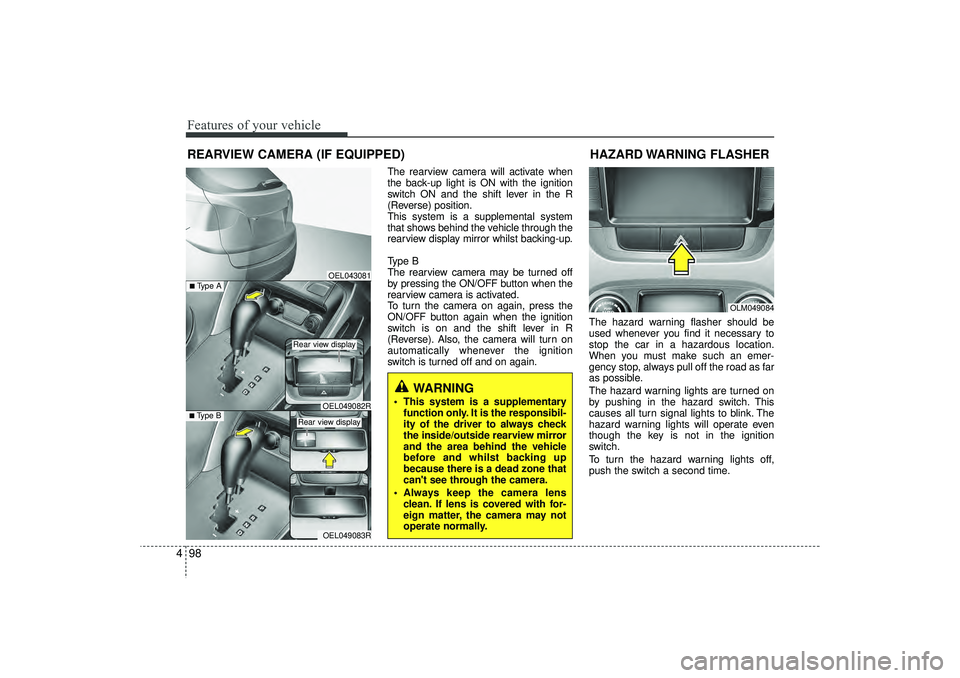
The rearview camera will activate when
the back-up light is ON with the ignition
switch ON and the shift lever in the R
(Reverse) position.
This system is a supplemental system
that shows behind the vehicle through the
rearview display mirror whilst backing-up.
Type B
The rearview camera may be turned off
by pressing the ON/OFF button when the
rearview camera is activated.
To turn the camera on again, press the
ON/OFF button again when the ignition
switch is on and the shift lever in R
(Reverse). Also, the camera will turn on
automatically whenever the ignition
switch is turned off and on again. The hazard warning flasher should be
used whenever you find it necessary to
stop the car in a hazardous location.
When you must make such an emer-
gency stop, always pull off the road as far
as possible.
The hazard warning lights are turned on
by pushing in the hazard switch. This
causes all turn signal lights to blink. The
hazard warning lights will operate even
though the key is not in the ignition
switch.
To turn the hazard warning lights off,
push the switch a second time.
REARVIEW CAMERA (IF EQUIPPED)
WARNING
This system is a supplementary
function only. It is the responsibil-
ity of the driver to always check
the inside/outside rearview mirror
and the area behind the vehicle
before and whilst backing up
because there is a dead zone that
can't see through the camera.
Always keep the camera lens clean. If lens is covered with for-
eign matter, the camera may not
operate normally.
OEL043081
OLM049084
HAZARD WARNING FLASHER
OEL049083R
■Type B
OEL049082R
■Type A
Rear view display Rear view display
EL(FL) UK 4A.QXP 2/9/2015 9:06 PM Page 98