Page 274 of 550
4 189
Features of your vehicle
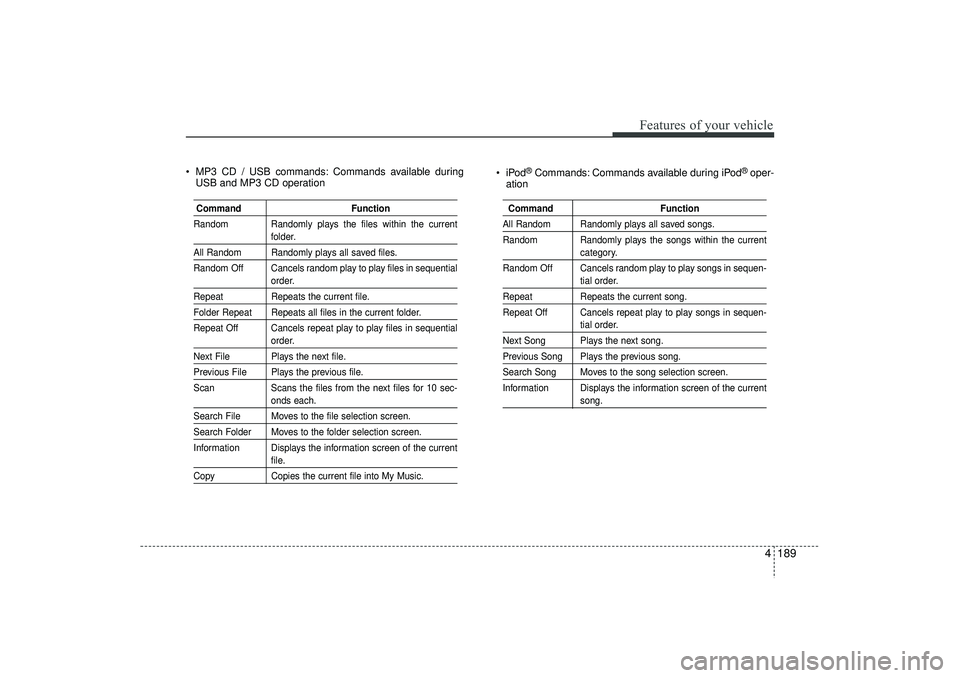
MP3 CD / USB commands: Commands available duringUSB and MP3 CD operation iPod
®Commands: Commands available during iPod
®oper-
ation
Command Function
Random Randomly plays the files within the current
folder.
All Random Randomly plays all saved files.
Random Off Cancels random play to play files in sequential
order.
Repeat Repeats the current file.Folder Repeat Repeats all files in the current folder.
Repeat Off Cancels repeat play to play files in sequential
order.
Next File Plays the next file.Previous File Plays the previous file.
ScanScans the files from the next files for 10 sec-
onds each.
Search File Moves to the file selection screen.Search Folder Moves to the folder selection screen.
Information Displays the information screen of the current
file.
Copy Copies the current file into My Music.
Command FunctionAll Random Randomly plays all saved songs.
Random Randomly plays the songs within the current
category.
Random Off Cancels random play to play songs in sequen-tial order.
Repeat Repeats the current song.
Repeat Off Cancels repeat play to play songs in sequen-
tial order.
Next Song Plays the next song.Previous Song Plays the previous song.Search Song Moves to the song selection screen.
Information Displays the information screen of the current
song.
EL(FL) UK 4B AUDIO.QXP 3/13/2015 4:19 PM Page 189
Page 278 of 550
4 193
Features of your vehicle
SYSTEM CONTROLLERS AND
FUNCTIONS ❈ Display and settings may differ
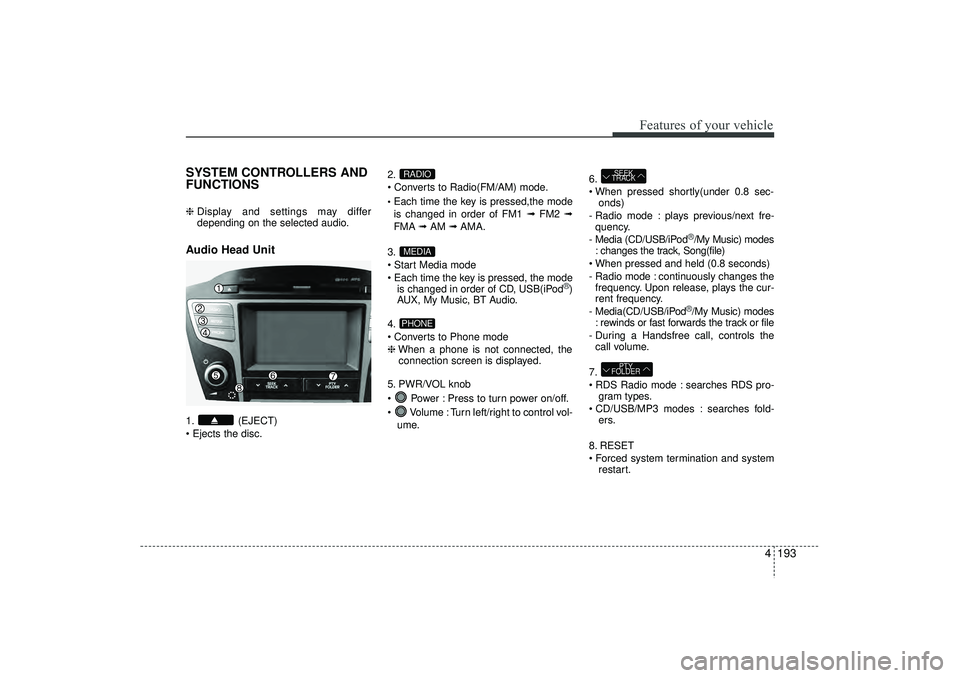
depending on the selected audio.Audio Head Unit 1. (EJECT)
Ejects the disc. 2.
Converts to Radio(FM/AM) mode.
Each time the key is pressed,the mode
is changed in order of FM1 ➟
FM2 ➟
FMA ➟AM ➟AMA.
3.
Start Media mode
Each time the key is pressed, the mode is changed in order of CD, USB(iPod
®)
AUX, My Music, BT Audio.
4.
Converts to Phone mode
❈ When a phone is not connected, the
connection screen is displayed.
5. PWR/VOL knob
Power : Press to turn power on/off.
Volume : Turn left/right to control vol- ume. 6.
When pressed shortly(under 0.8 sec-
onds)
- Radio mode : plays previous/next fre- quency.
- Media (CD/USB/iPod
®/My Music) modes
: changes the track, Song(file)
When pressed and held (0.8 seconds)
- Radio mode : continuously changes the frequency. Upon release, plays the cur-
rent frequency.
- Media(CD/USB/iPod®/My Music) modes
: rewinds or fast forwards the track or file
- During a Handsfree call, controls the call volume.
7.
RDS Radio mode : searches RDS pro- gram types.
CD/USB/MP3 modes : searches fold- ers.
8. RESET
Forced system termination and system restart.
PTY
FOLDERSEEK
TRACK
PHONEMEDIARADIO
EL(FL) UK 4B AUDIO.QXP 3/13/2015 4:19 PM Page 193
Page 279 of 550
Features of your vehicle194
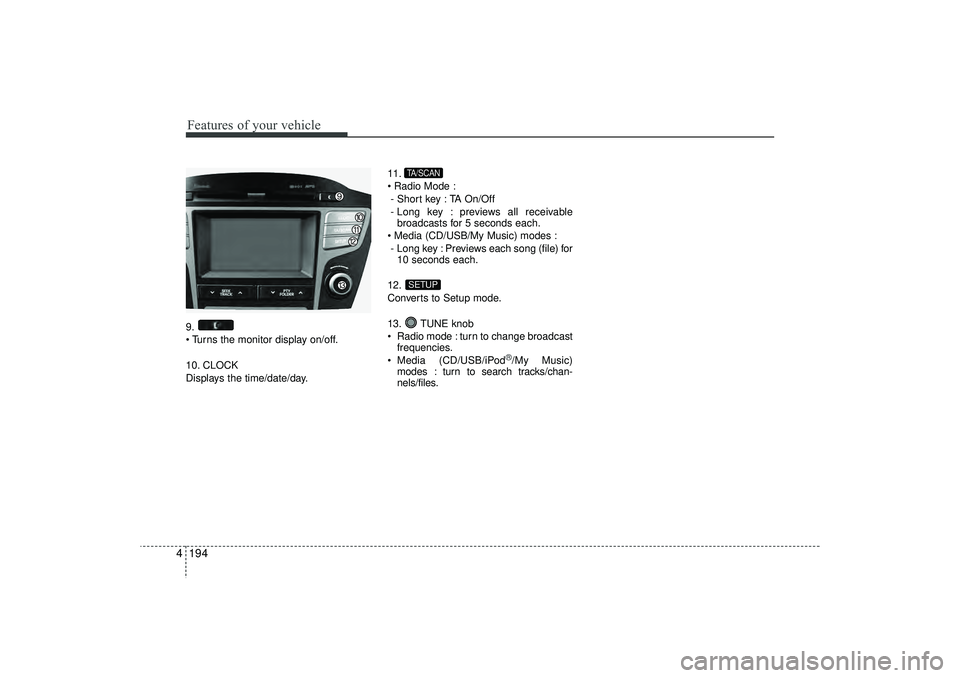
49.
Turns the monitor display on/off.
10. CLOCK
Displays the time/date/day. 11.
Radio Mode :
- Short key : TA On/Off
- Long key : previews all receivable broadcasts for 5 seconds each.
Media (CD/USB/My Music) modes : - Long key : Previews each song (file) for 10 seconds each.
12.
Converts to Setup mode.
13. TUNE knob
Radio mode : turn to change broadcast frequencies.
Media (CD/USB/iPod
®/My Music)
modes : turn to search tracks/chan-
nels/files.
SETUPTA/SCAN
EL(FL) UK 4B AUDIO.QXP 3/13/2015 4:19 PM Page 194
Page 285 of 550
Features of your vehicle200
4MP3 File Information
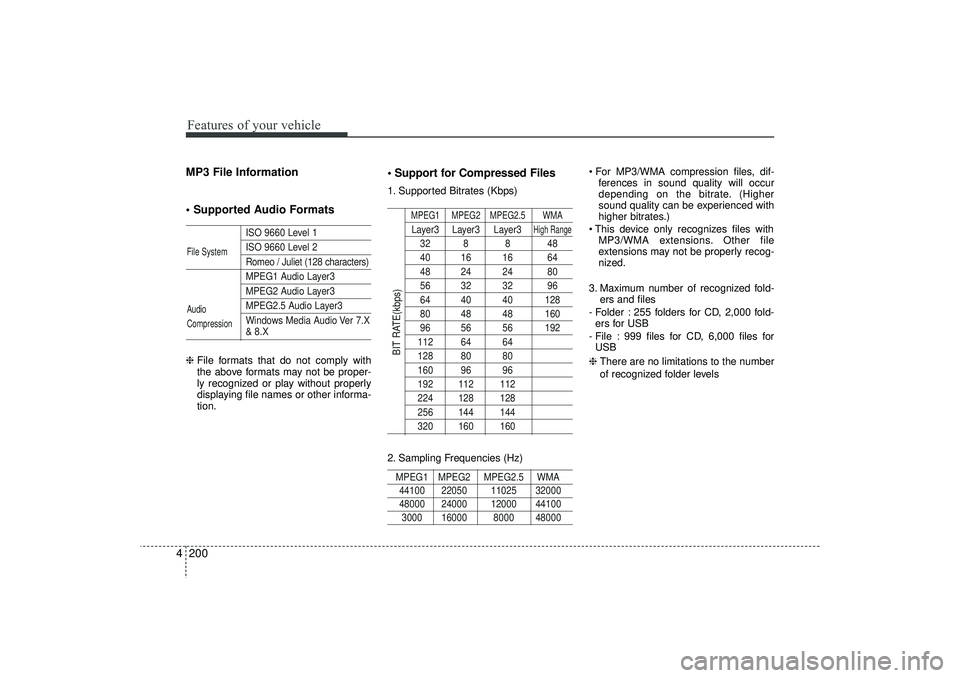
Supported Audio Formats
ISO 9660 Level 1ISO 9660 Level 2Romeo / Juliet (128 characters)MPEG1 Audio Layer3MPEG2 Audio Layer3MPEG2.5 Audio Layer3
Windows Media Audio Ver 7.X& 8.X
❈ File formats that do not comply with
the above formats may not be proper-
ly recognized or play without properly
displaying file names or other informa-
tion.
Support for Compressed Files1. Supported Bitrates (Kbps)
MPEG1 MPEG2 MPEG2.5 WMALayer3 Layer3 Layer3
High Range
32 8 8 4840 16 16 6448 24 24 8056 32 32 9664 40 40 12880 48 48 16096 56 56 192112 64 64128 80 80160 96 96192 112 112224 128 128256 144 144320 160 160
2. Sampling Frequencies (Hz)MPEG1 MPEG2 MPEG2.5 WMA44100 22050 11025 32000 48000 24000 12000 441003000 16000 8000 48000
For MP3/WMA compression files, dif-
ferences in sound quality will occur
depending on the bitrate. (Higher
sound quality can be experienced with
higher bitrates.)
This device only recognizes files with MP3/WMA extensions. Other file
extensions may not be properly recog-
nized.
3. Maximum number of recognized fold- ers and files
- Folder : 255 folders for CD, 2,000 fold- ers for USB
- File : 999 files for CD, 6,000 files for USB
❈ There are no limitations to the number
of recognized folder levels
File System
Audio
Compression
BIT RATE(kbps)
EL(FL) UK 4B AUDIO.QXP 3/13/2015 4:19 PM Page 200
Page 287 of 550
Features of your vehicle202
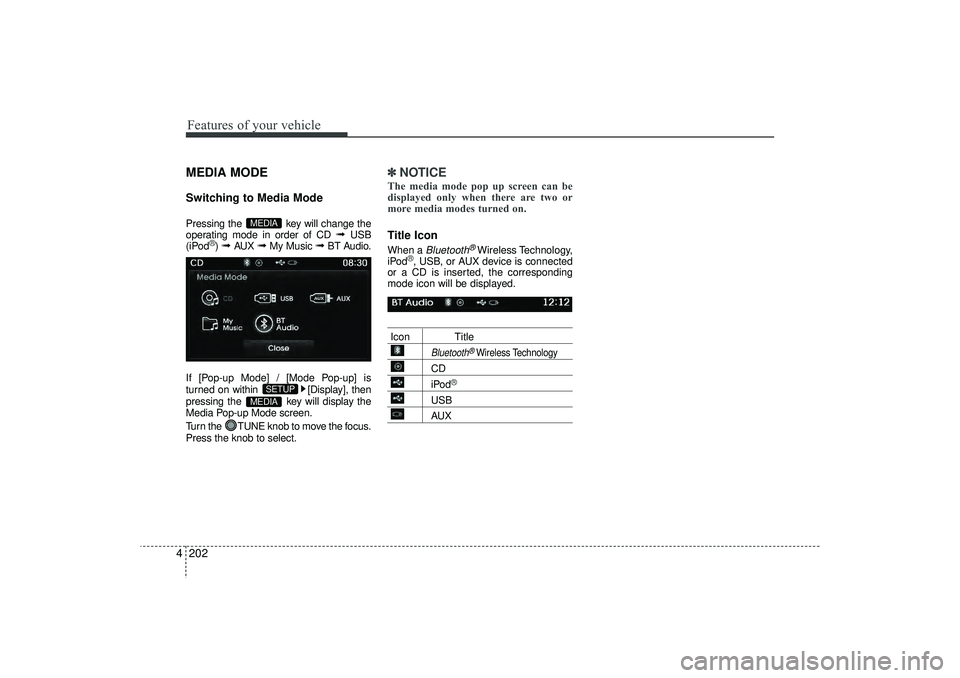
4MEDIA MODESwitching to Media ModePressing the key will change the
operating mode in order of CD
➟
USB
(iPod
®) ➟
AUX
➟
My Music
➟
BT Audio.
If [Pop-up Mode] / [Mode Pop-up] is
turned on within [Display], then
pressing the key will display the
Media Pop-up Mode screen.
Turn the TUNE knob to move the focus.
Press the knob to select.
✽ ✽ NOTICE The media mode pop up screen can be
displayed only when there are two or
more media modes turned on.Title Icon When a
Bluetooth
®Wireless Technology,
iPod
®, USB, or AUX device is connected
or a CD is inserted, the corresponding
mode icon will be displayed.
Icon Title
Bluetooth
®Wireless Technology
CDiPod
®
USBAUX
MEDIA
SETUP
MEDIA
EL(FL) UK 4B AUDIO.QXP 3/13/2015 4:19 PM Page 202
Page 297 of 550
Features of your vehicle212
4✽
✽
NOTICE - USING THE USB
DEVICE• Connect the USB device after turning
on the engine. The USB device may
become damaged if it is already con-
nected when the ignition is turned
on.The USB device may not operate
properly if the car ignition is turned
on or off with the USB device connect-
ed.
• Heed caution to static electricity when connecting/disconnecting USB
devices.
• Encoded MP3 Players will not be rec- ognized when connected as an exter-
nal device.
• When connecting an external USB device, the device may not properly
recognize the USB is in some states.
• Only products formatted with byte/sectors under 64Kbyte will be
recognized.
• This device recognizes USB devices formatted in FAT 12/16/32 file for-
mats. This device does not recognize
files in NTFS file format. (Continued)(Continued)
• Some USB devices may not be sup-
ported due to compatibility issues.
• Avoid contact between the USB con- nector with bodily parts or foreign
objects.
• Repeated connecting/disconnecting of USB devices within short periods of
time may result in product malfunc-
tion.
• A strange noise may occur when dis- connecting the USB.
• Make sure to connect/disconnect external USB devices with the audio
power turned off.
• The amount of time required to recog- nize the USB device may differ
depending on the type, size or file for-
mats stored in the USB. Such differ-
ences in time are not indications of
malfunctions.
• The device only supports USB devices used to play music files.
• USB images and videos are not sup- ported. (Continued)(Continued)
• Do not use the USB I/F to charge bat-
teries or USB accessories that gener-
ate heat. Such acts may lead to wors-
ened performance or damage to the
device.
• The device may not recognize the USB device if separately purchased USB
hubs and extension cables are being
used. Connect the USB directly with
the multimedia terminal of the vehi-
cle.
• When using mass storage USB devices with separate logical drives, only files
saved to the root drive can be played.
• Files may not properly operate if application programs are installed to
the USBs.
• The device may not operate normally if MP3 Players, mobile phones, digital
cameras, or other electronic devices
(USB devices not recognized as
portable disk drives) are connected
with the device. (Continued)
EL(FL) UK 4B AUDIO.QXP 3/13/2015 4:19 PM Page 212
Page 298 of 550
4 213
Features of your vehicle
(Continued)
• Charging through the USB may notwork for some mobile devices.
• The device may not support normal operation when using a USB memory
type besides (Metal Cover Type) USB
Memory.
• The device may not support normal operation when using formats such as
HDD Type, CF, or SD Memory.
• The device will not support files locked by DRM (Digital Rights
Management.)
• USB memory sticks used by connect- ing an Adaptor (SD Type or CF Type)
may not be properly recognized.
• The device may not operate properly when using USB HDDs or USBs sub-
ject to connection failures caused by
vehicle vibrations. (e.g. i-stick type) (Continued)(Continued)
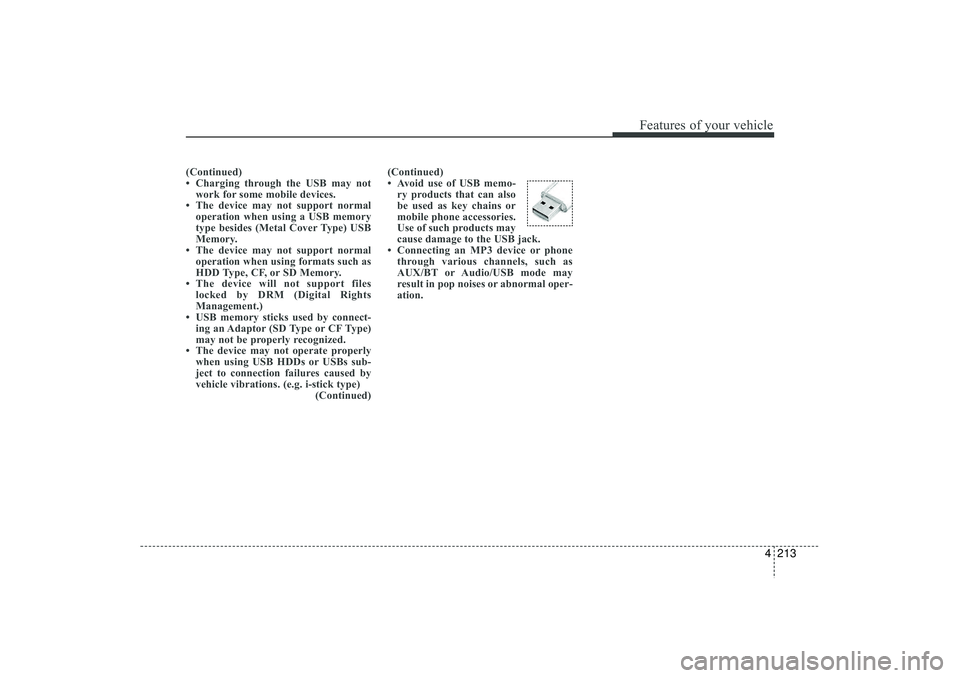
• Avoid use of USB memo-
ry products that can also
be used as key chains or
mobile phone accessories.
Use of such products may
cause damage to the USB jack.
• Connecting an MP3 device or phone through various channels, such as
AUX/BT or Audio/USB mode may
result in pop noises or abnormal oper-
ation.
EL(FL) UK 4B AUDIO.QXP 3/13/2015 4:19 PM Page 213
Page 299 of 550
Features of your vehicle214
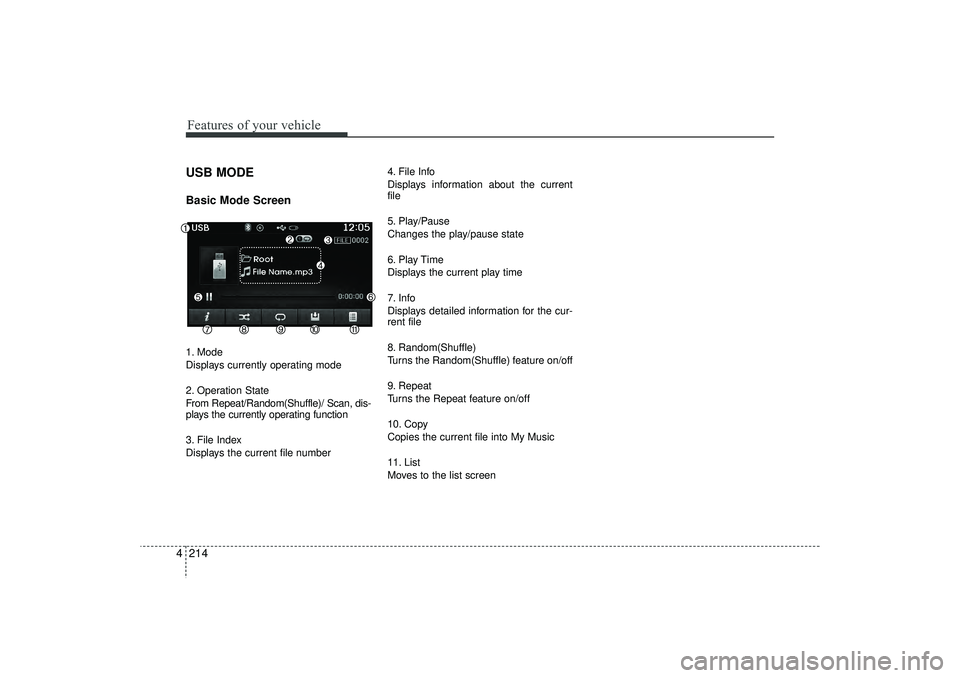
4USB MODE Basic Mode Screen1. Mode
Displays currently operating mode
2. Operation State
From Repeat/Random(Shuffle)/ Scan, dis-
plays the currently operating function
3. File Index
Displays the current file number 4. File Info
Displays information about the current
file
5. Play/Pause
Changes the play/pause state
6. Play Time
Displays the current play time
7. Info
Displays detailed information for the cur-
rent file
8. Random(Shuffle)
Turns the Random(Shuffle) feature on/off
9. Repeat
Turns the Repeat feature on/off
10. Copy
Copies the current file into My Music
11. List
Moves to the list screen
EL(FL) UK 4B AUDIO.QXP 3/13/2015 4:19 PM Page 214