2016 HYUNDAI IX35 ESP
[x] Cancel search: ESPPage 129 of 550
Features of your vehicle44
4Remote controlElectric type (if equipped)
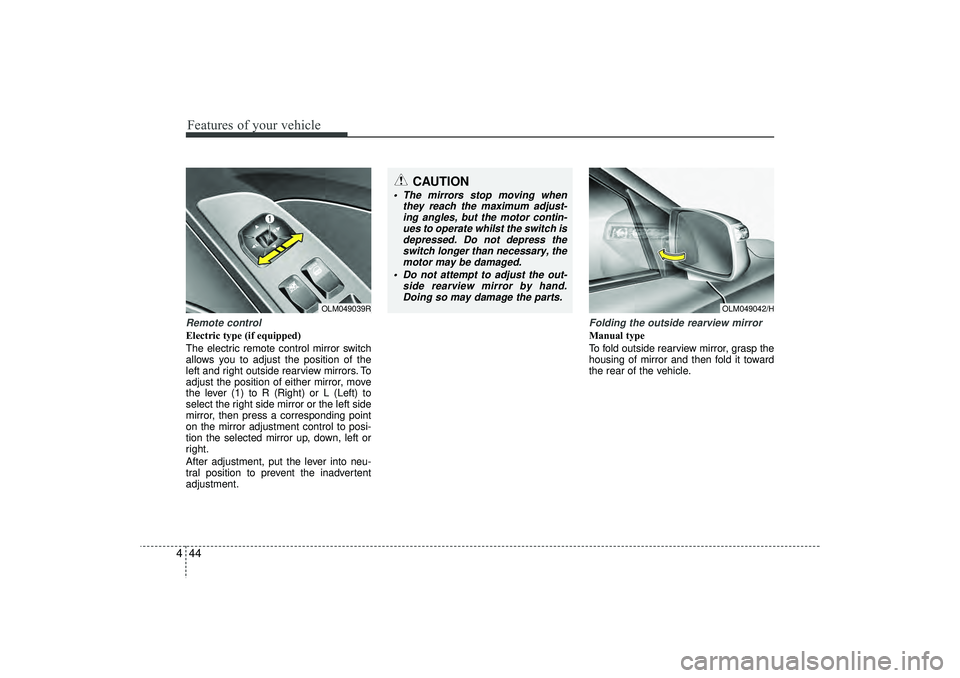
The electric remote control mirror switch
allows you to adjust the position of the
left and right outside rearview mirrors. To
adjust the position of either mirror, move
the lever (1) to R (Right) or L (Left) to
select the right side mirror or the left side
mirror, then press a corresponding point
on the mirror adjustment control to posi-
tion the selected mirror up, down, left or
right.
After adjustment, put the lever into neu-
tral position to prevent the inadvertent
adjustment.
Folding the outside rearview mirrorManual type
To fold outside rearview mirror, grasp the
housing of mirror and then fold it toward
the rear of the vehicle.
OLM049039R
CAUTION
The mirrors stop moving when
they reach the maximum adjust-ing angles, but the motor contin- ues to operate whilst the switch isdepressed. Do not depress theswitch longer than necessary, the motor may be damaged.
Do not attempt to adjust the out- side rearview mirror by hand.Doing so may damage the parts.
OLM049042/H
EL(FL) UK 4A.QXP 2/9/2015 9:04 PM Page 44
Page 166 of 550
481
Features of your vehicle
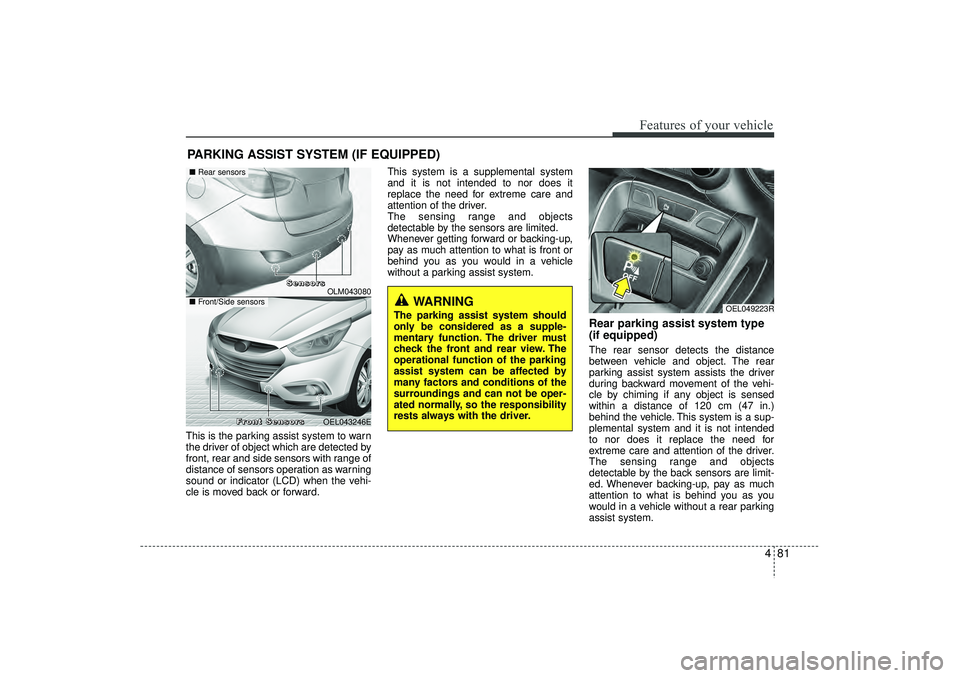
This is the parking assist system to warn
the driver of object which are detected by
front, rear and side sensors with range of
distance of sensors operation as warning
sound or indicator (LCD) when the vehi-
cle is moved back or forward.This system is a supplemental system
and it is not intended to nor does it
replace the need for extreme care and
attention of the driver.
The sensing range and objects
detectable by the sensors are limited.
Whenever getting forward or backing-up,
pay as much attention to what is front or
behind you as you would in a vehicle
without a parking assist system.
Rear parking assist system type
(if equipped)The rear sensor detects the distance
between vehicle and object. The rear
parking assist system assists the driver
during backward movement of the vehi-
cle by chiming if any object is sensed
within a distance of 120 cm (47 in.)
behind the vehicle. This system is a sup-
plemental system and it is not intended
to nor does it replace the need for
extreme care and attention of the driver.
The sensing range and objects
detectable by the back sensors are limit-
ed. Whenever backing-up, pay as much
attention to what is behind you as you
would in a vehicle without a rear parking
assist system.
PARKING ASSIST SYSTEM (IF EQUIPPED)
OEL049223R
WARNING
The parking assist system should
only be considered as a supple-
mentary function. The driver must
check the front and rear view. The
operational function of the parking
assist system can be affected by
many factors and conditions of the
surroundings and can not be oper-
ated normally, so the responsibility
rests always with the driver.
OLM043080OEL043246E
■
Rear sensors ■Front/Side sensors
S
S
S
S
e
e
e
e
n
n
n
n
s
s
s
s
o
o
o
o
r
r
r
r
s
s
s
s
F
F
F
F
r
r
r
r
o
o
o
o
n
n
n
n
t
t
t
t
S
S
S
S
e
e
e
e
n
n
n
n
s
s
s
s
o
o
o
o
r
r
r
r
s
s
s
s
EL(FL) UK 4A.QXP 2/9/2015 9:05 PM Page 81
Page 167 of 550
Features of your vehicle82
4
Operating condition This system will activate when backing
up with the ignition switch ON.
If the vehicle is moving at a speed over
10 km/h (6 mph), the system may not
be activated correctly.
This system will activate when the indi- cator on the rear parking assist OFF
button is not illuminated. If you desire
to deactivate the rear parking assist
system, press the rear parking assist
OFF button again. (The indicator on
the button will illuminate.) To turn the
system on, press the button again.
(The indicator on the button will go off.)
The sensing distance whilst the rear parking assist system is in operation is
approximately 120 cm (47 in.).
When more than two objects are sensed at the same time, the closest
one will be recognized first.
Types of warning sound When an object is 120 cm to 61 cm(47.2 in. to 24 in.) from the rear bumper:
Buzzer beeps intermittently.
When an object is 60 cm to 31 cm (23.6 in. to 12.2 in.) from the rear bumper:
Buzzer beeps more frequently.
When an object is within 30 cm (11.8 in.) of the rear bumper:
Buzzer sounds continuously.
WARNING
The rear parking assist system is a
supplementary function only. The
operation of the rear parking assist
system can be affected by several
factors (including environmental
conditions). It is the responsibility
of the driver to always check the
area behind the vehicle before and
whilst backing up.
EL(FL) UK 4A.QXP 2/9/2015 9:05 PM Page 82
Page 169 of 550
Features of your vehicle84
4✽
✽
NOTICEThis system can only sense objects with-
in the range and location of the sensors;
It can not detect objects in other areas
where sensors are not installed. Also,
small or slim objects, such as poles or
objects located between sensors may not
be detected by the sensors.
Always visually check behind the vehi-
cle when backing up.
Be sure to inform any drivers of the
vehicle that may be unfamiliar with the
system regarding the systems capabili-
ties and limitations.
Self-diagnosisIf you don’t hear an audible warning
sound or if the buzzer sounds intermit-
tently when shifting the gear to the R
(Reverse) position, this may indicate a
malfunction in the rear parking assist
system. If this occurs, we recommend
that the system be checked by a
HYUNDAI authorised repairer.
WARNING
Your new vehicle warranty does not
cover any accidents or damage to
the vehicle or injuries to its occu-
pants due to a rear parking assist
system malfunction. Always drive
safely and cautiously.
WARNING
Pay close attention when the vehi-
cle is driven close to objects on the
road, particularly pedestrians, and
especially children. Be aware that
some objects may not be detected
by the sensors, due to the object’s
distance, size or material, all of
which can limit the effectiveness of
the sensor. Always perform a visu-
al inspection to make sure the vehi-
cle is clear of all obstructions
before moving the vehicle in any
direction.
EL(FL) UK 4A.QXP 2/9/2015 9:05 PM Page 84
Page 171 of 550
Features of your vehicle86
4
Self-diagnosis When the front/rear parking assist sys-
tem has a malfunction, if you operate the
system, the warning sound sounds 3
times. In this time, the indicator on switch
will blink and the warning on the cluster
will blink. However, the warning regarding
object will not sound.
In this time, we recommend that the sys-
tem be checked by a HYUNDAI autho-
rised repairer.
WARNING
Pay close attention when the vehi-
cle is driven close to objects on the
road, particularly pedestrians, and
especially children. Be aware that
some objects may not be detected
by the sensors, due to the object's
distance, size or material, all of
which can limit the effectiveness of
the sensor. Always perform a visual
inspection to make sure the vehicle
is clear of all obstructions before
moving the vehicle in any direction.
CAUTION
This system can only sense
objects within the range and loca-tion of the sensors;
It can not detect objects in otherareas where sensors are notinstalled. Also, small or slimobjects, such as poles or objects located between sensors may notbe detected by the sensors.
Always visually check front orbehind the vehicle when gettingforward or backing up.
Be sure to inform any drivers of the vehicle that may be unfamiliarwith the system regarding thesystems capabilities and limita-tions.
WARNING
Your new vehicle warranty does not
cover any accidents or damage to
the vehicle or injuries to its occu-
pants related to a parking assist
system. Always drive safely and
cautiously.
EL(FL) UK 4A.QXP 2/9/2015 9:05 PM Page 86
Page 183 of 550
Features of your vehicle98
4
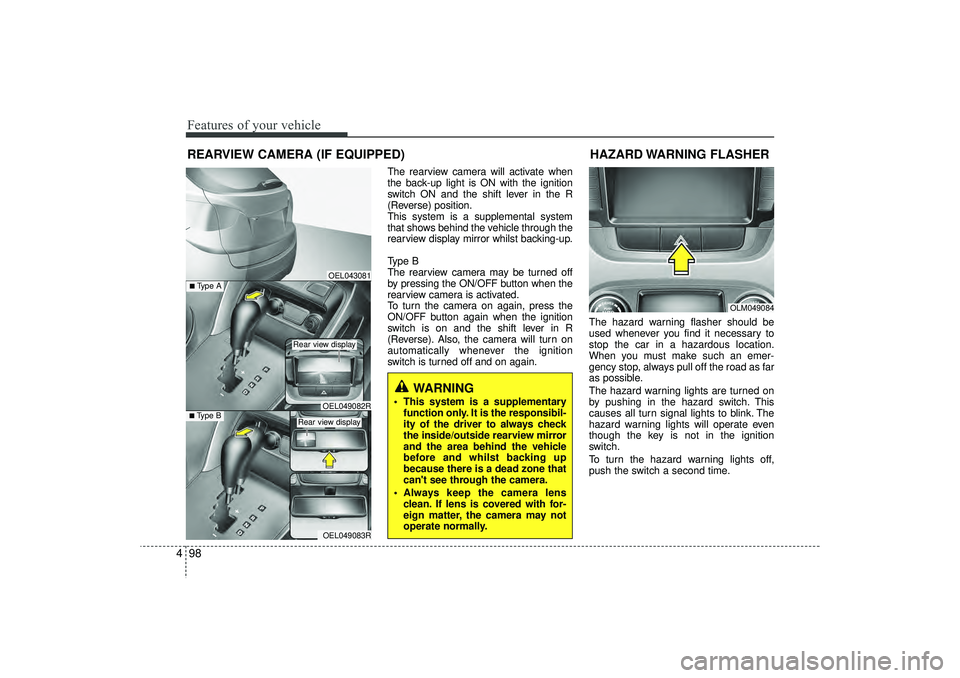
The rearview camera will activate when
the back-up light is ON with the ignition
switch ON and the shift lever in the R
(Reverse) position.
This system is a supplemental system
that shows behind the vehicle through the
rearview display mirror whilst backing-up.
Type B
The rearview camera may be turned off
by pressing the ON/OFF button when the
rearview camera is activated.
To turn the camera on again, press the
ON/OFF button again when the ignition
switch is on and the shift lever in R
(Reverse). Also, the camera will turn on
automatically whenever the ignition
switch is turned off and on again. The hazard warning flasher should be
used whenever you find it necessary to
stop the car in a hazardous location.
When you must make such an emer-
gency stop, always pull off the road as far
as possible.
The hazard warning lights are turned on
by pushing in the hazard switch. This
causes all turn signal lights to blink. The
hazard warning lights will operate even
though the key is not in the ignition
switch.
To turn the hazard warning lights off,
push the switch a second time.
REARVIEW CAMERA (IF EQUIPPED)
WARNING
This system is a supplementary
function only. It is the responsibil-
ity of the driver to always check
the inside/outside rearview mirror
and the area behind the vehicle
before and whilst backing up
because there is a dead zone that
can't see through the camera.
Always keep the camera lens clean. If lens is covered with for-
eign matter, the camera may not
operate normally.
OEL043081
OLM049084
HAZARD WARNING FLASHER
OEL049083R
■Type B
OEL049082R
■Type A
Rear view display Rear view display
EL(FL) UK 4A.QXP 2/9/2015 9:06 PM Page 98
Page 189 of 550

Features of your vehicle104
4Daytime running light
(if equipped)Daytime Running Lights (DRL) can make
it easier for others to see the front of your
vehicle during the day. DRL can be help-
ful in many different driving conditions,
and it is especially helpful after dawn and
before sunset.
The DRL system will make the head-
lights turn OFF when:
1. The parklight switch is ON.
2. Engine stops.
Headlight levelling device
(if equipped)To adjust the headlight beam level
according to the number of the passen-
gers and the loading weight in the lug-
gage area, turn the beam levelling switch.
The higher the number of the switch
position, the lower the headlight beam
level. Always keep the headlight beam at
the proper levelling position, or head-
lights may dazzle other road users. Listed below are the examples of proper
switch settings. For loading conditions
other than those listed below, adjust the
switch position so that the beam level
may be the nearest as the condition
obtained according to the list.
Loading condition Switch position
Driver only 0
Driver + Front passenger 0
Full passengers
(including driver) 1
Full passengers (including
driver) + Maximum permis-
sible loading 2
Driver + Maximum permis-
sible loading 3
OLM049211R
EL(FL) UK 4A.QXP 2/9/2015 9:06 PM Page 104
Page 217 of 550
Features of your vehicle132
43. Select the position.
4. The outside (fresh) air will be selected
automatically. If the position is
selected, air conditioning (if equipped)
will also be selected automatically.
If the air conditioning (if equipped) and/or
outside (fresh) air position are not select-
ed automatically, press the correspon-
ding button manually.
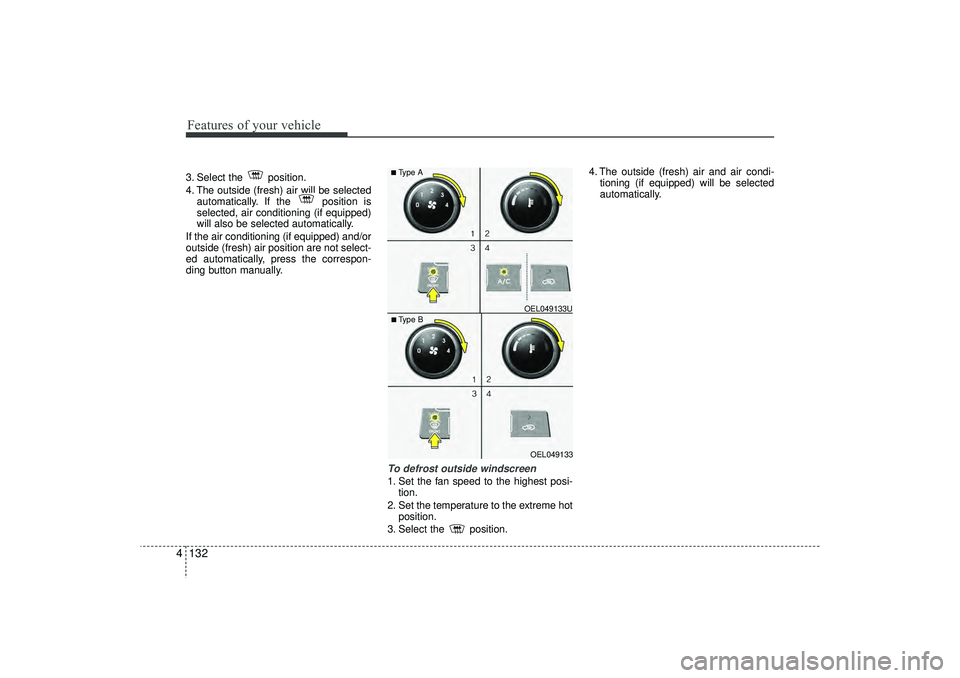
To defrost outside windscreen 1. Set the fan speed to the highest posi- tion.
2. Set the temperature to the extreme hot position.
3. Select the position. 4. The outside (fresh) air and air condi-
tioning (if equipped) will be selected
automatically.
OEL049133
■Type B OEL049133U■Type A
EL(FL) UK 4A.QXP 2/9/2015 9:08 PM Page 132