2016 HYUNDAI IX35 fuel type
[x] Cancel search: fuel typePage 149 of 550
Features of your vehicle64
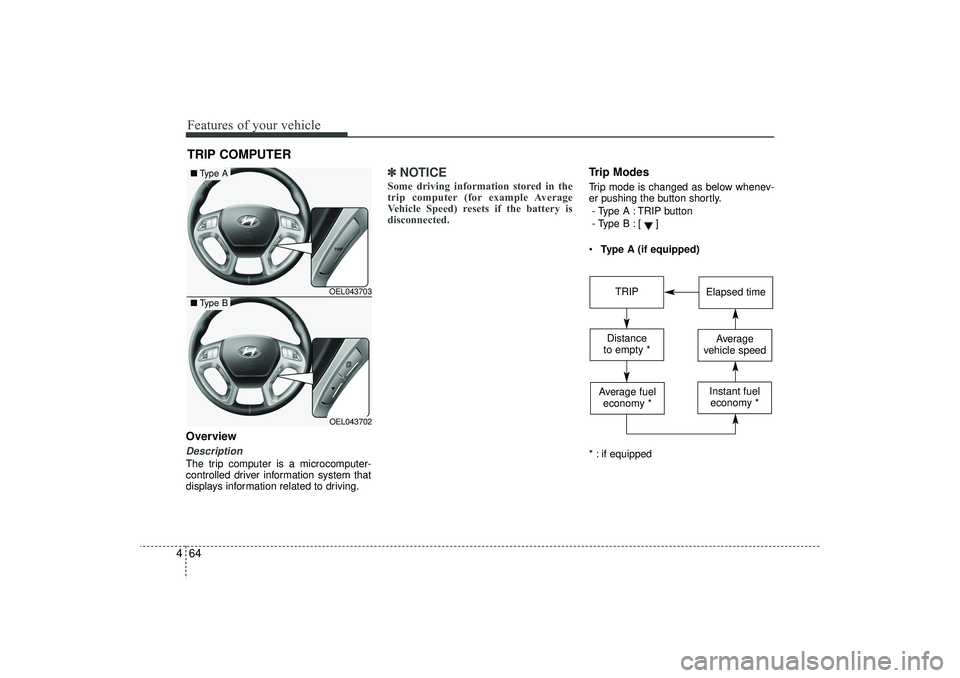
4OverviewDescriptionThe trip computer is a microcomputer-
controlled driver information system that
displays information related to driving.
✽ ✽
NOTICESome driving information stored in the
trip computer (for example Average
Vehicle Speed) resets if the battery is
disconnected.
Trip ModesTrip mode is changed as below whenev-
er pushing the button shortly.
- Type A : TRIP button
- Type B :
[]
Type A (if equipped)
* : if equipped
TRIP COMPUTER
OEL043703OEL043702
■ Type A■Type B
TRIP
Elapsed time
Distance
to empty *
Average
vehicle speed
Average fuel economy *
Instant fueleconomy *
EL(FL) UK 4A.QXP 2/9/2015 9:05 PM Page 64
Page 150 of 550
465
Features of your vehicle
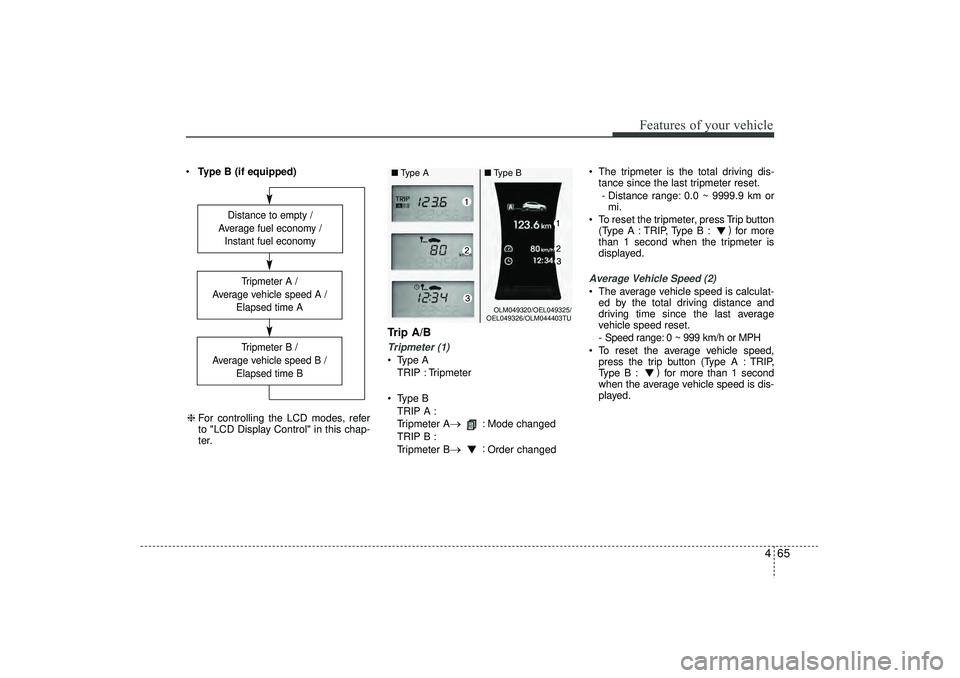
Type B (if equipped)
Trip A/BTripmeter (1) Type A
TRIP : Tripmeter
Type B TRIP A :
Tripmeter A
→
: Mode changed
TRIP B :
Tripmeter B
→
: Order changed The tripmeter is the total driving dis-
tance since the last tripmeter reset.
- Distance range: 0.0 ~ 9999.9 km or mi.
To reset the tripmeter, press Trip button (Type A : TRIP, Type B : )
for more
than 1 second when the tripmeter is
displayed.
Average Vehicle Speed (2) The average vehicle speed is calculat- ed by the total driving distance and
driving time since the last average
vehicle speed reset.
- Speed range: 0 ~ 999 km/h or MPH
To reset the average vehicle speed, press the trip button (Type A : TRIP,
Type B : )
for more than 1 second
when the average vehicle speed is dis-
played.
Distance to empty /
Average fuel economy / Instant fuel economy
Tripmeter B /
Average vehicle speed B / Elapsed time BTripmeter A /
Average vehicle speed A / Elapsed time A
❈For controlling the LCD modes, refer
to "LCD Display Control" in this chap-
ter.
OLM049320/OEL049325/
OEL049326/OLM044403TU
■ Type A ■Type B
EL(FL) UK 4A.QXP 2/9/2015 9:05 PM Page 65
Page 151 of 550
Features of your vehicle66
4✽
✽
NOTICE• The average vehicle speed is not dis-
played if the driving distance is less
than 300 meters (0.186 miles) or the
driving time is less than 10 seconds
since the ignition switch or Engine
Start/Stop button is turned to ON.
• Even if the vehicle is not in motion, the average vehicle speed keeps going
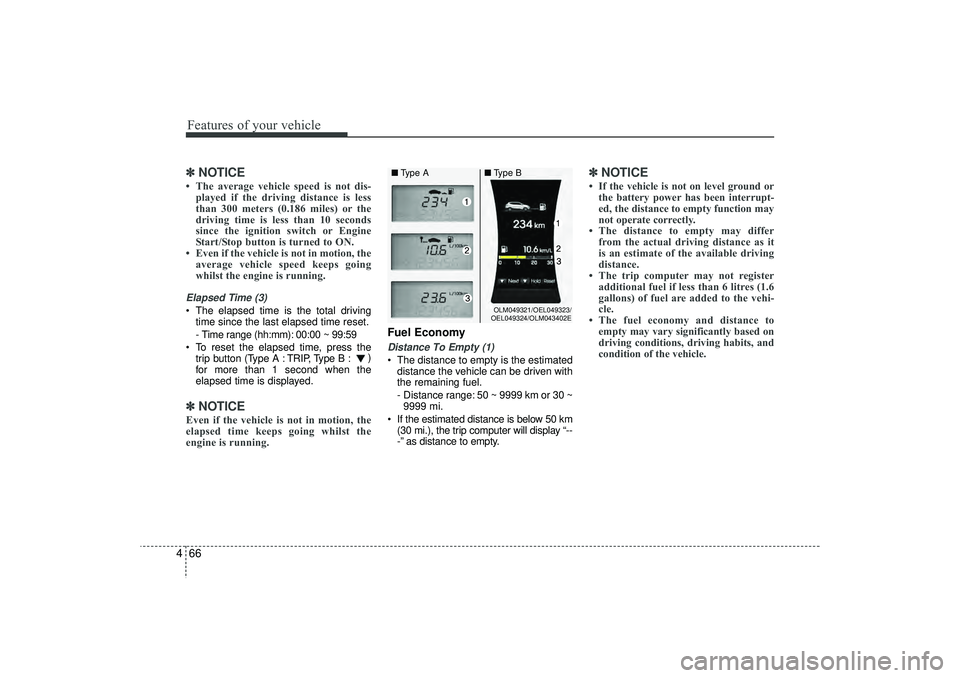
whilst the engine is running.Elapsed Time (3) The elapsed time is the total driving
time since the last elapsed time reset.
- Time range (hh:mm): 00:00 ~ 99:59
To reset the elapsed time, press the trip button (Type A : TRIP, Type B : )
for more than 1 second when the
elapsed time is displayed.✽ ✽ NOTICEEven if the vehicle is not in motion, the
elapsed time keeps going whilst the
engine is running.
Fuel EconomyDistance To Empty (1) The distance to empty is the estimated
distance the vehicle can be driven with
the remaining fuel.
- Distance range: 50 ~ 9999 km or 30 ~9999 mi.
If the estimated distance is below 50 km (30 mi.), the trip computer will display “--
-” as distance to empty.
✽ ✽ NOTICE• If the vehicle is not on level ground or
the battery power has been interrupt-
ed, the distance to empty function may
not operate correctly.
• The distance to empty may differ from the actual driving distance as it
is an estimate of the available driving
distance.
• The trip computer may not register additional fuel if less than 6 litres (1.6
gallons) of fuel are added to the vehi-
cle.
• The fuel economy and distance to empty may vary significantly based on
driving conditions, driving habits, and
condition of the vehicle.
OLM049321/OEL049323/
OEL049324/OLM043402E
■ Type A ■Type B
EL(FL) UK 4A.QXP 2/9/2015 9:05 PM Page 66
Page 152 of 550
467
Features of your vehicle
Average Fuel Economy (2) The average fuel economy is calculat-ed by the total driving distance and fuel
consumption since the last average fuel
economy reset.
- Fuel economy range: 0.0 ~ 99.9L/100km or MPG
The average fuel economy can be reset both manually and automatically.
Manual reset
To clear the average fuel economy manu-
ally, press the trip b utton (Type A : TRIP,
Type B : )
for more than 1 second
when the average fuel economy is dis-
played. Automatic reset
The average fuel economy will be
cleared to zero (---) when the vehicle
speed exceeds 1 km/h after refuelling
more than 6 litres (1.6 gallons).
✽ ✽
NOTICEThe average fuel economy is not dis-
played for more accurate calculation if
the vehicle does not drive more than 10
seconds or 50 meters (0.03 miles) since
the ignition switch or Engine Start/Stop
button is turned to ON.
Instant Fuel Economy (3) This mode displays the instant fuel
economy during the last few seconds
when the vehicle speed is more than
10 km/h (6.2 MPH).
- Fuel economy range:
Type A : 0 ~ 99.9 L/100 km or MPG
Type B : 0 ~ 30 L/100 km or 0 ~ 50
MPG
EL(FL) UK 4A.QXP 2/9/2015 9:05 PM Page 67
Page 363 of 550
515
Driving your vehicle
ISG (IDLE STOP AND GO) SYSTEM (IF EQUIPPED)Your vehicle may be equipped with the
ISG system, which reduces fuel con-
sumption by automatically shutting down
the engine, when the vehicle is at a
standstill. (For example : red light, stop
sign and traffic jam)
The engine starts automatically as soon
as the starting conditions are met.
The ISG system is ON whenever the
engine is running.✽ ✽NOTICE When the engine automatically starts by
the ISG system, some warning lights
(ABS, ESC, ESC OFF, EPS or Parking
brake warning light) may turn on for a
few seconds.
This happens because of low battery
voltage. It does not mean the system is
malfunctioning.
Auto stopTo stop the engine in idle stop mode1. Decrease the vehicle speed to less
than 5 km/h.
2. Shift into N (Neutral) position.
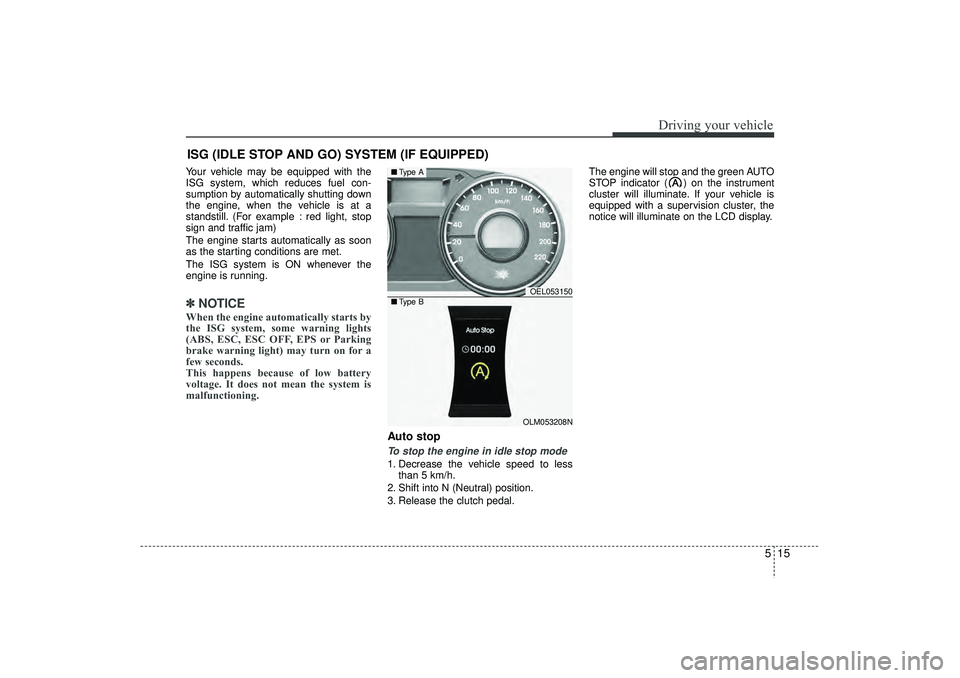
3. Release the clutch pedal. The engine will stop and the green AUTO
STOP indicator ( ) on the instrument
cluster will illuminate. If your vehicle is
equipped with a supervision cluster, the
notice will illuminate on the LCD display.
OEL053150OLM053208N
■
Type A■Type B
EL(FL) UK 5.QXP 12/16/2014 8:08 PM Page 15
Page 413 of 550
565
Driving your vehicle
If you are considering towing with your
vehicle, you should first check with your
Local Laws to determine their legal
requirements.
Since laws vary the requirements for tow-
ing trailers, cars, or other types of vehi-
cles or apparatus may differ. We recom-
mend that you ask a HYUNDAI autho-
rised repairer.
✽ ✽NOTICE -
For Europe
• The technically permissible maximum
load on the rear axle(s) may be
exceeded by not more than 15 % and
the technically permissible maximum
laden mass of the vehicle may be
exceeded by not more than 10 % or
220.4 lbs (100 kg), whichever value is
lower. In this case, do not exceed 62.1
mph (100 km/h) for vehicle of catego-
ry M1 or 49.7 mph (80 km/h) for vehi-
cle of category N1.
• When a vehicle of category M1 is tow- ing a trailer, the additional load
imposed at the trailer coupling device
may cause the tyre maximum load
ratings to be exceeded, but not by
more than 15 %. In this case, do not
exceed 100 km/h (62.1 mph) and
increase the tyre inflation pressure by
at least 0.2 bar.
Your vehicle can tow a trailer. To identify
what the vehicle trailering capacity is for
your vehicle, you should read the infor-
mation in “Weight of the trailer” that
appears later in this section.
Remember that trailering is different than
just driving your vehicle by itself.
Trailering means changes in handling,
durability, and fuel economy. Successful,
safe trailering requires correct equip-
ment, and it has to be used properly.
This section contains many time-tested,
important trailering tips and safety rules.
Many of these are important for your
safety and that of your passengers.
Please read this section carefully before
you pull a trailer.
Load-pulling components such as the
engine, transaxle, wheel assemblies, and
tyres are forced to work harder against
the load of the added weight. The engine
is required to operate at relatively higher
speeds and under greater loads. This
additional burden generates extra heat.
The trailer also adds considerably to
wind resistance, increasing the pulling
requirements.
TRAILER TOWING
CAUTION
Pulling a trailer improperly can
damage your vehicle and result in costly repairs not covered by yourwarranty. To pull a trailer correctly, follow the advice in this section.
WARNING
- Towing a trail- er
If you don't use the correct equip-
ment and/or drive improperly, you
can lose control when you pull a
trailer. For example, if the trailer is
too heavy, the brakes may not work
well - or even at all. You and your
passengers could be seriously or
fatally injured. Pull a trailer only if
you have followed all the steps in
this section.
WARNING
- Weight limits
Before towing, make sure the total
trailer weight, GCW (gross combi-
nation weight), GVW (gross vehicle
weight), GAW (gross axle weight )
and trailer nose weight are all with-
in the limits.
EL(FL) UK 5.QXP 12/16/2014 8:10 PM Page 65
Page 430 of 550
What to do in an emergency86TYRE PRESSURE MONITORING SYSTEM (TPMS, IF EQUIPPED) (TYPE A)Low tyre pressure telltale /
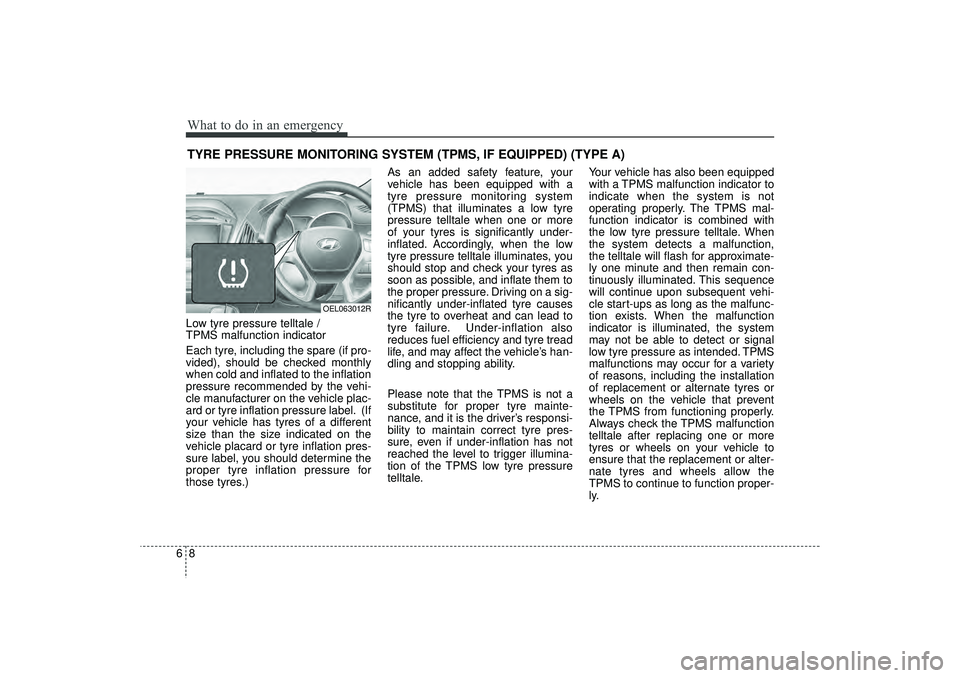
TPMS malfunction indicator
Each tyre, including the spare (if pro-
vided), should be checked monthly
when cold and inflated to the inflation
pressure recommended by the vehi-
cle manufacturer on the vehicle plac-
ard or tyre inflation pressure label. (If
your vehicle has tyres of a different
size than the size indicated on the
vehicle placard or tyre inflation pres-
sure label, you should determine the
proper tyre inflation pressure for
those tyres.)As an added safety feature, your
vehicle has been equipped with a
tyre pressure monitoring system
(TPMS) that illuminates a low tyre
pressure telltale when one or more
of your tyres is significantly under-
inflated. Accordingly, when the low
tyre pressure telltale illuminates, you
should stop and check your tyres as
soon as possible, and inflate them to
the proper pressure. Driving on a sig-
nificantly under-inflated tyre causes
the tyre to overheat and can lead to
tyre failure. Under-inflation also
reduces fuel efficiency and tyre tread
life, and may affect the vehicle’s han-
dling and stopping ability.
Please note that the TPMS is not a
substitute for proper tyre mainte-
nance, and it is the driver’s responsi-
bility to maintain correct tyre pres-
sure, even if under-inflation has not
reached the level to trigger illumina-
tion of the TPMS low tyre pressure
telltale.
Your vehicle has also been equipped
with a TPMS malfunction indicator to
indicate when the system is not
operating properly. The TPMS mal-
function indicator is combined with
the low tyre pressure telltale. When
the system detects a malfunction,
the telltale will flash for approximate-
ly one minute and then remain con-
tinuously illuminated. This sequence
will continue upon subsequent vehi-
cle start-ups as long as the malfunc-
tion exists. When the malfunction
indicator is illuminated, the system
may not be able to detect or signal
low tyre pressure as intended. TPMS
malfunctions may occur for a variety
of reasons, including the installation
of replacement or alternate tyres or
wheels on the vehicle that prevent
the TPMS from functioning properly.
Always check the TPMS malfunction
telltale after replacing one or more
tyres or wheels on your vehicle to
ensure that the replacement or alter-
nate tyres and wheels allow the
TPMS to continue to function proper-
ly.
OEL063012R
EL(FL) UK 6.QXP 12/16/2014 8:12 PM Page 8
Page 435 of 550
613
What to do in an emergency
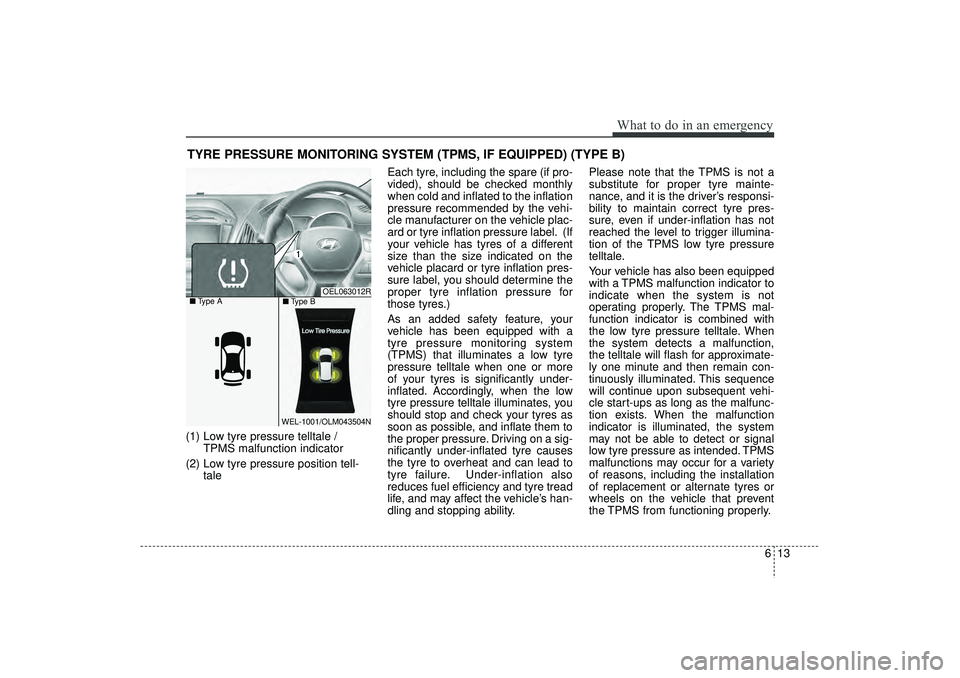
TYRE PRESSURE MONITORING SYSTEM (TPMS, IF EQUIPPED) (TYPE B)(1) Low tyre pressure telltale / TPMS malfunction indicator
(2) Low tyre pressure position tell- tale Each tyre, including the spare (if pro-
vided), should be checked monthly
when cold and inflated to the inflation
pressure recommended by the vehi-
cle manufacturer on the vehicle plac-
ard or tyre inflation pressure label. (If
your vehicle has tyres of a different
size than the size indicated on the
vehicle placard or tyre inflation pres-
sure label, you should determine the
proper tyre inflation pressure for
those tyres.)
As an added safety feature, your
vehicle has been equipped with a
tyre pressure monitoring system
(TPMS) that illuminates a low tyre
pressure telltale when one or more
of your tyres is significantly under-
inflated. Accordingly, when the low
tyre pressure telltale illuminates, you
should stop and check your tyres as
soon as possible, and inflate them to
the proper pressure. Driving on a sig-
nificantly under-inflated tyre causes
the tyre to overheat and can lead to
tyre failure. Under-inflation also
reduces fuel efficiency and tyre tread
life, and may affect the vehicle’s han-
dling and stopping ability. Please note that the TPMS is not a
substitute for proper tyre mainte-
nance, and it is the driver’s responsi-
bility to maintain correct tyre pres-
sure, even if under-inflation has not
reached the level to trigger illumina-
tion of the TPMS low tyre pressure
telltale.
Your vehicle has also been equipped
with a TPMS malfunction indicator to
indicate when the system is not
operating properly. The TPMS mal-
function indicator is combined with
the low tyre pressure telltale. When
the system detects a malfunction,
the telltale will flash for approximate-
ly one minute and then remain con-
tinuously illuminated. This sequence
will continue upon subsequent vehi-
cle start-ups as long as the malfunc-
tion exists. When the malfunction
indicator is illuminated, the system
may not be able to detect or signal
low tyre pressure as intended. TPMS
malfunctions may occur for a variety
of reasons, including the installation
of replacement or alternate tyres or
wheels on the vehicle that prevent
the TPMS from functioning properly.
OEL063012R
WEL-1001/OLM043504N
■
Type A
■Type B
EL(FL) UK 6.QXP 12/16/2014 8:12 PM Page 13