2016 HYUNDAI IX35 lock
[x] Cancel search: lockPage 370 of 550
Driving your vehicle22
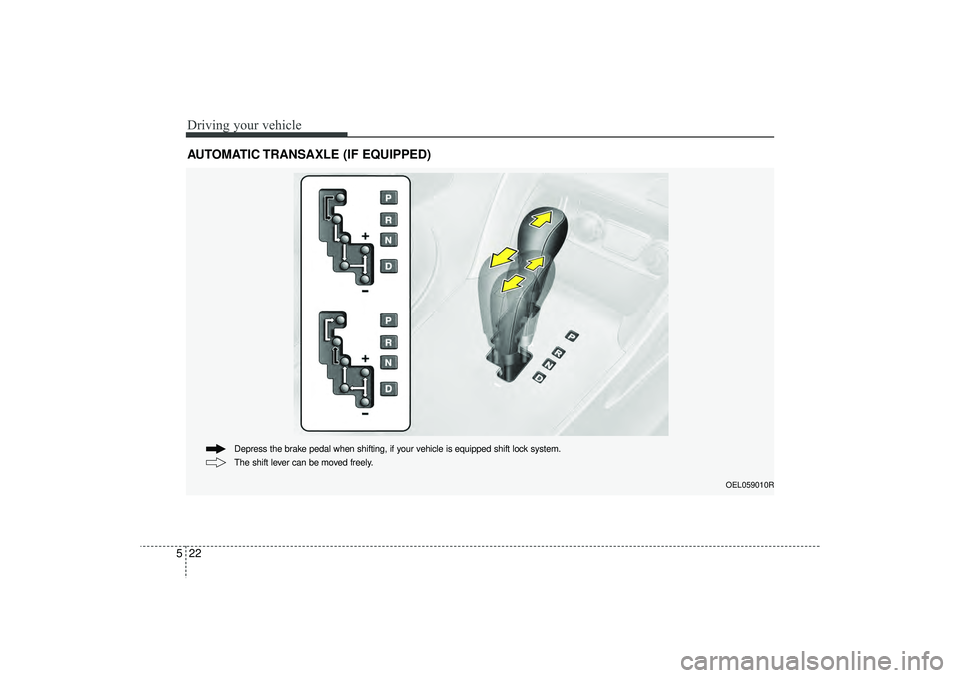
5AUTOMATIC TRANSAXLE (IF EQUIPPED)
OEL059010R
The shift lever can be moved freely. Depress the brake pedal when shifting, if your vehicle is equipped shift lock system.
EL(FL) UK 5.QXP 12/16/2014 8:09 PM Page 22
Page 371 of 550
523
Driving your vehicle
Automatic transaxle operationThe highly efficient automatic transaxle
has 6 forward speeds and one reverse
speed. The individual speeds are select-
ed automatically, depending on the posi-
tion of the shift lever.✽ ✽NOTICEThe first few shifts on a new vehicle, if
the battery has been disconnected, may
be somewhat abrupt. This is a normal
condition, and the shifting sequence will
adjust after shifts are cycled a few times
by the TCM (Transaxle Control
Module) or PCM (Powertrain Control
Module).
For smooth operation, depress the brake
pedal when shifting from N (Neutral) to a forward or reverse gear.
Transaxle ranges
The indicator lights in the instrument
cluster displays the shift lever position
when the ignition switch is in the ON
position.
P (Park)
Always come to a complete stop before
shifting into P (Park). This position locks
the transaxle and prevents the front
wheels from rotating.
WARNING
- Automatictransaxle
Always check the surrounding
areas near your vehicle for peo-
ple, especially children, before
shifting a vehicle into D (Drive) or
R (Reverse).
Before leaving the driver’s seat, always make sure the shift lever
is in the P (Park) position; then
set the parking brake fully and
shut the engine off. Unexpected
and sudden vehicle movement
can occur if these precautions
are not followed in the order iden-
tified.
Do not use the engine brake (shifting from a high gear to
lower gear) rapidly on slippery
roads. The vehicle may slip caus-
ing an accident.
CAUTION
To avoid damage to your transaxle, do not accelerate theengine in R (Reverse) or any for- ward gear position with thebrakes on.
When stopped on an upgrade, do not hold the vehicle stationarywith engine power. Use the serv-ice brake or the parking brake.
Do not shift from N (Neutral) or P (Park) into D (Drive), or R(Reverse) when the engine is above idle speed.
EL(FL) UK 5.QXP 12/16/2014 8:09 PM Page 23
Page 372 of 550
Driving your vehicle24
5
R (Reverse)
Use this position to drive the vehicle
backward.
N (Neutral)
The wheels and transaxle are not
engaged. The vehicle will roll freely even
on the slightest incline unless the parking
brake or service brakes are applied. D (Drive)
This is the normal forward driving posi-
tion. The transaxle will automatically shift
through a 6-gear sequence, providing the
best fuel economy and power.
For extra power when passing another
vehicle or climbing grades, depress the
accelerator fully, at which time the
transaxle will automatically downshift to
the next lower gear.
✽ ✽
NOTICEAlways come to a complete stop before
shifting into D (Drive).
WARNING
Shifting into P (Park) whilst the
vehicle is in motion will cause the
drive wheels to lock which will
cause you to lose control of the
vehicle.
Do not use the P (Park) position in place of the parking brake.
Always make sure the shift lever
is latched in the P (Park) position
and set the parking brake fully.
Never leave a child unattended in a vehicle.
CAUTION
The transaxle may be damaged ifyou shift into P (Park) whilst thevehicle is in motion.
CAUTION
Always come to a complete stop before shifting into or out of R(Reverse); you may damage the transaxle if you shift into R(Reverse) whilst the vehicle is inmotion, except as explained in “Rocking the vehicle”, in this manu-al.
WARNING
Do not drive with the shift lever in N
(Neutral).
The engine brake will not work and
lead to an accident.
EL(FL) UK 5.QXP 12/16/2014 8:09 PM Page 24
Page 373 of 550
525
Driving your vehicle
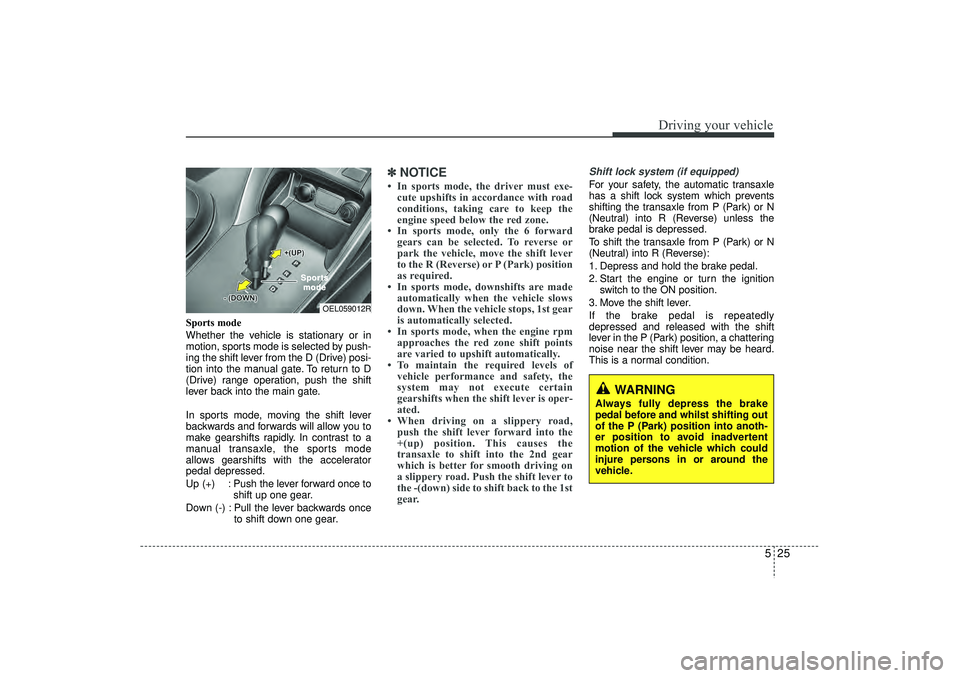
Sports mode
Whether the vehicle is stationary or in
motion, sports mode is selected by push-
ing the shift lever from the D (Drive) posi-
tion into the manual gate. To return to D
(Drive) range operation, push the shift
lever back into the main gate.
In sports mode, moving the shift lever
backwards and forwards will allow you to
make gearshifts rapidly. In contrast to a
manual transaxle, the sports mode
allows gearshifts with the accelerator
pedal depressed.
Up (+) : Push the lever forward once toshift up one gear.
Down (-) : Pull the lever backwards once to shift down one gear.
✽ ✽NOTICE• In sports mode, the driver must exe-
cute upshifts in accordance with road
conditions, taking care to keep the
engine speed below the red zone.
• In sports mode, only the 6 forward gears can be selected. To reverse or
park the vehicle, move the shift lever
to the R (Reverse) or P (Park) position
as required.
• In sports mode, downshifts are made automatically when the vehicle slows
down. When the vehicle stops, 1st gear
is automatically selected.
• In sports mode, when the engine rpm approaches the red zone shift points
are varied to upshift automatically.
• To maintain the required levels of vehicle performance and safety, the
system may not execute certain
gearshifts when the shift lever is oper-
ated.
• When driving on a slippery road, push the shift lever forward into the
+(up) position. This causes the
transaxle to shift into the 2nd gear
which is better for smooth driving on
a slippery road. Push the shift lever to
the -(down) side to shift back to the 1st
gear.
Shift lock system (if equipped)For your safety, the automatic transaxle
has a shift lock system which prevents
shifting the transaxle from P (Park) or N
(Neutral) into R (Reverse) unless the
brake pedal is depressed.
To shift the transaxle from P (Park) or N
(Neutral) into R (Reverse):
1. Depress and hold the brake pedal.
2. Start the engine or turn the ignition
switch to the ON position.
3. Move the shift lever.
If the brake pedal is repeatedly
depressed and released with the shift
lever in the P (Park) position, a chattering
noise near the shift lever may be heard.
This is a normal condition.
OEL059012R
Spor
Spor
ts
ts
mode
mode
WARNING
Always fully depress the brake
pedal before and whilst shifting out
of the P (Park) position into anoth-
er position to avoid inadvertent
motion of the vehicle which could
injure persons in or around the
vehicle.
EL(FL) UK 5.QXP 12/16/2014 8:09 PM Page 25
Page 374 of 550
Driving your vehicle26
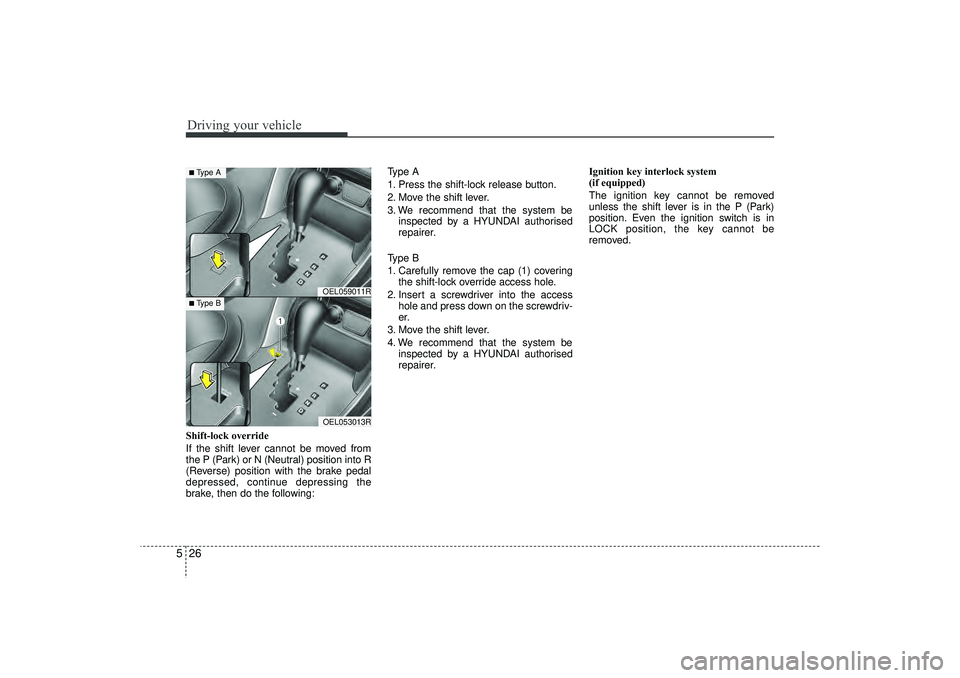
5Shift-lock override
If the shift lever cannot be moved from
the P (Park) or N (Neutral) position into R
(Reverse) position with the brake pedal
depressed, continue depressing the
brake, then do the following: Type A
1. Press the shift-lock release button.
2. Move the shift lever.
3. We recommend that the system be
inspected by a HYUNDAI authorised
repairer.
Type B
1. Carefully remove the cap (1) covering the shift-lock override access hole.
2. Insert a screwdriver into the access hole and press down on the screwdriv-
er.
3. Move the shift lever.
4. We recommend that the system be inspected by a HYUNDAI authorised
repairer. Ignition key interlock system
(if equipped)
The ignition key cannot be removed
unless the shift lever is in the P (Park)
position. Even the ignition switch is in
LOCK position, the key cannot be
removed.
OEL059011ROEL053013R
■Type A■Type B
EL(FL) UK 5.QXP 12/16/2014 8:09 PM Page 26
Page 377 of 550

529
Driving your vehicle
This mode is used for climbing or descending sharp grades,off-road driving, driving on sandy and muddy roads, etc., to
maximize traction.
This mode automatically begins to deactivate at speeds above 19 mph (30 km/h) and is shifted to 4WD AUTO mode
at speed above 25 mph (40 km/h). If the vehicle decelerates
to speeds below 19 mph (30 km/h), however, the transfer
mode is shifted into 4WD LOCK mode again.
4WD AUTO
(4WD LOCK is deactivated)
(Indicator light isnot illuminated)
✽ ✽ NOTICE• When driving on normal roads, deactivate the 4WD LOCK mode by pushing the 4WD LOCK button (the \
indicator light goes
off). Driving on normal roads with 4WD LOCK mode(especially, when cornering) may cause mechanical noise or vibration.
The noise and vibration will disappear when the 4WD LOCK mode is deactivated. Some parts of the power train may be dam-
aged by prolonged driving with the noise and vibration.
• When the 4WD LOCK mode is deactivated, a shock may be felt as the drive \
power is delivered entirely to the front wheels. This shock is not a mechanical failure.Four Wheel Drive (4WD) transfer mode selectionTransfer mode Selection button Indicator light Description
When driving in 4WD AUTO mode, the vehicle operates sim-
ilar to conventional 2WD vehicles under normal operating
conditions. However, if the system determines that there is a
need for the 4WD mode, the engine’s driving power is dis-
tributed to all four wheels automatically without driver inter-
vention.
When driving on normal roads and pavement, the vehicle moves similar to conventional 2WD vehicles.
4WD LOCK
(Indicator light is illuminated)
EL(FL) UK 5.QXP 12/16/2014 8:09 PM Page 29
Page 379 of 550
531
Driving your vehicle
You must consciously take the effort tolearn how to corner in a 4WD vehicle.
Do not rely on your experience in con-
ventional 2WD vehicles in choosing
safe cornering speed in 4WD mode.
For drivers with little or no experience
of driving a 4WD, you must drive more
slowly in 4WD.
Drive carefully off-road because your vehicle may be damaged by rocks or
roots of trees. Become familiar with the
off-road conditions where you are
going to drive before you begin driving.
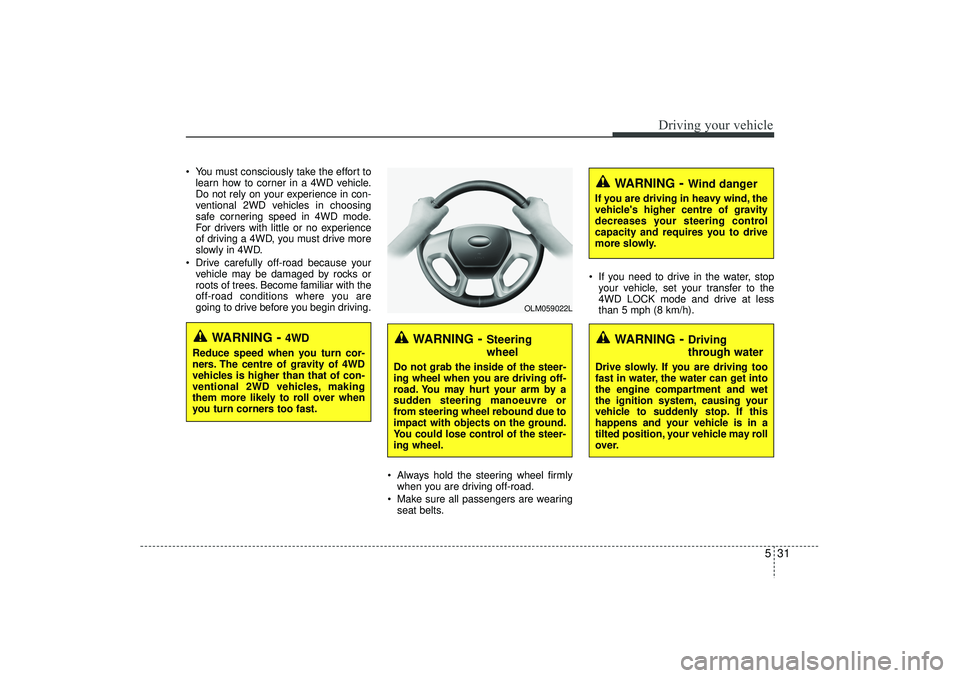
Always hold the steering wheel firmlywhen you are driving off-road.
Make sure all passengers are wearing seat belts. If you need to drive in the water, stop
your vehicle, set your transfer to the
4WD LOCK mode and drive at less
than 5 mph (8 km/h).
WARNING
- Steering
wheel
Do not grab the inside of the steer-
ing wheel when you are driving off-
road. You may hurt your arm by a
sudden steering manoeuvre or
from steering wheel rebound due to
impact with objects on the ground.
You could lose control of the steer-
ing wheel.
WARNING
- Wind danger
If you are driving in heavy wind, the
vehicle's higher centre of gravity
decreases your steering control
capacity and requires you to drive
more slowly.
WARNING
- Driving
through water
Drive slowly. If you are driving too
fast in water, the water can get into
the engine compartment and wet
the ignition system, causing your
vehicle to suddenly stop. If this
happens and your vehicle is in a
tilted position, your vehicle may roll
over.
OLM059022L
WARNING
- 4WD
Reduce speed when you turn cor-
ners. The centre of gravity of 4WD
vehicles is higher than that of con-
ventional 2WD vehicles, making
them more likely to roll over when
you turn corners too fast.
EL(FL) UK 5.QXP 12/16/2014 8:09 PM Page 31
Page 386 of 550
Driving your vehicle38
5Anti-lock brake system (ABS)
The ABS continuously senses the speed
of the wheels. If the wheels are going to
lock, the ABS system repeatedly modu-
lates the hydraulic brake pressure to the
wheels.
When you apply your brakes under con-
ditions which may lock the wheels, you
may hear a “tik-tik’’ sound from the
brakes, or feel a corresponding sensation
in the brake pedal. This is normal and it
means your ABS is active.
In order to obtain the maximum benefit
from your ABS in an emergency situa-
tion, do not attempt to modulate your
brake pressure and do not try to pump
your brakes. Press your brake pedal as
hard as possible or as hard as the situa-
tion warrants and allow the ABS to con-
trol the force being delivered to the
brakes.
WARNING
ABS (or ESC) will not prevent acci-
dents due to improper or danger-
ous driving manoeuvres. Even
though vehicle control is improved
during emergency braking, always
maintain a safe distance between
you and objects ahead. Vehicle
speeds should always be reduced
during extreme road conditions.
The braking distance for vehicle
equipped with an anti-lock braking
system (Electronic Stability Control
System) may be longer than for
those without it in the following
road conditions.
During these conditions the vehicle
should be driven at reduced
speeds:
Rough, gravel or snow-covered
roads.
With tyre chains installed.
On roads where the road surface is pitted or has different surface
height.
(Continued)
(Continued)
The safety features of an ABS (or
ESC) equipped vehicle should not
be tested by high speed driving or
cornering. This could endanger the
safety of yourself or others.
EL(FL) UK 5.QXP 12/16/2014 8:09 PM Page 38