Page 314 of 550
4 229
Features of your vehicle
✽
✽NOTICE - USING THE
Bluetooth
®Wireless
Technology Audio Mode
• Bluetooth
®Wireless Technology Audio
Mode can be used only when a
Bluetooth®Wireless Technology phone
has been connected.
• Bluetooth®Wireless Technology Audio
Mode will not be available when con-
necting mobile phones that do not
support this feature.
• Whilst Bluetooth
®
Wireless
Technology Audio is playing, if the
Bluetooth
®Wireless Technology phone
is connected, then the music will also
stop.
• Moving the Track up/down whilst playing Bluetooth
®
Wireless
Technology audio mode may result in
pop noises in some mobile phones.
• Bluetooth
®
Wireless Technology
streaming audio may not be support-
ed in some mobile phones. (Continued)(Continued)
• When returning to Bluetooth
®
Wireless Technology Audio mode
after ending a call, the mode may not
automatically restart in some mobile
phones.
• Receiving an incoming call or making an outgoing call whilst playing
Bluetooth
®Wireless Technology Audio
may result in audio interference.
EL(FL) UK 4B AUDIO.QXP 3/13/2015 4:19 PM Page 229
Page 315 of 550
Features of your vehicle230
4Bluetooth
®Wireless
Technology AUDIO MODE
Using
Bluetooth
®Wireless
Technology Audio Mode
Playing/Pausing Bluetooth
®Wireless
Technology
Audio
Once a
Bluetooth
®Wireless Technology
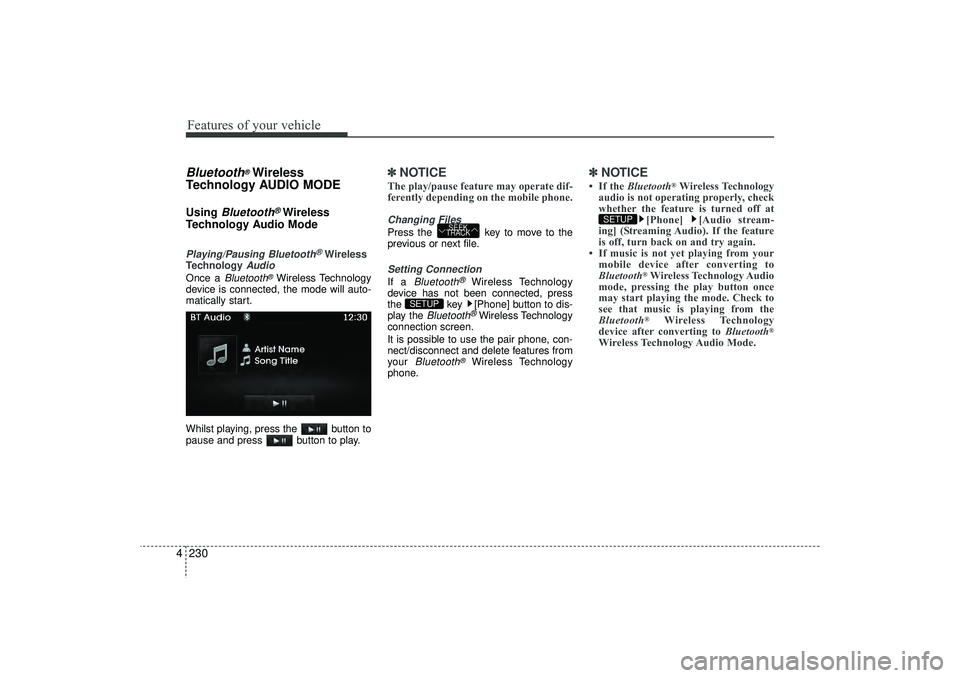
device is connected, the mode will auto-
matically start.
Whilst playing, press the button to
pause and press button to play.
✽ ✽ NOTICE The play/pause feature may operate dif-
ferently depending on the mobile phone.Changing FilesPress the key to move to the
previous or next file.Setting ConnectionIf a
Bluetooth
®
Wireless Technology
device has not been connected, press
the key [Phone] button to dis-
play the
Bluetooth
®Wireless Technology
connection screen.
It is possible to use the pair phone, con-
nect/disconnect and delete features from
your
Bluetooth
®
Wireless Technology
phone.
✽ ✽ NOTICE • If the Bluetooth
®Wireless Technology
audio is not operating properly, check
whether the feature is turned off at [Phone] [Audio stream-
ing] (Streaming Audio). If the feature
is off, turn back on and try again.
• If music is not yet playing from your mobile device after converting to
Bluetooth
®Wireless Technology Audio
mode, pressing the play button once
may start playing the mode. Check to
see that music is playing from the
Bluetooth®
Wireless Technology
device after converting to Bluetooth
®
Wireless Technology Audio Mode.SETUP
SETUP
SEEK
TRACK
EL(FL) UK 4B AUDIO.QXP 3/13/2015 4:19 PM Page 230
Page 316 of 550
4 231
Features of your vehicle
Bluetooth
®Wireless Technology
Using
Bluetooth
®Wireless
Technology Handsfree
Bluetooth
®Wireless Technology refers to
a short-distance wireless networking
technology which uses a 2.4GHz ~
2.48GHz frequency to connect various
devices within a certain distance.
Supported within PCs, external devices,
Bluetooth
®
Wireless Technology
phones, PDAs, various electronic
devices, and automotive environments,
Bluetooth
®Wireless Technology allows
data to be transmitted at high speeds
without having to use a connector cable.
Bluetooth
®
Wireless Technology
Handsfree refers to a device which
allows the user to conveniently make
phone calls with
Bluetooth
®Wireless
Technology mobile phones through the
audio system.
CAUTION
Bluetooth
®Wireless Technology
Handsfree is a feature that enables drivers to practice safe driving.Connecting the car audio systemwith a Bluetooth
®
Wireless
Technology phone allows the user to conveniently make calls, receive calls, and manage the phone book.Before using the Bluetooth
®
Wireless Technology , carefullyread the contents of this user’s manual.
Excessive use or operations whilst driving may lead to negligent driv-ing practices and be the cause of accidents.
Do not operate the device exces- sively whilst driving.
Viewing the screen for prolonged periods of time is dangerous andmay lead to accidents. When driv- ing, view the screen only for shortperiods of time.
EL(FL) UK 4B AUDIO.QXP 3/13/2015 4:19 PM Page 231
Page 317 of 550

Features of your vehicle232
4✽
✽
NOTICE - USING UPON
CONNECTING
Bluetooth
®
Wireless Technology PHONE
• Before connecting the car audio sys-
tem with the mobile phone, check to
see that the mobile phone supports
Bluetooth
®Wireless Technology fea-
tures.
• Even if the phone supports Bluetooth
®
Wireless Technology, the phone will
not be found during device searches if
the phone has been set to hidden state
or the Bluetooth
®Wireless Technology
power is turned off. Disable the hid-
den state or turn on the Bluetooth
®
Wireless Technology power prior to
searching/connecting with the car
audio system. (Continued)(Continued)
• If you do not want to automatically
connect your Bluetooth
®
Wireless
Technology phone, try the following.
1. Turn off the Bluetooth®Wireless
Technology feature in your mobile
phone.
- For more information on Bluetooth
®
Wireless Technology features within
your mobile, refer to your mobile
phone user’s manual.
2. Turn off the Bluetooth
®Wireless
Technology feature in your car
audio system.
- To turn off the Bluetooth®Wireless
Technology feature in your car
audio system, go to >
[Phone] and [turn off] the
Bluetooth
®Wireless Technology fea-
ture.
• Park the vehicle when connecting the car audio system with your mobile
phone. (Continued)(Continued)
•
Bluetooth
®Wireless Technology con-
nection may become intermittently
disconnected in some mobile phones.
Follow these steps to try again.
1. Turn the Bluetooth
®
Wireless
Technology function within the
mobile phone off/on and try again.
2. Turn the mobile phone power Off/On and try again.
3 Completely remove the mobile phone battery, reboot, and then
again.
4. Reboot the audio system and try again.
5. Delete all paired devices, pair and try again.
• The Handsfree call volume and quali- ty may differ depending on the mobile
phone. (Continued)
SETUP
EL(FL) UK 4B AUDIO.QXP 3/13/2015 4:19 PM Page 232
Page 318 of 550
4 233
Features of your vehicle
(Continued)
•Bluetooth
®Wireless Technology fea-
tures supported within the vehicle are
as follows. Some features may not be
supported depending on your
Bluetooth®
Wireless Technology
device.
- Answering and placing Bluetooth
®
Wireless Technology Handsfree calls
- Menu operation during call (Switch to Private, Switch to call waiting,
Outgoing volume)
- Download Call History
- Download Mobile Phone book
- Phone book/Call History Auto Download
- Bluetooth
®
Wireless Technology
device auto connection - Bluetooth
®
Wireless Technology Audio
• It is possible to pair up to five Bluetooth
®
Wireless Technology
devices to the car system.
• Only one Bluetooth
®
Wireless
Technology device can be connected at
a time. (Continued)(Continued)
• Other devices cannot be paired whilst
a Bluetooth
®
Wireless Technology
device is already connected.
• When a Bluetooth
®
Wireless
Technology device is being connected,
the connection process cannot be can-
celled.
• Only Bluetooth
®Wireless Technology
Handsfree and Bluetooth
®Wireless
Technology audio related features will
operate within this system.
• Normal operation is possible only for devices that support Handsfree or
audio features, such as a Bluetooth
®
Wireless Technology mobile phone or
a Bluetooth
®
Wireless Technology
audio device.
• Only one function can be used at a time between the Bluetooth
®Wireless
Technology Handsfree and Bluetooth
®
Wireless Technology audio. (Whilst
playing Bluetooth
®
Wireless
Technology audio, streaming will end
upon entering the Bluetooth®Wireless
Technology phone screen.) (Continued)(Continued)
• If a connected Bluetooth
®Wireless
Technology device becomes discon-
nected for various reasons, such as
being out of range, turning the device
OFF, or a Bluetooth
®
Wireless
Technology communication error,
Bluetooth
®
Wireless Technology
devices are automatically searched
and connected.
• Placing the audio system within an electromagnetic environment may
result in noise interference.
EL(FL) UK 4B AUDIO.QXP 3/13/2015 4:19 PM Page 233
Page 319 of 550
Features of your vehicle234
4Pairing a
Bluetooth
®Wireless
Technology De vice
What is
Bluetooth
®
Wireless
Technology Pairing?
Pairing refers to the process of synchro-
nizing your
Bluetooth
®
Wireless
Technology phone or device with the car
audio system for connection. Pairing is
necessary to connect and use the
Bluetooth
®Wireless Technology feature.
Pairing Key / Key on
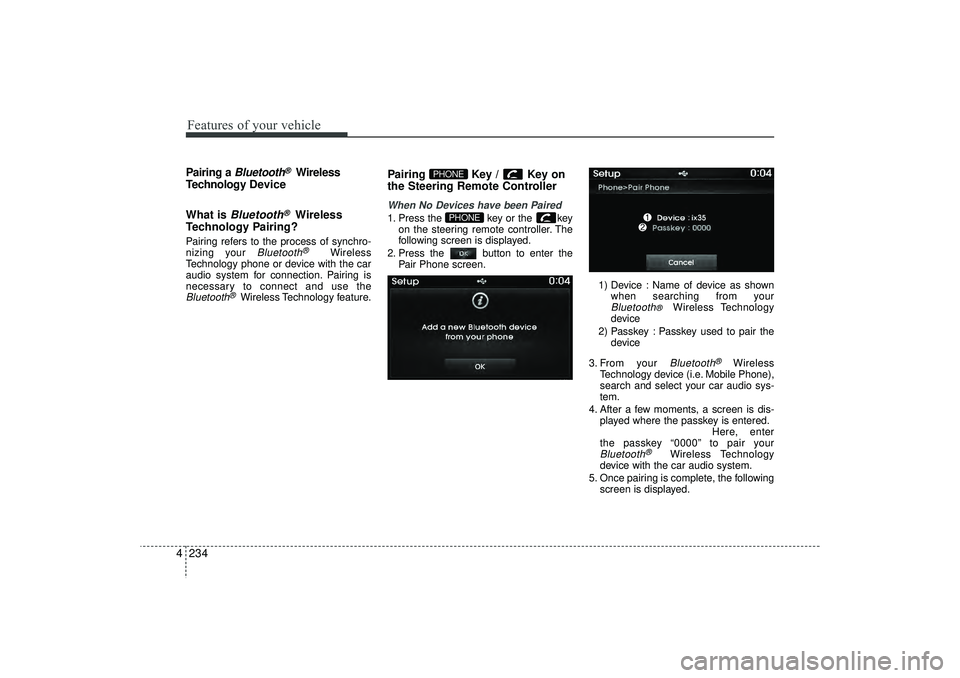
the Steering Remote ControllerWhen No Devices have been Paired1. Press the key or the key on the steering remote controller. The
following screen is displayed.
2. Press the button to enter the Pair Phone screen.
1) Device : Name of device as shownwhen searching from your
Bluetooth
®
Wireless Technology
device
2) Passkey : Passkey used to pair the device
3. From your Bluetooth
®
Wireless
Technology device (i.e. Mobile Phone),
search and select your car audio sys-
tem.
4. After a few moments, a screen is dis- played where the passkey is entered. Here, enter
the passkey “0000” to pair your
Bluetooth
®
Wireless Technology
device with the car audio system.
5. Once pairing is complete, the following screen is displayed.
PHONE
PHONE
EL(FL) UK 4B AUDIO.QXP 3/13/2015 4:19 PM Page 234
Page 320 of 550
4 235
Features of your vehicle
✽
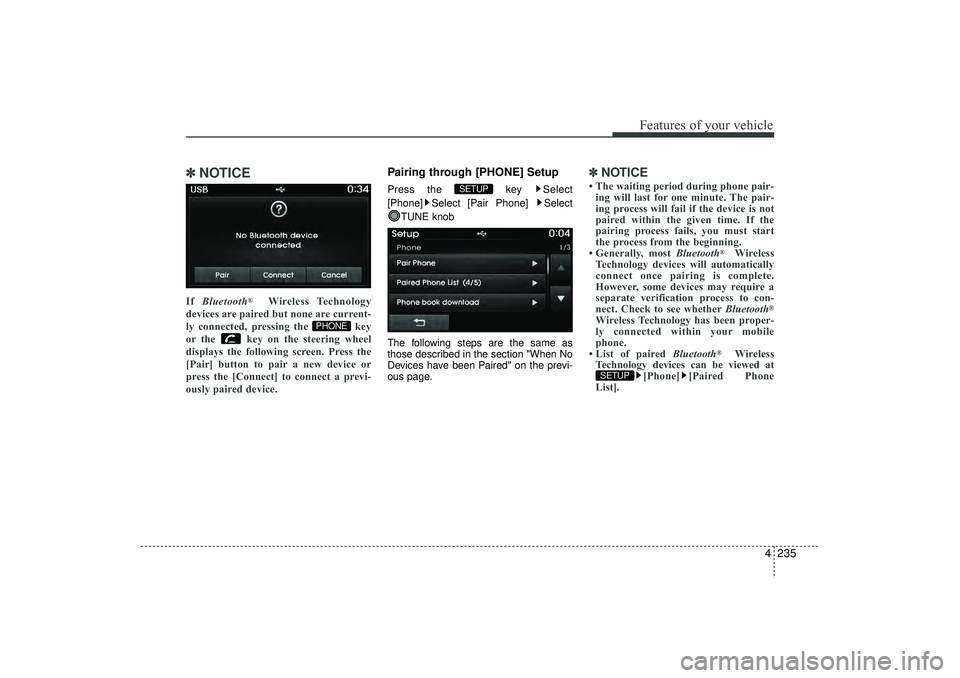
✽NOTICE If Bluetooth
®
Wireless Technology
devices are paired but none are current-
ly connected, pressing the key
or the key on the steering wheel
displays the following screen. Press the
[Pair] button to pair a new device or
press the [Connect] to connect a previ-
ously paired device.
Pairing through [PHONE] SetupPress the key Select
[Phone] Select [Pair Phone] Select TUNE knob
The following steps are the same as
those described in the section "When No
Devices have been Paired" on the previ-
ous page.
✽ ✽ NOTICE • The waiting period during phone pair-
ing will last for one minute. The pair-
ing process will fail if the device is not
paired within the given time. If the
pairing process fails, you must start
the process from the beginning.
• Generally, most Bluetooth
®
Wireless
Technology devices will automatically
connect once pairing is complete.
However, some devices may require a
separate verification process to con-
nect. Check to see whether Bluetooth
®
Wireless Technology has been proper-
ly connected within your mobile
phone.
• List of paired Bluetooth
®
Wireless
Technology devices can be viewed at [Phone] [Paired Phone
List].
SETUP
SETUP
PHONE
EL(FL) UK 4B AUDIO.QXP 3/13/2015 4:19 PM Page 235
Page 321 of 550
Features of your vehicle236
4Connecting a DevicePress the key Select
[Phone] Select [Paired Phone List]
1) Connected Phone : Device that is cur- rently connected
2) Paired Phone : Device that is paired but not connected From the paired phone list, select the
device you want to connect and press the
button.
SETUP
EL(FL) UK 4B AUDIO.QXP 3/13/2015 4:19 PM Page 236
![HYUNDAI IX35 2016 Owners Manual Features of your vehicle236
4Connecting a DevicePress the key Select
[Phone] Select [Paired Phone List]
1) Connected Phone : Device that is cur- rently connected
2) Paired Phone : Device that is pai](/manual-img/35/56235/w960_56235-320.png "HYUNDAI IX35 2016 Owners Manual Features of your vehicle236
4Connecting a DevicePress the key Select
[Phone] Select [Paired Phone List]
1) Connected Phone : Device that is cur- rently connected
2) Paired Phone : Device that is pai")