Page 202 of 419

Features of your vehicle
128 4
8.
• Each time the button is shortly pressed
(under 0.8 seconds), sets screen Off
➟Screen On ➟Screen Off
❈Audio operation is maintained and
only the screen will be turned Off. In
the screen Off state, press any key to
turn the screen On again.9.
• Radio Mode
- Shortly press the key (under 0.8sec-
onds): TA On/Off
- Press and hold the key (over 0.8sec-
onds): Previews each broadcast for 5
seconds each.
• Media mode
- Press and hold the key (over 0.8sec-
onds): Previews each song (file) for
10 seconds each.
❈Press and holding the key again to
continue listening to the current song
(file).
10.
• Shortly press the key (under 0.8 sec-
onds) : Moves to the Display, Sound,
Clock, Phone, System setting modes
• Press and hold the key (over 0.8 sec-
onds) : Move to the Time setting screen11.
• Displays menus for the current mode.
❈iPod
®List : Move to parent category
12.
• MP3 CD, USB mode : Folder Search
13. TUNE knob
• Radio mode : Changes frequency by
turning the knob left/right
• CD, USB, iPod
®, My Music mode:
Searches songs (files) by turning the
knob left/right
❈When the desired song is displayed,
press the knob to play the song.
• Moves focus in all selection menus and
selects menus
FOLDER
MENU
SETUPCLOCK
TA
SCAN
procarmanuals.com
Page 204 of 419

Features of your vehicle
130 4
SYSTEM CONTROLLERS AND
FUNCTIONS
❈Display and settings may differ
depending on the selected audio.
Audio Head Unit (Except EUROPE)
1. (EJECT)
• Ejects the disc.2.
• Changes to FM/AM mode.
• Each time the key is pressed,the mode
is changed in order of FM1
➟FM2 ➟AM.
3.
• Changes to CD, USB(iPod
®), AUX, My
Music, BT Audio mode.
• Each time the key is pressed, the mode
is changed in order of CD, USB(iPod
®),
AUX, My Music, BT Audio.
4. (if equipped)
• Operates Phone Screen
❈When a phone is not connected, the
connection screen is displayed.
5.
• Radio Mode : Automatically searches
for broadcast frequencies.
• CD, USB, iPod
®, My Music modes
- Shortly press the key (under 0.8 sec-
onds): Moves to next or previous song
(file)
- Press and hold the key (over 0.8 sec-
onds): Rewinds or fast-forwards the
current song.6. PWR/VOL knob
• Power Knob: Turns power On/ Off by
pressing the knob
• Volume Knob: Sets volume by turn-
ing the knob left/right
7. ~ (Preset)
• Radio Mode: Saves frequencies (chan-
nels) or receives saved frequencies
(channels)
• CD, USB, iPod
®, My Music mode
- : Repeat
- : Random
• In the Radio, Media, Setup, and Menu
pop up screen, the number menu is
selected.
2 RDM
1 RPT
61
SEEK
TRACK
PHONE
MEDIA
RADIO
procarmanuals.com
Page 205 of 419

4131
Features of your vehicle
8.
• Each time the button is shortly pressed
(under 0.8 seconds), sets screen Off
➟Screen On ➟Screen Off
❈Audio operation is maintained and
only the screen will be turned Off. In
the screen Off state, press any key to
turn the screen On again.9.
• Radio Mode
- Press the key (under 0.8 seconds):
Previews each broadcast for 5 sec-
onds each
• CD, USB, My Music mode
- Press the key (under 0.8 seconds):
Previews each song (file) for 10 sec-
onds each
❈Press the key again to continue listen-
ing to the current song (file).
10.
• Shortly press the key (under 0.8 sec-
onds) : Moves to the Display, Sound,
Clock, Phone, System setting modes
• Press and hold the key (over 0.8 sec-
onds) : Move to the Time setting screen
11.
• Displays menus for the current mode.
❈iPod
®List : Move to parent category
12.
• MP3 CD, USB mode : Folder Search13. TUNE knob
• Radio mode : Changes frequency by
turning the knob left/right
• CD, USB, iPod
®, My Music mode:
Searches songs (files) by turning the
knob left/right
❈When the desired song is displayed,
press the knob to play the song.
• Moves focus in all selection menus and
selects menus
FOLDER
MENU
SETUPCLOCK
SCAN
DISP
procarmanuals.com
Page 206 of 419
Features of your vehicle
132 4
SETUP (For EUROPE)
Display Settings
Press the key Select [Display]
through TUNE knob or key
Select menu through TUNE knob
Mode Pop up
[Mode Pop up] Changes . selec-
tion mode
• During On state, press the or
key to display the mode
change pop up screen.
• When the pop up screen is displayed,
use the TUNE knob or keys ~
to select the desired mode.
Scroll text
[Scroll text] Set /
• : Maintains scroll
• : Scrolls only one (1) time.
Song Info
When playing an MP3 file, select the
desired display info from ‘Folder/File’ or
‘Album/Artist/Song’.
Off
On
OffOn
6
1
MEDIARADIO
On
1 RPT
SETUPCLOCK
procarmanuals.com
Page 210 of 419
Features of your vehicle
136 4
SETUP (Except EUROPE)
Display Settings
Press the key Select [Display]
through TUNE knob or key
Select menu through TUNE knob
Mode Pop up
[Mode Pop up] Changes . selec-
tion mode
• During On state, press the or
key to display the mode
change pop up screen.
• When the pop up screen is displayed,
use the TUNE knob or keys ~
to select the desired mode.
Text Scroll
[Text Scroll] Set /
• : Maintains scroll
• : Scrolls only one (1) time.
Media Display
When playing an MP3 file, select the
desired display info from ‘Folder/File’ or
‘Album/Artist/Song’.
Sound Settings
Press the key Select [Sound]
through TUNE knob or key
Select menu through TUNE knob.2 RDM
SETUPCLOCK
Off
On
OffOn
6
1
MEDIARADIO
On
1 RPT
SETUPCLOCK
procarmanuals.com
Page 219 of 419
4145
Features of your vehicle
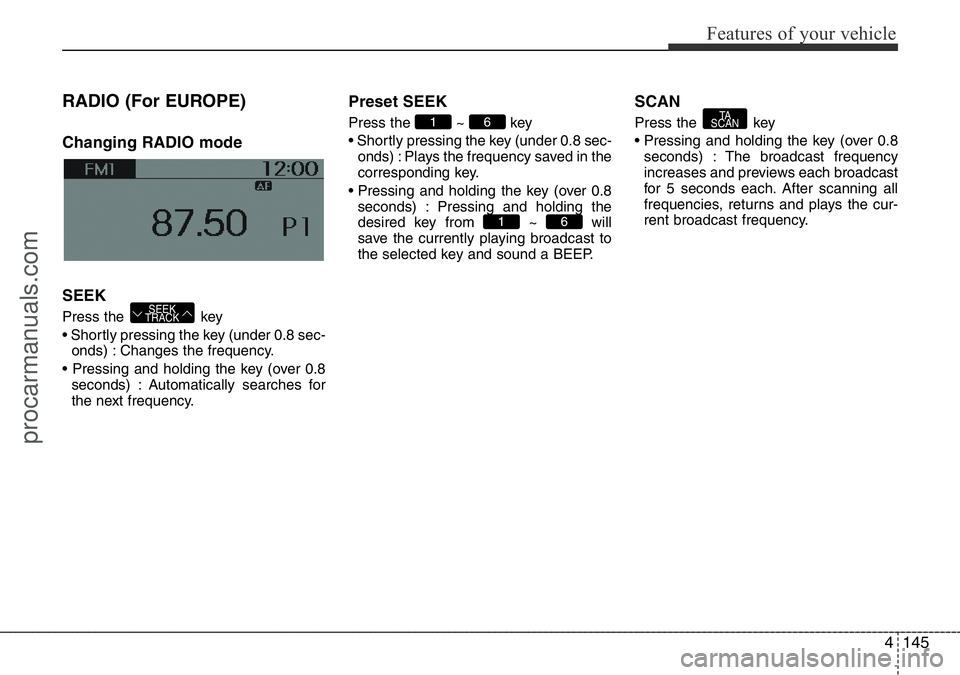
RADIO (For EUROPE)
Changing RADIO mode
SEEK
Press the key
• Shortly pressing the key (under 0.8 sec-
onds) : Changes the frequency.
• Pressing and holding the key (over 0.8
seconds) : Automatically searches for
the next frequency.
Preset SEEK
Press the ~ key
• Shortly pressing the key (under 0.8 sec-
onds) : Plays the frequency saved in the
corresponding key.
• Pressing and holding the key (over 0.8
seconds) : Pressing and holding the
desired key from ~ will
save the currently playing broadcast to
the selected key and sound a BEEP.
SCAN
Press the key
• Pressing and holding the key (over 0.8
seconds) : The broadcast frequency
increases and previews each broadcast
for 5 seconds each. After scanning all
frequencies, returns and plays the cur-
rent broadcast frequency.TA
SCAN
61
61
SEEK
TRACK
procarmanuals.com
Page 220 of 419

Features of your vehicle
146 4
Selecting through manual
search
Turn the TUNE knob left/right to adjust
the frequency.
Traffic Announcement (TA)
Shortly pressing the key (under
0.8 seconds) : Set / TA Traffic
Announcement) mode.
MENU
Within key are the A.Store (Auto
Store) and Info functions.
AST (Auto Store)
Press the key Set [ AST]
through TUNE knob or key.
Select AST (Auto Store) to save frequen-
cies with superior reception to presets
~ . If no frequencies are
received, then the most recently received
frequency will be broadcast.
❈Saves only to the Preset memory
~ of FMA or AMA mode.
AF (Alternative Frequency)
Press the key Set [ AF]
through TUNE knob or key.
The Alternative Frequency option can be
turned On/Off.
Region
Press the key Set [ Region]
through TUNE knob or key.
The Region option can be turned On/Off.
News
Press the key Set [ News]
through TUNE knob or key.
The News option can be turned On/Off.
Info Volume
Info Volume refers to the sound volume
upon receiving News or Traffic information.
The info volume can be controlled by turn-
ing the VOL knob left/right whilst a news
or traffic broadcast is playing.
❈AF, Region, and News are RDS Radio
menus.
4
MENU
3MENU
2RDMMENU
61
61
1 RPTMENU
MENU
OffOn
TA
SCAN
procarmanuals.com
Page 221 of 419
4147
Features of your vehicle
DAB RADIO (For DAB Model)
❈RADIO may differ depending on the
selected audio.
Changing RADIO mode
Press the Key to change the
mode in order of FM1 ➟FM2 ➟FMA ➟DAB1 ➟DAB2 ➟ AM.
SEEK
Press the key
• Shortly pressing the key (under 0.8 sec-
onds) : Changes the station.
• Press and hold the key (over 0.8 sec-
onds) : Change the Ensemble.
Ensemble
Press the key
• Search the Ensemble. Use the Tune
knob to select the desired Ensemble
and select stations within the Ensemble.
Preset SEEK
Press the ~ key
• Shortly pressing the key (under 0.8 sec-
onds) : Plays the station saved in the
corresponding key.
• Pressing and holding the key (over 0.8
seconds) : Pressing and holding the
desired key from ~ will save
the currently playing station to the select-
ed key and sound a BEEP.
61
61 FOLDER
SEEK
TRACK
RADIO
procarmanuals.com
![HYUNDAI I800 2016 Owners Manual Features of your vehicle
132 4
SETUP (For EUROPE)
Display Settings
Press the key Select [Display]
through TUNE knob or key
Select menu through TUNE knob
Mode Pop up
[Mode Pop up] Changes . selec-](/manual-img/35/57914/w960_57914-205.png "HYUNDAI I800 2016 Owners Manual Features of your vehicle
132 4
SETUP (For EUROPE)
Display Settings
Press the key Select [Display]
through TUNE knob or key
Select menu through TUNE knob
Mode Pop up
[Mode Pop up] Changes . selec-")
![HYUNDAI I800 2016 Owners Manual Features of your vehicle
136 4
SETUP (Except EUROPE)
Display Settings
Press the key Select [Display]
through TUNE knob or key
Select menu through TUNE knob
Mode Pop up
[Mode Pop up] Changes . s](/manual-img/35/57914/w960_57914-209.png "HYUNDAI I800 2016 Owners Manual Features of your vehicle
136 4
SETUP (Except EUROPE)
Display Settings
Press the key Select [Display]
through TUNE knob or key
Select menu through TUNE knob
Mode Pop up
[Mode Pop up] Changes . s")