2016 HYUNDAI I800 change time
[x] Cancel search: change timePage 173 of 419

499
Features of your vehicle
Climate control air filter
(if equipped)
The climate control air filter installed
behind the glove box filters the dust or
other pollutants that come into the vehi-
cle from the outside through the heating
and air conditioning system. If dust or
other pollutants accumulate in the filter
over a period of time, the air flow from the
air vents may decrease, resulting in
moisture accumulation on the inside of
the windscreen even when the outside
(fresh) air position is selected. If this hap-
pens, we recommend that the climate
control air filter be replaced by a
HYUNDAI authorised repairer.
✽NOTICE
• Replace the filter according to the
Maintenance Schedule.
If the car is being driven in severe
conditions such as dusty or rough
roads, more frequent air conditioner
filter inspections and changes are
required.
• When the air flow rate suddenly
decreases, we recommend that the
system be checked by a HYUNDAI
authorised repairer.
Checking the amount of air con-
ditioner refrigerant and compres-
sor lubricant
When the amount of refrigerant is low,
the performance of the air conditioning is
reduced. Overfilling also has a negative
impact on the air conditioning system.
Therefore, we recommend that the sys-
tem be inspected by a HYUNDAI autho-
rised repairer.
✽NOTICE
It is important when servicing the air
conditioning system that the correct
type and amount of oil and refrigerant is
used. Otherwise, damage to the com-
pressor and abnormal system operation
may occur.
WARNING
Improper service may cause seri-
ous injury to the person performing
the service. For more detailed infor-
mation, we recommend that you
contact a HYUNDAI authorised
repairer.
1LDA5047
Outside air
Recirculated
air
Climate control
air filterBlower
Evaporator
coreHeater core
procarmanuals.com
Page 185 of 419

4111
Features of your vehicle
Hour (1)
Pressing the H button with your finger, a
pencil or similar object will advance the
time displayed by one hour.
Minute (2)
Pressing the M button with your finger, a
pencil or similar object will advance the
time displayed by one minute.
Reset (3)
To clear away minutes, press the R but-
ton with your finger, a pencil or similar
object. Then the clock will be set precise-
ly on the hour.
For example, if the R button is pressed
whilst the time is between 9:01 and 9:29,
the display will be reset to 9:00.
9:01 ~ 9:29 display changed to 9:00
9:30 ~ 9:59 display changed to 10:00
Display conversion (if equipped)
To change the 12 hour format to the 24
hour format, press the R button until the
display blinks.
For example, if the R button is pressed
whilst the time is 10:15 p.m., the display
will be changed to 22:15.
Clothes hanger (if equipped)
OTQ047122
CAUTION
Do not hang heavy clothes, since
those may damage the hook.
WARNING
Do not hang other objects except
clothes. In an accident it may cause
vehicle damage or personal injury.
procarmanuals.com
Page 197 of 419

4123
Features of your vehicle
✽NOTICE - USING THE iPod®
DEVICE
• Some iPod®models may not support
communication protocol and files may
not properly play.
Supported iPod
®models:
- iPod®Mini
- iPod®4th (Photo) ~ 6th (Classic)
generation
- iPod
®Nano 1st~4th generation
- iPod®Touch 1st~2nd generation
• The order of search or playback of
songs in the iPod
®can be different
from the order searched in the audio
system.
• If the iPod
®disabled due to its own
malfunction, reset the iPod®. (Reset:
Refer to iPod®manual)
• An iPod®may not operate normally
on low battery.
(Continued)(Continued)
• Some iPod
®devices, such as the
iPhone®, can be connected through
the Bluetooth®Wireless Technology
interface. The device must have audio
Bluetooth
®Wireless Technology capa-
bility (such as for stereo headphone
Bluetooth
®Wireless Technology ). The
device can play, but it will not be con-
trolled by the audio system.
• To use iPod
®features within the
audio, use the cable provided upon
purchasing an iPod
®d device.
• Skipping or improper operation may
occur depending on the characteris-
tics of your iPod
®/iPhone®device.
• If your iPhone®is connected to both
the Bluetooth®Wireless Technology
and USB, the sound may not be prop-
erly played. In your iPhone
®, select
the Dock connector orBluetooth®
Wireless Technology to change the
sound output (source).
(Continued)(Continued)
• When connecting
iPod®with theiPod®Power Cable, insert the connec-
tor to the multimedia socket complete-
ly. If not inserted completely, communi-
cations between
iPod®and audio may
be interrupted.
• When adjusting the sound effects of
the
iPod®and the audio system, the
sound effects of both devices will over-
lap and might reduce or distort the
quality of the sound.
• Deactivate (turn off) the equalizer
function of an
iPod®when adjusting
the audio system’s volume, and turn
off the equalizer of the audio system
when using the equalizer of an
iPod®.
• When not using iPod®with car audio,
detach the iPod®cable from iPod®.
Otherwise, iPod®may remain in
accessory mode, and may not work
properly.
procarmanuals.com
Page 201 of 419
4127
Features of your vehicle
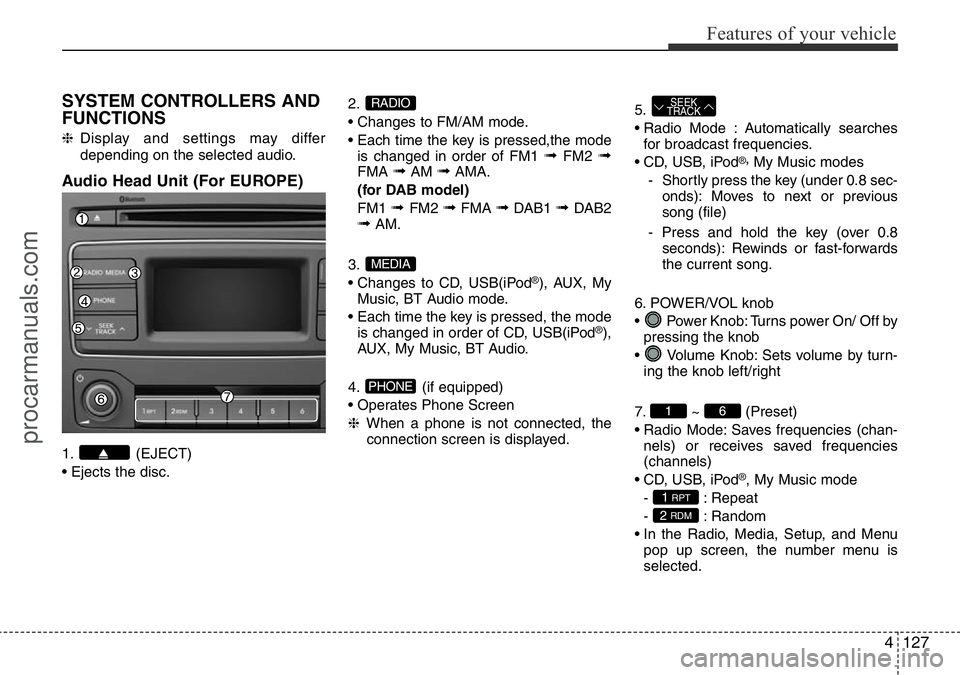
SYSTEM CONTROLLERS AND
FUNCTIONS
❈Display and settings may differ
depending on the selected audio.
Audio Head Unit (For EUROPE)
1. (EJECT)
• Ejects the disc.2.
• Changes to FM/AM mode.
• Each time the key is pressed,the mode
is changed in order of FM1
➟FM2 ➟FMA ➟AM ➟AMA.
(for DAB model)
FM1
➟ FM2 ➟FMA ➟DAB1 ➟ DAB2➟AM.
3.
• Changes to CD, USB(iPod
®), AUX, My
Music, BT Audio mode.
• Each time the key is pressed, the mode
is changed in order of CD, USB(iPod
®),
AUX, My Music, BT Audio.
4. (if equipped)
• Operates Phone Screen
❈When a phone is not connected, the
connection screen is displayed.5.
• Radio Mode : Automatically searches
for broadcast frequencies.
• CD, USB, iPod
®,My Music modes
- Shortly press the key (under 0.8 sec-
onds): Moves to next or previous
song (file)
- Press and hold the key (over 0.8
seconds): Rewinds or fast-forwards
the current song.
6. POWER/VOL knob
• Power Knob: Turns power On/ Off by
pressing the knob
• Volume Knob: Sets volume by turn-
ing the knob left/right
7. ~ (Preset)
• Radio Mode: Saves frequencies (chan-
nels) or receives saved frequencies
(channels)
• CD, USB, iPod
®, My Music mode
- : Repeat
- : Random
• In the Radio, Media, Setup, and Menu
pop up screen, the number menu is
selected.
2 RDM
1 RPT
61
SEEK
TRACK
PHONE
MEDIA
RADIO
procarmanuals.com
Page 202 of 419

Features of your vehicle
128 4
8.
• Each time the button is shortly pressed
(under 0.8 seconds), sets screen Off
➟Screen On ➟Screen Off
❈Audio operation is maintained and
only the screen will be turned Off. In
the screen Off state, press any key to
turn the screen On again.9.
• Radio Mode
- Shortly press the key (under 0.8sec-
onds): TA On/Off
- Press and hold the key (over 0.8sec-
onds): Previews each broadcast for 5
seconds each.
• Media mode
- Press and hold the key (over 0.8sec-
onds): Previews each song (file) for
10 seconds each.
❈Press and holding the key again to
continue listening to the current song
(file).
10.
• Shortly press the key (under 0.8 sec-
onds) : Moves to the Display, Sound,
Clock, Phone, System setting modes
• Press and hold the key (over 0.8 sec-
onds) : Move to the Time setting screen11.
• Displays menus for the current mode.
❈iPod
®List : Move to parent category
12.
• MP3 CD, USB mode : Folder Search
13. TUNE knob
• Radio mode : Changes frequency by
turning the knob left/right
• CD, USB, iPod
®, My Music mode:
Searches songs (files) by turning the
knob left/right
❈When the desired song is displayed,
press the knob to play the song.
• Moves focus in all selection menus and
selects menus
FOLDER
MENU
SETUPCLOCK
TA
SCAN
procarmanuals.com
Page 204 of 419

Features of your vehicle
130 4
SYSTEM CONTROLLERS AND
FUNCTIONS
❈Display and settings may differ
depending on the selected audio.
Audio Head Unit (Except EUROPE)
1. (EJECT)
• Ejects the disc.2.
• Changes to FM/AM mode.
• Each time the key is pressed,the mode
is changed in order of FM1
➟FM2 ➟AM.
3.
• Changes to CD, USB(iPod
®), AUX, My
Music, BT Audio mode.
• Each time the key is pressed, the mode
is changed in order of CD, USB(iPod
®),
AUX, My Music, BT Audio.
4. (if equipped)
• Operates Phone Screen
❈When a phone is not connected, the
connection screen is displayed.
5.
• Radio Mode : Automatically searches
for broadcast frequencies.
• CD, USB, iPod
®, My Music modes
- Shortly press the key (under 0.8 sec-
onds): Moves to next or previous song
(file)
- Press and hold the key (over 0.8 sec-
onds): Rewinds or fast-forwards the
current song.6. PWR/VOL knob
• Power Knob: Turns power On/ Off by
pressing the knob
• Volume Knob: Sets volume by turn-
ing the knob left/right
7. ~ (Preset)
• Radio Mode: Saves frequencies (chan-
nels) or receives saved frequencies
(channels)
• CD, USB, iPod
®, My Music mode
- : Repeat
- : Random
• In the Radio, Media, Setup, and Menu
pop up screen, the number menu is
selected.
2 RDM
1 RPT
61
SEEK
TRACK
PHONE
MEDIA
RADIO
procarmanuals.com
Page 205 of 419

4131
Features of your vehicle
8.
• Each time the button is shortly pressed
(under 0.8 seconds), sets screen Off
➟Screen On ➟Screen Off
❈Audio operation is maintained and
only the screen will be turned Off. In
the screen Off state, press any key to
turn the screen On again.9.
• Radio Mode
- Press the key (under 0.8 seconds):
Previews each broadcast for 5 sec-
onds each
• CD, USB, My Music mode
- Press the key (under 0.8 seconds):
Previews each song (file) for 10 sec-
onds each
❈Press the key again to continue listen-
ing to the current song (file).
10.
• Shortly press the key (under 0.8 sec-
onds) : Moves to the Display, Sound,
Clock, Phone, System setting modes
• Press and hold the key (over 0.8 sec-
onds) : Move to the Time setting screen
11.
• Displays menus for the current mode.
❈iPod
®List : Move to parent category
12.
• MP3 CD, USB mode : Folder Search13. TUNE knob
• Radio mode : Changes frequency by
turning the knob left/right
• CD, USB, iPod
®, My Music mode:
Searches songs (files) by turning the
knob left/right
❈When the desired song is displayed,
press the knob to play the song.
• Moves focus in all selection menus and
selects menus
FOLDER
MENU
SETUPCLOCK
SCAN
DISP
procarmanuals.com
Page 206 of 419
![HYUNDAI I800 2016 Owners Manual Features of your vehicle
132 4
SETUP (For EUROPE)
Display Settings
Press the key Select [Display]
through TUNE knob or key
Select menu through TUNE knob
Mode Pop up
[Mode Pop up] Changes . selec-](/manual-img/35/57914/w960_57914-205.png "HYUNDAI I800 2016 Owners Manual Features of your vehicle
132 4
SETUP (For EUROPE)
Display Settings
Press the key Select [Display]
through TUNE knob or key
Select menu through TUNE knob
Mode Pop up
[Mode Pop up] Changes . selec-")
Features of your vehicle
132 4
SETUP (For EUROPE)
Display Settings
Press the key Select [Display]
through TUNE knob or key
Select menu through TUNE knob
Mode Pop up
[Mode Pop up] Changes . selec-
tion mode
• During On state, press the or
key to display the mode
change pop up screen.
• When the pop up screen is displayed,
use the TUNE knob or keys ~
to select the desired mode.
Scroll text
[Scroll text] Set /
• : Maintains scroll
• : Scrolls only one (1) time.
Song Info
When playing an MP3 file, select the
desired display info from ‘Folder/File’ or
‘Album/Artist/Song’.
Off
On
OffOn
6
1
MEDIARADIO
On
1 RPT
SETUPCLOCK
procarmanuals.com