2016 HYUNDAI I40 car battery
[x] Cancel search: car batteryPage 42 of 534

Downloaded from www.Manualslib.com manuals search engine Safety system of your vehicle
18
3
Seat belt restraint system
SEAT BELTS
(Continued)
Avoid wearing twisted seat belts.
A twisted belt can't do its job as
well. In a collision, it could even
cut into you. Be sure the belt
webbing is straight and not twist-
ed.
Be careful not to damage the belt webbing or hardware. If the belt
webbing or hardware is dam-
aged, replace it.
WARNING
Seat belts are designed to bear
upon the bony structure of the
body, and should be worn low
across the front of the pelvis or the
pelvis, chest and shoulders, as
applicable; wearing the lap section
of the belt across the abdominal
area must be avoided.
Seat belts should be adjusted as
firmly as possible, consistent with
comfort, to provide the protection
for which they have been designed.
A slack belt will greatly reduce the
protection afforded to the wearer.
(Continued)
WARNING
For maximum restraint systemprotection, the seat belts must
always be used whenever the car
is moving.
Seat belts are most effective when seatbacks are in the
upright position.
Children age 12 and younger must always be properly
restrained in the rear seat. Never
allow children to ride in the front
passenger seat. If a child over 12
must be seated in the front seat,
he/she must be properly belted
and the seat should be moved as
far back as possible.
Never wear the shoulder belt under your arm or behind your
back. An improperly positioned
shoulder belt can cause serious
injuries in a crash. The shoulder
belt should be positioned midway
over your shoulder across your
collarbone.
(Continued)
(Continued)
Care should be taken to avoid con-
tamination of the webbing with pol-
ishes, oils and chemicals, and par-
ticularly battery acid.
Cleaning may safely be carried out
using mild soap and water. The belt
should be replaced if webbing
becomes frayed, contaminated or
damaged. It is essential to replace
the entire assembly after it has
been worn in a severe impact even
if damage to the assembly is not
obvious. Belts should not be worn
with straps twisted. Each belt
assembly must only be used by one
occupant; it is dangerous to put a
belt around a child being carried on
the occupant's lap.
Page 109 of 534
Downloaded from www.Manualslib.com manuals search engine Features of your vehicle
22
4
Opening the tailgate
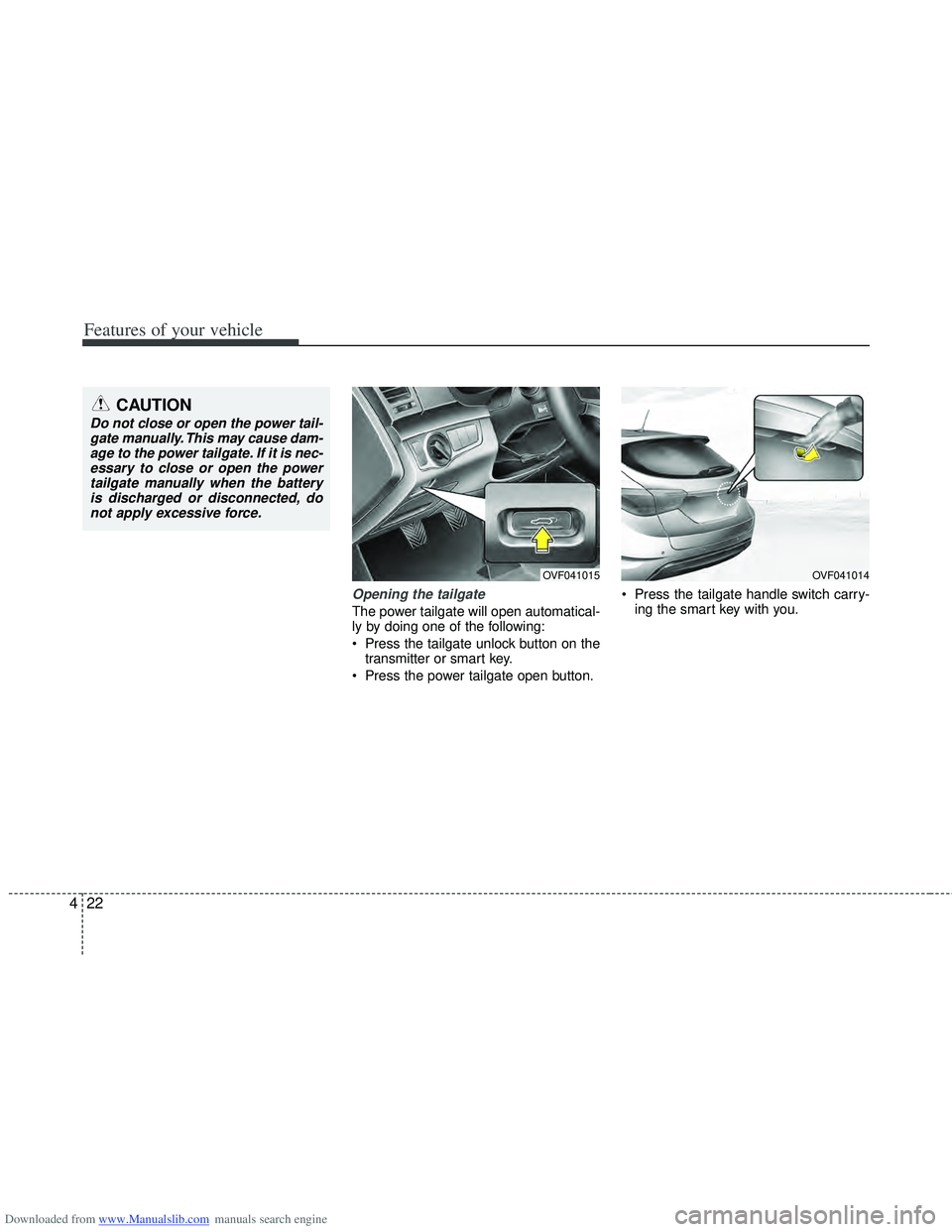
The power tailgate will open automatical-
ly by doing one of the following:
Press the tailgate unlock button on the
transmitter or smart key.
Press the power tailgate open button. Press the tailgate handle switch carry-
ing the smart key with you.
OVF041015OVF041014
CAUTION
Do not close or open the power tail-gate manually. This may cause dam-age to the power tailgate. If it is nec-essary to close or open the powertailgate manually when the battery is discharged or disconnected, donot apply excessive force.
Page 125 of 534
Downloaded from www.Manualslib.com manuals search engine Features of your vehicle
38
4
Resetting the sunroof
Whenever the vehicle battery is discon-
nected or discharged, you must reset
your sunroof system as follows:
1. Turn the ignition switch to the ON
position.
2. Close the sunshade and sunroof completely if opened.
3. Release the sunroof control lever.
4. Push the sunroof control lever forward in the direction of close (about 10 sec-
onds) until the sunroof moves a little.
Then, release the lever.
5. Push the sunroof control lever forward in the direction of close, until the sun-
roof operates as follows again:
SUNSHADE OPEN →TILT OPEN →
SLIDE OPEN → SLIDE CLOSE →
SUNSHADE CLOSE
Then, release the lever.
When this is complete, the sunroof sys-
tem has been reset.WARNING - Sunroof
Be careful that no head, hands and body parts are obstructed by
a closing sunroof.
Do not extend the face, neck, arms or body outside the sunroof
while driving.
Make sure your hands and head are safely out of the way before
closing a sunroof.
CAUTION
Periodically remove any dirt that may accumulate on the guide rail.
If you try to open the sunroof when the temperature is belowfreezing or when the sunroof iscovered with snow or ice, theglass or the motor could be dam-aged.
Page 260 of 534

Downloaded from www.Manualslib.com manuals search engine 4173
Features of your vehicle
✽
✽NOTICE FOR USING THE
iPod DEVICE
• Some iPod models might not support
the communication protocol and the
files will not be played.
Supported iPod models:
- iPod Mini
- iPod 4th (Photo) ~ 6th(Classic) gen-eration
- iPod Nano 1st~4th generation
- iPod Touch 1st~2nd generation
• The order of search or playback of songs in the iPod can be different
from the order searched in the audio
system.
• If the iPod disabled due to its own malfunction, reset the iPod. (Reset:
Refer to iPod manual)
• An iPod may not operate normally on low battery.
• Some iPod devices, such as the iPhone, can be connected through the
Bluetooth
®interface. The device must
have audio Bluetooth®capability
(such as for stereo headphone
Bluetooth
®). The device can play, but
it will not be controlled by the audio
system.
CAUTION IN USING THE
iPod DEVICE
The HYUNDAI iPod Power Cable
is needed in order to operate iPodwith the audio buttons on theaudio system. The USB cable pro- vided by Apple may cause mal-function and should not be used for HYUNDAI vehicles.
❋ ❋ The HYUNDAI iPod Power
Cable may be purchasedthrough your HYUNDAIDealership.
When connecting iPod with the iPod Power Cable, insert the con-nector to the multimedia socket completely. If not inserted com-pletely, communications betweeniPod and audio may be interrupt- ed.
When adjusting the sound effects of the iPod and the audio system,the sound effects of both devices will overlap and might reduce ordistort the quality of the sound.
(Continued)
(Continued) Deactivate (turn off) the equalizer function of an iPod when adjust-ing the audio system’s volume,and turn off the equalizer of the audio system when using theequalizer of an iPod.
When the iPod cable is connect- ed, the system can be switched toAUX mode even without iPoddevice and may cause noise.Disconnect the iPod cable whenyou are not using the iPod device.
When not using iPod with car audio, detach the iPod cable fromiPod. Otherwise, iPod may remain in accessory mode, and may notwork properly.
(Continued)
Page 267 of 534
Downloaded from www.Manualslib.com manuals search engine Features of your vehicle
180
4
CAUTION IN USING
BLUETOOTH®CELLULAR
PHONE
Do not use a cellular phone or
perform Bluetooth®settings (e.g.
pairing a phone) while driving.
Some Bluetooth
®-enabled phones
may not be recognized by the system or fully compatible withthe system.
Before using Bluetooth
®related
features of the audio system, refer your phone’s User’s Manual for phone-side Bluetooth
®opera-
tions.
The phone must be paired to the audio system to use Bluetooth
®
related features.
You will not be able to use the hands-free feature when yourphone (in the car) is outside ofthe cellular service area (e.g. in atunnel, in a underground, in amountainous area, etc.).
If the cellular phone signal is poor or the vehicles interior noise istoo loud, it may be difficult to hearthe other person’s voice during a call.
(Continued)
(continued) Do not place the phone near or inside metallic objects, otherwise
communications with Bluetooth
®
system or cellular service sta- tions can be disturbed.
While a phone is connected through Bluetooth
®your phone
may discharge quicker than usual for additional Bluetooth
®-related
operations.
Some cellular phones or other devices may cause interferencenoise or malfunction to audiosystem. In this case, store thedevice in a different location mayresolve the situation.
Please save your phone name in English, or your phone name maynot be displayed correctly.
If Priority is set upon vehicle igni- tion (IGN/ACC ON), the Bluetoothphone will be automatically con-nected. Even if you are outside,the Bluetooth phone will be auto-matically connected once you arein the vicinity of the vehicle.
If you do not want automaticBluetooth power off.
(Continued)
(continued) Bluetooth connection may become intermittently discon-nected in some mobile phones.Follow the following steps to try again.
1) Turn the Bluetooth Function within the mobile phoneON/OFF and try to connect again.
2) Turn the mobile phone power ON/OFF and try to connectagain.
3) Completely remove the mobile phone battery, reboot, and thentry to connect again.
4) Reboot the Audio and try to connect again.
5) Delete all paired devices from the mobile phone and Audioand re-pair for use.
The hands-free call volume and quality may differ depending onthe mobile phone.
Page 282 of 534
Downloaded from www.Manualslib.com manuals search engine 4195
Features of your vehicle
✽
✽NOTICE FOR USING THE
iPod DEVICE
• Some iPod models might not sup-
port the communication protocol
and the files will not be played.
Supported iPod models:
- iPod Mini
- iPod 4th(Photo) ~ 6th(Classic)
generation
- iPod Nano 1st~4th generation
- iPod Touch 1st~2nd generation
• The order of search or playback of songs in the iPod can be different
from the order searched in the
audio system.
• If the iPod disabled due to its own malfunction, reset the iPod. (Reset:
Refer to iPod manual)
• An iPod may not operate normally on low battery.
• Some iPod devices, such as the iPhone, can be connected through the
Bluetooth
®interface. The device
must have audio Bluetooth®capabili-
ty (such as for stereo headphone
Bluetooth
®). The device can play, but
it will not be controlled by the audio
system.
CAUTION IN USING THE
iPod DEVICE
The Hyundai iPod Power Cable is
needed in order to operate iPodwith the audio buttons on theaudio system. The USB cable pro-vided by Apple may cause mal-function and should not be usedfor Hyundai vehicles.
❋ The Hyundai iPod Power Cablemay be purchased through yourHyundai Dealership.
When connecting iPod with the iPod Power Cable, insert the con-nector to the multimedia socket completely. If not inserted com-pletely, communications betweeniPod and audio may be interrupted.
When adjusting the sound effects of the iPod and the audio system, thesound effects of both devices willoverlap and might reduce or distort the quality of the sound.
Deactivate (turn off) the equalizer function of an iPod when adjust-ing the audio system’s volume,and turn off the equalizer of theaudio system when using theequalizer of an iPod.
(Continued)
(Continued) When the iPod cable is connected, the system can be switched to AUXmode even without iPod deviceand may cause noise. D isconnect
the iPod cable when you are not using the iPod device.
When not using iPod with car audio, detach the iPod cable fromiPod. Otherwise, iPod may remainin accessory mode, and may notwork properly.
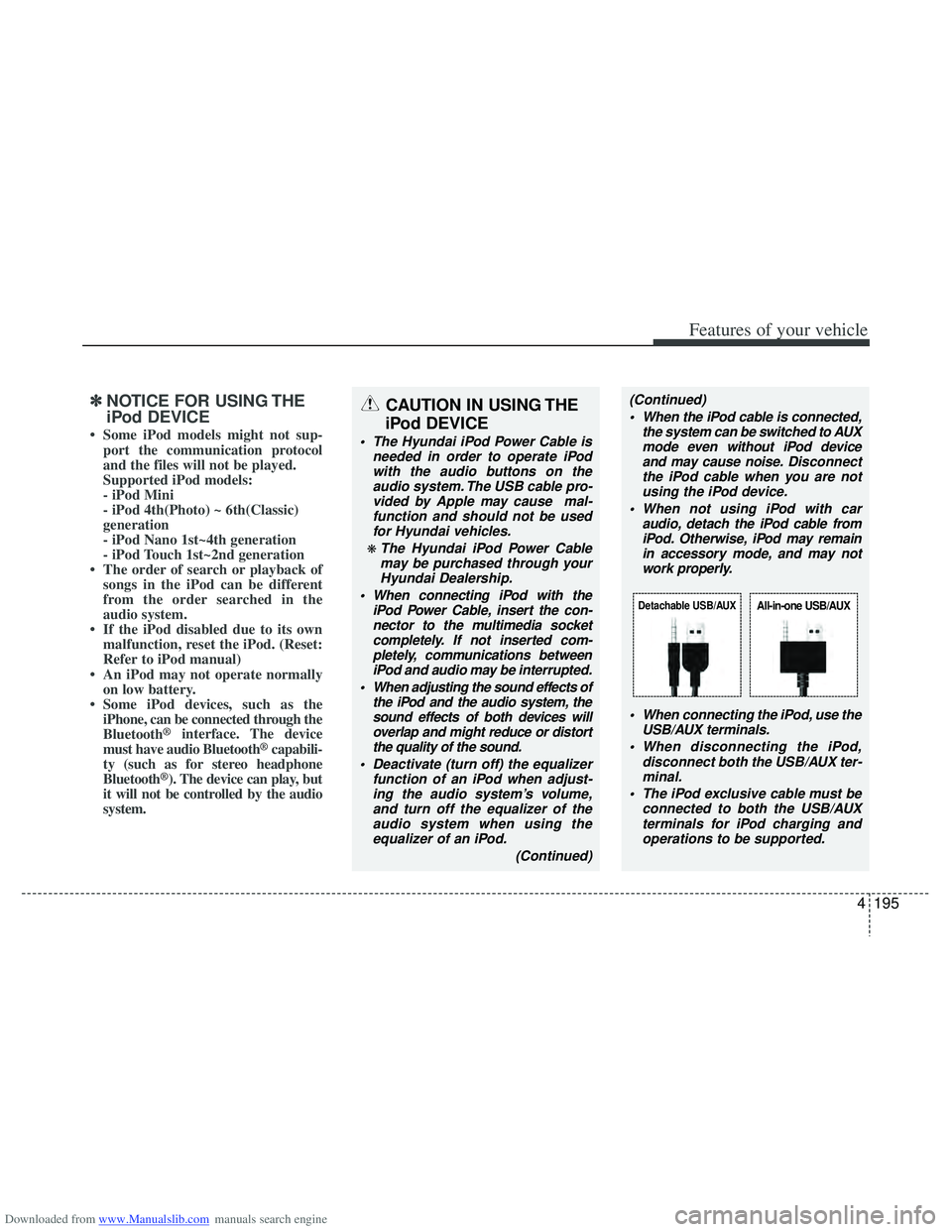
When connecting the iPod, use theUSB/AUX terminals.
When disconnecting the iPod, disconnect both the USB/AUX ter-minal.
The iPod exclusive cable must be connected to both the USB/AUXterminals for iPod charging and operations to be supported.
Detachable USB/AUXAll-in-one USB/AUX
Page 311 of 534

Downloaded from www.Manualslib.com manuals search engine Driving your vehicle
18
5
The light on the ISG OFF button will
illuminate.
A message "Please Enable Battery Sensor" will appear on the LCD display.
✽
✽ NOTICE
• If the ISG OFF button light is not
turned off by pressing the ISG OFF
button again or if the ISG system con-
tinuously does not work correctly,
please contact an authorized
HYUNDAI dealer as soon as possible.
• When the ISG OFF button light comes on, it may stop illuminating after driv-
ing your vehicle at approximately 80
km/h for a maximum of two hours
and setting the fan speed control
below the 2nd position. If the ISG
OFF button light continues to illumi-
nate in spite of the procedure, please
contact an authorized HYUNDAI
dealer as soon as possible.WARNING
When the engine is in Idle Stop
mode, it's possible to restart the
engine without the driver taking
any action.
Before leaving the car or doing any-
thing in the engine room area, stop
the engine by turning the ignition
switch to the LOCK/OFF position or
removing the ignition key.
OVF051031/OVF051039
■Type A■Type B
Page 364 of 534

Downloaded from www.Manualslib.com manuals search engine 571
Driving your vehicle
Use high quality ethylene glycol
coolant
Your vehicle is delivered with high quality
ethylene glycol coolant in the cooling
system. It is the only type of coolant that
should be used because it helps prevent
corrosion in the cooling system, lubri-
cates the water pump and prevents
freezing. Be sure to replace or replenish
your coolant in accordance with the
maintenance schedule in section 7.
Before winter, have your coolant tested to
assure that its freezing point is sufficient
for the temperatures anticipated during
the winter.
Check battery and cables
Winter puts additional burdens on the
battery system. Visually inspect the bat-
tery and cables as described in section
7. The level of charge in your battery can
be checked by an authorized HYUNDAI
dealer or a service station.
Change to "winter weight" oil if
necessary
In some climates it is recommended that
a lower viscosity "winter weight" oil be
used during cold weather. See section 8
for recommendations. If you aren't sure
what weight oil you should use, consult
an authorized HYUNDAI dealer.
Check spark plugs and ignition
system
Inspect your spark plugs as described in
section 7 and replace them if necessary.
Also check all ignition wiring and compo-
nents to be sure they are not cracked,
worn or damaged in any way.
CAUTION
Chains that are the wrong size orimproperly installed can damageyour vehicle's brake lines, sus-pension, body and wheels.
Stop driving and retighten the chains any time you hear themhitting the vehicle.
WARNING- Tire chains
The use of chains may adversely affect vehicle handling.
Do not exceed 30 km/h (20 mph) or the chain manufacturer’s rec-
ommended speed limit, whichev-
er is lower.
Drive carefully and avoid bumps, holes, sharp turns, and other
road hazards, which may cause
the vehicle to bounce.
Avoid sharp turns or locked- wheel braking.