2016 Hyundai H350 heater
[x] Cancel search: heaterPage 183 of 473
3-121
Convenient features of your vehicle
3
For maximum defrosting, set thetemperature control to the extreme
right/hot position and the fan speedcontrol to the highest speed.
If warm air to the floor is desired while defrosting or defogging, setthe mode to the floor-defrost posi-tion.
Before driving, clear all snow and ice from the windshield, rear win-
dow, outside rear view mirrors, and
all side windows.
Clear all snow and ice from the hood and air inlet in the cowl grill to
improve heater and defroster effi-ciency and to reduce the probabili-
ty of fogging up the inside of thewindshield.To defog inside windshield
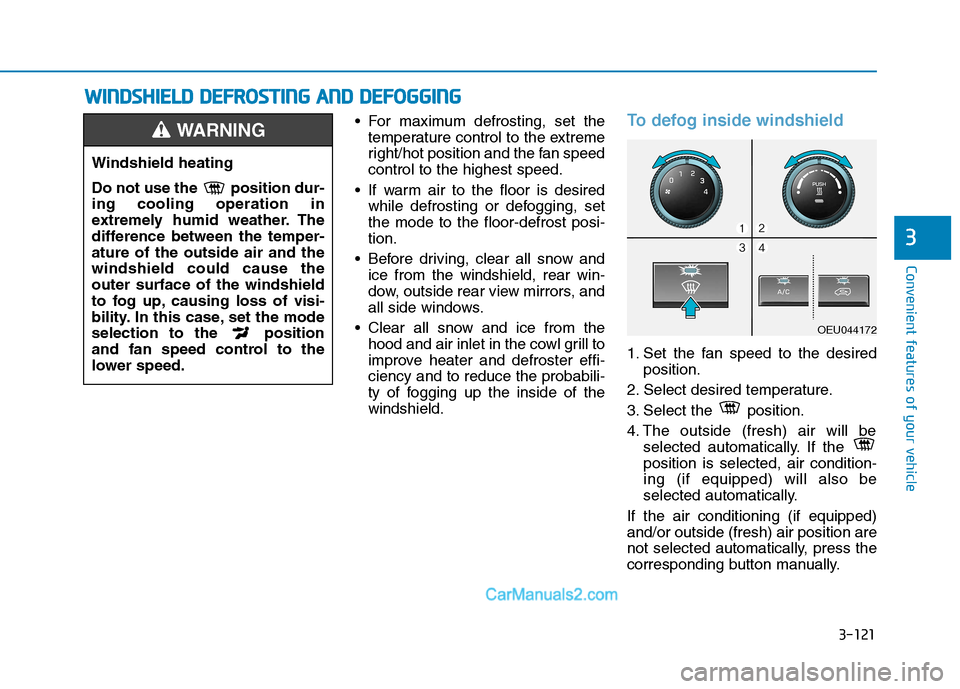
1. Set the fan speed to the desired position.
2. Select desired temperature.
3. Select the position.
4. The outside (fresh) air will be selected automatically. If the position is selected, air condition-ing (if equipped) will also be
selected automatically.
If the air conditioning (if equipped)and/or outside (fresh) air position are
not selected automatically, press the
corresponding button manually.
Windshield heating
Do not use the position dur- ing cooling operation in
extremely humid weather. The
difference between the temper-ature of the outside air and thewindshield could cause theouter surface of the windshield
to fog up, causing loss of visi-
bility. In this case, set the mode
selection to the position
and fan speed control to the
lower speed.
WARNING
WW IINN DDSSHH IIEE LLDD DD EEFFRR OO SSTT IINN GG AA NN DD DD EEFFOO GGGGIINN GG
OEU044172
Page 191 of 473
3-129
Convenient features of your vehicle
3
❇There is a cable hole which
enables the use of the power outlet
with the crash-pad console storage
cover being closed. To allow a
cable to pass through the hole,
open the crash-pad console stor-
age, connect to the power outlet,
and fit the cable into the hole
before closing the crash-pad con-
sole storage cover.
Some thick connectors may not
pass from the crash-pad to the
crash-pad console storage cover.
Do not store any volatile or inflam-
mable substance or liquid inside
the crash-pad console storage
while using the power outlet with
the cover closed. The heat gener-
ated by the power outlet may
cause a fire.
Use power outlet only when the engine is running and
remove the accessory plug
after use. Using the accessory
plug for prolonged periods oftime with the engine off could
cause the battery to dis-
charge.
(Continued)
CAUTION
(Continued)
Only use 12V electric acces-
sories which are less than
10A in electric capacity.
Adjust the air-conditioner or
heater to the lowest operating
level when using the poweroutlet.
Close the cover when not in
use.
Some electronic devices can
cause electronic interference
when plugged into a vehicle’s
power outlet. These devices
may cause excessive audiostatic and malfunctions in
other electronic systems or
devices used in your vehicle.
Do not put a finger or a foreign
element (pin, etc.) into a power
outlet and do not touch with a
wet hand. You may get an elec-
tric shock.
WARNING
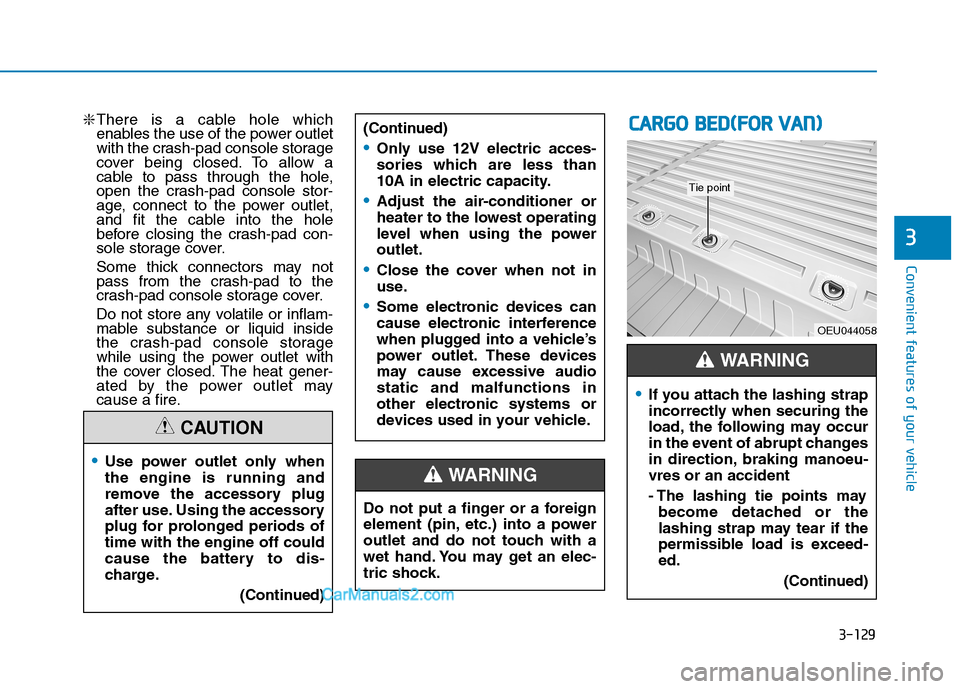
CCAA RRGG OO BB EEDD ((FF OO RR VV AA NN ))
OEU044058
If you attach the lashing strap
incorrectly when securing the
load, the following may occur
in the event of abrupt changes
in direction, braking manoeu-vres or an accident
- The lashing tie points may
become detached or the
lashing strap may tear if the
permissible load is exceed-ed.
(Continued)
WARNING
Tie point
Page 203 of 473
4-11
Multimedia System
4
(Continued)
You may hear a strange noise whenconnecting or disconnecting a USB
device.
If you disconnect the external USB device during playback in USB
mode, the external USB device can
be damaged or may malfunction.
Therefore, disconnect the external
USB device when the audio is
turned off or in another mode. (e.g,
Radio, CD)
Depending on the type and capacity of the external USB device or the
type of the files stored in the device,
there is a difference in the time
taken for recognition of the device.
Do not use the USB device for pur- poses other than playing music files.
Playing videos through the USB is not supported.
Use of USB accessories such as rechargers or heaters using USB I/F
may lower performance or cause
trouble.
(Continued)(Continued)
If you use devices such as a USB hub
purchased separately, the vehicle's
audio system may not recognize the
USB device. In that case, connect
the USB device directly to the multi-
media terminal of the vehicle.
If the USB device is divided by logi- cal drives, only the music files on the
highest-priority drive are recog-
nized by vehicle audio.
Devices such as MP3 Player/ Cellular phone/Digital
camera can be unrecog-
nizable by standard
USB I/F can be unrecog-
nizable.
Charging through the USB may not be supported in some mobile
devices.
USB HDD or USB types liable to connection failures due to vehicle
vibrations are not supported. (i-
stick type)
Some non-standard USB devices (METAL COVER TYPE USB) can
be unrecognizable.
(Continued)(Continued)
Some USB flash memory readers
(such as CF, SD, micro SD, etc.) or
external-HDD type devices can be
unrecognizable.
Music files protected by DRM (DIGITAL RIGHTS MANAGE-
MENT) are not recognizable.
The data in the USB memory may be lost while using this audio.
Always back up important data on a
personal storage device.
Please avoid using USB memory products which can be used as key
chains or cellular phone accessories
as they could cause damage to the
USB jack. Please make certain only
to use plug type connector products.
Page 275 of 473
5-4
Driving your vehicle
Always check the surrounding
areas near your vehicle for peo-
ple, especially children, before
putting a vehicle into “Drive” or
“Reverse”.
WARNING
Driving under the influence of alcohol or drugs
Drinking and driving is danger-
ous. Drunk driving is the num-
ber one contributor to the high-
way death toll each year. Even asmall amount of alcohol will
affect your reflexes, percep-
tions and judgment. Drivingwhile under the influence of
drugs is as dangerous or more
dangerous than driving drunk.
You are much more likely to
have a serious accident if you
drink or take drugs and drive.
If you are drinking or taking
drugs, don’t drive. Do not ridewith a driver who has beendrinking or taking drugs.Choose a designated driver orcall a cab.
WARNING
All passengers must be proper-
ly belted whenever the vehicle
is moving. Refer to “Seat belts”
in section 3 for more informa-
tion on their proper use.
WARNING
When you intend to park or
stop the vehicle with the
engine on, be careful not todepress the accelerator pedal
for a long period of time. It
may overheat the engine or
exhaust system and cause
fire.
When you make a sudden stop or turn the steering
wheel rapidly, loose objects
may drop on the floor and it
could interfere with the opera-
tion of the foot pedals, possi-
bly causing an accident. Keep
all things in the vehicle safelystored.
If you do not focus on driving,
it may cause an accident. Becareful when operating what
may disturb driving such as
audio or heater. It is theresponsibility of the driver to
always drive safely.
WARNING
Page 372 of 473

7-9
7
Maintenance
At least monthly:
Check coolant level in the enginecoolant reservoir.
Check the operation of all exterior lights, including the stoplights, turn
signals and hazard warning flash-
ers.
Check the inflation pressures of all tires including the spare.
At least twice a year
(i.e., every Spring and Fall) :
Check radiator, heater and air con- ditioning hoses for leaks or dam-
age.
Check windshield washer spray and wiper operation. Clean wiper
blades with clean cloth dampened
with washer fluid.
Check headlight alignment.
Check muffler, exhaust pipes, shields and clamps.
Check the lap/shoulder belts for wear and function.
Check for worn tires and loose wheel lug nuts.
At least once a year :
Clean body, door and hood drainholes.
Clean and lubricate door hinges and checks, and hood hinges.
Clean and lubricate door and hood locks and latches.
Clean and lubricate door rubber weatherstrips.
Check the air conditioning system.
Check the power steering fluid level.
Clean battery and terminals.
Check the brake and clutch fluid level.
Page 388 of 473
7-25
7
Maintenance
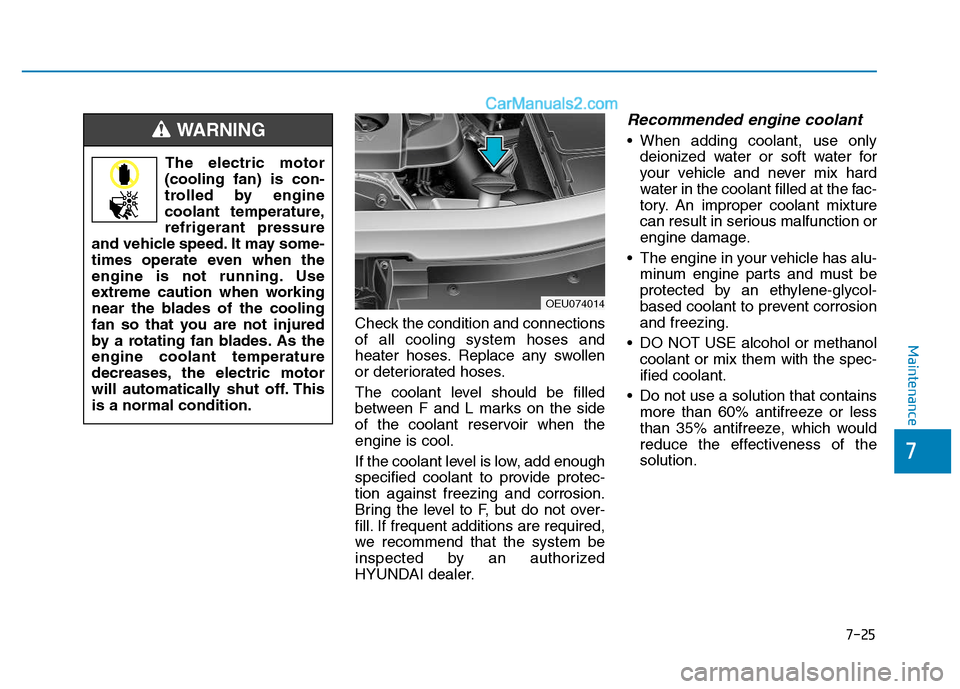
Check the condition and connections of all cooling system hoses and
heater hoses. Replace any swollen
or deteriorated hoses.
The coolant level should be filled
between F and L marks on the side
of the coolant reservoir when theengine is cool.
If the coolant level is low, add enough
specified coolant to provide protec-tion against freezing and corrosion.
Bring the level to F, but do not over-
fill. If frequent additions are required,
we recommend that the system be
inspected by an authorized
HYUNDAI dealer.
Recommended engine coolant
When adding coolant, use onlydeionized water or soft water for
your vehicle and never mix hard
water in the coolant filled at the fac-
tory. An improper coolant mixture
can result in serious malfunction or
engine damage.
The engine in your vehicle has alu- minum engine parts and must be
protected by an ethylene-glycol-
based coolant to prevent corrosionand freezing.
DO NOT USE alcohol or methanol coolant or mix them with the spec-ified coolant.
Do not use a solution that contains more than 60% antifreeze or less
than 35% antifreeze, which would
reduce the effectiveness of thesolution.
The electric motor
(cooling fan) is con-
trolled by engine
coolant temperature,
refrigerant pressure
and vehicle speed. It may some-
times operate even when the
engine is not running. Use
extreme caution when working
near the blades of the cooling
fan so that you are not injured
by a rotating fan blades. As theengine coolant temperature
decreases, the electric motor
will automatically shut off. Thisis a normal condition.WARNING
OEU074014
Page 421 of 473

7-58
Maintenance
No.Fuse ratingFuse NameCircuit Protected
2310AMODULE-2HLLD Actuator Left/Right, Glow Relay Module(IG1), Brake Switch, FPAS Sensor, C/PAD Switch, BEZEL Switch, LDC Module(IG1)
247.5AMODULE-5I_S_MIRR(IG2), CM(IG2), Passenger Heater Module(IG2), Seat HTD Module Left/Right(IG2),
F/FILTER Relay 'S'
2510A2
IMMOImmobilizer Module(B+), Key Warning Switch
267.5A1
IMMOImmobilizer Module(IG1)
2720ASEAT BOX (IG2)SEAT BOX (ELECTRIC VENTILATOR2 10A, A/CON RR(IG2) 10A, IG2 10A(AUX POWER(IG2)
Relay 'S'))
287.5A1
A/CONA/C Control Module(IG2)
2915AA/BAGA/BAG Control Module(IG1)
307.52
EMERGENCY CALLEmergency-Call(IG1)
Page 422 of 473
7-59
7
Maintenance
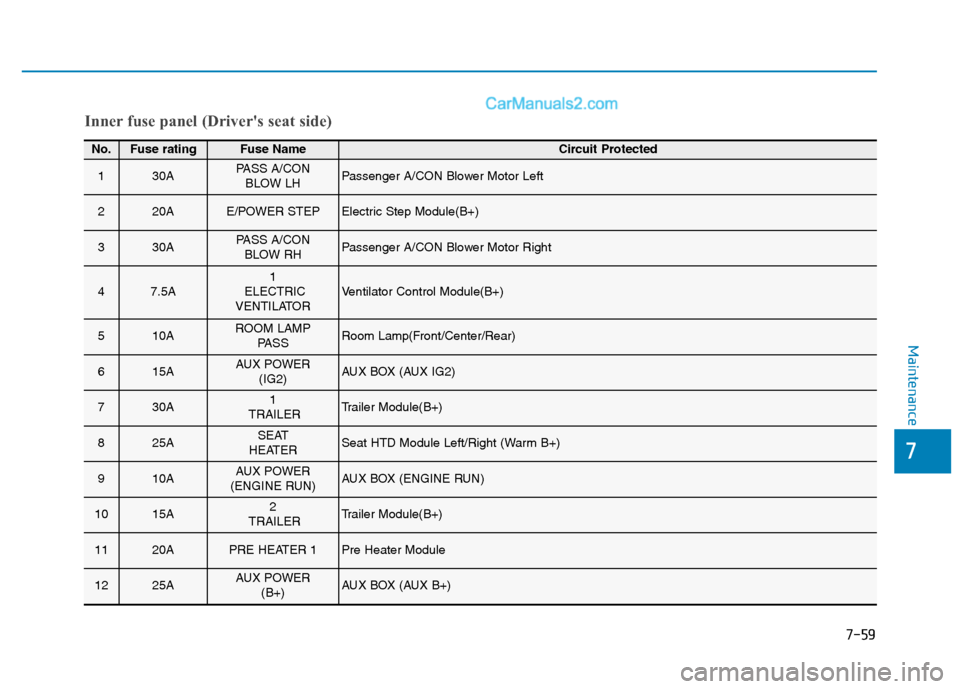
Inner fuse panel (Driver's seat side)
No.Fuse ratingFuse Name Circuit Protected
130APASS A/CONBLOW LHPassenger A/CON Blower Motor Left
220AE/POWER STEPElectric Step Module(B+)
330APASS A/CONBLOW RHPassenger A/CON Blower Motor Right
47.5A1
ELECTRIC
VENTILATORVentilator Control Module(B+)
510AROOM LAMP PASSRoom Lamp(Front/Center/Rear)
615AAUX POWER (IG2)AUX BOX (AUX IG2)
730A1
TRAILERTrailer Module(B+)
825ASEAT
HEATERSeat HTD Module Left/Right (Warm B+)
910AAUX POWER
(ENGINE RUN)AUX BOX (ENGINE RUN)
1015A2
TRAILERTrailer Module(B+)
1120APRE HEATER 1Pre Heater Module
1225AAUX POWER (B+)AUX BOX (AUX B+)