2016 Hyundai Genesis reset
[x] Cancel search: resetPage 235 of 503

3-141
Convenient features of your vehicle
3
Adjusting temperature and mode
of the driver & passenger side
individually (Type B)
Press the "SYNC" button again toadjust the temperature and mode
of the driver & passenger side indi-
vidually. The illumination of button
turns off.
Operate the driver side tempera- ture control knob to adjust the driv-
er side temperature.
Operate the driver side mode selection button to adjust the direc-
tion of the driver side air flow.
Operate the passenger side tem- perature control knob to adjust the
passenger side temperature.
Operate the passenger side mode selection button to adjust the direc-
tion of the passenger side air flow.Temperature conversion
If the battery has been discharged or
disconnected, the temperature mode
display will reset to Fahrenheit.
This is a normal condition. You can
switch the temperature mode between
Centigrade to Fahrenheit as follows;
- Automatic climate control system
While pressing the OFF button,
depress the AUTO button for 3 sec-
onds or more. The display will change
from Centigrade to Fahrenheit, or
from Fahrenheit to Centigrade.
- “User Setting mode” in the cluster :You can change the temperature unit
in the “Other features – Temperature
unit”.
Air intake control
This is used to select the outside
(fresh) air position or recirculated air
position.
To change the air intake control posi-
tion, push the control button.
ODH043151
■Type B ODH043093
■Type A
Page 244 of 503

3-150
Convenient features of your vehicle
Auto defogging system
ON/OFF
If your vehicle is equipped with the
auto defogging system, it is automat-
ically activated when the conditions
are met.However, if you would like to cancel
the auto defogging system, turn off
the Auto defogging function in the
AVN climate monitor.
If the battery has been disconnected
or discharged, it resets to the auto
defogging status.
✽ ✽
NOTICE
When the air conditioning is turned
on and the outside air position is
selected by the auto defogging sys-
tem, if you try to turn off the air con-
ditioning and select the recirculated
air position, the indicator will blink
3 times and the air conditioning will
not be turned off and recirculated
air position will not be selected.
ODH043145L
ODH044141N
■
Type A
■ Type B
Do not remove the sensor cover
located on the upper end of the
driver side windshield glass.
Damage to system parts could
occur and may not be covered
by your vehicle warranty.
CAUTION
Page 260 of 503

4-4
Steering wheel audio controlVOLUME (VOL + / - ) (1)
Move the VOLUME lever up toincrease volume.
Move the VOLUME lever down to decrease volume.
SEEK/PRESET ( / ) (2)
If the SEEK/PRESET lever is moved
up or down and held for 0.8 second
or more, it will function in the follow-
ing modes;
RADIO mode
It will function as the AUTO SEEK
select button. It will SEEK until you
release the button.
MEDIA mode
It will function as the FF/REW button.
If the SEEK/PRESET lever is moved
up or down, it will function in the fol-
lowing modes;
RADIO mode
It will function as the PRESET STA-
TION UP/DOWN button.
MEDIA mode
It will function as the TRACK UP/
DOWN button.
MODE (3)
Press the MODE button to select
Radio, XM, Disc, or AUX.
MUTE ( ) (4)
Press the MUTE button to mute thesound.
Press the MUTE button again to activate the sound.
✽ ✽ NOTICE
Detailed information is described in
a separately supplied manual.
Multimedia System
ODH043118L
ODH043118
■ Type A
■Type B
Do not operate audio remote
control buttons simultaneously.
CAUTION
Page 314 of 503

5-53
Driving your vehicle
5
Decreasing the vehicle speedlower than the memory speed by
5 mph (10 km/h).
Decreasing the vehicle speed to less than approximately 20 mph
(30 km/h).
The ESC (Electronic Stability Control) is operating.
Downshifting to the 2nd gear in Sports Mode.
✽ ✽ NOTICE
Each of the above actions will cancel
Cruise Control operation (the SET
indicator light in the instrument
cluster will go off), but only pressing
the CRUISE button will turn the
system off. If you wish to resume
Cruise Control operation, push the
lever up (RES+) located on your
steering wheel. You will return to
your previously preset speed, unless
the system was turned off using the
CRUISE button.
To resume preset Cruising
speed
Push the lever (1) up (RES+). If the
vehicle speed is over 20 mph (30
km/h), the vehicle will resume the
preset speed.
To turn Cruise Control off
Push the CRUISE button (the
CRUISE indicator light will go off).
Turn the engine OFF.ODH053025/Q
ODH053023
Page 385 of 503

7
Maintenance
7
Maintenance
Engine compartment .............................................7-3
Maintenance services ...........................................7-5
Owner's responsibility ......................................................7-5
Owner maintenance precautions ..................................7-5
Owner maintenance ...............................................7-6
Owner maintenance schedule ........................................7-7
Scheduled maintenance services.........................7-8
Normal maintenance schedule .......................................7-9
Maintenance under severe usage conditions ..........7-22
Explanation of scheduled maintenance
items.......................................................................7\
-24
Engine oil ..............................................................7-27
Checking the engine oil level .......................................7-27
Checking the engine oil and filter ..............................7-28
Engine coolant......................................................7-29
Checking the engine coolant level..............................7-29
Changing engine coolant...............................................7-31
Brake fluid ............................................................7-32
Checking the brake fluid level .....................................7-32
Washer fluid .........................................................7-34
Checking the washer fluid level ..................................7-34
Parking brake .......................................................7-34
Checking the parking brake .........................................7-34
Air cleaner ............................................................7-35
Filter replacement ...........................................................7-35
Climate control air filter .....................................7-36
Filter inspection ...............................................................7-36
Wiper blades .........................................................7-38
Blade inspection ..............................................................7-38
Blade replacement ..........................................................7-38
Battery...................................................................7-40
For best battery service................................................7-41
Battery recharging .........................................................7-42
Reset features .................................................................7-44
Tires and wheels ..................................................7-45
Tire care ........................................................................\
....7-45
Recommended cold tire inflation pressures.............7-46
Check tire inflation pressure........................................7-47
Tire rotation .....................................................................7-4\
8
Wheel alignment and tire balance ..............................7-49
Tire replacement .............................................................7-49
Wheel replacement .........................................................7-50
Tire traction ......................................................................7-\
50
Tire maintenance ............................................................7-51
Tire sidewall labeling ......................................................7-51
Tire terminology and definitions.................................7-55
All season tires ................................................................7-58
7
Page 428 of 503

7-44
Maintenance
Reset features
Some items need to be reset after
the battery has been discharged or
the battery has been disconnected.
See chapter 3 for:
Auto up/down window
Sunroof
Trip computer
Climate control system
Page 433 of 503
7-49
7
Maintenance
Wheel alignment and tire bal-
ance
The wheels on your vehicle were
aligned and balanced carefully at the
factory to give you the longest tire life
and best overall performance.
In most cases, you will not need to
have your wheels aligned again.
However, if you notice unusual tire
wear or your vehicle pulling one way
or the other, the alignment may need
to be reset.
If you notice your vehicle vibrating
when driving on a smooth road, your
wheels may need to be rebalanced.
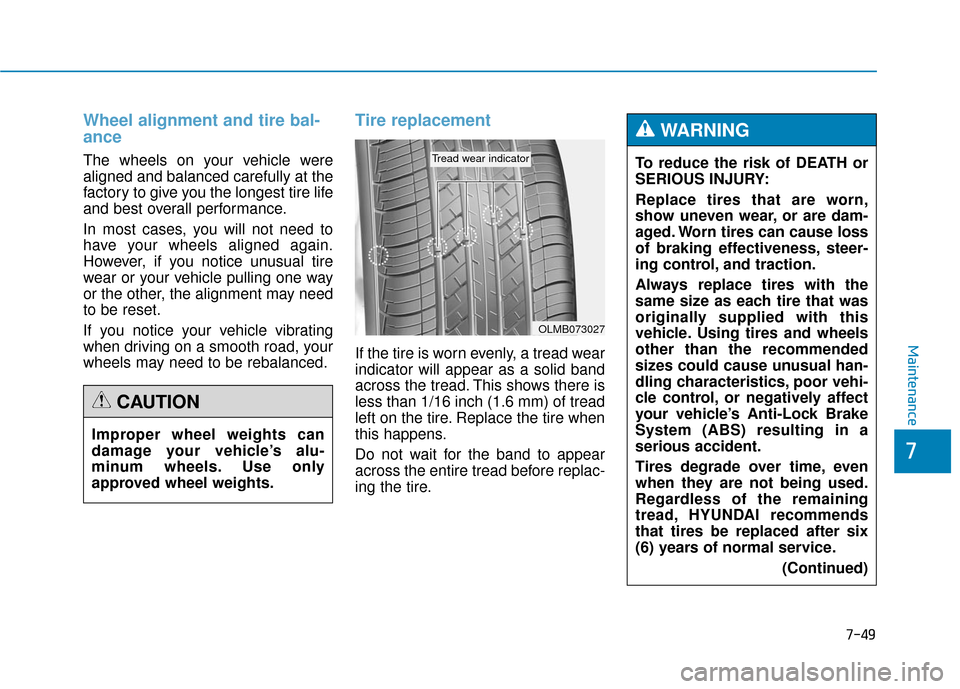
Tire replacement
If the tire is worn evenly, a tread wear
indicator will appear as a solid band
across the tread. This shows there is
less than 1/16 inch (1.6 mm) of tread
left on the tire. Replace the tire when
this happens.
Do not wait for the band to appear
across the entire tread before replac-
ing the tire.
OLMB073027
Tread wear indicator
Improper wheel weights can
damage your vehicle’s alu-
minum wheels. Use only
approved wheel weights.
CAUTION
To reduce the risk of DEATH or
SERIOUS INJURY:
Replace tires that are worn,
show uneven wear, or are dam-
aged. Worn tires can cause loss
of braking effectiveness, steer-
ing control, and traction.
Always replace tires with the
same size as each tire that was
originally supplied with this
vehicle. Using tires and wheels
other than the recommended
sizes could cause unusual han-
dling characteristics, poor vehi-
cle control, or negatively affect
your vehicle’s Anti-Lock Brake
System (ABS) resulting in a
serious accident.
Tires degrade over time, even
when they are not being used.
Regardless of the remaining
tread, HYUNDAI recommends
that tires be replaced after six
(6) years of normal service.(Continued)
WARNING
Page 447 of 503

7-63
7
Maintenance
In an emergency, if you do not have
a spare fuse, use a fuse of the same
rating from a circuit you may not
need for operating the vehicle, such
as the cigarette lighter fuse.
If the headlamps or other electrical
components do not work and the
fuses are OK, check the fuse panel
in the engine compartment. If a fuse
is blown, it must be replaced with the
same rating.Fuse switch
Always, place the fuse switch to the
ON position.
If you move the switch to the OFF
position, some items such as audio
and digital clock must be reset and
the smart key may not work properly.
ODH073032
Always place the fuse switch
in the ON position while driv-
ing the vehicle.
Do not move the transporta-
tion fuse switch repeatedly.
The fuse switch may be dam-
aged.
CAUTION