Page 191 of 477

Indicator Lights
Electronic StabilityControl (ESC) IndicatorLight
This indicator light illuminates:
Once you turn ON the ignition
switch or the Engine Start/Stop
button.
- It illuminates for approximately 3seconds and then goes OFF.
When there is a malfunction with the ESC system.
In this case, have your vehicle
inspected by an authorized
EQUUS dealer.
This indicator flashes:
While the ESC is operating.
❈For further information, refer to
"Electronic Stability Control (ESC)"
in the chapter 5.
Electronic Stability
Control (ESC) OFFIndicator Light
This indicator light illuminates:
Once you turn ON the ignition
switch or the Engine Start/Stop
button.
- It illuminates for approximately 3seconds and then goes OFF.
When you deactivate the ESC system by pressing the ESC OFF
button.
❈ For further information, refer to
"Electronic Stability Control
(ESC)" in the chapter 5.
Immobilizer Indicator
Light
This indicator illuminates up to 30
seconds:
When the vehicle detects the
Smart Key in the vehicle while the
Engine Start/Stop button is the
ACC or ON position.
- At this time, you can start theengine.
- The indicator light goes off after starting the engine.
This indicator flashes for a few sec-
onds:
When the smart key is out of the vehicle.
- At this time, you cannot start theengine.
This indicator illuminates for 2 sec-
onds and goes OFF:
When the Smart Key is not detect- ed inside the vehicle while the
Engine Start/Stop button is ON.
In this case, have your vehicle
inspected by an authorized
EQUUS dealer.
This indicator flashes:
When the Smart Key battery isweak.
- In this case, you cannot start theengine. However, by pressing the
Engine Start/Stop button with the
smart key, you may start the
engine. (For further information,
refer to “Starting the Engine” in
the chapter 5).
3-96
Convenient features of your vehicle
Page 194 of 477

Advanced VehicleSafety Management(AVSM) OFF IndicatorLight (if equipped)
This indicator light illuminates:
Once you turn ON the Engine
Start/Stop button
- It illuminates for approximately 3seconds and then goes OFF.
When you deactivate the AVSM system on the LCD display.
❈ For further information, refer to
“LCD Display” in this chapter.
When this indicator illuminates with-
out selecting the AVSM OFF, there is
a malfunction with the AVSM.
In this case, have your vehicle
inspected by an authorized EQUUS
dealer.
❈ For further information, refer to
“Advanced Vehicle Safety
Management (AVSM) System” in
the chapter 5.
SPORT/SNOW Mode
Indicator Light
This indicator light illuminates:
When you select "SPORT/SNOW"
mode as the drive mode.
❈ For further information, refer to
"Drive mode integrated control
system" in the chapter 5.
Information
If you activate the Driving Mode
Theme on the User Settings Mode of
the LCD display (if equipped), the
SPORT and SNOW indicators will not
turn on the instrument cluster.
ECO Indicator Light
(if equipped)
The ECO indicator light informs you
to drive economically, and turns on
green in accordance with the driving
condition.
This indicator light illuminates:
[Green] when you are driving eco-
nomically.
The drive’s driving habit and road condition can affect fuel efficiency.
The light will not display : - If the condition does not meeteconomical driving such as P
(Park), N (Neutral), R (Reverse),
or sports mode.
- While the instant fuel Economy of the trip computer is display on
the LCD display.
In the "User Settings Mode" of the LCD, you can activate or deacti-
vate the ECO driving mode.
❈ For further information, refer to
"LCD Display" in this chapter.
i
3-99
Convenient features of your vehicle03
Do not monitor the ECO indica-
tor while driving. This will dis-
tract you and may cause an
accident, resulting in severe
personal injury.
WARNING
Page 204 of 477

Battery saver function
The purpose of this function is toprevent the battery from being dis-
charged. The system automatical-
ly turns OFF the parking lights
when the driver turns OFF the
engine and opens the driver's
door.
With this function, the parking lights are turned OFF automatical-
ly if the driver parks the vehicle on
the side of the road at night.
If necessary, in order to keep the
lights ON when the engine is
turned OFF, perform the follow-
ings:
1) Open the driver-side door.
2) Turn the parking lights ON and OFF again using the light
switch on the steering column.
Headlamp escort function
When you press the Engine
Start/Stop button to the ACC or OFF
position with the headlamps ON, the
headlamps (and/or tail lights) remain
ON for approximately 5 minutes.
However, when the driver’s door is
open and then closed, the head-
lamps are turned OFF after 15 sec-
onds.
The headlamps can be turned OFF
by pressing the lock button on the
Smart Key twice or turning the light
switch to the OFF or Auto position.
However, when you turn the light
switch to the Auto position, and when
it is dark outside, the headlamps will
not be turned OFF.
If the driver exit the vehicle
through other doors (except dri-
ver’s door), the battery saver func-
tion does not operate and the
headlamp escort function does
not turn OFF automatically.
Therefore, it discharges the bat-
tery. In this case, make sure to
turn OFF the lamp before exiting
the vehicle.
NOTICE
L LI
IG
G H
H T
TI
IN
N G
G
3-109
Convenient features of your vehicle03
Page 205 of 477
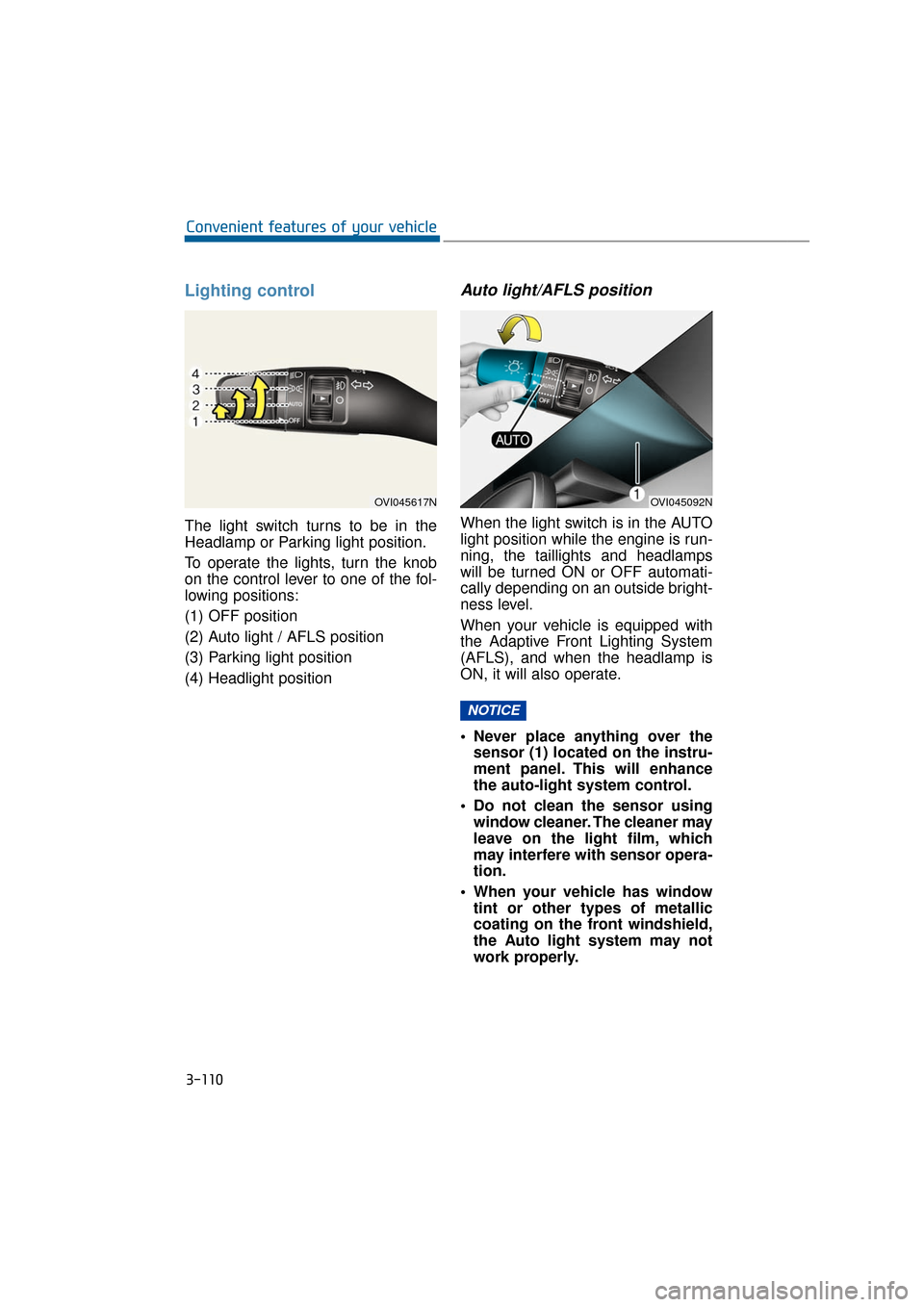
Lighting control
The light switch turns to be in the
Headlamp or Parking light position.
To operate the lights, turn the knob
on the control lever to one of the fol-
lowing positions:
(1) OFF position
(2) Auto light / AFLS position
(3) Parking light position
(4) Headlight position
Auto light/AFLS position
When the light switch is in the AUTO
light position while the engine is run-
ning, the taillights and headlamps
will be turned ON or OFF automati-
cally depending on an outside bright-
ness level.
When your vehicle is equipped with
the Adaptive Front Lighting System
(AFLS), and when the headlamp is
ON, it will also operate.
Never place anything over thesensor (1) located on the instru-
ment panel. This will enhance
the auto-light system control.
Do not clean the sensor using window cleaner. The cleaner may
leave on the light film, which
may interfere with sensor opera-
tion.
When your vehicle has window tint or other types of metallic
coating on the front windshield,
the Auto light system may not
work properly.
NOTICE
3-110
Convenient features of your vehicle
OVI045092NOVI045617N
Page 206 of 477
Parking light position ( )
When the light switch is in the park-
ing light position, the tail, license and
instrument panel lights are ON and
the tail light indicator is ON.
Headlamp position ( )
When the light switch is in the head-
lamp position, the head, tail, license
and instrument panel lights are ON.
Information
The Engine Start/Stop button must be
pressed ON to turn ON the head-
lamps.
High beam operation
To turn ON the high beam head-
lamps, push the lever away from you.
Pull it back for low beams. The high
beam indicator illuminates, when the
headlamp high beams are switched
ON.
To prevent the battery from being
discharged, do not leave the lights
ON for a prolonged period of time
while the engine is not running.
i
3-111
Convenient features of your vehicle03
OVI045618N
OVI045619N
OVI045426N
Do not use high beam when
there are other vehicles. Using
high beam could obstruct the
other driver's vision.
WARNING
Page 208 of 477

Information
If an indicator flash is abnormally
quick or slow, a bulb may be burned
out or have a poor electrical connec-
tion in the circuit.
Front fog light
Fog lights improve visibility and help
to avoid accidents which happen due
to poor visibility with fog, rain, snow,
etc. The fog lights will turn ON when
fog light switch (1) is turned to ON
with the headlamps ON.
To turn OFF the fog lights, turn the
switch to OFF.
When in operation, the fog lights
consume large amounts of vehicle
electrical power. Use the fog lights
only when visibility is poor.
Unnecessary usage may drain the
battery.
Daytime running light
Daytime Running Lights (DRL) can
make it easier for others to see the
front of your vehicle during the day-
time. DRL can be helpful in many dif-
ferent driving conditions, especially
after dawn or before sunset.
The DRL system will turn OFF when:
1. The headlamp switch is ON.
2. The parking brake is set.
3. Engine stops.
Headlight leveling device
Automatic type
It automatically adjusts the head-
lamp beam levels according to the
number of passengers and the load-
ing weight in the luggage area.
It offers the proper headlight beam
under various conditions.
NOTICE
i
3-113
Convenient features of your vehicle03
OVI045251C
When it does not properly oper-
ate, or when the headlamp
beam is isolated to the high or
low position, have your vehicle
inspected by an authorized
EQUUS dealer.
Do not attempt to inspect or
replace the wiring by yourself.
WARNING
Page 209 of 477
AFLS (Adaptive Front Lighting
System) (if equipped)
The AFLS uses the steering angle
and vehicle speed to widen your field
of vision by swiveling and leveling the
headlamp. Turn the knob to the
AUTO position when the engine is
running. The AFLS will operate when
the headlamp is ON. To turn OFF the
AFLS, turn the knob to the other
position. After turning the AFLS OFF,
headlamp swiveling no longer
occurs, but leveling operates contin-
uously.If the AFLS malfunction indicator illu-
minates, the AFLS does not work
properly. Drive to the nearest safe
location and restart the engine. If the
indicator continuously remains ON,
have your vehicle inspected by an
authorized EQUUS dealer.
3-114
Convenient features of your vehicle
OVI045091N
■
Type A■Type B
OVI045622N/OVI045425N
Page 210 of 477

A : Wiper speed control· MIST – Single wipe
· OFF – OffAUTO – AUTO control wipe
· LO – Low wiper speed
· HI – High wiper speed
B : Auto control wipe time adjustment
C : Wash with brief wipes
Windshield wipers
Operate the windshield wipers as fol-
lows when the ignition switch is
turned ON.
MIST : For a single wiping cycle,
push the lever upward and
release it with the lever in the
OFF position. The wipers will
operate continuously if the
lever is pushed upward and
held.
OFF : Wiper is not in operation. AUTO : The rain sensor located on
the upper end of the wind-
shield glass senses the
amount of rainfall and con-
trols the wiping cycle at the
proper interval. The more it
rains, the faster the wiper
operates. When the rain
stops, the wiper stops. To
vary the speed setting, turn
the speed control knob (B).
LO : Normal wiper speed
HI : Fast wiper speed
Information
If there is a thick pile of snow or ice on
the windshield, defrost the windshield
for about 10 minutes, or until the
snow and/or ice is melted away before
using the windshield wipers to proper-
ly operate.
Information
• When you operate the wipers, if your vehicle has a problem in any
part of the wiper operation system,
the wiper may operate in the LO
mode regardless of the wiper switch
position. In this case, have your
vehicle checked by an authorized
EQUUS dealer as soon as possible.
• When the engine is turned OFF, the wiper blade sometimes may move
slightly for reducing the deteriora-
tion of the windshield wipers.
i
i
W W I
IP
P E
ER
R S
S
A
A N
N D
D
W
W A
AS
SH
H E
ER
R
3-115
Convenient features of your vehicle03
OVI045500N

