Page 107 of 477

To release:
1. Open the glove box with themechanical key.
2. Set the Trunk Lid Control button to the ON position (depressed).
In this position, the trunk lid will open
with the Trunk Lid button of the Smart
Key.
Battery Replacement
When the Smart Key does not prop-
erly operate, replace the battery with
a new one.
Battery Replacement of the Conventional-type Smart Key
Battery Type: CR2032
To Replace the Battery:
1. Open the rear cover of the Smart
Key.
2. Remove the old battery and insert a new one. Make sure the battery
is in the correct position.
3. Close the rear cover of the Smart Key.
Battery Replacement of theCard-type Smart Key
Battery Type: CR2412
To Replace the Battery:
1. Open the sliding battery cover.
2. Remove the old battery and insert
a new one. Make sure the battery
is in the correct position.
3. Close the sliding battery cover.
Information
• When your Smart Key is suspected to be damaged, or when your Smart
Key does not properly operate, con-
tact an authorized EQUUS dealer.
• An inappropriate disposal of the battery can be harm-
ful to the environment and
human health.
Dispose of the battery in
accordance with your local
law(s) and regulation(s).
i
3-12
Convenient features of your vehicle
OVI045603N
OVI045004N
Page 108 of 477

This system helps to protect your
vehicle and valuables. The hazard
warning lights will continuously flash
with a warning alarm, when any of
the followings occurs:
- A door is opened without using theSmart Key.
- The trunk is opened without using the Smart Key.
- The engine hood is opened.
The alarm continues for 30 seconds.
This repeats once more, and then
the system resets. To turn OFF the
alarm, unlock the doors with the
Smart Key.
The Theft Alarm System automati-
cally sets ON 30 seconds, after lock-
ing the doors and the trunk. To acti-
vate the system, you must lock the
doors and the trunk from outside with
the Smart Key or by pressing the but-
ton on the door handles with the
Smart Key. The hazard warning lights
flash once with a chime sound to
indicate onset of the system.
Once the Theft Alarm System sets
ON, opening any door, the trunk, or
the hood without using the Smart
Key will activate the alarm. The Theft
Alarm System will not set ON, when
the hood, the trunk, or any door is
not securely closed. When the sys-
tem does not set ON, check the
hood, the trunk, or the doors are
securely closed.
Do not attempt to modify this system
or add other devices to it.Information
• Do not lock the doors until all pas- sengers leave the vehicle. When any
passenger remains in the vehicle, the
alarm will activate.
• When you cannot cancel the Theft Alarm System with the Smart Key,
open the doors by using the mechan-
ical key and turn ON the Engine
Start/Stop button.
i
T TH
H E
EF
FT
T -
-A
A L
LA
A R
RM
M
S
S Y
Y S
ST
T E
EM
M
3-13
Convenient features of your vehicle03
Page 109 of 477

Operating Door Locks From
Outside the Vehicle
To lock the doors, press the button
on the outside door handle while car-
rying the Smart Key with you or
press the Door Lock button on the
Smart Key.
Grab the driver’s outside door handle
while carrying the Smart Key or
press the Door Unlock button on the
Smart Key to open the driver’s door.
When you touch the door handle of
the front outside doors, all doors will
unlock. When you press the Door
Unlock button on the Smart Key
again within four seconds, then all
the doors will unlock.
Once the doors are unlocked, they
may be opened by pulling the door
handle.When closing the door, push the
door with your hand. Make sure that
doors are securely closed.
Information
You can control the door unlock mode
in the User Settings menu on the LCD
display. You can unlock all doors by
simply pressing the unlock button.
Information
• In a cold and wet climate, door locks
and door mechanisms may not
properly operate due to freezing
conditions.
• When the door is locked and unlocked multiple times in a rapid
and consecutive manner with either
the vehicle key or door lock switch,
the system operation may temporar-
ily stop in order to protect the cir-
cuit and prevent component dam-
ages.
i
i
D DO
O O
OR
R
L
L O
O C
CK
K S
S
3-14
Convenient features of your vehicle
OVI045008N-1
■Type A
OVI045081N
■ Type B
Door Unlock
UnlockLock
Door Lock
If you don't close the door securely, the door may open
again.
Be careful that someone's body and hands are not
trapped when closing the door.
WARNING
Page 110 of 477

Power Door Latch (if equipped)
When a door is not completely
closed, but is just slightly latched in
the first detent position, the door will
automatically close.
To reduce the risk of injury:
Before closing a door, checkthere are no obstructions in the
path of the door.
Keep your fingers away from a door edge, otherwise they may
become trapped inside when the
power door latch operates.
Operating Door Locks From
Inside the Vehicle
With the Door Lock Button :
To unlock doors, push the door lock button (1) to the “Unlock”
position. The red mark (2) on the
door lock button will be visible.
To lock doors, push the door lock button (1) to the “Lock” position.
When the door is locked properly,
the red mark (2) on the door lock
button will be invisible.
To open a door, pull the door han- dle (3) outwards.
When the inner door handle of the driver’s (or front passenger’s) door
is pulled when the door lock button
is in the lock position, the button
will be unlocked and doors open.
Doors cannot be locked, when the Smart Key is in the vehicle, and
when any door is open.
Information
When a power door lock fails to oper-
ate while you are in the vehicle, try
one or more of the following proce-
dures to exit:
(Continued)
i
NOTICE
3-15
Convenient features of your vehicle03
OVI045007N
OVI045008A
LockUnlock
Page 111 of 477
(Continued)
Repeatedly attempt to unlock a door
(both electronic and manual) while
simultaneously pulling out a door
handle.
Operate the locks and handles of
other front/rear doors.
Lower a front window and use the
mechanical key from outside to
unlock the door.
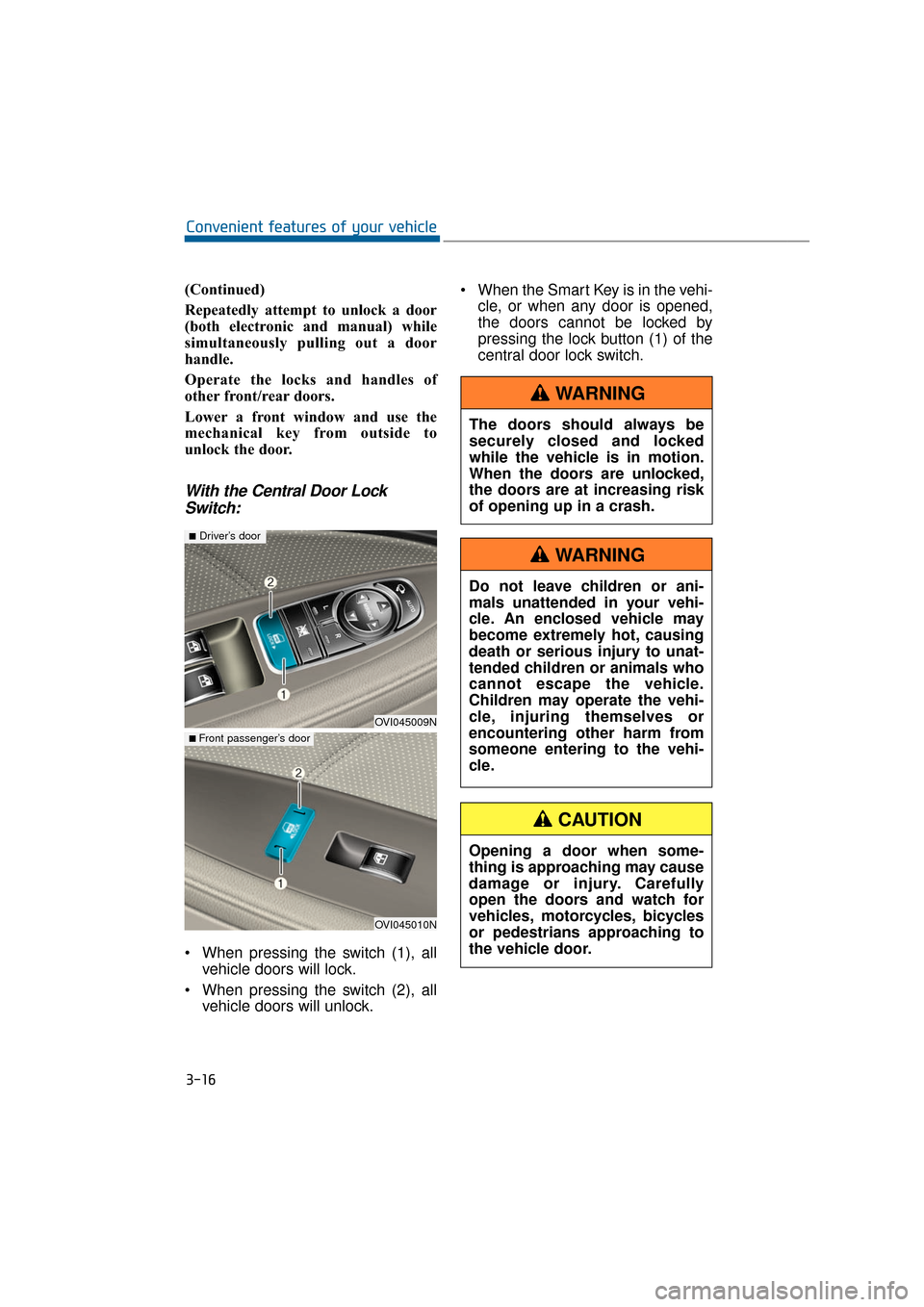
With the Central Door LockSwitch:
When pressing the switch (1), all
vehicle doors will lock.
When pressing the switch (2), all vehicle doors will unlock. When the Smart Key is in the vehi-
cle, or when any door is opened,
the doors cannot be locked by
pressing the lock button (1) of the
central door lock switch.
3-16
Convenient features of your vehicle
OVI045009N
■Driver’s door
OVI045010N
■ Front passenger’s door
The doors should always be
securely closed and locked
while the vehicle is in motion.
When the doors are unlocked,
the doors are at increasing risk
of opening up in a crash.
WARNING
Do not leave children or ani-
mals unattended in your vehi-
cle. An enclosed vehicle may
become extremely hot, causing
death or serious injury to unat-
tended children or animals who
cannot escape the vehicle.
Children may operate the vehi-
cle, injuring themselves or
encountering other harm from
someone entering to the vehi-
cle.
WARNING
Opening a door when some-
thing is approaching may cause
damage or injury. Carefully
open the doors and watch for
vehicles, motorcycles, bicycles
or pedestrians approaching to
the vehicle door.
CAUTION
Page 112 of 477

Auto Door Lock/Unlock Features
You can adjust the auto door lock/
unlock modes in the User Setting.
Refer to the User Setting Mode in the
chapter 3.
Child-Protector Rear Door
Locks
The child safety lock is equipped to
prevent a child seated in a rear from
accidentally opening a rear door. The
rear door safety lock should be used
whenever a child seats in a vehicle.
The child safety lock (1) is located on
the edge of each rear door. When the
child safety lock is in the lock position
( ), that rear door will not open by
pulling the inner door handle (2).
To open a rear door from inside the
vehicle, unlock ( ) the child safety
lock.
3-17
Convenient features of your vehicle03
When a child accidently opens
a rear door while driving, the
child may fall out of the vehicle.
The rear door safety locks
should always be used whenev-
er a child is in the vehicle.
WARNING
Always secure your vehicle.
Leaving your vehicle unlocked
increases the potential risk to
you or others from someone
hiding in your vehicle.
To secure your vehicle, depress
the brake pedal, move the shift
lever to P (Park), set the parking
brake, turn OFF the Engine
Start/Stop button, close all win-
dows, lock all doors, and take
the Smart Key with you.
WARNING
OVI045011N
Page 113 of 477

Non-Powered Trunk
To open:
1. Locate the shift lever in P(Park).
2. Then do one of the followings:- Press the Smart Key TrunkUnlock button for one second or
over.
- Press the button on the trunk, while taking the Smart Key in
your possession.
- Use the mechanical key.
- Use the trunk release button.
3. Lift up the trunk lid. To close:
Close the trunk lid and press it down,
until it latches.
To prevent the trunk lift cylinders
and other attached components
from being damaged, always close
the trunk before driving.
Information
In a cold and wet temperature, the
trunk lock and trunk mechanisms
may not properly operate due to freez-
ing conditions.
i
NOTICE
T T
R
R U
U N
NK
K
3-18
Convenient features of your vehicle
OVI045012N
OVI045013N
Always securely close the trunk
lid while the vehicle is in
motion. When it is still open or
ajar, poisonous exhaust gases
containing carbon monoxide
(CO) may enter the vehicle,
resulting serious illness or
death.
WARNING
The trunk lid swings open
upwards. Make sure there is no
object or people near the trunk
lid area, before opening it.
WARNING
Page 114 of 477

Power Trunk (if equipped)
(1) Power Trunk Main Control button
(2) Power Trunk Open button
(3) Power Trunk Close button(4) Power Trunk Lock button
To open:
1. Locate the shift lever in P(Park).
2. Then do one of the following:
- Press the Trunk Unlock button onthe Smart Key for one second or
over.
- Press the Power Trunk Open but- ton on the trunk, taking the
Smart Key in your possession,
with all doors locked.
- Press the Power Trunk Main Control button.
To close:
Do one of the followings:
- Press the Power Trunk Main Control button until the Power
Trunk is securely closed.
- Press the Power Trunk Close but- ton on the trunk.
- Press the Lock button on the trunk, while carrying the Smart
Key, with all doors closed. All
doors will lock and the theft alarm
system sets ON.
Pressing a button or switch, while
opening or closing the trunk, may
stop the operation. Press any button
to re-operate the Power Trunk.
3-19
Convenient features of your vehicle03
OVI045013N
OVI045014N
OVI045015N
OVI045016N