Page 205 of 477
Lighting control
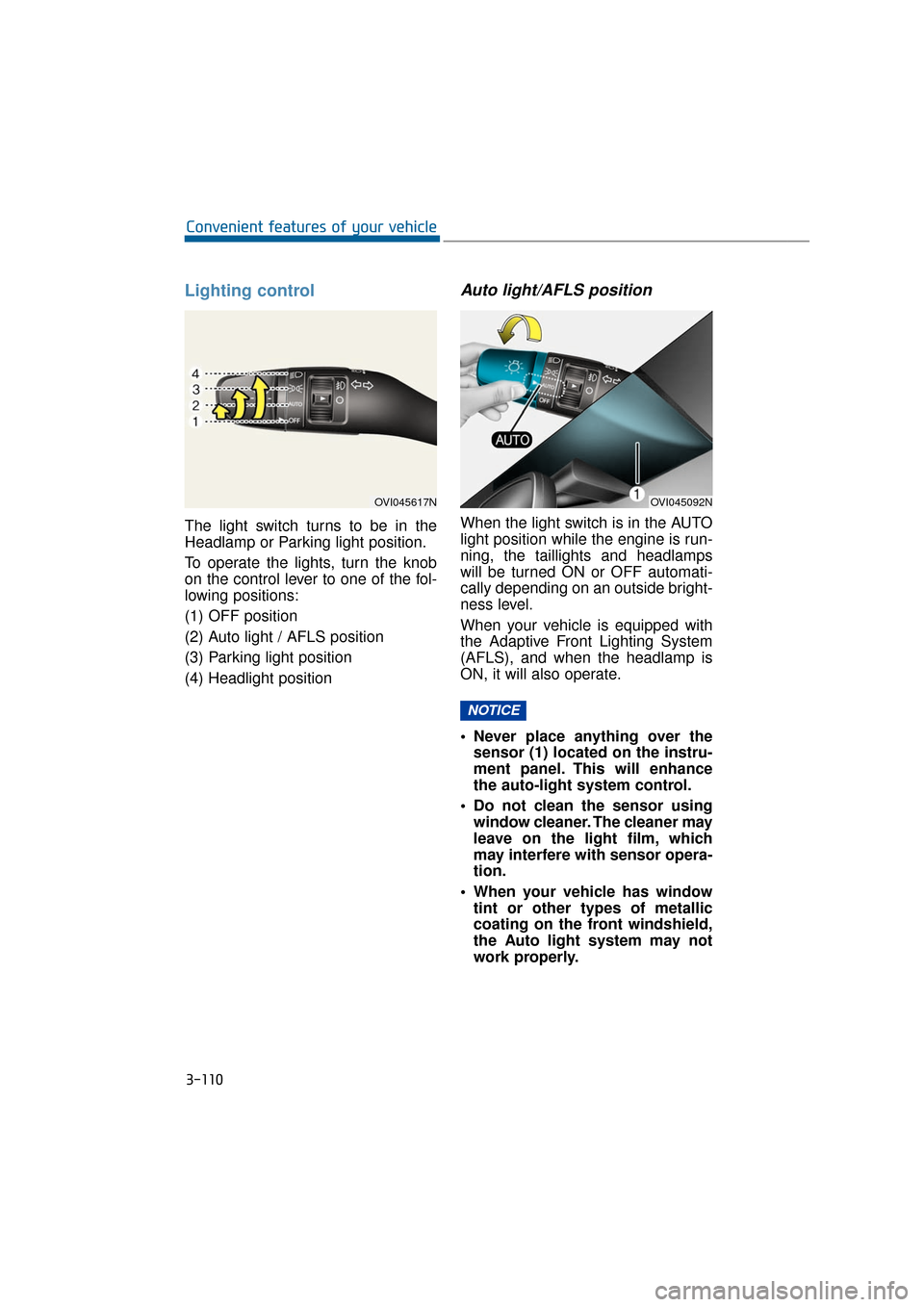
The light switch turns to be in the
Headlamp or Parking light position.
To operate the lights, turn the knob
on the control lever to one of the fol-
lowing positions:
(1) OFF position
(2) Auto light / AFLS position
(3) Parking light position
(4) Headlight position
Auto light/AFLS position
When the light switch is in the AUTO
light position while the engine is run-
ning, the taillights and headlamps
will be turned ON or OFF automati-
cally depending on an outside bright-
ness level.
When your vehicle is equipped with
the Adaptive Front Lighting System
(AFLS), and when the headlamp is
ON, it will also operate.
Never place anything over thesensor (1) located on the instru-
ment panel. This will enhance
the auto-light system control.
Do not clean the sensor using window cleaner. The cleaner may
leave on the light film, which
may interfere with sensor opera-
tion.
When your vehicle has window tint or other types of metallic
coating on the front windshield,
the Auto light system may not
work properly.
NOTICE
3-110
Convenient features of your vehicle
OVI045092NOVI045617N
Page 206 of 477
Parking light position ( )
When the light switch is in the park-
ing light position, the tail, license and
instrument panel lights are ON and
the tail light indicator is ON.
Headlamp position ( )
When the light switch is in the head-
lamp position, the head, tail, license
and instrument panel lights are ON.
Information
The Engine Start/Stop button must be
pressed ON to turn ON the head-
lamps.
High beam operation
To turn ON the high beam head-
lamps, push the lever away from you.
Pull it back for low beams. The high
beam indicator illuminates, when the
headlamp high beams are switched
ON.
To prevent the battery from being
discharged, do not leave the lights
ON for a prolonged period of time
while the engine is not running.
i
3-111
Convenient features of your vehicle03
OVI045618N
OVI045619N
OVI045426N
Do not use high beam when
there are other vehicles. Using
high beam could obstruct the
other driver's vision.
WARNING
Page 207 of 477

To flash the headlamps, pull the lever
towards you. It will return to the
default (low beam) position when
released. The headlamp switch does
not need to be ON to flash the head-
lamps.
Turn signals and lane change
signals
The ignition switch must be ON to
turn ON the turn signals. To turn ON
the turn signals, move the lever up or
down (A). Green arrow indicators on
the instrument panel indicate which
turn signal is operating. They will be
automatically OFF after a vehicle
completes a turn. If the indicator con-
tinues to flash after a turn, manually
return the lever to the OFF position.
To signal a lane change, move the
turn signal lever slightly and hold it in
position (B). The lever will return to
the OFF position when released.
If an indicator stays on and does not
flash or if it flashes abnormally, one
of the turn signal bulbs may be
burned out and require replacement.
One-touch triple turn signal
To activate a one-touch triple turn
signal, move the turn signal lever
slightly for less than 1.8 seconds and
then release it. The lane change sig-
nals will flash three times.
You can activate or deactivate this
function. Refer to the “User Settings”
in this chapter.
3-112
Convenient features of your vehicle
OVI045620N
OVI045621N
Page 208 of 477

Information
If an indicator flash is abnormally
quick or slow, a bulb may be burned
out or have a poor electrical connec-
tion in the circuit.
Front fog light
Fog lights improve visibility and help
to avoid accidents which happen due
to poor visibility with fog, rain, snow,
etc. The fog lights will turn ON when
fog light switch (1) is turned to ON
with the headlamps ON.
To turn OFF the fog lights, turn the
switch to OFF.
When in operation, the fog lights
consume large amounts of vehicle
electrical power. Use the fog lights
only when visibility is poor.
Unnecessary usage may drain the
battery.
Daytime running light
Daytime Running Lights (DRL) can
make it easier for others to see the
front of your vehicle during the day-
time. DRL can be helpful in many dif-
ferent driving conditions, especially
after dawn or before sunset.
The DRL system will turn OFF when:
1. The headlamp switch is ON.
2. The parking brake is set.
3. Engine stops.
Headlight leveling device
Automatic type
It automatically adjusts the head-
lamp beam levels according to the
number of passengers and the load-
ing weight in the luggage area.
It offers the proper headlight beam
under various conditions.
NOTICE
i
3-113
Convenient features of your vehicle03
OVI045251C
When it does not properly oper-
ate, or when the headlamp
beam is isolated to the high or
low position, have your vehicle
inspected by an authorized
EQUUS dealer.
Do not attempt to inspect or
replace the wiring by yourself.
WARNING
Page 209 of 477
AFLS (Adaptive Front Lighting
System) (if equipped)
The AFLS uses the steering angle
and vehicle speed to widen your field
of vision by swiveling and leveling the
headlamp. Turn the knob to the
AUTO position when the engine is
running. The AFLS will operate when
the headlamp is ON. To turn OFF the
AFLS, turn the knob to the other
position. After turning the AFLS OFF,
headlamp swiveling no longer
occurs, but leveling operates contin-
uously.If the AFLS malfunction indicator illu-
minates, the AFLS does not work
properly. Drive to the nearest safe
location and restart the engine. If the
indicator continuously remains ON,
have your vehicle inspected by an
authorized EQUUS dealer.
3-114
Convenient features of your vehicle
OVI045091N
■
Type A■Type B
OVI045622N/OVI045425N
Page 216 of 477

Puddle lamp
With all the doors (and trunk) closed
and locked, the puddle lamp will be
turned ON for approximately 15 sec-
onds, when any of the followings is
performed.
- The door unlock button on theSmart Key is pressed.
- You grab the door handle while taking the Smart Key in your pos-
session.
- You approach to the vehicle, while taking the Smart Key in posses-
sion.
Also, when the outside rearview mir-
ror folding switch is in the AUTO
position, the outside rearview mirror
will be automatically unfolded.
Headlamp
With the headlamp (light switch in
the headlamp or AUTO position) ON,
and with all doors (and trunk) closed
and locked, the parking lights and
headlamps will be turned ON for 15
seconds, when the following is per-
formed.
- The door unlock button on the Smart Key is pressed.
At this time, when you press the door
lock or unlock button, the position
light and headlamps will immediately
turn OFF.
Interior light
With the interior light switch in the
DOOR position and all doors (and
trunk) closed and locked, the room
lamp will be turned ON for 30 sec-
onds, if any of the followings is per-
formed.
- The door unlock button on the smart key is pressed.
- You put your hand into the door handle while taking the smart key
in your possession.
At this time, when you press the door
lock or unlock button, the room lamp
will be immediately turned OFF.
W W E
EL
LC
C O
O M
M E
E
S
S Y
Y S
ST
T E
EM
M
3-121
Convenient features of your vehicle03
OVI045402N
Page 305 of 477

DRIVER'S ATTENTION
The driver must be cautious in the
below situations, because the sys-
tem may not assist the driver nor
work properly.
The lane is not visible due tosnow, rain, stain, puddles or oth-
ers.
The exterior brightness sudden- ly changes, such as driving
through a tunnel.
The headlamp is turned OFF or weak in the night time or in a
tunnel.
It is difficult to distinguish the lane mark colors from the road.
The vehicle drives on a steep slope or a curve.
Lights, such as sunlight, street- light or lights from other vehi-
cles, reflect from the water on
the road.
The lens or windshield is stained with foreign substances.
The sensor cannot detect the lane lines because of fog, heavy
rain or heavy snow.
The surrounding temperature of the inside rear view mirror is
extremely high due to direct
sunlight.
The lane is very wide or narrow.
The lane mark is damaged or indistinct.
The shadow of median strips cast on the lane marks.
There are similar marks to lane marks.
There is a boundary structure.
The distance from a vehicle in front is very short. So, its driving
hides the lane marks in front.
(Continued)(Continued)
The vehicle is violently shaken.
The number of lane marks
increases or decreases, or the
lane marks cross each other in a
complicated manner.
Something is placed on the dashboard.
The vehicle drives against sun- light.
The vehicle drives in a construc- tion area.
There are more than two lane marks.
The lane marks are hard to be distinguished due to dust or
grease in a tunnel.
The lane marks are hard to be distinguished after raining at
night.
The lane marks are hard to be distinguished due to dust.
5-54
Driving your vehicle
Page 320 of 477

5-69
Driving your vehicle05
Smooth cornering
Avoid braking or shifting a gear on a
corner, especially when a road sur-
face is wet. It is ideal to drive a cor-
ner by gently accelerating. When you
take this suggestion, the tire wear-
out will be minimized.
Driving at night
Since night-time driving is more haz-
ardous than day-time driving, here
are some important tips to remem-
ber:
Slow down a driving speed andkeep a longer safe distance from a
vehicle in front, as it may be hard-
er to see at night, especially in
areas without any street lights.
Adjust your mirror angle to reduce glares from the headlamps of other
vehicles.
Keep your headlamps clean and properly aimed at. Any foreign sub-
stances on a headlamp and an
improperly adjusted headlamp
angle make it much harder to see
at night. Turning the headlamp ON,
while operating windshield wipers,
is mandatory in some states.
Avoid directly staring at the head- lamps of approaching vehicles.
This may temporarily blind your
vision, and take several seconds
for your eyes to readjust in the
darkness.
OVI055209NOVI055210N

