Page 150 of 526

465
Features of your vehicle
Engine Oil Pressure
Warning Light
This warning light illuminates:
• Once you set the ignition switch or
Engine Start/Stop Button to the ON
position.
- It remains on until the engine is
started.
• When the engine oil pressure is low.
If the engine oil pressure is low:
1. Drive carefully to the nearest safe
location and stop your vehicle.
2. Turn the engine off and check the
engine oil level (For more details,
refer to “Engine Oil” in chapter 7).
If the level is low, add oil as
required.
If the warning light remains on
after adding oil or if oil is not avail-
able, have your vehicle inspected
by an authorized HYUNDAI dealer
as soon as possible.
Low Fuel Level Warning
Light
This warning light illuminates:
When the fuel tank is nearly empty.
If the fuel tank is nearly empty, add
fuel as soon as possible.
CAUTION - Engine Oil
Pressure
Warning Light
• If the engine does not stop
immediately after the Engine
Oil Pressure Warning Light is
illuminated, severe damage
could result.
• If the warning light stays on
while the engine is running, it
indicates that there may be
serious engine damage or
malfunction. In this case,
1. Stop the vehicle as soon as
it is safe to do so.
2. Turn off the engine and
check the oil level. If the oil
level is low, fill the engine
oil to the proper level.
3. Start the engine again. If the
warning light stays on after
the engine is started, turn
the engine off immediately.
In this case, have your vehi-
cle inspected by an author-
ized HYUNDAI dealer.
CAUTION - Low Fuel
Level
Driving with the Low Fuel Level
warning light on or with the fuel
level below "E (Empty)" can
cause the engine to misfire and
damage the catalytic converter
(if equipped).
Page 156 of 526

471
Features of your vehicle
KEY OUT Indicator Light
(if equipped)
When the ENGINE START/STOP
button is in the ACC or ON position,
if any door is open, the system
checks for the smart key.
This indicator light blinks:
When the smart key is not in the
vehicle and any door is open with the
ignition switch or Engine Start/Stop
button in the ACC or ON position.
- At this time, if you close all doors,
the chime will also sound for
approximately 5 seconds.
- The indicator will go off while the
vehicle is moving.
The rearview camera will activate
when the back-up light is ON with the
engine start/stop button ON and the
shift lever in the R position.
This system is a supplemental sys-
tem that shows behind the vehicle
through the monitor while backing-
up.
KEY
OUT
REARVIEW CAMERA (IF EQUIPPED)
WARNING
• This system is a supplemen-
tary function only. It is the
responsibility of the driver to
always check the inside/out-
side rearview mirror and the
area behind the vehicle before
and while backing up.
• Always keep the camera lens
clean. If the lens is covered
with foreign matter, the cam-
era may not operate normally.
OMD044091
OMD045092
Page 340 of 526

57
Driving your vehicle
Key ignition switch positions
Switch
PositionActionNotes
LOCK
To turn the ignition switch to the LOCK position, push the key in
slightly at the ACC position and turn the key towards the LOCK
position.
The ignition key can be removed in the LOCK position.The steering wheel locks to protect the vehi-
cle from theft. (if equipped)
ACC
Electrical accessories are usable.The steering wheel unlocks.
If difficulty is experienced turning the ignition
switch to the ACC position, turn the key
while turning the steering wheel right and
left to release tension.
ON
This is the normal key position when the engine has started.
All features and accessories are usable.
The warning lights can be checked when you turn the ignition
switch from ACC to ON.Do not leave the ignition switch in the ON
position when the engine is not running to
prevent the battery from discharging.
STARTTo start the engine, turn the ignition switch to the START position.
The switch returns to the ON position when you let go of the key.The engine will crank until you release the
key.
Page 345 of 526
Driving your vehicle
12 5
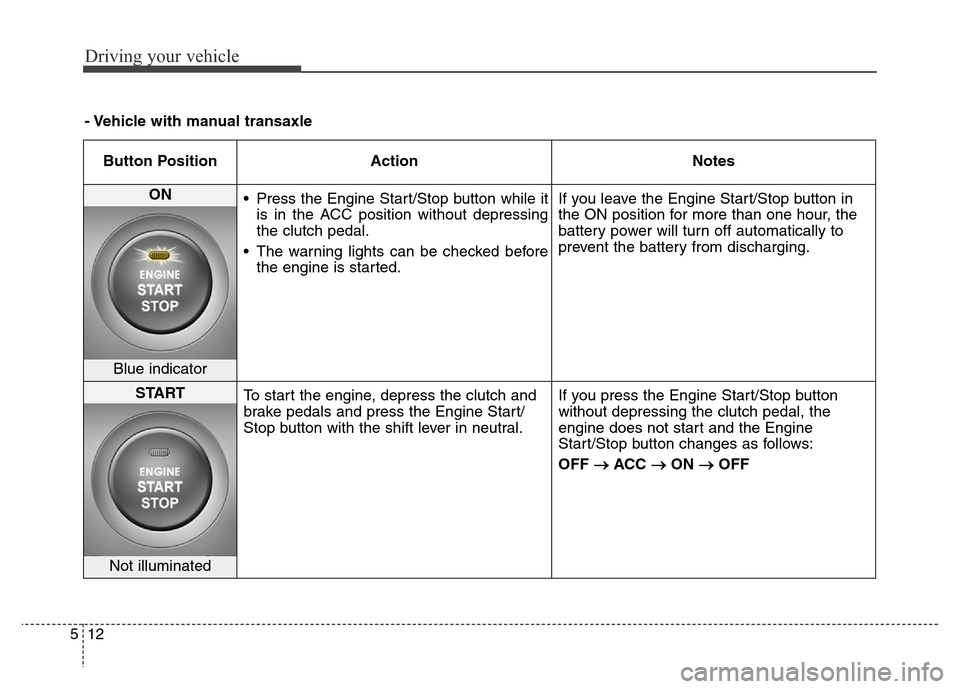
Button Position Action Notes
ON
• Press the Engine Start/Stop button while it
is in the ACC position without depressing
the clutch pedal.
• The warning lights can be checked before
the engine is started.If you leave the Engine Start/Stop button in
the ON position for more than one hour, the
battery power will turn off automatically to
prevent the battery from discharging.
Blue indicator
START
To start the engine, depress the clutch and
brake pedals and press the Engine Start/
Stop button with the shift lever in neutral.If you press the Engine Start/Stop button
without depressing the clutch pedal, the
engine does not start and the Engine
Start/Stop button changes as follows:
OFF
→ACC →ON →OFF
Not illuminated
- Vehicle with manual transaxle
Page 347 of 526
Driving your vehicle
14 5
- Vehicle with automatic transaxle
Button Position Action Notes
ON
• Press the Engine Start/Stop button while it
is in the ACC position without depressing
the brake pedal.
• The warning lights can be checked before
the engine is started.Do not leave the Engine Start/Stop button in
the ON position when the engine is not run-
ning to prevent the battery from discharging.
Blue indicator
START
To start the engine, depress the brake pedal
and press the Engine Start/Stop button with
the shift lever in the P (Park) or in the N
(Neutral) position.
For your safety, start the engine with the
shift lever in the P (Park) position.If you press the Engine Start/Stop button
without depressing the brake pedal, the
engine does not start and the Engine
Start/Stop button changes as follows:
OFF
→ACC →ON →OFF
Not illuminated
Page 365 of 526

Driving your vehicle
32 5
Check the Parking
Brake Warning Light by
placing the ignition
switch to the ON posi-
tion (do not start the
engine).
This light will be illuminated when the
parking brake is applied with the igni-
tion switch in the START or ON posi-
tion.
Before driving, be sure the parking
brake is released and the Brake
Warning Light is OFF.If the Parking Brake Warning Light
remains on after the parking brake is
released while engine is running,
there may be a malfunction in the
brake system. Immediate attention is
necessary.
If at all possible, cease driving the
vehicle immediately. If that is not pos-
sible, use extreme caution while
operating the vehicle and only con-
tinue to drive the vehicle until you
can reach a safe location.Anti-lock Brake System (ABS)
WARNING
An Anti-Lock Braking System
(ABS) or an Electronic Stability
Control (ESC) system will not
prevent accidents due to
improper or dangerous driving
maneuvers. Even though vehi-
cle control is improved during
emergency braking, always
maintain a safe distance
between you and objects ahead
of you. Vehicle speeds should
always be reduced during
extreme road conditions. The
braking distance for cars
equipped with ABS or ESC may
be longer than for those without
these systems in the following
road conditions.
(Continued)
Page 369 of 526

Driving your vehicle
36 5
ESC operation
ESC ON condition
When the ignition switch is in the ON
position, the ESC and the ESC OFF
indicator lights illuminate for approxi-
mately three seconds and goes off,
then the ESC is turned on.
If this light stays on, your vehicle may
have a malfunction with the ESC
system. Have your vehicle checked
by an authorized HYUNDAI dealer
as soon as possible.When operating
When the ESC is in opera-
tion, the ESC indicator light
blinks:
• When you apply your brakes under
conditions which may lock the
wheels, you may hear sounds from
the brakes, or feel a corresponding
sensation in the brake pedal. This
is normal and it means your ESC is
active.
• When the ESC activates, the
engine may not respond to the
accelerator as it does under rou-
tine conditions.
• If the Cruise Control was in use
when the ESC activates, the cruise
control automatically disengages.
The Cruise Control can be reen-
gaged when the road conditions
allow. See “Cruise Control System”
later in this chapter.• When moving out of the mud or
driving on a slippery road, the
engine rpm (revolutions per
minute) may not increase even if
you press the accelerator pedal
deeply. This is to maintain the sta-
bility and traction of the vehicle and
does not indicate a problem.
Page 370 of 526

537
Driving your vehicle
ESC OFF condition
< For 4-door vehicle >
To cancel ESC operation :
• State 1
Press the ESC OFF button shortly
(ESC OFF indicator light illumi-
nates). At this state, the engine con-
trol function does not operate. In
other words, the traction control
function does not operate but only
the brake control function operates.
•State 2
Press the ESC OFF button for more
than 3 seconds. ESC OFF indicator
light illuminates and ESC OFF warn-
ing chime will sound. At this state,
the engine control function and brake
control function does not operate. In
other words, the vehicle stability con-
trol function does not operate any
more.
If the ignition switch is placed to the
LOCK/OFF position when ESC is off,
ESC remains off. Upon restarting the
engine, the ESC will automatically
turn on again.< For 2-door vehicle >
To cancel ESC operation, press the
ESC OFF button (ESC OFF indicator
light illuminates).
If the ignition switch is placed to the
LOCK/OFF position when ESC is off,
ESC remains off. Upon restarting the
engine, the ESC will automatically
turn on again.Indicator lights
When the ignition switch is placed to
the ON position, the ESC indicator
light illuminates, then goes off if the
ESC system is operating normally.
The ESC indicator light blinks when-
ever the ESC is operating.
If ESC indicator light stays on, your
vehicle may have a malfunction with
the ESC system. When this warning
light illuminates, have the vehicle
checked by an authorized HYUNDAI
dealer as soon as possible.
The ESC OFF indicator light comes
on when the ESC is turned off with
the button.
■ESC indicator light (blinks)
■ ESC OFF indicator light (comes on)