Page 84 of 661
83
uuIndicators u
Continued
Instrument Panel
IndicatorNameOn/BlinkingExplanationMessage
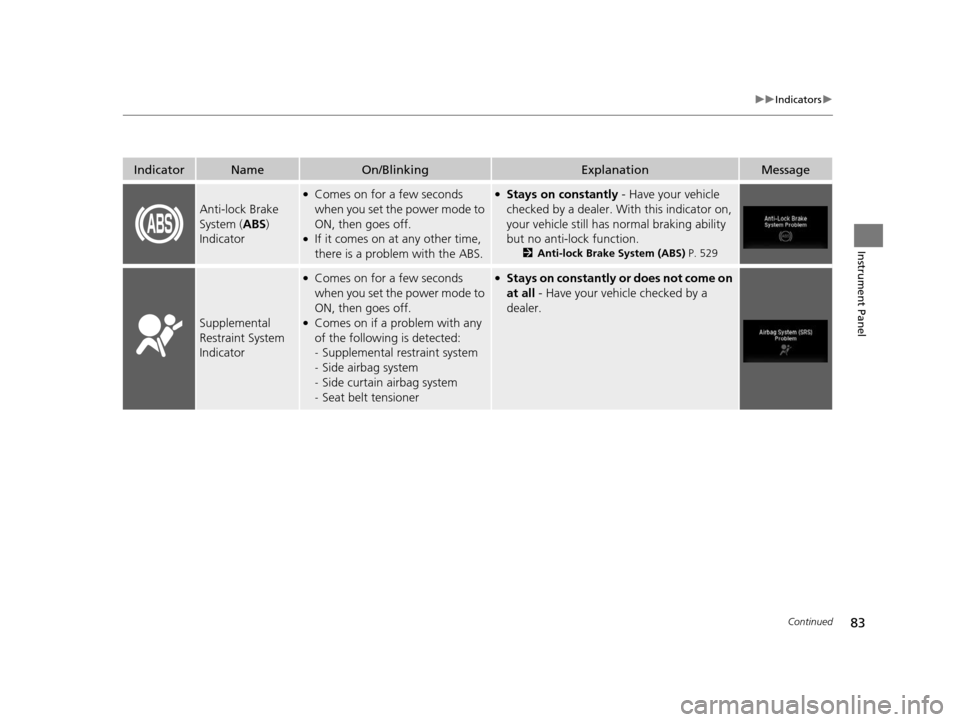
Anti-lock Brake
System (ABS)
Indicator
●Comes on for a few seconds
when you set the power mode to
ON, then goes off.
●If it comes on at any other time,
there is a problem with the ABS.
●Stays on constantly - Have your vehicle
checked by a dealer. With this indicator on,
your vehicle still has normal braking ability
but no anti-lock function.
2 Anti-lock Brake System (ABS) P. 529
Supplemental
Restraint System
Indicator
●Comes on for a few seconds
when you set the power mode to
ON, then goes off.
●Comes on if a problem with any
of the following is detected:
-Supplemental restraint system
- Side airbag system
- Side curtain airbag system
- Seat belt tensioner
●Stays on constantly or does not come on
at all - Have your vehicle checked by a
dealer.
16 PILOT-31TG76000.book 83 ページ 2015年6月15日 月曜日 午前11時30分
Page 105 of 661

104
uuIndicators uMulti-Information Display (MID) Warning and Information Messages
Instrument Panel
MessageConditionExplanation
●Appears when the transmission system temperature is
too high. The vehicle does not operate properly.●Stop in a safe place in (P.●Let the engine idle until the message disappears.
●Appears when you set the power mode to ACCESSORY
or ON.2 Starting the Engine P. 461
●Appears when the engine does not restart automatically
due to the following reason:
●The hood is open.●There is a problem in the syst em that disables Auto Idle-
stop.
●Follow the normal procedure to start the engine.
2 Starting the Engine P. 461
●Appears when you attempt to change to another gear
position with the transmission in
(P and the engine
OFF.
●To select another gear position while in (P the engine
must be ON.
●Appears when you try to chan ge the gear position after
the position has automatically been changed to
(P with
the driver’s door open and the driver’s seat belt
unfastened.
●Press the park button If you leave the vehicle.
Automatic transmission models with electronic gear selector
16 PILOT-31TG76000.book 104 ページ 2015年6月15日 月曜日 午前11時30分
Page 106 of 661

105
uuIndicators uMulti-Information Display (MID) Warning and Information Messages
Continued
Instrument Panel
MessageConditionExplanation
●Appears when you change to (N, then press and hold
(N again for two seconds.
●The gear position remains in (N for 15 minutes, then
automatically switches to
(P.
2 If you want to keep the transmission in (N
position [car wash mode] P. 475
●Appears when the vehicle is stopped with the driver’s
seat belt unfastened and there is a chance that the
vehicle may roll unintentionally.●Press the (P button before release the brake pedal
when idling, parking or exiting the vehicle.
2 Shift Operation P. 473
●Appears when the engine stops without the
transmission in
(P, and does not restart automatically.●Appears if you open the hood while Auto Idle-stop
activates.
●If you want to set the power mode to ON, change the
gear position to
(P.●If you want to start the engine, follow the normal
procedure.
2Starting the Engine P. 461
Automatic transmission models with electronic gear selector
16 PILOT-31TG76000.book 105 ページ 2015年6月15日 月曜日 午前11時30分
Page 107 of 661

106
uuIndicators uMulti-Information Display (MID) Warning and Information Messages
Instrument Panel
MessageConditionExplanation
●Appears when you try to ch ange the gear position
without depressing the brake pedal.●Depress the brake pedal, then select a shift button.
●Appears when you try to ch ange the gear position
without releasing your foot off the accelerator pedal.●Release your foot off the accelerator pedal, then select a
shift button.
●Appears when the (P button is pressed while the
vehicle is moving.
●Appears if you change the gear position to (R while the
vehicle is moving forward, or to
(D while the vehicle is
reversing.
●Make sure that the vehicle comes to a stop before
operating the select button.
●Appears when you set the po wer mode to ON without
fastening the driver’s seat belt.
●Appears when you change the gear position after (P
has been automatically select ed with the driver’s door
open, the driver’s seat belt unfastened, then the brake
pedal is released.
●Fasten the seat belt properly before you start to drive.
2 Shift Operation P. 473
●Appears when you press the (P button but it is not
engaged due to low ATF temperature.●Depress the brake pedal until this message disappear.
Automatic transmission models with electronic gear selector
16 PILOT-31TG76000.book 106 ページ 2015年6月15日 月曜日 午前11時30分
Page 179 of 661
uuAdjusting the Seats uAdjusting the Seat Positions
178
Controls
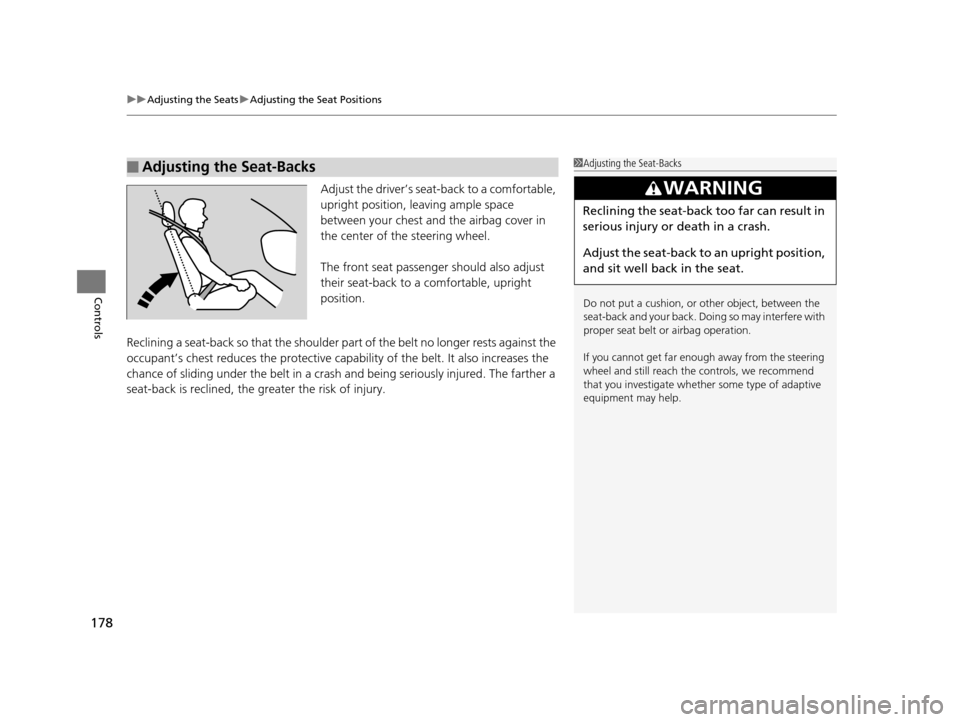
Adjust the driver’s sea t-back to a comfortable,
upright position, leaving ample space
between your chest and the airbag cover in
the center of the steering wheel.
The front seat passenger should also adjust
their seat-back to a comfortable, upright
position.
Reclining a seat-back so that the shoulder pa rt of the belt no longer rests against the
occupant’s chest reduces the protective capa bility of the belt. It also increases the
chance of sliding under the belt in a crash and being seriously injured. The farther a
seat-back is reclined, the greater the risk of injury.
■Adjusting the Seat-Backs1 Adjusting the Seat-Backs
Do not put a cushion, or other object, between the
seat-back and your back. Do ing so may interfere with
proper seat belt or airbag operation.
If you cannot get far e nough away from the steering
wheel and still reach th e controls, we recommend
that you investigate whether some type of adaptive
equipment may help.
3WARNING
Reclining the seat-back too far can result in
serious injury or death in a crash.
Adjust the seat-back to an upright position,
and sit well back in the seat.
16 PILOT-31TG76000.book 178 ページ 2015年6月15日 月曜日 午前11時30分
Page 183 of 661
uuAdjusting the Seats uAdjusting the Seat Positions
182
Controls
After all occupants have adjusted their seats and head restraints, and put on their
seat belts, it is very important that they continue to sit upright, well back in their
seats, with their feet on the floor until the vehicle is safely park ed and the engine is
off.
Sitting improperly can increase the chance of injury during a crash. For example, if
an occupant slouches, lies down, turns si deways, sits forward, leans forward or
sideways, or puts one or both feet up, the chance of injury during a crash is greatly
increased.
In addition, an occupant who is out of position in the front seat can be seriously or
fatally injured in a crash by striking interior parts of the vehicle or being struck by an
inflating front airbag.
■Maintain a Proper Sitting Position1 Maintain a Proper Sitting Position
3WARNING
Sitting improperly or out of position can
result in serious injury or death in a crash.
Always sit upright, well back in the seat,
with your feet on the floor.
16 PILOT-31TG76000.book 182 ページ 2015年6月15日 月曜日 午前11時30分
Page 184 of 661
183
uuAdjusting the Seats uRear Seats
Continued
Controls
Rear Seats
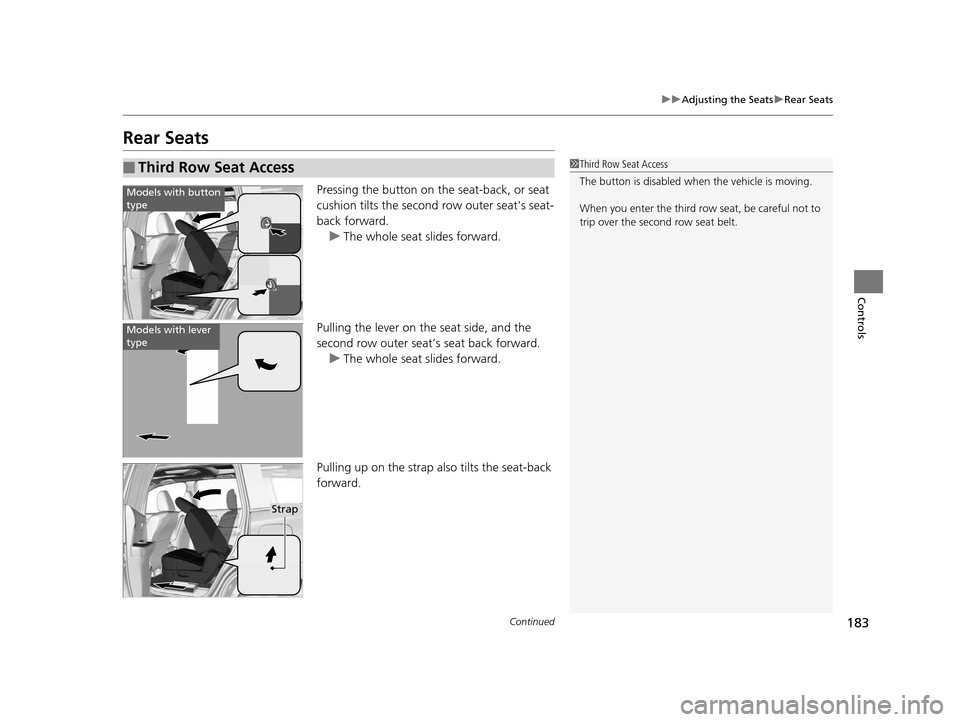
Pressing the button on the seat-back, or seat
cushion tilts the second row outer seat's seat-
back forward.
u The whole seat slides forward.
Pulling the lever on the seat side, and the
second row outer seat’s seat back forward. u The whole seat slides forward.
Pulling up on the strap also tilts the seat-back
forward.
■Third Row Seat Access1 Third Row Seat Access
The button is disabled wh en the vehicle is moving.
When you enter the third row seat, be careful not to
trip over the second row seat belt.
Models with button
type
Models with lever
type
Strap
16 PILOT-31TG76000.book 183 ページ 2015年6月15日 月曜日 午前11時30分
Page 185 of 661

uuAdjusting the Seats uRear Seats
184
Controls
Separately fold down the left and right halves of the second row seat to make room
for cargo.
1. Store the center seat belt first. Insert the latch plate into the slot on the side of the
anchor buckle.
2. Retract the seat belt into the holder on the ceiling.
2 Seat Belt with Detachable Anchor P. 42
3.Lower the center head restraint to its lo west position. Put the armrest back into
the seat-back.
4.Pull up on the seat-back angle adjustment
lever.
To return the seat to th e original position, pull
up the seat-back in the upright position.
■Folding Down the Second Row Seat1Folding Down the Second Row Seat
Make sure that the folded seat-back does not press
against the front passenger seat, as this can cause the
weight sensors in the front passenger seat to work
improperly. 2 Passenger Airbag Off Indicator P. 56
The front seats must be far enough forward so they
do not interfere with the second row seats as they
fold down.
To lock the seat-back upri ght, push it backwards until
it locks.
Make sure the seat-back, head restraints and seat
cushion are securely latche d back into place before
driving. Also, make sure all rear shoulder belts are
positioned in front of the seat-back, and the center
shoulder belt is re-posit ioned in the holding slot.
Lever
16 PILOT-31TG76000.book 184 ページ 2015年6月15日 月曜日 午前11時30分