Page 106 of 661

105
uuIndicators uMulti-Information Display (MID) Warning and Information Messages
Continued
Instrument Panel
MessageConditionExplanation
●Appears when you change to (N, then press and hold
(N again for two seconds.
●The gear position remains in (N for 15 minutes, then
automatically switches to
(P.
2 If you want to keep the transmission in (N
position [car wash mode] P. 475
●Appears when the vehicle is stopped with the driver’s
seat belt unfastened and there is a chance that the
vehicle may roll unintentionally.●Press the (P button before release the brake pedal
when idling, parking or exiting the vehicle.
2 Shift Operation P. 473
●Appears when the engine stops without the
transmission in
(P, and does not restart automatically.●Appears if you open the hood while Auto Idle-stop
activates.
●If you want to set the power mode to ON, change the
gear position to
(P.●If you want to start the engine, follow the normal
procedure.
2Starting the Engine P. 461
Automatic transmission models with electronic gear selector
16 PILOT-31TG76000.book 105 ページ 2015年6月15日 月曜日 午前11時30分
Page 108 of 661
107
uuIndicators uMulti-Information Display (MID) Warning and Information Messages
Continued
Instrument Panel
MessageConditionExplanation
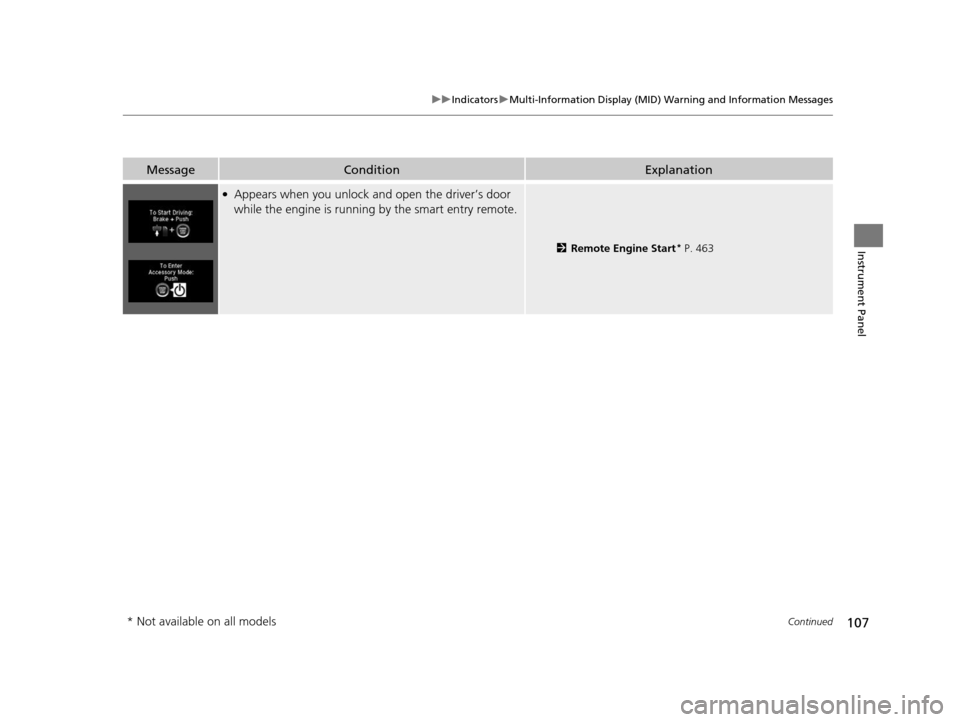
●Appears when you unlock an d open the driver’s door
while the engine is running by the smart entry remote.
2Remote Engine Start* P. 463
* Not available on all models
16 PILOT-31TG76000.book 107 ページ 2015年6月15日 月曜日 午前11時30分
Page 111 of 661

110
uuIndicators uMulti-Information Display (MID) Warning and Information Messages
Instrument Panel
MessageConditionExplanation
●Appears when Auto Engine Idle-stop Guidance
Screens ON has been selected from the customization
menu.
●Appears when Auto Idle-sto p does not activate for
some reason.
●Appears when the engine restarts automatically.●Appears when the battery te mperature is around 14°F
(−10°C) or lower.
●Appears when Auto Idle-stop does not activate because
the climate control system is in use, and the difference
between the set temperature and actual interior
temperature becomes significant.
●Appears when Auto Idle-stop does not activate because
the engine coolant temperature is low or high.
2 Auto Idle-stop* P. 479
●Appears when Auto Idle-stop does not activate because
the battery charge level is low.●Appears even though the battery is fully charged -
The system may not read the battery amount correctly.
Drive for a few minutes.
●Appears after charging the battery or jump
starting - Disconnect the negative - cable once and
reconnect it again to the battery. Drive a few minutes.
Models with Auto Idle-stop
* Not available on all models
16 PILOT-31TG76000.book 110 ページ 2015年6月15日 月曜日 午前11時30分
Page 112 of 661
111
uuIndicators uMulti-Information Display (MID) Warning and Information Messages
Continued
Instrument Panel
MessageConditionExplanation
●Appears when Auto Idle-sto p does not activate because
the pressure to the brake pedal is not enough.●Depress the brake pedal firmly.
●Appears when Auto Engine Idle-stop Guidance
Screens ON has been selected from the customization
menu.
●Appears when the system is under the following
conditions while Auto Idle-stop activates:
●The battery charge level is low.●The battery temperature is around 14°F (−10°C) or
lower.
●The climate control system is in use, and the difference
between the set temperature and actual interior
temperature becomes significant.
●The humidity in the interior is high.
●The engine restarts automatically in a few seconds.
2Starting the Engine P. 461
●Appears when the hood is opened.●Close the hood.
Models with Auto Idle-stop
16 PILOT-31TG76000.book 111 ページ 2015年6月15日 月曜日 午前11時30分
Page 114 of 661
113
Instrument Panel
Gauges and Multi-Information Display (MID)
Gauges
Gauges include the speedometer, tachometer, fuel gauge, and related indicators.
They are displayed when the power mode is in ON.
Displays your driving speed in mph (U.S.) or km/h (Canada).
Shows the number of engine revolutions per minute.
Displays the amount of fuel left in the fuel tank.
Displays the temperature of the engine coolant.
■Speedometer
■Tachometer
■Fuel Gauge
■Temperature Gauge
1Fuel Gauge
NOTICE
You should refuel when the reading approaches .
Running out of fuel can cause the engine to misfire,
damaging the cata lytic converter.
The actual amount of remain ing fuel may differ from
the fuel gauge reading.E
1 Temperature Gauge
NOTICE
Driving with the temperat ure gauge pointer in the
upper zone can cause serious engine damage. Pull
safely to the side of th e road and allow engine
temperature to return to normal.
2 Overheating P. 622
16 PILOT-31TG76000.book 113 ページ 2015年6月15日 月曜日 午前11時30分
Page 115 of 661
114
uuGauges and Multi-Information Display (MID) uMID
Instrument Panel
MID
The MID shows the odometer, trip meter, ou tside temperature indicator, and other
gauges. It also displays important messages such as warnings and other helpful
information.
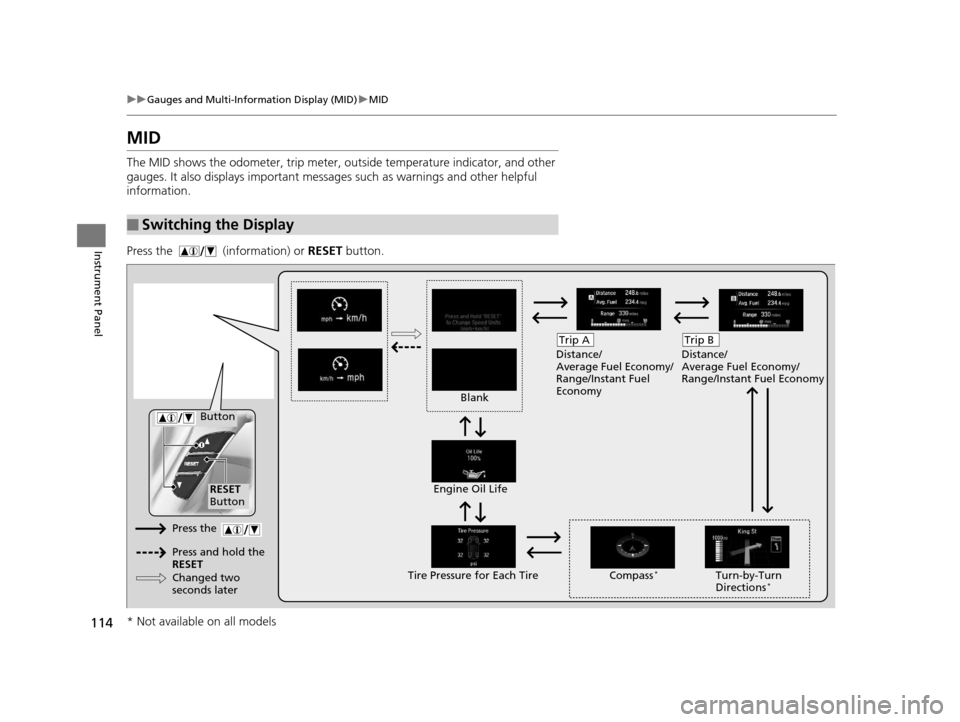
Press the (information) or RESET button.
■Switching the Display
Blank Distance/
Average Fuel Economy/
Range/Instant Fuel
Economy
Trip A
Tire Pressure for Each TireEngine Oil Life
Turn-by-Turn
Directions*
RESET
Button Compass
*
Button
Distance/
Average Fuel Economy/
Range/Instant Fuel Economy
Trip B
Press the
Press and hold the
RESET
Changed two
seconds later
* Not available on all models
16 PILOT-31TG76000.book 114 ページ 2015年6月15日 月曜日 午前11時30分
Page 118 of 661

117
uuGauges and Multi-Info rmation Display (MID)uMID
Instrument Panel
Shows the estimated distance you can travel on the remaining fuel. This distance is
estimated from the fuel economy of your previous trips.
Shows the instant fuel economy as a bar gr aph in mpg (U.S.) or l/100 km (Canada).
Shows you turn-by-turn driv ing directions to your destination linked with the
navigation system.
2 Refer to the navigation system
Shows each tire’s pressure.
2TPMS with Tire Fill Assist P. 523
Shows the remaining oil life and Maintenance MinderTM.
2Maintenance MinderTM P. 559
■Range
■Instant Fuel Economy
■Turn-by-Turn Directions
■Tire Pressure Monitor
■Engine Oil Life and Maintenance Items
1Turn-by-Turn Directions
The multi-information disp lay shows a compass when
the route guidance is not used.
You can select whether the turn-by-turn display
comes on or not during the route guidance.
2 Customized Features P. 342
2 Refer to the navigation system
Models with navigation system
16 PILOT-31TG76000.book 117 ページ 2015年6月15日 月曜日 午前11時30分
Page 120 of 661

119
Controls
This chapter explains how to operate the various controls necessary for driving.
Clock.................................................. 120
Locking and Unlocking the Doors ... 121
Key Types and Functions .................. 121
Locking/Unlocking the Doors from the Outside .......................................... 123
Low Smart Entry Remote Signal Strength ..... 130Locking/Unlocking the Doors from the Inside ............................................. 131
Childproof Door Locks ..................... 133
Auto Door Locking/Unlocking .......... 134
Opening and Closing the Tailgate ... 135
Security System ................................ 144
Immobilizer System .......................... 144
Security System Alarm ...................... 144
Opening and Closing the Windows.... 147
Opening and Closing the Moonroof*.. 149Panoramic Glass Roof*..................... 150
Operating the Switches Around the
Steering Wheel ............................... 151
ENGINE START/STOP Button............. 151
Turn Signals ..................................... 154
Light Switches.................................. 155
Fog Lights
*...................................... 158
Auto High-Beam System*................ 159
Daytime Running Lights ................... 162
Wipers and Washers ........................ 163
Brightness Control ........................... 166
Defogger/Heated Door Mirror
*........ 167
Driving Position Memory System*.... 168
Adjusting the Steering Wheel........... 170 Adjusting the Mirrors
....................... 171
Interior Rearview Mirror ................... 171
Power Door Mirrors ......................... 172
Adjusting the Seats .......................... 174
Adjusting the Seat Positions ............. 174
Rear Seats........................................ 183
Armrest ........................................... 186
Interior Lights/Interior Convenience Items ................................................ 188
Interior Lights .................................. 188
Interior Convenience Items .............. 191
Heating and Cooling
*....................... 205
Climate Control System*.................. 210
* Not available on all models
16 PILOT-31TG76000.book 119 ページ 2015年6月15日 月曜日 午前11時30分