Page 356 of 661
355
uuCustomized Features u
Continued
Features
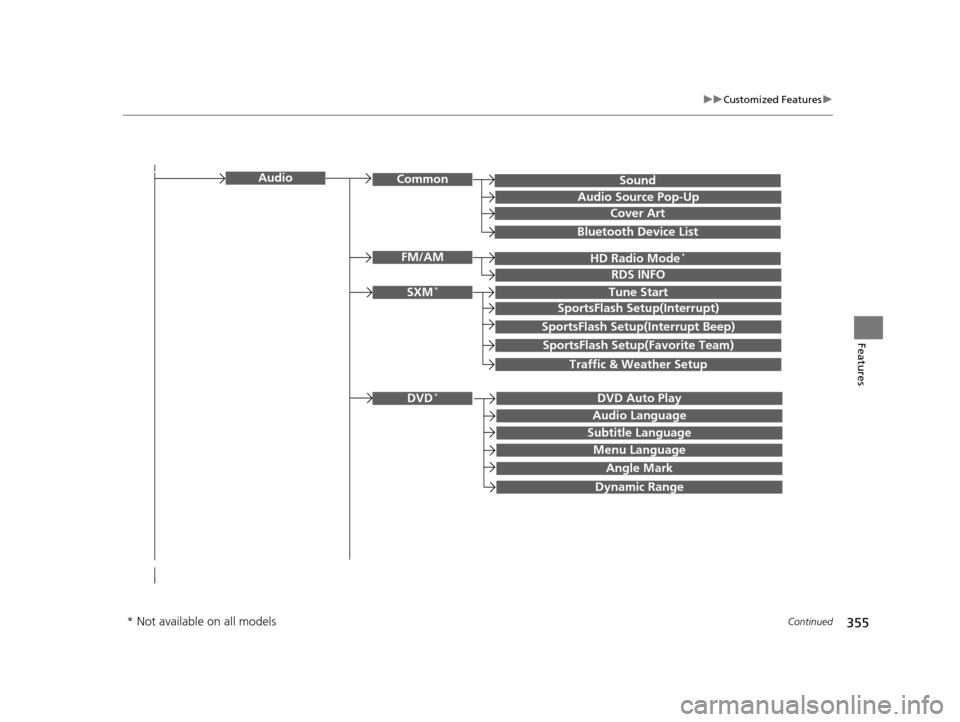
SoundAudioCommon
Audio Source Pop-Up
Cover Art
HD Radio Mode*FM/AM
RDS INFO
SXM*Tune Start
SportsFlash Setup(Interrupt)
SportsFlash Setup(Interrupt Beep)
SportsFlash Setup(Favorite Team)
Traffic & Weather Setup
DVD Auto PlayDVD*
Audio Language
Subtitle Language
Menu Language
Angle Mark
Bluetooth Device List
Dynamic Range
* Not available on all models
16 PILOT-31TG76000.book 355 ページ 2015年6月15日 月曜日 午前11時30分
Page 358 of 661
357
uuCustomized Features u
Continued
Features
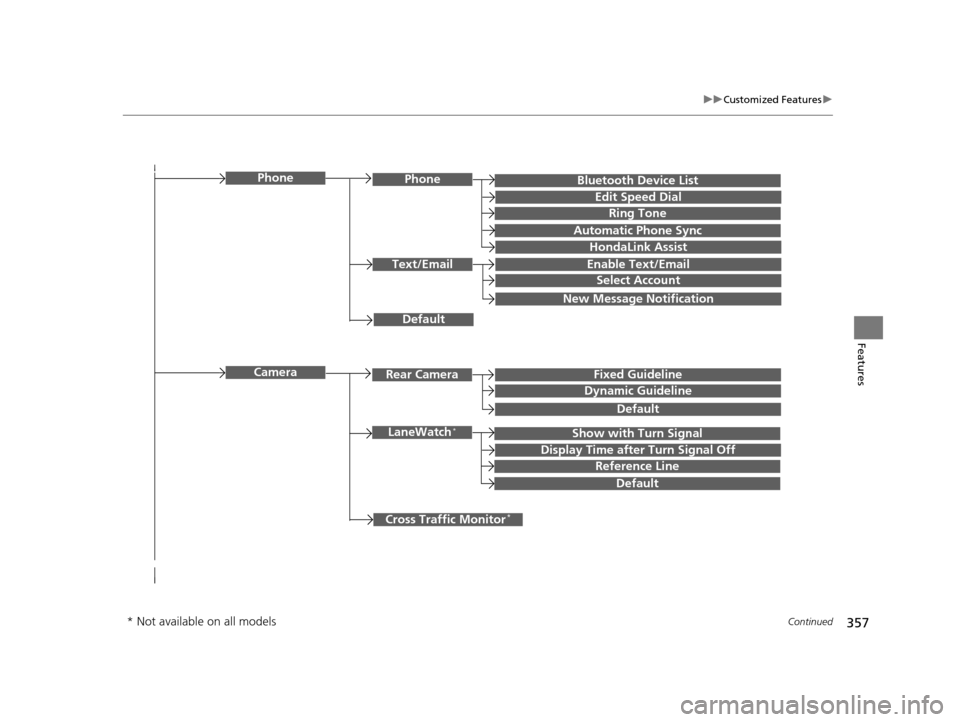
Bluetooth Device List
Default
PhonePhone
Edit Speed Dial
Ring Tone
Automatic Phone Sync
HondaLink Assist
Text/EmailEnable Text/Email
Select Account
New Message Notification
Cross Traffic Monitor*
Camera
Show with Turn SignalLaneWatch*
Display Time after Turn Signal Off
Reference Line
Default
Rear CameraFixed Guideline
Dynamic Guideline
Default
* Not available on all models
16 PILOT-31TG76000.book 357 ページ 2015年6月15日 月曜日 午前11時30分
Page 359 of 661
358
uuCustomized Features u
Features
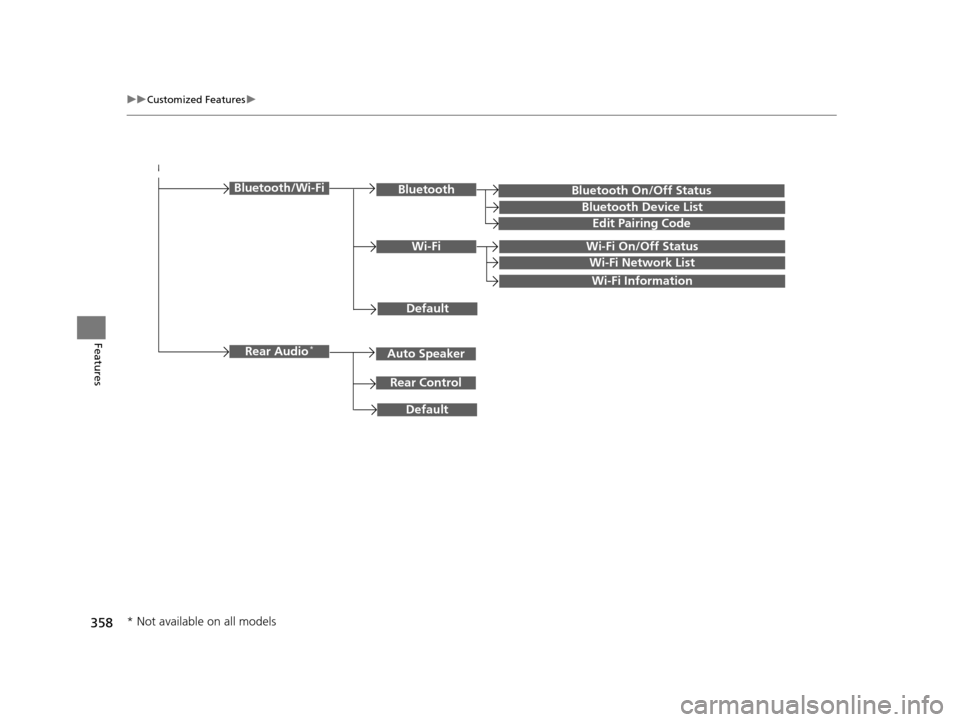
Bluetooth On/Off Status
Default
Bluetooth/Wi-FiBluetooth
Bluetooth Device List
Edit Pairing Code
Wi-FiWi-Fi On/Off Status
Wi-Fi Network List
Wi-Fi Information
Default
Rear Audio*
Rear Control
Auto Speaker
* Not available on all models
16 PILOT-31TG76000.book 358 ページ 2015年6月15日 月曜日 午前11時30分
Page 370 of 661
369
uuCustomized Features u
Continued
Features
*1:Default SettingSetup
Group Customizable Features Descri
ption Selectable Settings
Audio
Common
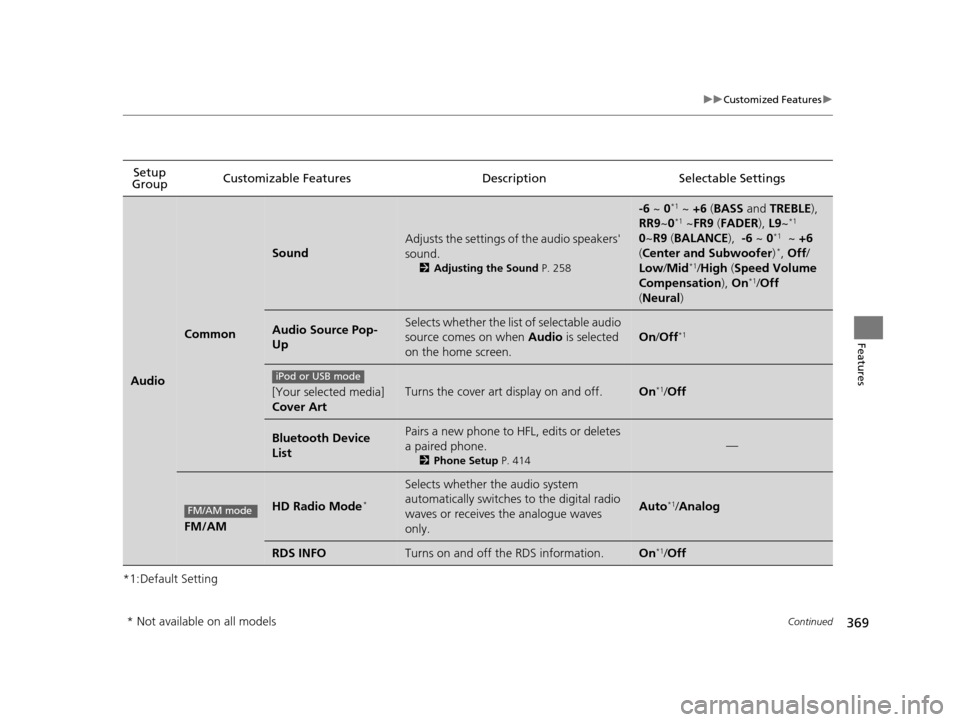
Sound
Adjusts the settings of the audio speakers'
sound.
2Adjusting the Sound P. 258
-6 ~ 0*1 ~ +6 (BASS and TREBLE),
RR9 ~0*1 ~FR9 (FADER ), L9~*1
0 ~R9 (BALANCE ), -6 ~ 0*1 ~ +6
( Center and Subwoofer )*, Off /
Low /Mid*1/High (Speed Volume
Compensation ), On*1/Off
( Neural )
Audio Source Pop-
UpSelects whether the list of selectable audio
source comes on when Audio is selected
on the home screen.
On /Off*1
[Your selected media]
Cover ArtTurns the cover art display on and off.On*1/Off
Bluetooth Device
ListPairs a new phone to HFL, edits or deletes
a paired phone.
2 Phone Setup P. 414
—
FM/AM
HD Radio Mode*
Selects whether the audio system
automatically switches to the digital radio
waves or receives the analogue waves
only.
Auto*1/Analog
RDS INFOTurns on and off the RDS information.On*1/Off
iPod or USB mode
FM/AM mode
* Not available on all models
16 PILOT-31TG76000.book 369 ページ 2015年6月15日 月曜日 午前11時30分
Page 375 of 661
374
uuCustomized Features u
Features
*1:Default SettingSetup
Group Customizable Featur
es Description Selectable Settings
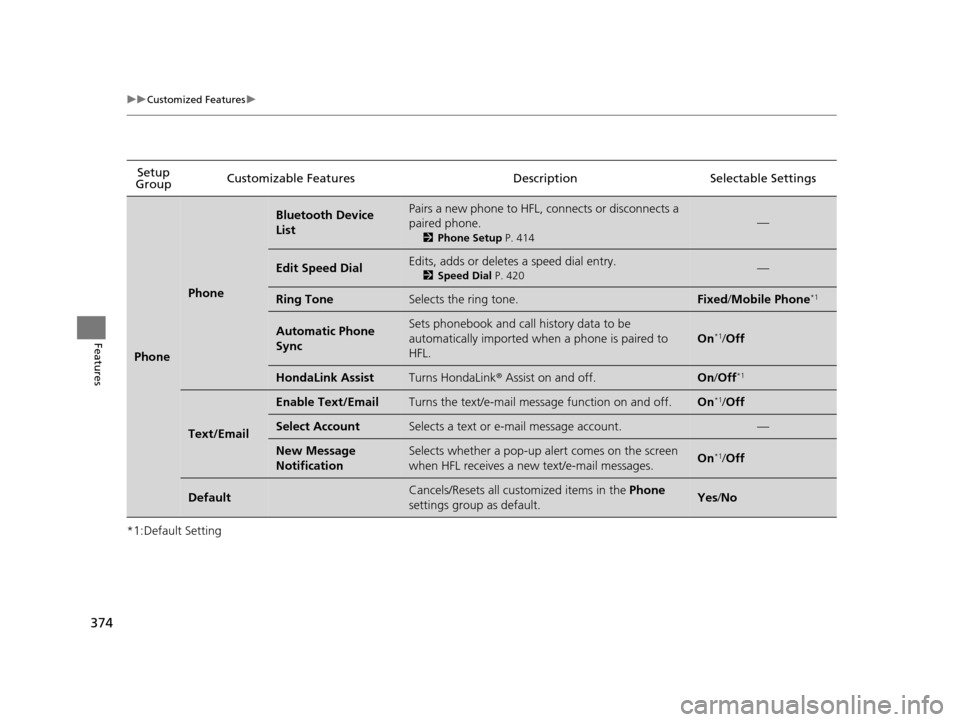
Phone
Phone
Bluetooth Device
ListPairs a new phone to HFL, connects or disconnects a
paired phone.
2Phone Setup P. 414
—
Edit Speed DialEdits, adds or deletes a speed dial entry.
2Speed Dial P. 420—
Ring ToneSelects the ring tone.Fixed /Mobile Phone*1
Automatic Phone
SyncSets phonebook and call history data to be
automatically imported when a phone is paired to
HFL.
On*1/ Off
HondaLink AssistTurns HondaLink ® Assist on and off.On/Off*1
Text/Email
Enable Text/EmailTurns the text/e-mail message function on and off.On*1/Off
Select AccountSelects a text or e-mail message account.—
New Message
NotificationSelects whether a pop-up al ert comes on the screen
when HFL receives a new text/e-mail messages.On*1/ Off
DefaultCancels/Resets all customized items in the Phone
settings group as default.Yes /No
16 PILOT-31TG76000.book 374 ページ 2015年6月15日 月曜日 午前11時30分
Page 377 of 661
376
uuCustomized Features u
Features
*1:Default SettingSetup
Group Customizable Features
DescriptionSelectable Settings
Bluetooth/
Wi-Fi
Bluetooth
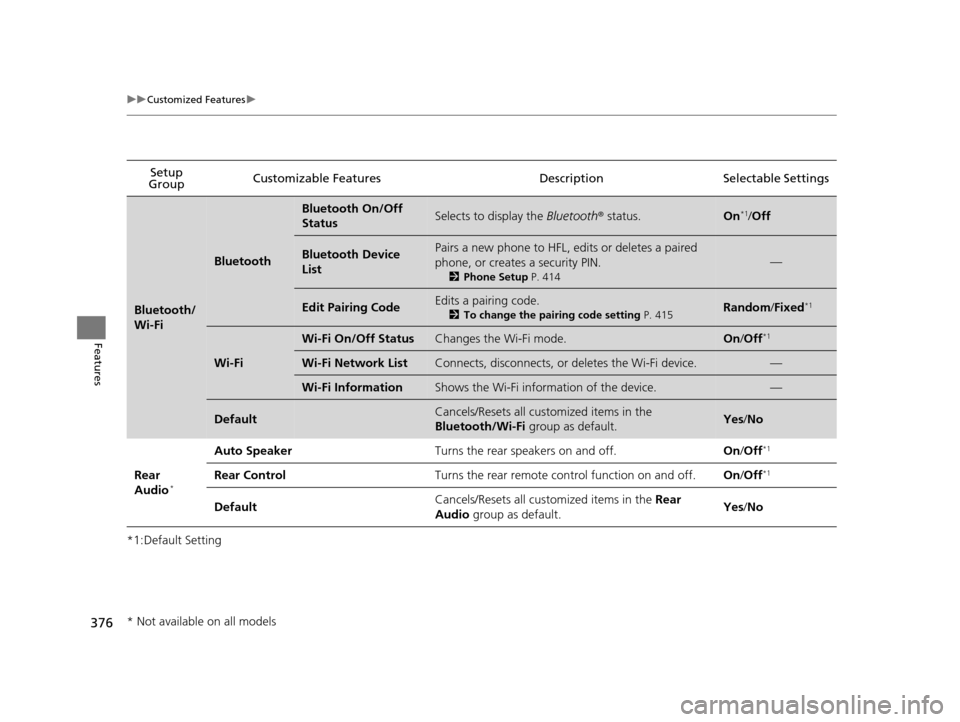
Bluetooth On/Off
StatusSelects to display the Bluetooth® status.On*1/Off
Bluetooth Device
ListPairs a new phone to HFL, edits or deletes a paired
phone, or creates a security PIN.
2 Phone Setup P. 414
—
Edit Pairing CodeEdits a pairing code.
2To change the pairing code setting P. 415Random/Fixed*1
Wi-Fi
Wi-Fi On/Off StatusChanges the Wi-Fi mode.On /Off*1
Wi-Fi Network ListConnects, disconnects, or deletes the Wi-Fi device.—
Wi-Fi InformationShows the Wi-Fi information of the device.—
DefaultCancels/Resets all customized items in the
Bluetooth/Wi-Fi group as default.Yes/No
Rear
Audio*
Auto SpeakerTurns the rear speakers on and off.On /Off*1
Rear ControlTurns the rear remote con trol function on and off.On/Off*1
DefaultCancels/Resets all customized items in the Rear
Audio group as default.Yes/No
* Not available on all models
16 PILOT-31TG76000.book 376 ページ 2015年6月15日 月曜日 午前11時30分
Page 382 of 661
381Continued
Features
Bluetooth® HandsFreeLink ®
Bluetooth® HandsFreeLink ® (HFL) allows you to place and receive phone calls using
your vehicle’s audio system, without handling your cell phone.
Using HFL
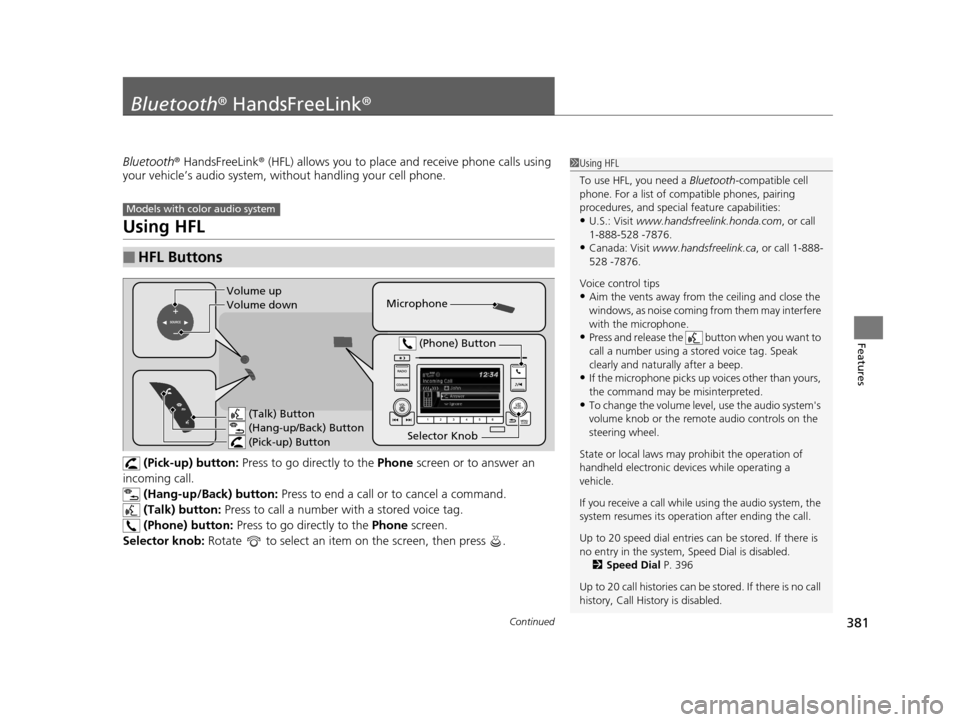
(Pick-up) button: Press to go directly to the Phone screen or to answer an
incoming call. (Hang-up/Back) button: Press to end a call or to cancel a command.
(Talk) button: Press to call a number wi th a stored voice tag.
(Phone) button: Press to go directly to the Phone screen.
Selector knob: Rotate to select an item on the screen, then press .
■HFL Buttons
1Using HFL
To use HFL, you need a Bluetooth-compatible cell
phone. For a list of compatible phones, pairing
procedures, and special feature capabilities:
•U.S.: Visit www.handsfreelink.honda.com , or call
1-888-528 -7876.
•Canada: Visit www.handsfreelink.ca , or call 1-888-
528 -7876.
Voice control tips
•Aim the vents away from the ceiling and close the
windows, as noise coming fr om them may interfere
with the microphone.
•Press and release the button when you want to
call a number using a st ored voice tag. Speak
clearly and naturally after a beep.
•If the microphone picks up vo ices other than yours,
the command may be misinterpreted.
•To change the volume level, use the audio system's
volume knob or the remote audio controls on the
steering wheel.
State or local laws may pr ohibit the operation of
handheld electronic devi ces while operating a
vehicle.
If you receive a call while using the audio system, the
system resumes its operati on after ending the call.
Up to 20 speed dial entries can be stored. If there is
no entry in the system, Speed Dial is disabled. 2 Speed Dial P. 396
Up to 20 call histories can be stored. If there is no call
history, Call History is disabled.
Models with color audio system
Microphone
(Talk) Button
(Hang-up/Back) Button
(Pick-up) Button
Selector Knob (Phone) Button
Volume up
Volume down
16 PILOT-31TG76000.book 381 ページ 2015年6月15日 月曜日 午前11時30分
Page 383 of 661
uuBluetooth ® HandsFreeLink ®u Using HFL
382
Features
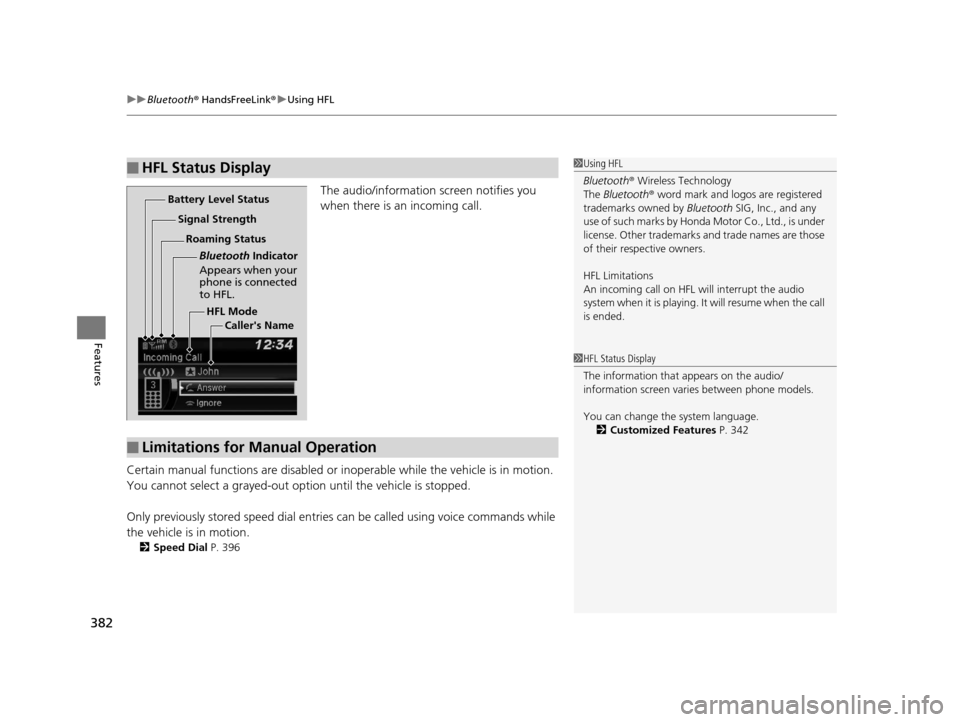
The audio/information screen notifies you
when there is an incoming call.
Certain manual functions are disabled or inoperable while the ve hicle is in motion.
You cannot select a grayed-out option until the vehicle is stopped.
Only previously stored speed dial entries can be called using voice commands while
the vehicle is in motion.
2 Speed Dial P. 396
■HFL Status Display1Using HFL
Bluetooth ® Wireless Technology
The Bluetooth ® word mark and logos are registered
trademarks owned by Bluetooth SIG, Inc., and any
use of such marks by Honda Motor Co., Ltd., is under
license. Other trademarks and trade names are those
of their respective owners.
HFL Limitations
An incoming call on HFL will interrupt the audio
s y s te m wh e n it is p la y i n g . It wi ll re s u m e w h en t h e c a l l
is ended.
HFL Mode
Battery Level Status
Signal Strength
Bluetooth Indicator
Appears when your
phone is connected
to HFL.
Roaming Status
Caller's Name
■Limitations for Manual Operation
1HFL Status Display
The information that appears on the audio/
information screen vari es between phone models.
You can change the system language. 2 Customized Features P. 342
16 PILOT-31TG76000.book 382 ページ 2015年6月15日 月曜日 午前11時30分