2016 HONDA PILOT display
[x] Cancel search: displayPage 557 of 661
556
Maintenance
Before Performing Maintenance
Inspection and Maintenance
For your safety, perform all listed inspections and maintenance to keep your vehicle
in good condition. If you become aware of any abnormality (noise, smell, insufficient
brake fluid, oil residue on the ground, etc.), have your vehicle inspected by a dealer.
(Note, however, that service at a dealer is not mandatory to keep your warranties in
effect.)
■Daily inspections
Perform inspections before long distance trips, when washing the vehicle, or when
refueling.
■Periodic inspections
• Check the brake fluid level monthly.
2 Checking the Brake Fluid P. 574
•Check the tire pressure monthly. Examin e the tread for wear and foreign objects.
2Checking and Maintaining Tires P. 585
•Check the operation of the exterior lights monthly.
2 Replacing Light Bulbs P. 575
•Check the condition of the wiper bl ades at least every six months.
2Checking and Maintaining Wiper Blades P. 581
■Types of Inspection and Maintenance
1Inspection and Maintenance
Maintenance, replacement, or repair of
emissions control devices and systems may be
done by any automotive repair establishment or
individuals using parts that are “certified” to
EPA standards.
According to state and fede ral regulations, failure to
perform maintenance on the maintenance main
items marked with # will not void your emissions
warranties. However, all maintenance services should
be performed in accordan ce with the intervals
indicated by the multi-information display (MID).
2 Maintenance Service Items P. 561
If you want to perform complex maintenance tasks
that require more skills a nd tools, you can purchase a
subscription to the Service Express website at
www.techinfo.honda.com .
2 Authorized Manuals P. 647
If you want to perform ma intenance yourself, make
sure that you have the necessary tools and skills first.
After performing ma intenance, update the records in
the separate maintenance booklet.
U.S. models
16 PILOT-31TG76000.book 556 ページ 2015年6月15日 月曜日 午前11時30分
Page 560 of 661
559Continued
Maintenance
Maintenance MinderTM
Maintenance items, which should be serviced at the same time that you replace the
engine oil, app ear on the MID.
You can view them on the engine oil life screen at any time.
To Use Maintenance MinderTM
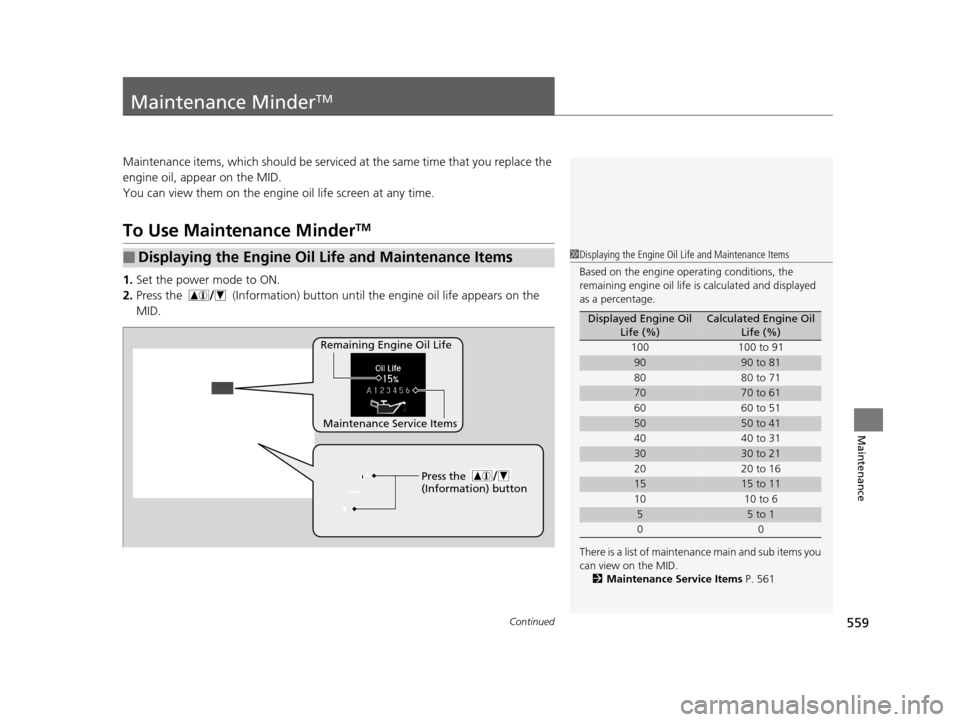
1. Set the power mode to ON.
2. Press the (Information) button until the engine oil life appears on the
MID.
■Displaying the Engine Oil Life and Maintenance Items1 Displaying the Engine Oil Life and Maintenance Items
Based on the engine ope rating conditions, the
remaining engine oi l life is calculated and displayed
as a percentage.
There is a list of maintena nce main and sub items you
can view on the MID. 2 Maintenance Service Items P. 561
Displayed Engine Oil
Life (%)Calculated Engine Oil Life (%)
100 100 to 91
9090 to 81
80 80 to 71
7070 to 61
60 60 to 51
5050 to 41
40 40 to 31
3030 to 21
20 20 to 16
1515 to 11
10 10 to 6
55 to 1
00
Remaining Engine Oil Life
Maintenance Service Items Press the
(Information) button
16 PILOT-31TG76000.book 559 ページ 2015年6月15日 月曜日 午前11時30分
Page 561 of 661
560
uuMaintenance MinderTMuTo Use Maintenance MinderTM
Maintenance
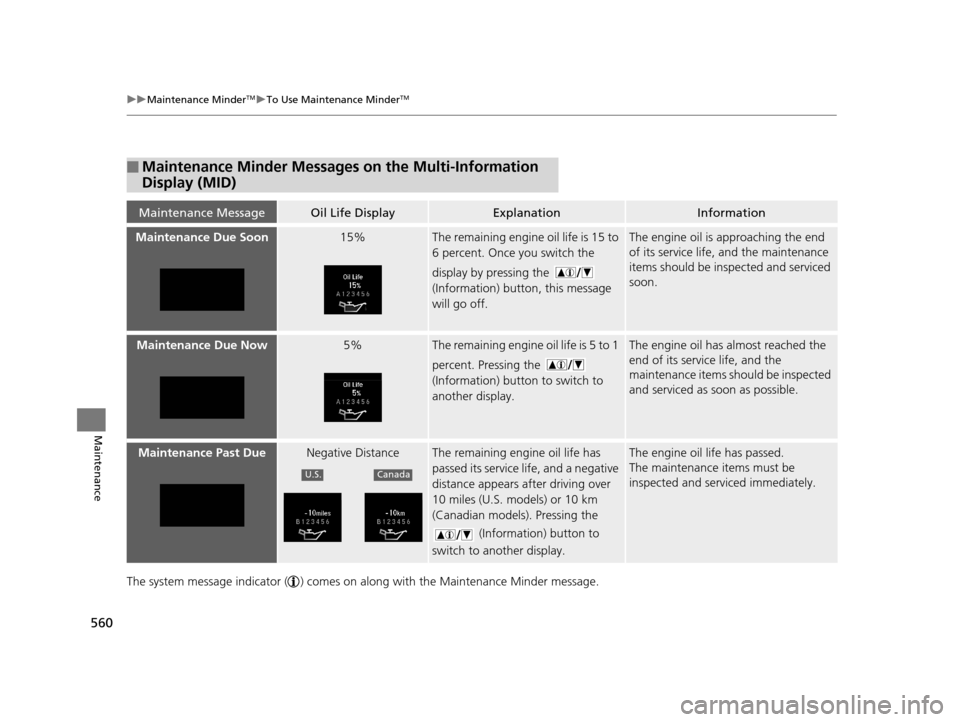
The system message indicator ( ) comes on along with the Maintenance Minder message.
■Maintenance Minder Messages on the Multi-Information
Display (MID)
Maintenance MessageOil Life DisplayExplanationInformation
Maintenance Due Soon15%The remaining engine oil life is 15 to
6 percent. Once you switch the
display by pressing the
(Information) button, this message
will go off.The engine oil is approaching the end
of its service life, and the maintenance
items should be inspected and serviced
soon.
Maintenance Due Now5%The remaining engine oil life is 5 to 1
percent. Pressing the
(Information) button to switch to
another display.The engine oil has almost reached the
end of its service life, and the
maintenance items should be inspected
and serviced as soon as possible.
Maintenance Past DueNegative DistanceThe remaining engi ne oil life has
passed its service life, and a negative
distance appears after driving over
10 miles (U.S. models) or 10 km
(Canadian models). Pressing the
(Information) button to
switch to another display.The engine oil life has passed.
The maintenance items must be
inspected and serviced immediately.
U.S.Canada
16 PILOT-31TG76000.book 560 ページ 2015年6月15日 月曜日 午前11時30分
Page 562 of 661

561
uuMaintenance MinderTMuTo Use Maintenance MinderTM
Continued
Maintenance
■Maintenance Service Items1Maintenance Service Items
•Independent of the Maintenance Minderinf
ormation, replace the brake fluid every 3 years.
•Inspect idle speed every 160,000 miles (256,000
km).•Adjust the valves during services A, B, 1, 2, or 3 if
t
hey are noisy.
Maintenance Minder MessageSystem Message
Indicator
Sub Items
Main
Item
*1: If the message
Maintenance Due Now does not appear more than 12 months after the display
is reset, change the engine oil every year.
# : See information on maintenance and emissions warranty in the first column on page 645.
*2: If you drive in dusty conditions, replace the air cleaner element every 15,000 miles (24,000 km).
*3: If you drive primarily in urban areas that have high concentrations of soot in the air from industry and from diesel-powered vehicles, replace every 15,000 miles (24,000 km).
CODEMaintenance Main Items
A
●Replace engine oil*1
B●Replace engine oil*1 and oil filter●Inspect front and rear brakes●Check parking brake adjustment●Inspect tie rod ends, steering gearbox, and boots●Inspect suspension components●Inspect driveshaft boots●Inspect brake hoses and li nes (Including ABS/VSA)●Inspect all fluid levels and condition of fluids●Inspect exhaust system#
●Inspect fuel lines and connections#
*4: If you drive regularly in very high temperatures (over 110°F, 43°C), in very low temperatures (under
-20°F, -29°C), or towing a trailer, replace every 60,000 miles/100,000 km.
*5: Driving in mountainous areas at very low vehicle speeds or trailer towing results in higher level of mechanical (Shear) stress to fluid. This requires differential fluid changes more frequently than
recommended by the Maintenance Minder. If you regularly drive your vehicle under these conditions,
have the differential fluid changed at 7,500 miles (12,000 km), then every 15,000 miles (24,000 km).
CODEMaintenance Sub Items
1
●Rotate tires
2●Replace air cleaner element*2
●Replace dust and pollen filter*3
●Inspect drive belt
3
●
Replace transmission fluid,
transfer fluid
*
4●Replace spark plugs●Replace timing belt and inspect water pump*4
●Inspect valve clearance
5
●Replace engine coolant
6●Replace rear differential fluid*, *5
*Not available on all models
16 PILOT-31TG76000.book 561 ページ 2015年6月15日 月曜日 午前11時30分
Page 563 of 661

uuMaintenance MinderTMuTo Use Maintenance MinderTM
562
Maintenance
Reset the engine oil life display if you have performed the maintenance service.
1. Set the power mode to ON.
2. Go to the Maintenance Info. group.
2Customized Features P. 342
3.Press and hold the RESET button
u The oil life reset mode is displayed on the MID.
4. Select Reset with the (Information) button, then push the RESET
button.
u The displayed maintenance items disappea r, and the engine oil life display
returns to 100%.
u To cancel the oil life reset mode, select Cancel, then push the RESET button.
■Resetting the Display1Resetting the Display
NOTICE
Failure to reset the engine oil life after a maintenance
service results in the sy stem showing incorrect
maintenance intervals, which can lead to serious
mechanical problems.
The dealer will reset the en gine oil life display after
completing the required ma intenance service. If
someone other than a deal er performs maintenance
service, reset the engine oil life display yourself.
Press the
(Information)
button
16 PILOT-31TG76000.book 562 ページ 2015年6月15日 月曜日 午前11時30分
Page 570 of 661
569
uuMaintenance Under the Hood uChanging the Engine Oil and Oil Filter
Continued
Maintenance
Changing the Engine Oil and Oil Filter
You must change the engine oil and oil fi lter regularly in order to maintain the
engine’s lubrication. The engine may be damaged if they are not changed regularly.
Change the oil and filter in accordance with the maintenance message on the multi-
information display. 1.Run the engine until it reaches normal
operating temperature, and then turn the
engine off.
2. Open the hood and remove the engine oil
fill cap.
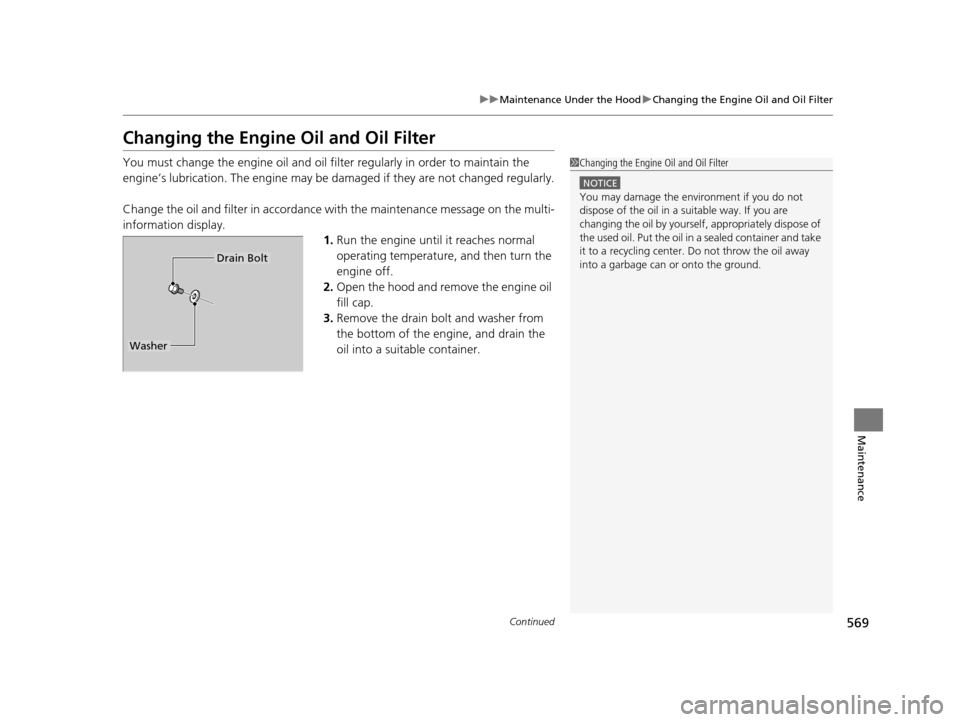
3. Remove the drain bolt and washer from
the bottom of the engine, and drain the
oil into a suitable container.1Changing the Engine Oil and Oil Filter
NOTICE
You may damage the environment if you do not
dispose of the oil in a suitable way. If you are
changing the oil by yourself , appropriately dispose of
the used oil. Put the oil in a sealed container and take
it to a recycling center. Do not throw the oil away
into a garbage can or onto the ground.
Drain Bolt
Washer
16 PILOT-31TG76000.book 569 ページ 2015年6月15日 月曜日 午前11時30分
Page 615 of 661
uuIf a Tire Goes Flat uChanging a Flat Tire
614
Handling the Unexpected
If you replace a flat tire with the spare tire, the low tire pressure/TPMS indicator
comes on while you are driving. After driving for a few miles (kilometers), the
indicator will start blinking for a short time and then stay on. Tire Pressure
Monitor Problem appears on the multi-informat ion display (MID), but this is
normal.
If you replace the tire with a specified regular tire, the warning message on the MID
and the low tire pressure/TPMS indicator will go off after a few miles (kilometers).
■TPMS with Tire Fill Assist and the Spare Tire1 TPMS with Tire Fill Assist and the Spare Tire
The system cannot monitor th e pressure of the spare
tire. Manually check the spare tire pressure to be sure
that it is correct.
Use the TPMS specific whee ls. Each is equipped with
a tire pressure sensor mount ed inside the tire behind
the valve stem.
16 PILOT-31TG76000.book 614 ページ 2015年6月15日 月曜日 午前11時30分
Page 650 of 661
Index
649
Index
Index
A
ABS (Anti-lock Brake System).................. 529
AC Power Outlet ...................................... 197
Accessories and Modifications ................ 553
Accessory Power Sockets ......................... 196
Adaptive Cruise Control (ACC) ................ 491
Indicator ................................................... 92
Adaptive Cruise Control (ACC) with Low
Speed Follow (LSF) Indicator ................................................... 92
Additives
Coolant .................................................. 571
Engine Oil ............................................... 566
Washer ................................................... 574
Additives, Engine Oil ............................... 566
Adjusting Armrest .................................................. 186
Front Seats.............................................. 174
Head Restraints ....................... 179, 180, 181
Mirrors.................................................... 171
Rear Seats ............................................... 183
Second Row Seat .................................... 176
Steering Wheel ....................................... 170
Temperature ........................................... 116
Agile Handling Assist System .................. 517
Aha
TM........................................................ 290
Air Conditioning System (Climate Control System) .................................................... 210
Changing the Mode................................ 211
Defrosting the Windshield and Windows .............................................. 211 Dust and Pollen Filter ............................... 599
Recirculation/Fresh Air Mode ................... 211
Sensor ..................................................... 216
Synchronized Mode ................................. 213
Using Automatic Climate Control ............ 210
Air Conditioning System (Heating and Cooling System) ...................................... 205
Cooling ................................................... 207
Defrosting the Windshield and Windows ............................................... 208
Heating ................................................... 206
Air Pressure ....................................... 586, 639
Airbags ........................................................ 45
Advanced Airbags ..................................... 51
After a Collision ......................................... 49
Airbag Care ............................................... 57
Event Data Recorder .................................... 0
Front Airbags (SRS) .................................... 48
Indicator .............................................. 55, 83
Passenger Airbag Off Indicator .................. 56
Sensors ...................................................... 45
Side Airbags .............................................. 52
Side Curtain Airbags .................................. 54
All-wheel drive (AWD) Indicator ............... 89
AM/FM Radio .................................... 231, 265
Anti-lock Brake System (ABS) .................. 529
Indicator .................................................... 83
Armrest ..................................................... 186
Audio Remote Controls ............................ 222
Audio System .................................... 218, 242
Adjusting the Sound ........................ 229, 258 Audio/Information Screen................ 225, 243
Auxiliary Input Jack.................................. 220
Changing the Home Screen Icon Layout .. 247
Closing Apps ........................................... 257
Display Setup .................................. 230, 259
Error Messages ........................................ 304
General Information ................................ 308
Home Screen........................................... 250
Limitations for Manual Operation ............ 260
MP3/WMA/AAC ...................... 236, 278, 291
Playing a CD............................................ 278
Reactivating ............................................ 221
Recommended CDs ................................. 309
Remote Controls ..................................... 222
Security Code .......................................... 221
Selecting an Audio Source ....................... 260
Status Area ............................................. 256
Theft Protection ...................................... 221
USB Flash Drives ...................................... 311
USB Port.................................................. 219
Wallpaper Setup.............................. 227, 248
Audio/Information Screen ............... 225, 243
Authorized Manuals ................................ 647
Auto Door Locking/Unlocking ................. 134
Customize ............................................... 367
Auto High-Beam System .......................... 159
Auto high-beam system Indicator............. 87
Auto Idle-stop ........................................... 479
OFF Button .............................................. 479
Auto Idle-stop In dicator (Green)............... 90
16 PILOT-31TG76000.book 649 ページ 2015年6月15日 月曜日 午前11時30分