2016 HONDA PILOT tow
[x] Cancel search: towPage 162 of 661

161
uuOperating the Switches Around the Steering Wheel uAuto High-Beam System*
Controls
■To manually cancel th e system temporarily
You can cancel the operation when you ma nually change the headlights to high
beams. Push the lever forward until you hear a click, or lightly pull the lever towards
you to flash high beams. The auto hi gh-beam system indicator goes off.
If you want the auto high-beam system operation to resume at once, pull the lever
towards you.
Disable the system when the vehicle is parked
with the power mode in ON and the light
switch is in the AUTO position.
To disable the system: Pull the light switch
lever towards you and hold it for 40 seconds.
The auto high-beam indica tor in the meter will
blink twice.
To enable the system: Pull the light switch
lever towards you and hold it for 30 seconds.
The auto high-beam indica tor in the meter will
blink once.
■To Disable the System
1 To Operate the System
If the Can Not Operate: message appears:
Park your vehicle in a safe place. Wipe away debris
blocking the windshield, then start driving again. If
the message remains on even after driving for a while
with the clean windshield, have your vehicle checked
by a dealer.
1 To Disable the System
The auto high-beam system will remain in the
selected disabled or enab led setting each time you
start the engine.
16 PILOT-31TG76000.book 161 ページ 2015年6月15日 月曜日 午前11時30分
Page 164 of 661

163
uuOperating the Switches Around the Steering Wheel uWipers and Washers
Continued
Controls
Wipers and Washers
The windshield wipers and washers can be
used when the power mode is in ON.
■MIST
The wipers run at high speed until you release
the lever.
■Wiper switch (OFF, INT*, AUTO*, LO, HI)
Change the wiper switch setting according to
the amount of rain.
■AUTO*
2 Automatic Intermittent Wipers* P. 164
■Adjusting wiper operation
Turn the adjustment ring to adjust wiper
operation.
■Washer
Sprays while you pull the lever toward you.
When you release the le ver for more than one
second, the spray stops, the wipers sweep two
or three more times to clear the windshield,
then stop.
■Windshield Wipers/Washers1 Wipers and Washers
NOTICE
Do not use the wipers when the windshield is dry.
The windshield will get sc ratched, or the rubber
blades will get damaged.
NOTICE
In cold weather, the blades may freeze to the
windshield, becoming stuck.
Operating the wipers in th is condition may damage
the wipers. Use the defroster to warm the
windshield, then turn the wipers on.
If the vehicle speeds up while the wipers are
operating intermittently, the length of the wipe
interval shortens.
When the vehicle starts moving, the wipers make a
single sweep.
When the vehicle speeds up, the wiper operation’s
shortest delay setting ( ) and the LO setting become
the same.
Turn the washers off if no washer fluid comes out.
The pump may get damaged.
The wiper motor may stop motor operation
temporarily to prevent an overload. Wiper operation
will return to normal within a few minutes, once the
circuit has returned to normal.
Intermittent Time
Adjustment Ring
MIST
INT
*: Low speed with
intermittent
AUTO
*: Automatic intermittent
operation OFF
LO: Low speed wipe
HI: High speed wipe Pull to
use
washer.
Lower speed, fewer sweeps
Higher speed, more sweeps
* Not available on all models
16 PILOT-31TG76000.book 163 ページ 2015年6月15日 月曜日 午前11時30分
Page 194 of 661
Continued193
uuInterior Lights/Interior Convenience Items uInterior Convenience Items
Controls
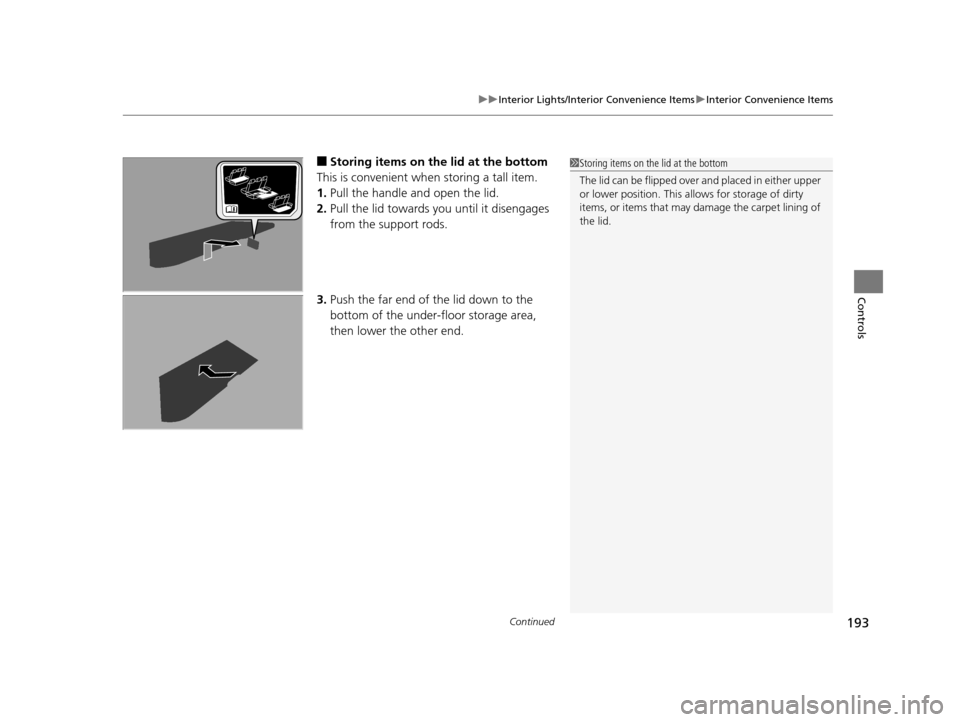
■Storing items on the lid at the bottom
This is convenient when storing a tall item.
1. Pull the handle and open the lid.
2. Pull the lid towards you until it disengages
from the support rods.
3. Push the far end of the lid down to the
bottom of the under-floor storage area,
then lower the other end.1Storing items on the lid at the bottom
The lid can be fli pped over and placed in either upper
or lower position. This allows for storage of dirty
items, or items that may da mage the carpet lining of
the lid.
16 PILOT-31TG76000.book 193 ページ 2015年6月15日 月曜日 午前11時30分
Page 442 of 661

441
Driving
This chapter discusses driving, refueling, and information on items such as accessories.
Before Driving................................... 442
Towing a Trailer ................................ 448
Off-Highway Driving Guidelines ..... 459
When Driving Starting the Engine .......................... 461
Automatic Transmission ................... 468
Shifting ............................................ 469
Auto Idle-stop
*................................ 479
Intelligent Traction Management*.... 484
Cruise Control ................................. 486
Front Sensor Camera
*...................... 489
Adaptive Cruise Control (ACC)*....... 491Road Departure Mi tigation (RDM)
System*...................................... 502Lane Keeping Assist System (LKAS)*.. 507
Vehicle Stability Assist (VSA ®), aka Electronic
Stability Control (ESC), System ............. 515
Agile Handling Assist System............ 517
Blind spot inform ation (BSI) System*.... 518
LaneWatchTM*.................................. 520Intelligent VTM4 (i-VTM4)*................. 522Tire Pressure Monitoring System (TPMS) - Required Federal Explanation ......... 525
Braking
Brake System ................................... 527
Anti-lock Brake System (ABS) ........... 529
Brake Assist System.......................... 530
Collision Mitigati on Braking System
TM
(CMBSTM)*..................................... 531 Parking Your Vehicle
When Stopped ................................ 540
Parking Sensor System
*................... 541
Cross Traffic Monitor*..................... 545
Multi-view rear camera*.................. 549
Refueling
Fuel Information .............................. 550
How to Refuel ................................. 551
Fuel Economy .................................... 552
Accessories and Modifications ........ 553
* Not available on all models
16 PILOT-31TG76000.book 441 ページ 2015年6月15日 月曜日 午前11時30分
Page 444 of 661
Continued443
uuBefore Driving uDriving Preparation
Driving
• Store or secure all items on board properly.
u Carrying too much cargo, or improperly storing it, can affect your vehicle’s
handling, stability, sto pping distance, and tires, and make it unsafe.
2Maximum Load Limit P. 445
•Do not pile items higher than the seat height.
u They can block your view and may be thrown forward in the event of sudden
braking.
• Do not place anything in the front seat footwells. Make sure to secure the floor
mat.
u An object or unsecured floor mat can in terfere with your brake and accelerator
pedal operation while driving.
• If you have any animals on board, do not let them move around in the vehicle.
u They may interfere with driv ing and a crash could occur.
• Securely close and lock al l doors and the tailgate.
2Locking/Unlocking the Doors from the Inside P. 131
•Adjust your seating position properly.
u Adjust the head restraint, too.
2Adjusting the Seats P. 174
2 Adjusting the Head Restraints P. 179
•Adjust the mirrors and steering wh eel properly for your driving.
u Adjust them while sitting in the proper driving position.
2 Adjusting the Steering Wheel P. 170
2 Adjusting the Mirrors P. 171
■Interior Checks1Interior Checks
The headlight aim is set by the factory, and does not
need to be adjusted. Howeve r, if you regularly carry
heavy items in the cargo area or tow a trailer, have
the aiming readjusted at a dealer or by a qualified
technician.
16 PILOT-31TG76000.book 443 ページ 2015年6月15日 月曜日 午前11時30分
Page 446 of 661
445
uuBefore Driving uMaximum Load Limit
Continued
Driving
Maximum Load Limit
The maximum load for your ve hicle is 1,173 lbs (532 kg).
The maximum load for your ve hicle is 1,340 lbs (608 kg).
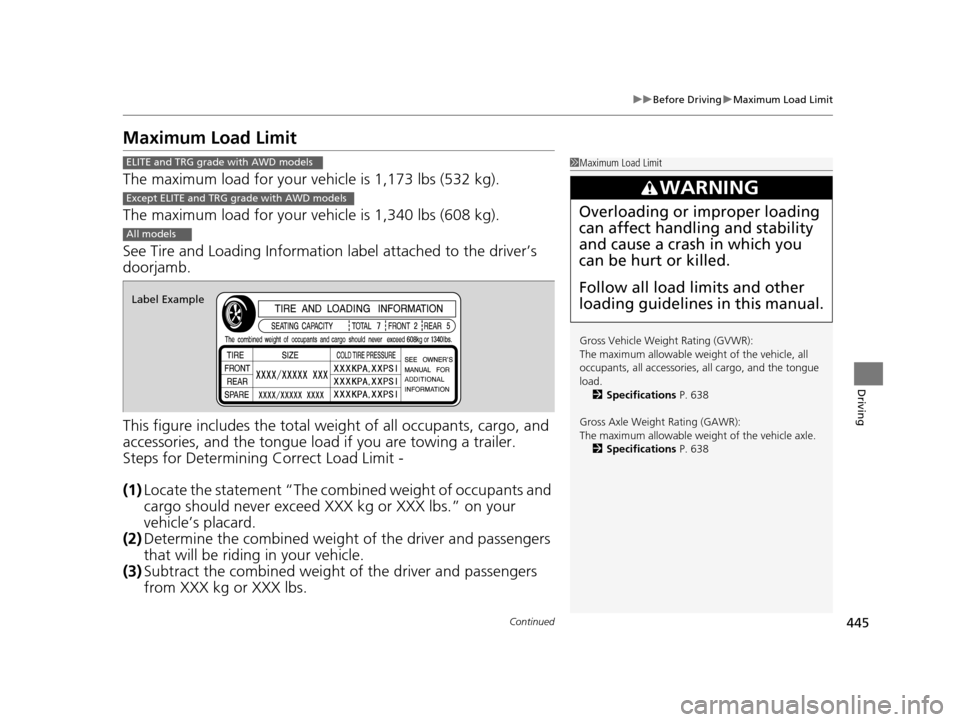
See Tire and Loading Information label attached to the driver’s
doorjamb.
This figure includes the total weig ht of all occupants, cargo, and
accessories, and the tongue load if you are towing a trailer.
Steps for Determining Correct Load Limit -
(1) Locate the statement “The comb ined weight of occupants and
cargo should never exceed XXX kg or XXX lbs.” on your
vehicle’s placard.
(2) Determine the combined weight of the driver and passengers
that will be riding in your vehicle.
(3) Subtract the combined weight of the driver and passengers
from XXX kg or XXX lbs.
1Maximum Load Limit
Gross Vehicle Weight Rating (GVWR):
The maximum allowable weight of the vehicle, all
occupants, all a ccessories, all cargo, and the tongue
load. 2 Specifications P. 638
Gross Axle Weight Rating (GAWR):
The maximum allowable weight of the vehicle axle. 2 Specifications P. 638
3WARNING
Overloading or improper loading
can affect handling and stability
and cause a crash in which you
can be hurt or killed.
Follow all load limits and other
loading guidelines in this manual.
ELITE and TRG grade with AWD models
Except ELITE and TRG grade with AWD models
All models
Label Example
16 PILOT-31TG76000.book 445 ページ 2015年6月15日 月曜日 午前11時30分
Page 447 of 661
446
uuBefore Driving uMaximum Load Limit
Driving
(4) The resulting figure equals the available amount of cargo and
luggage load capacity. For example, if the “XXX” amount
equals 1,400 lbs. and there will be five 150 lb. passengers in
your vehicle, the amount of av ailable cargo and luggage load
capacity is 650 lbs.
(1,400 - 750 (5 x 150) = 650 lbs.)
(5) Determine the combined weight of luggage and cargo being
loaded on the vehicle. That we ight may not safely exceed the
available cargo and luggage load capacity calculated in step 4.
(6) If your vehicle will be towing a tra iler, load from your trailer will
be transferred to your vehicl e. Consult this manual to
determine how this reduces the available cargo and luggage
load capacity of your vehicle.
16 PILOT-31TG76000.book 446 ページ 2015年6月15日 月曜日 午前11時30分
Page 449 of 661
448
Driving
Towing a Trailer
Towing Preparation
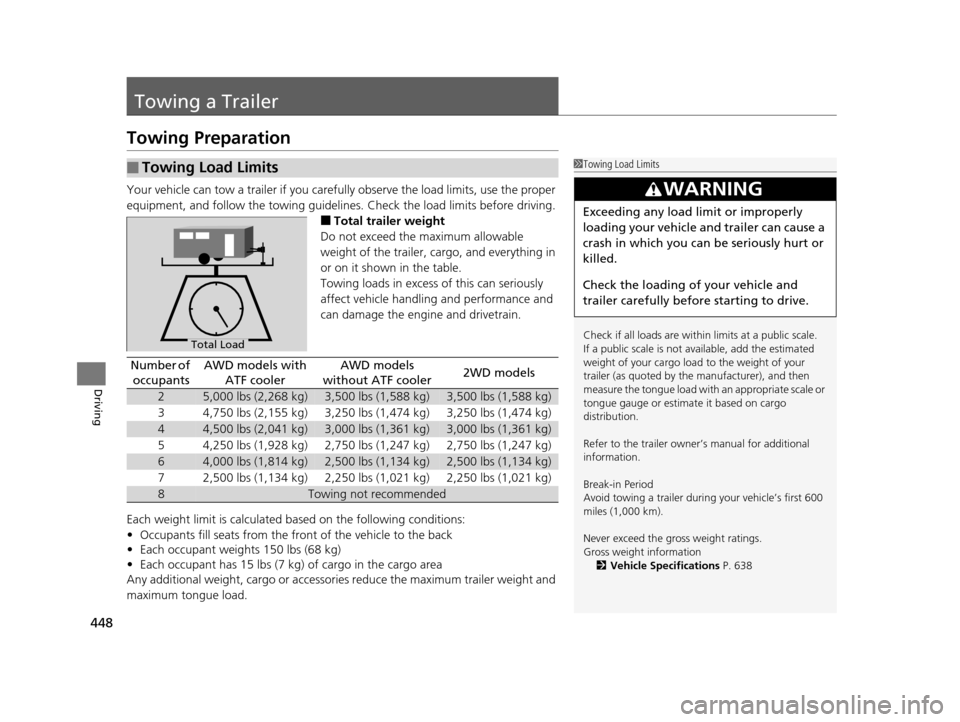
Your vehicle can tow a trailer if you carefully observe the load limits, use the proper
equipment, and follow the towing guidelin es. Check the load limits before driving.
■Total trailer weight
Do not exceed the maximum allowable
weight of the trailer, cargo, and everything in
or on it shown in the table.
Towing loads in excess of this can seriously
affect vehicle handling and performance and
can damage the engine and drivetrain.
Each weight limit is calculated based on the following conditions:
• Occupants fill seats from the front of the vehicle to the back
• Each occupant weights 150 lbs (68 kg)
• Each occupant has 15 lbs (7 kg) of cargo in the cargo area
Any additional weight, cargo or accessori es reduce the maximum trailer weight and
maximum tongue load.
■Towing Load Limits1 Towing Load Limits
Check if all loads are within limits at a public scale.
If a public scale is not available, add the estimated
weight of your cargo load to the weight of your
trailer (as quoted by the manufacturer), and then
measure the tongue load with an appropriate scale or
tongue gauge or estima te it based on cargo
distribution.
Refer to the trailer owner’s manual for additional
information.
Break-in Period
Avoid towing a trailer duri ng your vehicle’s first 600
miles (1,000 km).
Never exceed the gross weight ratings.
Gross weight information 2 Vehicle Specifications P. 638
3WARNING
Exceeding any load limit or improperly
loading your vehicle and trailer can cause a
crash in which you can be seriously hurt or
killed.
Check the loading of your vehicle and
trailer carefully before starting to drive.
Total Load
Number of
occupantsAWD models with ATF coolerAWD models
without ATF cooler2WD models
25,000 lbs (2,268 kg)3,500 lbs (1,588 kg)3,500 lbs (1,588 kg)
34,750 lbs (2,155 kg)3,250 lbs (1,474 kg)3,250 lbs (1,474 kg)
44,500 lbs (2,041 kg)3,000 lbs (1,361 kg)3,000 lbs (1,361 kg)
54,250 lbs (1,928 kg)2,750 lbs (1,247 kg)2,750 lbs (1,247 kg)
64,000 lbs (1,814 kg)2,500 lbs (1,134 kg)2,500 lbs (1,134 kg)
72,500 lbs (1,134 kg)2,250 lbs (1,021 kg)2,250 lbs (1,021 kg)
8Towing not recommended
16 PILOT-31TG76000.book 448 ページ 2015年6月15日 月曜日 午前11時30分