2016 HONDA PILOT battery
[x] Cancel search: batteryPage 112 of 661

111
uuIndicators uMulti-Information Display (MID) Warning and Information Messages
Continued
Instrument Panel
MessageConditionExplanation
●Appears when Auto Idle-sto p does not activate because
the pressure to the brake pedal is not enough.●Depress the brake pedal firmly.
●Appears when Auto Engine Idle-stop Guidance
Screens ON has been selected from the customization
menu.
●Appears when the system is under the following
conditions while Auto Idle-stop activates:
●The battery charge level is low.●The battery temperature is around 14°F (−10°C) or
lower.
●The climate control system is in use, and the difference
between the set temperature and actual interior
temperature becomes significant.
●The humidity in the interior is high.
●The engine restarts automatically in a few seconds.
2Starting the Engine P. 461
●Appears when the hood is opened.●Close the hood.
Models with Auto Idle-stop
16 PILOT-31TG76000.book 111 ページ 2015年6月15日 月曜日 午前11時30分
Page 122 of 661

121Continued
Controls
Locking and Unlocking the Doors
Key Types and Functions
This vehicle comes with the following keys:
Use the smart entry remote to start and stop
the engine, and to lock and unlock all the
doors and tailgate. You can also use the smart
entry system to lock an d unlock the doors and
tailgate.
■Keys
1 Key Types and Functions
All the keys have an immobilizer system. The
immobilizer system helps to protect against vehicle
theft. 2 Immobilizer System P. 144
The keys contain precision electronics.
Adhere to the following advi ce to prevent damage to
the electronics:
•Do not leave the keys in direct sunlight, or in
locations with high temperature or high humidity.
•Do not drop the keys or set heavy objects on them.
•Keep the keys away from liquids.
•Do not take the keys apart except for replacing the
battery.
If the circuits in the keys are damaged, the engine
may not start, and the smart entry system may not
work.
If the keys do not work properly, have them
inspected by a dealer.
You can remotely start th e engine using the smart
entry remote.
2 Remote Engine Start
* P. 463
Models with remote engine start
Models with remote engine start
Models without remote engine
start
* Not available on all models
16 PILOT-31TG76000.book 121 ページ 2015年6月15日 月曜日 午前11時30分
Page 123 of 661

uuLocking and Unlocking the Doors uKey Types and Functions
122
Controls
■Smart entry remote
The built-in key can be used to lock/unlock the
doors when the smart entry remote battery
becomes weak or the power door lock/unlock
operation is disabled.
To remove the built-in key, pull it out while
sliding the release knob. To reinstall the built-
in key, push the built-in key into the smart
entry remote until it clicks.
Contains a number that you will need if you
purchase a replacement key.
Release Knob Built-in Key
■Key Number Tag1
Key Number Tag
Keep the key number tag separate from the key in a
safe place outside of your vehicle.
If you wish to purchase an additional key, contact a
dealer.
If you lose your key and you cannot start the engine,
contact a dealer.
16 PILOT-31TG76000.book 122 ページ 2015年6月15日 月曜日 午前11時30分
Page 129 of 661
uuLocking and Unlocking the Doors uLocking/Unlocking the Doors from the Outside
128
Controls
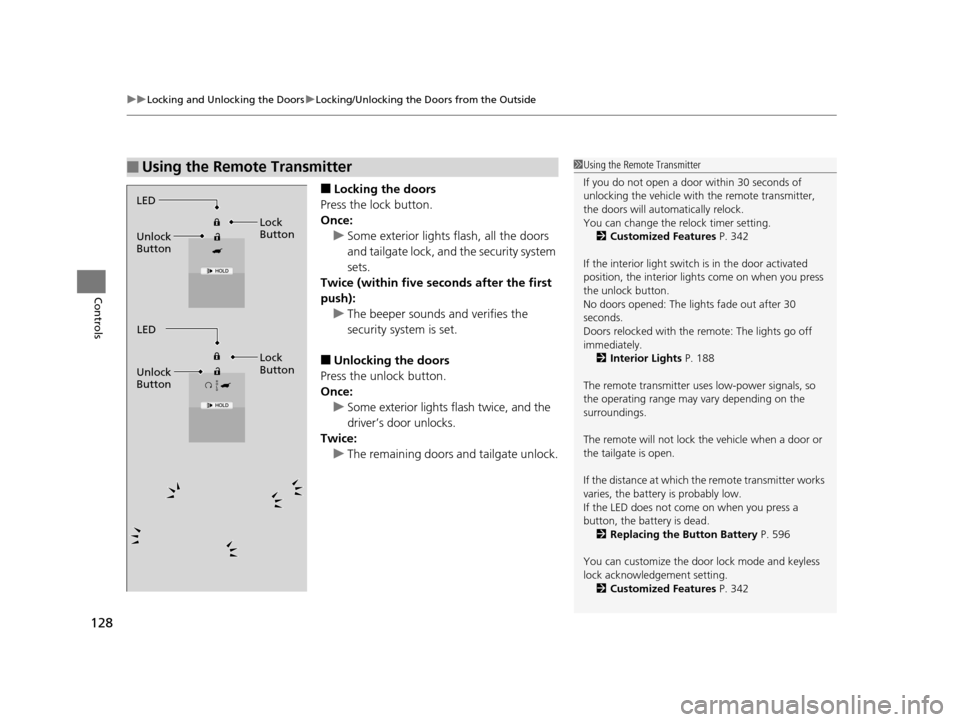
■Locking the doors
Press the lock button.
Once: u Some exterior lights flash, all the doors
and tailgate lock, and the security system
sets.
Twice (within five se conds after the first
push):
u The beeper sounds and verifies the
security system is set.
■Unlocking the doors
Press the unlock button.
Once: u Some exterior lights flash twice, and the
driver’s door unlocks.
Twice:
u The remaining doors and tailgate unlock.
■Using the Remote Transmitter1Using the Remote Transmitter
If you do not open a door within 30 seconds of
unlocking the vehicle with the remote transmitter,
the doors will automatically relock.
You can change the relock timer setting. 2 Customized Features P. 342
If the interior light switch is in the door activated
position, the interior light s come on when you press
the unlock button.
No doors opened: The li ghts fade out after 30
seconds.
Doors relocked with the remote: The lights go off
immediately. 2 Interior Lights P. 188
The remote transmitter us es low-power signals, so
the operating range may vary depending on the
surroundings.
The remote will not lock th e vehicle when a door or
the tailgate is open.
If the distance at which the remote transmitter works
varies, the batter y is probably low.
If the LED does not come on when you press a
button, the battery is dead. 2 Replacing the Button Battery P. 596
You can customize the door lock mode and keyless
lock acknowledge ment setting.
2 Customized Features P. 342
LED
Unlock
Button Lock
Button
LED
Unlock
Button Lock
Button
16 PILOT-31TG76000.book 128 ページ 2015年6月15日 月曜日 午前11時30分
Page 131 of 661
130
uuLocking and Unlocking the Doors uLow Smart Entry Remote Signal Strength
Controls
Low Smart Entry Remo te Signal Strength
The vehicle transmits radio waves to loca te the smart entry remote when locking/
unlocking the doors and tailgate, or to start the engine.
In the following cases, locking/unlocking the doors and tailgate, or starting the
engine may be inhibited or operation may be unstable:
• Strong radio waves are being tra nsmitted by nearby equipment.
• You are carrying the smart entry remote together with telecommunications
equipment, laptop computers, ce ll phones, or wireless devices.
• A metallic object is touching or covering the smart entry remote.1Low Smart Entry Remote Signal Strength
Communication between the smart entry remote and
the vehicle consumes the smart entry remote’s
battery.
The smart entry remote batte ry lasts about two years.
This changes by how often you use the remote.
The battery is consumed whenever the smart entry
remote is receivi ng strong radio wave s. Avoid placing
it near electrical appliances such as televisions and
personal computers.
16 PILOT-31TG76000.book 130 ページ 2015年6月15日 月曜日 午前11時30分
Page 141 of 661
140
uuOpening and Closing the Tailgate uOpening/Closing the Power Tailgate*
Controls
Opening/Closing the Power Tailgate*
The power tailgate can be operated by pressing the power tailgate button on the
remote transmitter or driver's door, or pressing the button on the tailgate.
■The power tailgate can be opened when:
• The tailgate is fully closed.
• The transmission is in
(P.
• Press and hold the tailgat e button on the remote transmitter for about one
second when the power mode is in VEHICLE OFF (LOCK).
u If you have changed the Keyless Open Mode setting to When Unlocked ,
you need to unlock the tailgate before you press the tailgate button to open it.
2Customized Features P. 342
■The power tailgate can be closed when:
• The tailgate is fully open.
• Press and hold the tailgat e button on the remote transmitter for about one
second when the power mode is in VEHICLE OFF (LOCK).
1Opening/Closing the Power Tailgate*
NOTICE
Do not push or pull on the power tailgate when it is
being automatically opened or closed.
Forcibly opening or closing the power tailgate while
in operation can deform the tailgate frame.
The power tailgate may not open or close under the
following conditions:
•The vehicle is park ed on a steep hill.
•The vehicle is swayed in a strong wind.•The tailgate or the roof is covered with snow or ice.
If you close the power tail gate when all the doors are
locked, the power tailgate locks automatically.
If you replace the battery or the power tailgate fuse
while the tailgate is open, the power tailgate may be
disabled. The power tail gate resumes once you
manually close the tailgate and wait for about five
minutes.
Installing aftermarket com ponents other than Honda
genuine accessories on the power tailgate may
prevent it from fully opening or closing.
Make sure the power tailgate is fully open before you
get your luggage in and out.
Make sure the power tailgat e is fully closed before
you start the vehicle.
* Not available on all models
16 PILOT-31TG76000.book 140 ページ 2015年6月15日 月曜日 午前11時30分
Page 146 of 661
Continued145
uuSecurity System uSecurity System Alarm
Controls
■To deactivate the security system alarm
Unlock the vehicle using the key, remote transmitter, or smart entry system. The
system, along with the horn and flashing lights, is deactivated.
■Setting the security system alarm
The security system alarm automatically sets when the following conditions have
been met:
• The power mode is set to VEHICLE OFF (LOCK).
• The hood is closed.
• All doors and the tailgate are locked from outside with the key, remote
transmitter, or smart entry system.
■When the security system alarm sets
The security system alarm indicator in the instrument panel blinks. When the
blinking interval changes after about 15 se conds, the security system alarm is set.
■To cancel the security system alarm
The security system alarm is canceled wh en the vehicle is unlocked using the key,
remote transmitter, smart entry system, or th e power mode is set to ON. The security
system alarm indicator goes off at the same time.
1 Security System Alarm
Do not set the security system alarm when someone
is in the vehicle or a window is open. The system can
accidentally activate when:
•Unlocking the door with the lock tab.•Opening the hood with the hood release.
If the battery goes dead after you have set the
security system alarm, the security alarm may go off
once the battery is re charged or replaced.
If this occurs, deactivate the security system alarm by
unlocking a door using the ke y, remote transmitter,
or smart entry system.
Do not attempt to alter th is system or add another
device to it.
16 PILOT-31TG76000.book 145 ページ 2015年6月15日 月曜日 午前11時30分
Page 152 of 661

151Continued
Controls
Operating the Switches Around the Steering Wheel
ENGINE START/STOP Button
*1:Canadian models
■Changing the Power Mode1ENGINE START/STOP Button
ENGINE START/STOP Button Operating Range
You can start the engine when the smart entry
remote is inside the vehicle.
The engine may also run if the smart entry remote is
close to the door or window, ev en if it is outside the
vehicle.
ON mode:
The ENGINE START/STOP button is red when the
power mode is set to ON.
If the smart entry remote battery is weak, beeper
sounds and the To Start, Hold Remote Near Start
Button message appears on the MID.
2 If the Smart Entry Remote Battery is Weak
P. 616
If the power mode does not change from VEHICLE
OFF to ACCESSORY, press the ENGINE START/STOP
button while moving the st eering wheel left and
right. The steering wheel will unlock, allowing the
mode to change.
Operating Range
Canadian models
VEHICLE OFF (LOCK)
The button is off.
The steering wheel is locked
*1.
The power to all electrical components is turned
off.
Blinking in white (When the door is opened)
ACCESSORY
The button blinks (in red).
Operate the audio system and other accessories
in this position.
ON
The button is on in red.
All electrical components can be used.
Press the button.
Without
pressing the
brake pedal
16 PILOT-31TG76000.book 151 ページ 2015年6月15日 月曜日 午前11時30分