Page 218 of 565
217
uuAudio System Basic Operation uDisplay Setup
Features
Display Setup
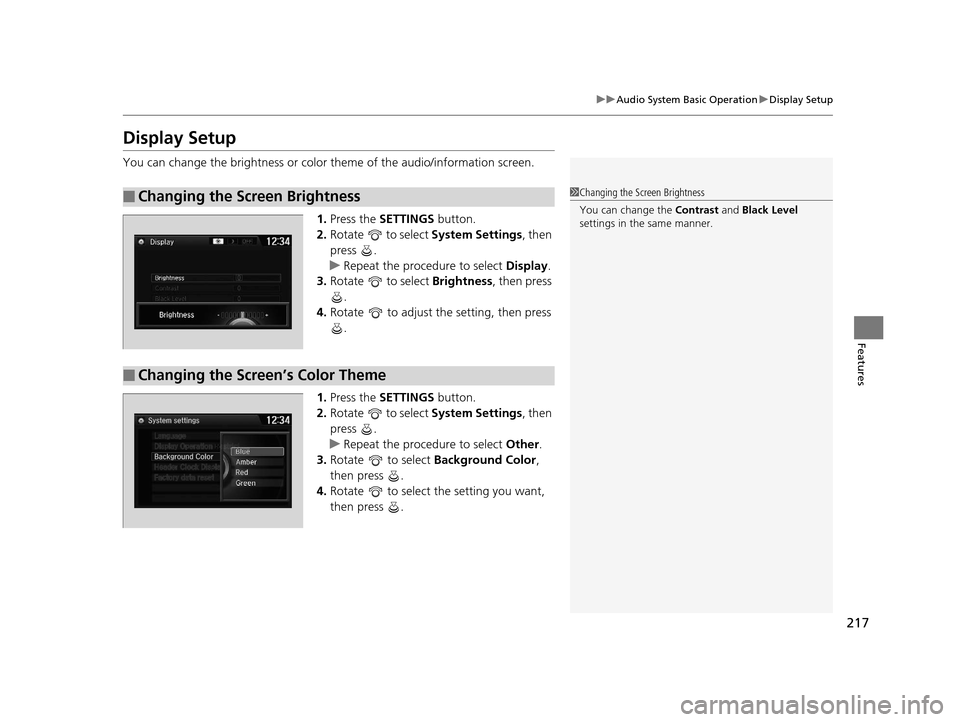
You can change the brightness or color theme of the audio/information screen.
1. Press the SETTINGS button.
2. Rotate to select System Settings, then
press .
u Repeat the procedure to select Display.
3. Rotate to select Brightness, then press
.
4. Rotate to adjust the setting, then press
.
1. Press the SETTINGS button.
2. Rotate to select System Settings, then
press .
u Repeat the procedure to select Other.
3. Rotate to select Background Color,
then press .
4. Rotate to select the setting you want,
then press .
■Changing the Screen Brightness1Changing the Screen Brightness
You can change the Contrast and Black Level
settings in the same manner.
■Changing the Screen’s Color Theme
16 US ODYSSEY-31TK86500.book 217 ページ 2015年6月24日 水曜日 午後3時0分
Page 245 of 565
244
uuAudio System Basic Operation uDisplay Setup
Features
Display Setup
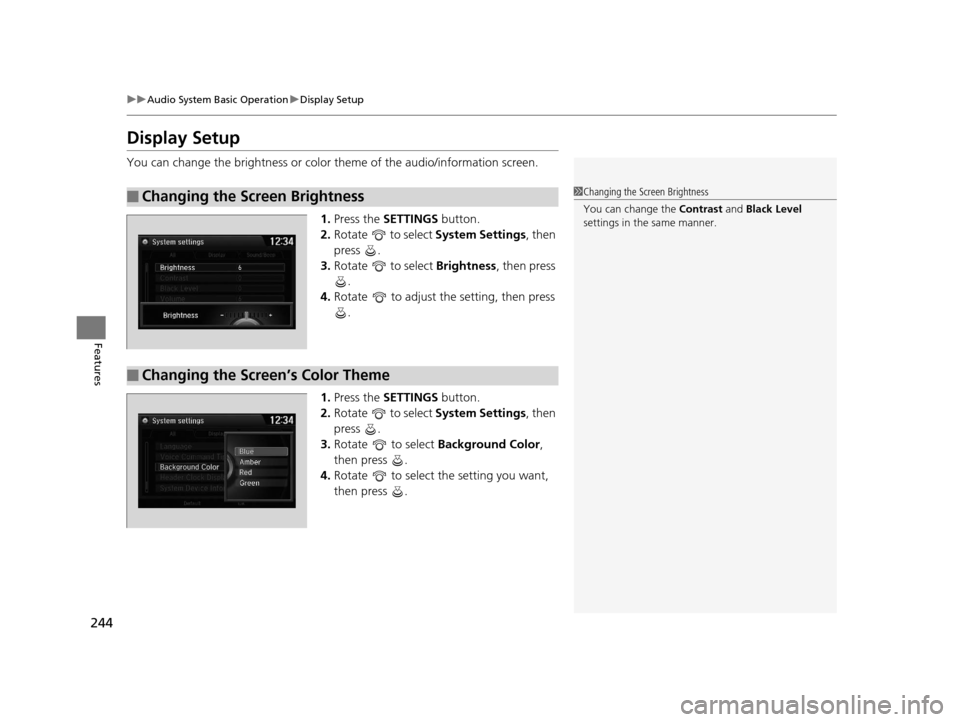
You can change the brightness or color theme of the audio/information screen.
1.Press the SETTINGS button.
2. Rotate to select System Settings, then
press .
3. Rotate to select Brightness , then press
.
4. Rotate to adjust the setting, then press
.
1. Press the SETTINGS button.
2. Rotate to select System Settings, then
press .
3. Rotate to select Background Color,
then press .
4. Rotate to select the setting you want,
then press .
■Changing the Screen Brightness1Changing the Screen Brightness
You can change the Contrast and Black Level
settings in the same manner.
■Changing the Screen’s Color Theme
16 US ODYSSEY-31TK86500.book 244 ページ 2015年6月24日 水曜日 午後3時0分
Page 297 of 565
296
uuCustomized Features u
Features
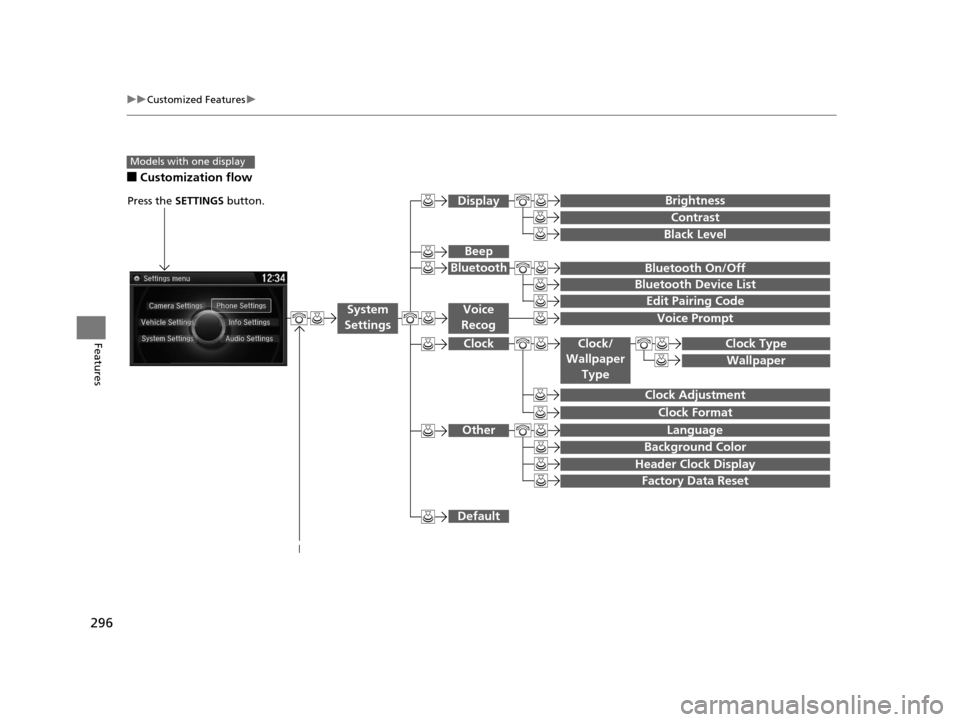
■Customization flow
Models with one display
Clock Format
Background Color
Header Clock Display
Factory Data Reset
Clock Adjustment
Press the SETTINGS button.
Language
Default
Edit Pairing Code
Bluetooth On/Off
Bluetooth Device List
Voice Prompt
Brightness
Contrast
Black Level
Beep
Clock/
Wallpaper
TypeClock Type
Wallpaper
System
SettingsVoice
Recog
Bluetooth
Display
Clock
Other
16 US ODYSSEY-31TK86500.book 296 ページ 2015年6月24日 水曜日 午後3時0分
Page 301 of 565
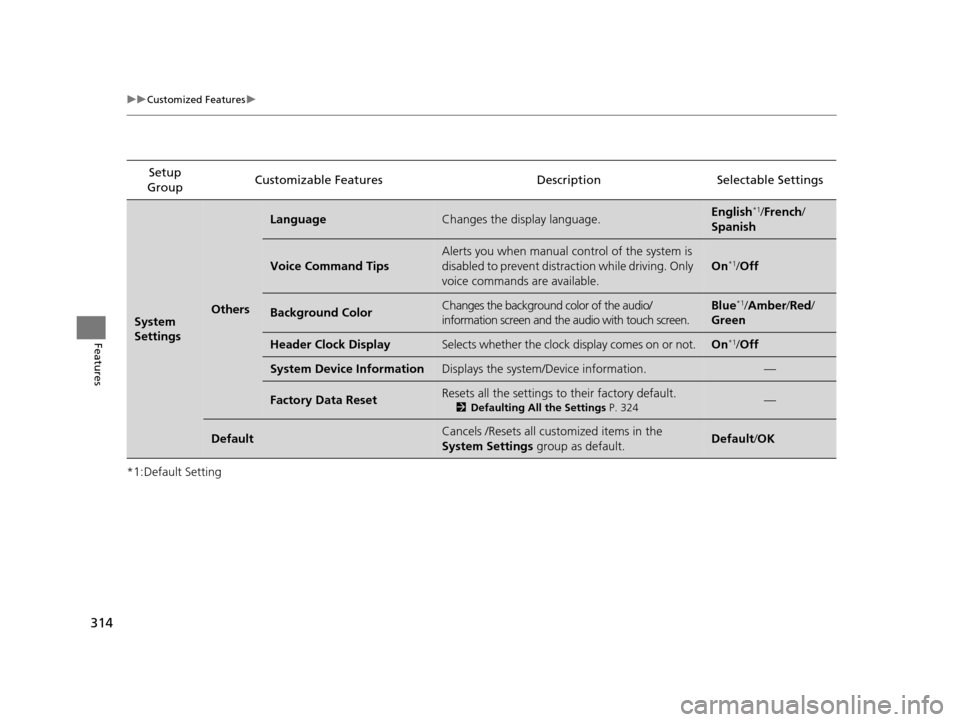
300
uuCustomized Features u
Features
*1:Default SettingSetup
Group Customizable Features Descri
ption Selectable Settings
System
Settings
Clock
Clock/
Wallpaper
Type
Clock TypeChanges the clock display type.Analog/Digital*1/
Small Digital /Off
Wallpaper
●Changes the wallpaper type.●Imports an image file for a new wallpaper.●Deletes an image file for a wallpaper.
2 Wallpaper Setup P. 214
Blank/Galaxy*1/
Metallic /Add New
Clock AdjustmentAdjusts Clock.
2 Clock P. 108—
Clock FormatSelects the digital clock display from 12H to 24H.12H*1/24H
Other
LanguageChanges the display language.English*1/French /
Spanish
Background ColorChanges the background color of the audio/
information screen.Blue*1/ Amber /Red/
Green
Header Clock DisplaySelects whether the clock display comes on or not.On*1/ Off
Factory Data ResetResets all the settings to their factory default.
2 Defaulting All the Settings P. 324Yes/No
DefaultCancels /Resets all customized items in the
System Settings group as default.Yes/No
16 US ODYSSEY-31TK86500.book 300 ページ 2015年6月24日 水曜日 午後3時0分
Page 309 of 565
308
uuCustomized Features u
Features
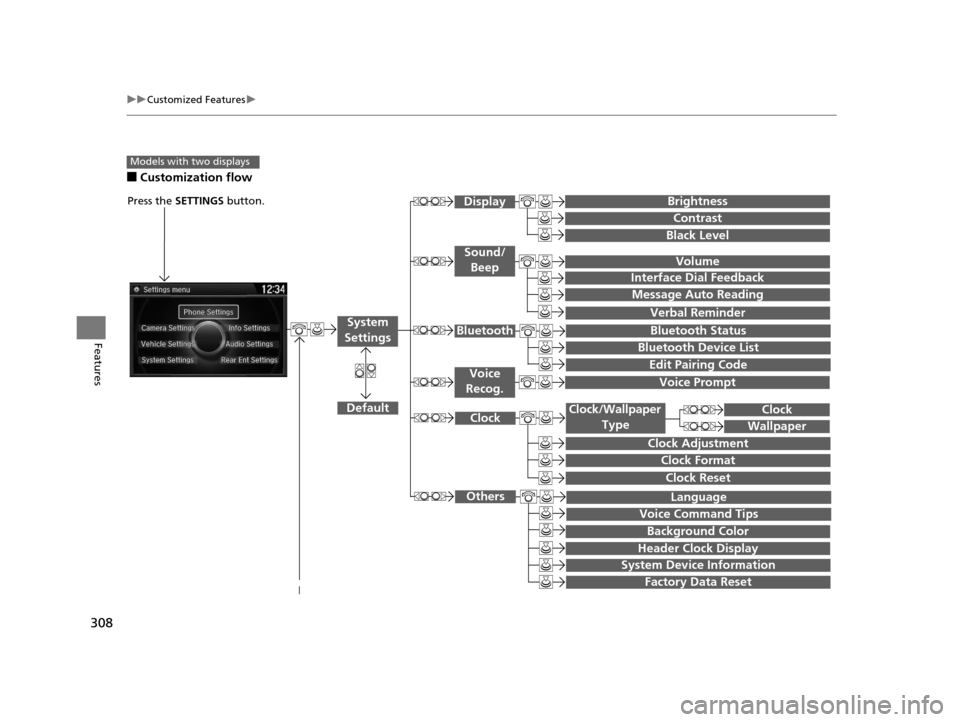
■Customization flow
Models with two displays
Press the SETTINGS button.
Voice Prompt
Message Auto Reading
Volume
Interface Dial Feedback
Verbal Reminder
Brightness
Contrast
Black Level
Bluetooth Status
Bluetooth Device List
Edit Pairing Code
Default
Sound/Beep
Display
System
SettingsBluetooth
Voice
Recog.
System Device Information
Factory Data Reset
Background Color
Header Clock Display
Clock Reset
Clock
Clock Adjustment
Clock Format
Clock
Language
Voice Command Tips
Others
Wallpaper
Clock/Wallpaper
Type
16 US ODYSSEY-31TK86500.book 308 ページ 2015年6月24日 水曜日 午後3時0分
Page 315 of 565
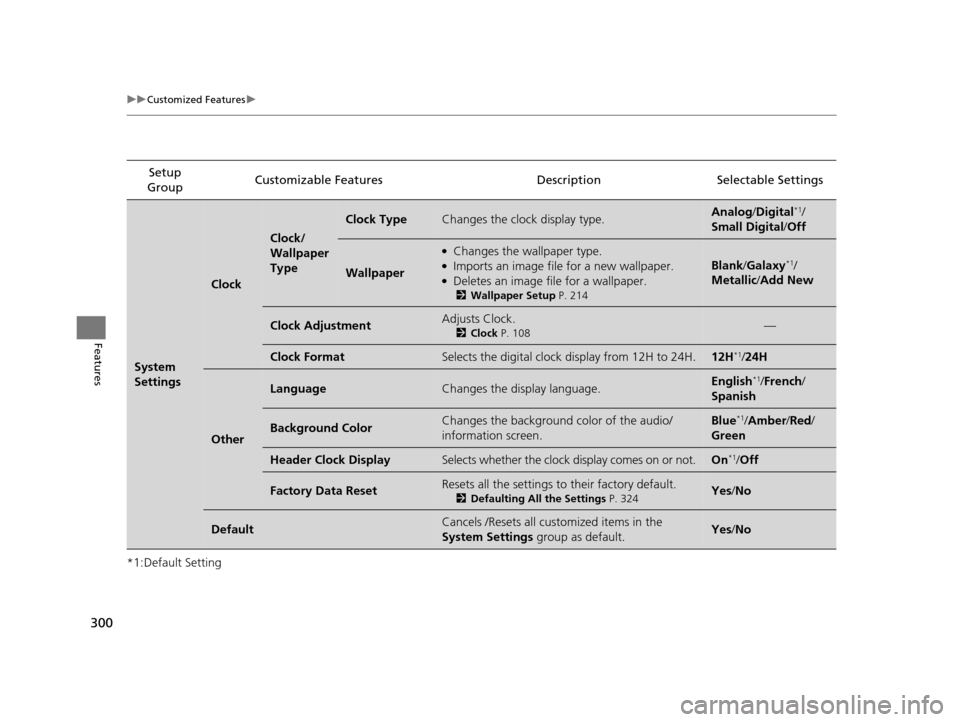
314
uuCustomized Features u
Features
*1:Default SettingSetup
Group Customizable Features Descri
ption Selectable Settings
System
SettingsOthers
LanguageChanges the display language.English*1/French /
Spanish
Voice Command Tips
Alerts you when manual control of the system is
disabled to prevent distraction while driving. Only
voice commands are available.
On*1/ Off
Background ColorChanges the background color of the audio/
information screen and the audio with touch screen.Blue*1/Amber /Red/
Green
Header Clock DisplaySelects whether the clock display comes on or not.On*1/ Off
System Device InformationDisplays the system /Device information.—
Factory Data ResetResets all the settings to their factory default.
2Defaulting All the Settings P. 324—
DefaultCancels /Resets all customized items in the
System Settings group as default.Default/OK
16 US ODYSSEY-31TK86500.book 314 ページ 2015年6月24日 水曜日 午後3時0分
Page 403 of 565
uuTowing a Trailer uTowing Preparation
402
Driving
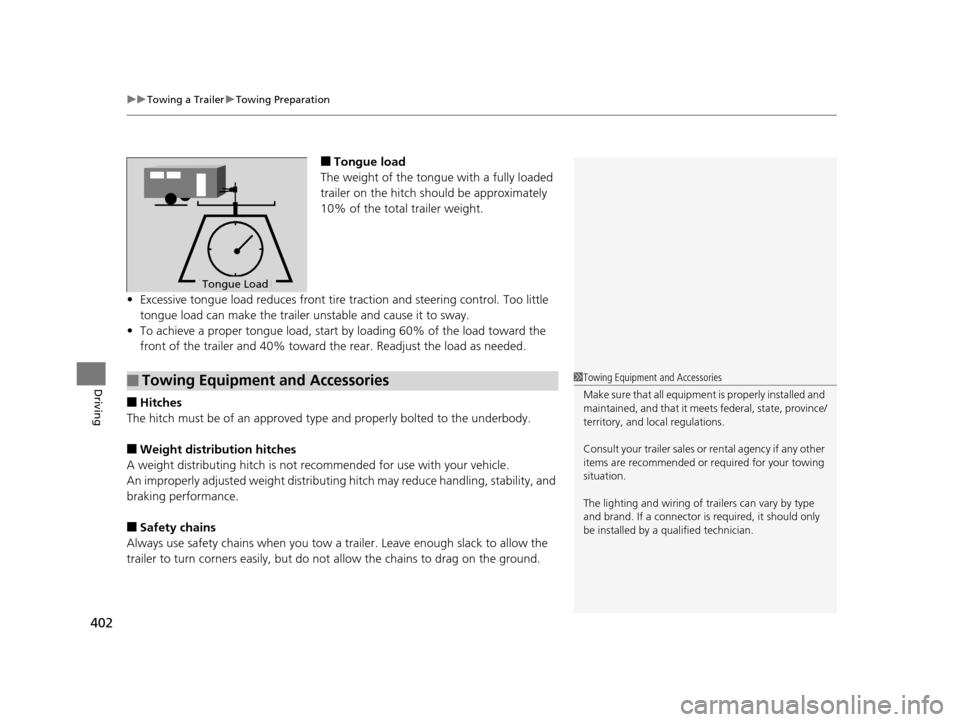
■Tongue load
The weight of the tongue with a fully loaded
trailer on the hitch should be approximately
10% of the total trailer weight.
• Excessive tongue load reduces front tire traction and steering control. Too little
tongue load can make the trailer unstable and cause it to sway.
• To achieve a proper tongue load, start by loading 60% of the load toward the
front of the trailer and 40% toward th e rear. Readjust the load as needed.
■Hitches
The hitch must be of an approved type and properly bolted to the underbody.
■Weight distribution hitches
A weight distributing hitch is not recommended for use with your vehicle.
An improperly adjusted weight distributin g hitch may reduce handling, stability, and
braking performance.
■Safety chains
Always use safety chains when you tow a trailer. Leave enough slack to allow the
trailer to turn corners easily, but do not allow the chains to drag on the ground.
To ngue LoadTongue Load
■Towing Equipment and Accessories1Towing Equipment and Accessories
Make sure that all equipment is properly installed and
maintained, and that it meets federal, state, province/
territory, and lo cal regulations.
Consult your traile r sales or rental agency if any other
items are recommended or required for your towing
situation.
The lighting and wiring of tra ilers can vary by type
and brand. If a connector is required, it should only
be installed by a qua lified technician.
16 US ODYSSEY-31TK86500.book 402 ページ 2015年6月24日 水曜日 午後3時0分
Page 453 of 565
452
Maintenance
Before Performing Maintenance
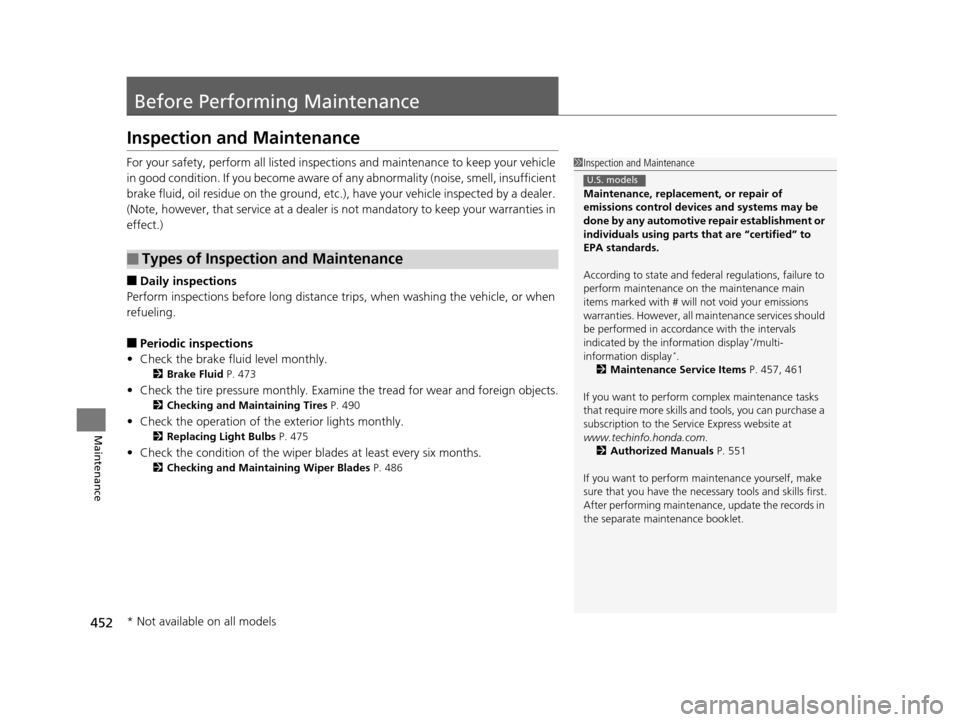
Inspection and Maintenance
For your safety, perform all listed inspections and maintenance to keep your vehicle
in good condition. If you become aware of any abnormality (noise, smell, insufficient
brake fluid, oil residue on the ground, etc.), have your vehicle inspected by a dealer.
(Note, however, that service at a dealer is not mandatory to keep your warranties in
effect.)
■Daily inspections
Perform inspections before long distance tri ps, when washing the vehicle, or when
refueling.
■Periodic inspections
• Check the brake fluid level monthly.
2 Brake Fluid P. 473
•Check the tire pressure monthly. Examin e the tread for wear and foreign objects.
2Checking and Maintaining Tires P. 490
•Check the operation of the exterior lights monthly.
2 Replacing Light Bulbs P. 475
•Check the condition of the wiper bl ades at least every six months.
2Checking and Maintaining Wiper Blades P. 486
■Types of Inspection and Maintenance
1Inspection and Maintenance
Maintenance, replacement, or repair of
emissions control devices and systems may be
done by any automotive repair establishment or
individuals using parts that are “certified” to
EPA standards.
According to state and fede ral regulations, failure to
perform maintenance on the maintenance main
items marked with # will not void your emissions
warranties. However, all ma intenance services should
be performed in accordan ce with the intervals
indicated by the information display
*/multi-
information display*.
2 Maintenance Service Items P. 457, 461
If you want to perform complex maintenance tasks
that require more skills a nd tools, you can purchase a
subscription to the Service Express website at
www.techinfo.honda.com.
2 Authorized Manuals P. 551
If you want to perform ma intenance yourself, make
sure that you have the necessary tools and skills first.
After performing ma intenance, update the records in
the separate maintenance booklet.
U.S. models
* Not available on all models
16 US ODYSSEY-31TK86500.book 452 ページ 2015年6月24日 水曜日 午後3時0分