Page 240 of 325

239
Text Message/E-mailHFL Menus
Bluetooth® HandsFreeLink®
HFL Menus
The power mode must be in ACCESSORY or ON to use HFL.
■Phone Settings screen
1.Press the SETTINGS button.
2. Rotate i to select Phone
Settings , then press u.1HFL Menus
To use HFL, you must first pair your Bluetooth®-
compatible cell phone to the system while the
vehicle is parked.
Some functions are limited while driving. A
message appears on the screen when the vehicle is
moving and the operation is canceled.
Edit the user name of a paired phone.
Phone
Edit Device Name
Connect phone
Bluetooth
Device List
(Existing
entry list)
Replace This Device
Add Bluetooth Device
Disconnect a paired phone from the system.Connect a phone to the system.
*1: Appears only when a phone is connected to HFL.Disconnect
(Existing entry list)
Pair a phone to the system.
Edit PIN Create a security PIN for a paired phone. Replace a previously paired phone with a
new phone.
Delete This DeviceDelete a previously paired phone.
Add Bluetooth DevicePair a phone to the system.
Continued
Page 241 of 325

240
Text Message/E-mailHFL Menus
Bluetooth® HandsFreeLink®
Text/
Email*1
Manual Input
Edit Speed DialNew Entry
Import from Call History
*1: Appears only when a phone is connected to HFL.
Import from Phonebook
Delete AllDelete all the previously stored speed dial numbers.
Select a phone number from the call
history to store as a speed dial number.
Select a phone number from the
phonebook to store as a speed dial number.
Enter a phone number to store as a speed
dial number.
Edit
Delete
(Existing
entry list)
Edit a previously stored speed dial number.
•
Change a number.
•Create or delete a voice tag.
Delete a previously st ored speed dial number.
Set calls to automatically transfer from your phone to HFL when you enter the
vehicle.Auto Transfer
Auto Answer
Ring Tone
Set whether to automatically answer an incoming call after about four
seconds.
Select the ring tone.
Use Contact Photo
Set phonebook data to be automatically imported when a phone is paired to
HFL.
Display a caller’s picture on an incoming call screen.Automatic Phone Sync
Select AccountSelect a mail or text message account.
Enable Text/EmailTurn the text message/E-mail function on and off.
New Text/Email AlertSelect whether a pop-up alert comes on the screen when HFL receives a new
text message/E-mail.
Cancel/Reset all customized items in the Phone Settings group as default.Default
Page 242 of 325
241
Text Message/E-mailHFL Menus
Bluetooth® HandsFreeLink®
■Phone screen
1.Press the PHONE button.
2. Press the MENU button to display
the menu items.
Select a phone number from the call history to store as a
speed dial number.
Speed Dial*1
Manual Input
New Entry Import from
Call History
Import from PhonebookSelect a phone number from th e phonebook to store as a
speed dial number. Enter a phone number to store as a speed dial number.
More Speed DialsDisplay another paired phone’s speed dial list.
*1: Appears only when a phone is connected to HFL.
(Existing entry list)Dial the selected number in the speed dial list.
Phonebook*1
Dial*1
Display the paired phone’s phonebook. Enter a phone number to dial.
Page 243 of 325
242
Text Message/E-mailHFL Menus
Bluetooth® HandsFreeLink®
Text/Email*1
Message is
read aloud.See the previous message.
(Read/Stop)
Previous
NextSee the next message. System reads received message aloud, or stop message
from being read.
Reply
CallReply to a received message using one of six fixed phrases.
Make a call to the sender.
Select
Account
Select a message
and press .
Select a mail or text message account.
Redial*1Redial the last number dialed in the phone’s history.
Display the last 20 outgoing, incoming and missed calls.
Call History*1All
Dialed
Received
Display the last 20 outgoing calls.
Display the last 20 incoming calls.
MissedDisplay the last 20 missed calls.
*1: Appears only when a phone is connected to HFL.
Page 247 of 325
246
Rear Entertainment SystemAudio Sources for Front and Rear Seats
Rear Entertainment System
Audio Sources for Front and Rear Seats
The table shows the possible audio source combinations of the front audio system
and rear entertainment system’s simultaneous use.
*1. The front seat passengers are only able to hear the DVD’s sound from the front speakers.
Front
RearAM/FM RadioSiriusXM®
RadioCDDVD*1HDDUSB
iPod®Bluetooth®
AudioPandora®
AhaTM
AM/FM
RadioYesYesYesYesYesYesYesYes
SiriusXM®
RadioYesYesYesYesYesYesNoNo
CDYesYesYesYesYesYesYesYes
DVDYesYesYesYesYesYesYesYes
HDDYesYesYesYesYesYesYesYes
USB
iPod®YesYesYesYesYesYesYesYes
1 Audio Sources for Front and Rear Seats
Yes: These audio sources are simultaneously
playable. When listening to same source in both
the front and rear, the pl aying channel or track
will also be the same for each.
No: These audio sources are not simultaneously
playable.
Page 278 of 325

277
TroubleshootingMap, Voice, Entering Destinations
Troubleshooting
I cannot select an option using the Interface Dial.To reduce potential driver distraction, ce rtain onscreen functions and features are
limited or inoperable while the vehicle is moving. Use voice commands or pull over to
proceed.
The navigation system pronunciation of street names
in the guidance command or destination address
sounds strange.The basic guidance phrases use a studio- recorded voice, but street names are
pronounced using a machine-generated voice. Consequently, the name may be
mispronounced or sound strange at times.
The screen is bright when I drive at night.1. Check that the nighttime dashboard brig htness control is not set to maximum.
2. Press the SETTINGS button. Select Navi Settings > Map > Color (Night) . Set the
Night color to Black for the best contrast.
2 Switching Display Mode Manually P. 70
The screen is dark when I drive during the day.Press the SETTINGS button. Select Navi Settings > Map > Color (Day) . Set the Day
color to White for the best contrast.
2 Switching Display Mode Manually P. 70
How do I change or remove my PIN?1. Press the SETTINGS button. Select Navi Settings > Personal Info > PIN Number >
Address Book PIN or Go Home PIN.
2. Enter your existing PIN. You then have the choice to change or remove the PIN.
2PIN Numbers P. 43
I have forgotten my PIN. How do I reset the PIN for
Home or the PIN for personal addresses?A dealer must reset the PIN for you.
Why is Call grayed out on the Calculate Route screen?Your phone is not paired to Bluetooth® HandsFreeLink® or, if paired, your phone is in
use.
2 Bluetooth ® HandsFreeLink® P. 202
ProblemSolution
Page 280 of 325
279
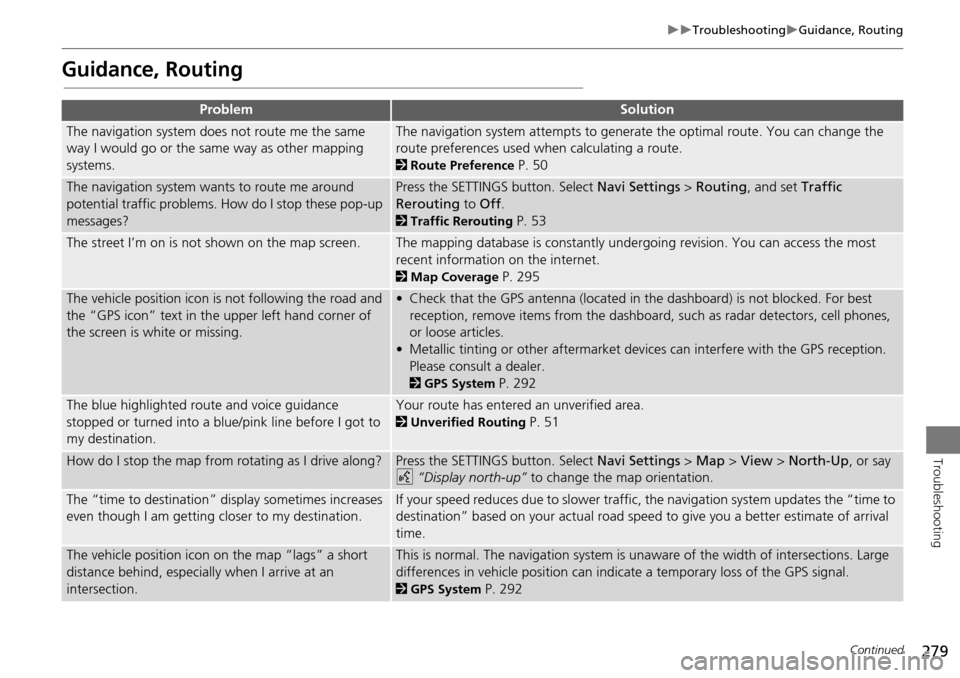
TroubleshootingGuidance, Routing
Troubleshooting
Guidance, Routing
ProblemSolution
The navigation system does not route me the same
way I would go or the same way as other mapping
systems.The navigation system attempts to generate the optimal route. You can change the
route preferences used when calculating a route.
2Route Preference P. 50
The navigation system wants to route me around
potential traffic problems. How do I stop these pop-up
messages?Press the SETTINGS button. Select Navi Settings > Routing , and set Traffic
Rerouting to Off .
2Traffic Rerouting P. 53
The street I’m on is not shown on the map screen.The mapping database is constantly undergoing revision. You can access the most
recent information on the internet.
2Map Coverage P. 295
The vehicle position icon is not following the road and
the “GPS icon” text in th e upper left hand corner of
the screen is white or missing.• Check that the GPS antenna (located in the dashboard) is not blocked. For best reception, remove items from the dashboard, such as radar detectors, cell phones,
or loose articles.
• Metallic tinting or other aftermarket devi ces can interfere with the GPS reception.
Please consult a dealer.
2 GPS System P. 292
The blue highlighted route and voice guidance
stopped or turned into a blue/pink line before I got to
my destination.Your route has entered an unverified area.
2Unverified Routing P. 51
How do I stop the map from rotating as I drive along?Press the SETTINGS button. Select Navi Settings > Map > View > North-Up , or say
d “Display north-up” to change the map orientation.
The “time to destination” display sometimes increases
even though I am getting closer to my destination.If your speed reduces due to slower traffic, the navigation system updates the “time to
destination” based on your actual road speed to give you a better estimate of arrival
time.
The vehicle position icon on the map “lags” a short
distance behind, especially when I arrive at an
intersection.This is normal. The navigation system is un aware of the width of intersections. Large
differences in vehicle position can indicate a temporary loss of the GPS signal.
2 GPS System P. 292
Continued
Page 313 of 325

312
Voice CommandsAudio Commands
Voice Commands
•Bluetooth Audio play
• Bluetooth Audio skip forward
• Bluetooth Audio skip back
• Bluetooth Audio group up
• Bluetooth Audio group down
• Bluetooth Audio pause
• Bluetooth Audio resume
NOTE:
Bluetooth ® Audio commands may not
work on some phones or Bluetooth®
Audio devices.
• Auxiliary play
■Bluetooth® Audio commands
■AUX commands
The system accepts these commands while
the Pandora® is playing.
• Pandora play
• Pandora skip forward
• Pandora station up
• Pandora station down
• Pandora pause
• Pandora resume
• Pandora thumbs up
• Pandora thumbs down
The system accepts these commands while
the Aha
TM is playing.
• Aha radio play
• Aha radio skip forward
• Aha radio skip back
• Aha radio station up
• Aha radio station down
• Aha radio resume
• Aha radio pause
• Aha radio like
• Aha radio dislike
■Pandora® commands
■AhaTM Radio commands
• Internet service play
• Internet service skip forward*1
•Internet service skip back*1
•Internet service station up*1
•Internet service station down*1
•Internet service resume*1
•Internet service pause*1
•Internet service like*1
•Internet service dislike*1
*1: The system accepts these commands
while the Internet service is playing.
Rear audio on*
Rear audio off*
Rear radio on*
Rear radio off*
Rear radio select FM
Rear radio select AM
Rear radio tune to # FM (#: frequency,
e.g., 95.5)
Rear radio tune to # AM (#: frequency,
e.g., 1020)
Rear radio seek up
Rear radio seek down
Rear radio next station
■ Internet service commands
■Rear Radio Commands


