2016 HONDA HR-V warning
[x] Cancel search: warningPage 54 of 77

100 || 101 DRIVING DRIVING
TABLE OF CONTENTS
INDEX
VISUAL INDEX
VOICE COMMAND
INDEX
SAFETY
INFORMATION
CUSTOMER
INFORMATION
INSTRUMENT PANEL
SPECIFICATIONS
VEHICLE
CONTROLS
MAINTENANCE
AUDIO AND
CONNECTIVITY
HANDLING THE
UNEXPECTED
BLUETOOTH®
HANDSFREELINK®
DRIVING
HONDALINK®
NAVIGATION
The rear camera view is restricted. You cannot see the corner ends of the bumper or what is
underneath the bumper. Its unique lens also makes objects appear closer or farther than they
actually are.
Visually con rm that it is safe to drive before backing up. Certain conditions (such as weather,
lighting, and high temperatures) may also restrict the rear view. Do not rely on the rearview display,
which does not give you all information about conditions at the rear of your vehicle.
*if equipped
Refueling
Use the proper fuel and refueling procedure to ensure the best performance and
safety of your vehicle.
Fuel Information
Use of unleaded gasoline of 87 octane or higher is recommended.
• Honda recommends TOP TIER Detergent Gasoline where available.
• Do NOT use gasoline containing more than 15% ethanol.
• Do NOT use gasoline containing methanol.
• Do NOT use gasoline containing MMT.
How to Refuel
1. The fuel fi ll door is located at the left rear of the
vehicle. Park next to the service pump that is
most accessible.
2. Turn off the engine.
3. Pull the fuel fi ll door release handle under the
lower left corner of the dashboard. The fuel fi ll
door opens.
4. Turn the fuel fi ll cap slowly to open. Place the fuel
fi ll cap in the holder.
5. Insert the fi ller nozzle fully. When the tank is full,
the fuel nozzle clicks off automatically.
6. Replace the fuel fi ll cap. Tighten it until you hear
at least one click. Close the fuel fi ll door. We recommend quality gasoline containing detergent additives that help
prevent fuel system and engine deposits. In addition, in order to maintain good
performance, fuel economy, and emissions control, we strongly recommend the
use of gasoline that does NOT contain harmful manganese-based fuel additives
such as MMT, if such gasoline is available.
NOTICE
Gasoline is highly fl ammable and explosive. You can be burned or seriously
injured when handling fuel.
• Stop the engine, and keep heat, sparks, and fl ame away.
• Handle fuel only outdoors.
• Wipe up spills immediately.
WARNING
Pull
HolderCap
Changing Camera Settings
Turn the guidelines on or off.
1. From the HOME screen, select Settings.
2. Select Camera.
3. Select Rear Wide Camera.
4. Select one of the options.
Fixed Guideline: Guidelines appear when you
shift into Reverse. Select On or Off.
Dynamic Guideline: Guidelines move as you turn
the steering wheel. Select On or Off.
5. Press BACK to exit the menu.
Multi-View Rear Camera*
When you shift into Reverse (R), a real-time image of the area behind your vehicle is
shown in the touchscreen, along with helpful parking guidelines.
Models with touchscreen
Press the icons on the touchscreen to change views.
Wide view Normal view Top down view
Page 55 of 77

102 || 103 HANDLING THE UNEXPECTED HANDLING THE UNEXPECTED
TABLE OF CONTENTS
INDEX
VISUAL INDEX
VOICE COMMAND
INDEX
SAFETY
INFORMATION
CUSTOMER
INFORMATION
INSTRUMENT PANEL
SPECIFICATIONS
VEHICLE
CONTROLS
MAINTENANCE
AUDIO AND
CONNECTIVITY
HANDLING THE
UNEXPECTED
BLUETOOTH®
HANDSFREELINK®
DRIVING
HONDALINK®
NAVIGATION
HANDLING THE UNEXPECTED
*if equipped
WARNING: Battery posts, terminals, and related accessories contain lead and lead
compounds. Wash your hands after handling.
After the Engine Starts
Once your vehicle’s engine has started, remove the jumper cables in the following
order:
1. Disconnect the jumper cable from your vehicle’s stud bolt.
2. Disconnect the other end of the jumper cable from the assisting vehicle’s (-)
terminal.
3. Disconnect the jumper cable from your vehicle’s (+) terminal.
4. Disconnect the other end of the jumper cable from the assisting vehicle’s (+)
terminal.
5. Have your vehicle inspected by a nearby service station or a dealer.
Shift Lever Does Not Move*
Follow the procedure below if you cannot move the shift lever out of Park (P).
1. Set the parking brake.
2. Remove the key from the ignition, or remove the
built-in key from the remote transmitter.
3. Wrap a cloth around the tip of a small fl at-tip
screwdriver. Put it into the shift lock release slot as
shown in the image, and remove the cover.
4. Insert the key into the shift lock release slot.
5. While pushing the key down, press the shift lever
release button and place the shift lever into Neutral
(N). The lock is now released. Have the shift lever
checked by a dealer as soon as possible.
Slot
Release buttonShift lock
release slot
*if equipped
Learn about what to do in critical or emergency situations.
Smart Entry Remote Battery Strength*
If the battery life in your remote transmitter is weak, follow the below steps to start
the engine.
1. Touch the back of the remote transmitter to the
ENGINE START/STOP button while the indicator is
fl ashing.
2. With the brake pedal pressed (and the clutch
pedal for manual transmission), press the ENGINE
START/STOP button within 10 seconds.
Jump Starting
Turn off the power to electric devices, such as audio and lights. Turn off the engine,
then open the hood.
1. Remove the under-hood fuse box cover (see
page 111). Connect the fi rst jumper cable to your
vehicle’s battery (+) terminal.
2. Connect the other end of the fi rst jumper cable
to the booster battery (+) terminal. Use a 12-volt
booster battery only.
3. Connect the second jumper cable to the booster
battery (-) terminal.
4. Connect the other end of the second jumper cable
to the stud bolt as shown. Do not connect this
jumper cable to any other part.
5. If your vehicle is connected to another vehicle,
start the assisting vehicle’s engine and increase its
rpm slightly.
6. Attempt to start your vehicle’s engine. If it turns over slowly, make sure that the
jumper cables have good metal-to-metal contact.
A battery can explode if you do not follow the correct procedure, seriously
injuring anyone nearby.
Keep all sparks, open fl ames, and smoking materials away from the
battery.
WARNING
Booster
batteryCover
Page 56 of 77

104 || 105 HANDLING THE UNEXPECTED HANDLING THE UNEXPECTED
TABLE OF CONTENTS
INDEX
VISUAL INDEX
VOICE COMMAND
INDEX
SAFETY
INFORMATION
CUSTOMER
INFORMATION
INSTRUMENT PANEL
SPECIFICATIONS
VEHICLE
CONTROLS
MAINTENANCE
AUDIO AND
CONNECTIVITY
HANDLING THE
UNEXPECTED
BLUETOOTH®
HANDSFREELINK®
DRIVING
HONDALINK®
NAVIGATION
Overheating
If the high temperature indicator comes on, the engine suddenly loses power, or
steam or spray comes out from under the hood, your engine is overheating.
1. Immediately park the vehicle in a safe place. Turn
off all accessories and turn on the hazard warning
lights.
2. If steam or spray is not present: Keep the engine
running and open the hood.
If steam or spray is present: Turn off the engine and
wait until it subsides. Then, open the hood.
3. Check that the cooling fan is operating and stop the engine once the high
temperature indicator goes off. If the cooling fan is not operating, immediately
stop the engine.
4. Once the engine has cooled down, inspect the coolant level and check the
cooling system components for leaks. If the coolant level in the reserve tank
is low, add coolant until it reaches the MAX mark. If there is no coolant in the
reserve tank, make sure the radiator is cool, then cover the radiator cap with a
heavy cloth and open the cap. If necessary, add coolant up to the base of the
fi ller neck, and put the cap back on.
Once the engine has cooled suffi ciently, restart it and check the high temperature
indicator. If the indicator is off, resume driving. If it stays on, contact a dealer for
repairs.
Reserve tank MAX
MIN
Steam and spray from an overheated engine can seriously scald you.
Do not open the hood if steam is coming out.
WARNING
Removing the radiator cap while the engine is hot can cause the coolant to
spray out, seriously scalding you.
Always let the engine and radiator cool down before removing the radiator cap.
WARNING
Continuing to drive with the temperature gauge needle at the H mark may damage
the engine.
NOTICE
Emergency Engine Stop*
The ENGINE START/STOP button may be used to stop the engine due to an
emergency situation even while driving. If you must stop the engine, choose one of
the following operations:
• Press and hold the ENGINE START/STOP button for
two seconds, or
• Firmly press the ENGINE START/STOP button two
times.
The steering wheel will not lock. The power mode changes to ACCESSORY (or OFF
for manual transmission), unless the shift lever is in Park (P), in which case the
power mode changes to VEHICLE OFF.
Because turning off the engine also disables the power assist the engine provides
to the steering and braking systems, it will require signifi cantly more physical effort
and time to steer and slow the vehicle. Downshift gears and use both feet on the
brake pedal, if necessary, to slow the vehicle and stop immediately in a safe place.
Do not press the button while driving unless it is absolutely necessary for the engine
to be switched off.
Emergency Towing
Call a professional towing service if you need to tow your vehicle.
All models
Flat bed equipment: The operator loads your vehicle on the back of a truck. This is
the best way to transport your vehicle.
2WD models
Wheel lift equipment: The tow truck uses two pivoting arms that go under the front
tires and lift them off the ground. The rear tires remain on the ground. This is an
acceptable way to tow your vehicle.
Trying to lift or tow your vehicle by the bumpers will cause serious damage. The
bumpers are not designed to support the vehicle’s weight.
Improper towing such as towing behind a motorhome or other motor vehicle can
damage the transmission.
NOTICE
*if equipped
Page 57 of 77

106 || 107 HANDLING THE UNEXPECTED HANDLING THE UNEXPECTED
TABLE OF CONTENTS
INDEX
VISUAL INDEX
VOICE COMMAND
INDEX
SAFETY
INFORMATION
CUSTOMER
INFORMATION
INSTRUMENT PANEL
SPECIFICATIONS
VEHICLE
CONTROLS
MAINTENANCE
AUDIO AND
CONNECTIVITY
HANDLING THE
UNEXPECTED
BLUETOOTH®
HANDSFREELINK®
DRIVING
HONDALINK®
NAVIGATION
Tire Pressure Monitoring System ( TPMS)
Monitors the tire pressure while you are driving. Available on U.S.models only.
If your vehicle’s tire pressure becomes signifi cantly
low, the low tire pressure indicator comes on.
Stop your vehicle in a safe place. Check the tire
pressure and adjust the pressure to the specifi ed
level. The specifi ed tire pressure is on a label on the
driver’s doorjamb.
TPMS Calibration
Any time you infl ate, change, or rotate one of more
of the tires, you need to recalibrate the system.
Press and hold the TPMS button. The TPMS
indicator blinks, and calibration begins.
Driving on an extremely underinfl ated tire can cause it to overheat. An overheated
tire can fail. Always infl ate your tires to the specifi ed pressure.
NOTICE
Changing a Flat Tire
If a tire goes fl at while driving, grasp the steering wheel fi rmly, and brake gradually
to reduce speed. Then, stop in a safe place. Replace the fl at tire with the compact
spare tire. Go to a dealer as soon as possible to have the full-size tire repaired or
replaced.
Getting Ready to Change the Tire
Park the vehicle on a fi rm, level, non-slippery surface. Apply the parking brake,
shift to Park (P), and turn the vehicle off. Turn on the hazard warning lights.
1. Open the tailgate. Turn on the cargo lights if
necessary (see page 37).
2. Open the cargo area fl oor lid.
3. Take the tool case out of the cargo area.
2WD models: Take out the wheel nut wrench, jack
handle bar, and jack.
AWD models: Take out the wheel nut wrench and
jack handle bar.
4. Unscrew the wing bolt and remove the spacer
cone. Then remove the spare tire.
5. AWD models: Turn the jack’s end bracket
counter-clockwise to loosen it, then remove the
jack.
6. Place a wheel block or rock in front and rear of
the wheel diagonal to the fl at tire.
7. Place the compact spare tire (wheel side up)
under the vehicle body, near the tire that needs
to be replaced.
8. Loosen each wheel nut about one turn using the
wheel nut wrench.
TPMS button
Low tire pressure/TPMS indicator
2WD models
Tool caseSpare tireJack
AWD models
Tool case Spare tire
AWD models
Jack
Floor lid
Page 58 of 77

108 || 109 HANDLING THE UNEXPECTED HANDLING THE UNEXPECTED
TABLE OF CONTENTS
INDEX
VISUAL INDEX
VOICE COMMAND
INDEX
SAFETY
INFORMATION
CUSTOMER
INFORMATION
INSTRUMENT PANEL
SPECIFICATIONS
VEHICLE
CONTROLS
MAINTENANCE
AUDIO AND
CONNECTIVITY
HANDLING THE
UNEXPECTED
BLUETOOTH®
HANDSFREELINK®
DRIVING
HONDALINK®
NAVIGATION
*if equipped
Setting Up the Jack
1. Place the jack under the jacking point closest to
the tire to be changed.
2. Turn the end bracket (as shown in the image)
until the top of the jack contacts the jacking
point. Make sure that the jacking point tab is
resting in the jack notch.
3. Raise the vehicle, using the jack handle bar and
the jack handle, until the tire is off the ground.
The following instructions must be followed to use the jack safely:
• Do not use the jack with people or luggage in the vehicle.
• Use the jack provided in your vehicle. Other jacks may not support the weight
(“load”) or fi t the jacking point.
• Do not use while the engine is running.
• Use only where the ground is fi rm and level.
• Use only at the jacking points.
• Do not get in the vehicle while using the jack.
• Do not put anything on top of or underneath the jack.The vehicle can easily roll off the jack, seriously injuring anyone underneath.
Follow the directions for changing a tire exactly, and never get under the
vehicle when it is supported only by the jack.
WARNING
Jack
handle
barWheel nut
Wrench as jack handle
Replacing the Flat Tire
1. Remove the wheel nuts and fl at tire.
2. Mount the compact spare tire. Replace the
wheel nuts, and lightly tighten them.
3. Lower the vehicle and remove the jack. Tighten
the wheel nuts in the order indicated in the
image. Go around, tightening the nuts, two to
three times in this order. Do not overtighten the
wheel nuts.
If you drive with the spare tire installed, the low
tire pressure/TPMS indicator* appears. The
indicator stays on until a regular tire is installed.
Storing the Flat Tire
2WD models
1. Remove the center cap.
2. Place the fl at tire face down in the spare tire
well.
3. Remove the spacer cone from the wing bolt, fl ip
it over, and insert it back on the bolt. Secure the
fl at tire with the wing bolt.
4. Securely store the wheel nut wrench, jack
handle bar, and jack back in the tool case. Store
the case in the cargo area under the fl oor lid.
Wheel
nuts
Wing bolt
Spacer
cone
For compact
spare tireFor full-
size tire
Page 59 of 77

110 || 111 HANDLING THE UNEXPECTED HANDLING THE UNEXPECTED
TABLE OF CONTENTS
INDEX
VISUAL INDEX
VOICE COMMAND
INDEX
SAFETY
INFORMATION
CUSTOMER
INFORMATION
INSTRUMENT PANEL
SPECIFICATIONS
VEHICLE
CONTROLS
MAINTENANCE
AUDIO AND
CONNECTIVITY
HANDLING THE
UNEXPECTED
BLUETOOTH®
HANDSFREELINK®
DRIVING
HONDALINK®
NAVIGATION
Loose items can fl y around the interior in a crash and can seriously injure the
occupants.
Store the wheel, jack, and tools securely before driving.
WARNING
*if equipped
AWD models
1. Remove the storage bag from the tool case.
2. Put the fl at tire in the storage bag, and knot the
top of the bag tightly.
3. Poke a hole through the bag, and pass the
holding belt through the hole of the bag and the
wheel of the fl at tire as shown.
4. Place the fl at tire in the cargo area, and thread
the belt through the rear anchor as shown.
5. Pass the belt through the ring, and tighten the
belt to secure the fl at tire in place.
Belt
Rear anchor
Fuse Locations
If any electrical devices are not working, turn the vehicle off and check to see if any
applicable fuse is blown. Fuse locations are shown on the fuse box cover. Locate the
fuse in question by the fuse number and box cover number.
Engine Compartment Fuse Boxes
Fuse box A
Located under the hood near the brake fl uid reservoir. Push the tabs to open the
box.
Circuit ProtectedAmps1Headlight Low Beam Main20 A2CDC*(30 A)3Hazard10 A4DBW15 A5Wiper*(30 A)6Stop10 A7IGP15 A8IG Coil15 A9EOP*(10 A)10INJ*(20 A)11VST2*(30 A)12Main Fan30 A13Starter SW*(30 A)14MG Clutch7.5 A15Battery Sensor(7.5 A)16Small Light10 A17AFP Main*(10 A)18Horn10 A19Fog Light*(10 A)20SBW*(10 A)
Ta b
Circuit ProtectedAmps21Back Up Main10 A22Audio(10 A)23Sub Fan(30 A)24VST1*(30 A)25STRLD*(7.5 A)26IGP CAM*(7.5 A)27––28––29Back Up*(30 A)30IGP LAF(7.5 A)31IGPS(7.5 A)32Right Headlight Low Beam10 A33Left Headlight Low Beam10 A
Page 62 of 77

116 || 117 MAINTENANCE MAINTENANCE
TABLE OF CONTENTS
INDEX
VISUAL INDEX
VOICE COMMAND
INDEX
SAFETY
INFORMATION
CUSTOMER
INFORMATION
INSTRUMENT PANEL
SPECIFICATIONS
VEHICLE
CONTROLS
MAINTENANCE
AUDIO AND
CONNECTIVITY
HANDLING THE
UNEXPECTED
BLUETOOTH®
HANDSFREELINK®
DRIVING
HONDALINK®
NAVIGATION
Safety Precautions
Some of the most important safety precautions are listed below; however, we cannot
warn you of every conceivable hazard that can arise in performing maintenance.
Only you can decide whether or not you should perform a given task.
Maintenance Safety
• To reduce the possibility of fi re or explosion, keep cigarettes, sparks, and fl ames
away from the battery and all fuel-related parts.
• Never leave rags, towels, or other fl ammable objects under the hood.
• To clean parts, use a commercially available degreaser or parts cleaner, not
gasoline.
• Wear eye protection and protective clothing when working with the battery or
compressed air.
• Do not run the engine in confi ned spaces where carbon monoxide gas can
accumulate.
Vehicle Safety
• The vehicle must be stationary, and parked on level ground with the parking
brake set and the engine off.
• Be aware that hot parts can burn you.
• Be aware that moving parts can injure you.
Improperly maintaining this vehicle or failing to correct a problem before driving
can cause a crash in which you can be seriously hurt or killed.
Always follow the inspection and maintenance recommendations according to
the schedules in this guide.
WARNING
Failure to properly follow maintenance instructions and precautions can cause
you to be seriously hurt or killed.
Always follow the procedures and precautions in this guide.
WARNING
Learn about basic maintenance that you can perform on the vehicle yourself, as well
as information about how to best maintain the vehicle.
MAINTENANCE Maintenance Minder™
Reminds you when indicated maintenance service is due.
When maintenance is due, the Maintenance Minder indicator comes on and a
message appears on the display every time you turn the vehicle on. Press the select/
reset knob to change displays.
Maintenance
Minder indicatorMain items
Sub itemsMaintenance Minder message
• Independent of the Maintenance Minder information, replace the brake fl uid
every 3 years.
• Inspect idle speed every 160,000 miles (256,000 km).
• Adjust the valves during services A, B, 1, 2, or 3 if they are noisy.
U.S. models
Maintenance, replacement, or repair of emissions control devices and systems
may be done by any automotive repair establishment or individuals using parts
that are certi ed to EPA standards.
According to state and federal regulations, failure to perform maintenance on the
maintenance main items marked with # will not void your emissions warranties.
However, all maintenance services should be performed in accordance with the
intervals indicated by the multi-information display.
Page 65 of 77
122 || 123 MAINTENANCE MAINTENANCE
TABLE OF CONTENTS
INDEX
VISUAL INDEX
VOICE COMMAND
INDEX
SAFETY
INFORMATION
CUSTOMER
INFORMATION
INSTRUMENT PANEL
SPECIFICATIONS
VEHICLE
CONTROLS
MAINTENANCE
AUDIO AND
CONNECTIVITY
HANDLING THE
UNEXPECTED
BLUETOOTH®
HANDSFREELINK®
DRIVING
HONDALINK®
NAVIGATION
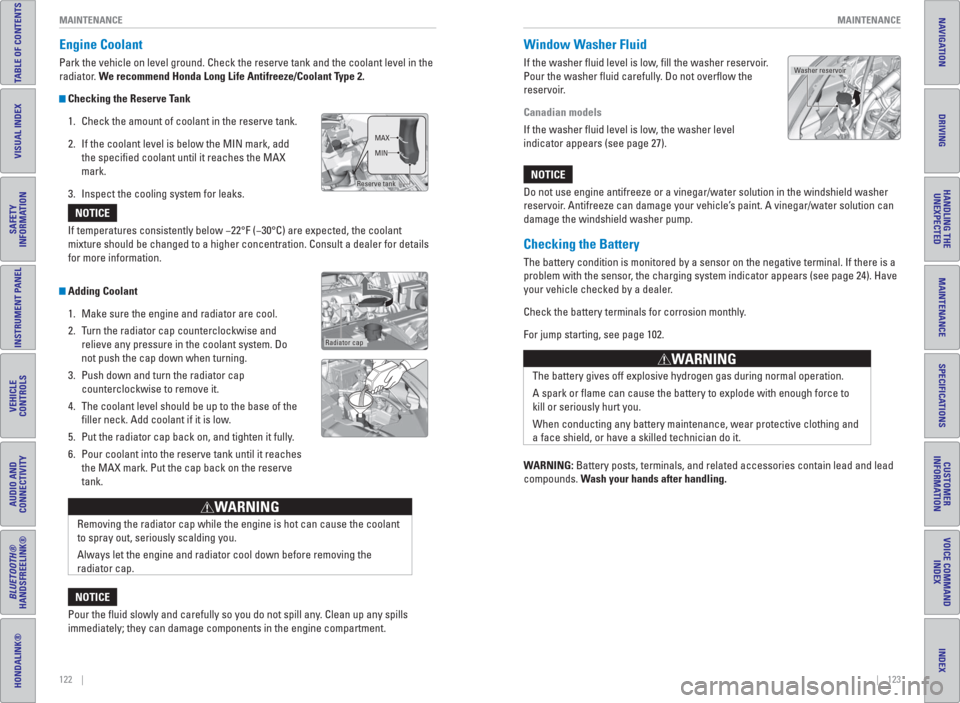
Engine Coolant
Park the vehicle on level ground. Check the reserve tank and the coolant level in the
radiator. We recommend Honda Long Life Antifreeze/Coolant Type 2.
Checking the Reserve Tank
1. Check the amount of coolant in the reserve tank.
2. If the coolant level is below the MIN mark, add
the specifi ed coolant until it reaches the MAX
mark.
3. Inspect the cooling system for leaks.
Adding Coolant
1. Make sure the engine and radiator are cool.
2. Turn the radiator cap counterclockwise and
relieve any pressure in the coolant system. Do
not push the cap down when turning.
3. Push down and turn the radiator cap
counterclockwise to remove it.
4. The coolant level should be up to the base of the
fi ller neck. Add coolant if it is low.
5. Put the radiator cap back on, and tighten it fully.
6. Pour coolant into the reserve tank until it reaches
the MAX mark. Put the cap back on the reserve
tank. If temperatures consistently below −22°F (−30°C) are expected, the coolant
mixture should be changed to a higher concentration. Consult a dealer for details
for more information.
NOTICE
Reserve tankMAX
MIN
Radiator cap
Removing the radiator cap while the engine is hot can cause the coolant
to spray out, seriously scalding you.
Always let the engine and radiator cool down before removing the
radiator cap.
WARNING
Pour the fl uid slowly and carefully so you do not spill any. Clean up any spills
immediately; they can damage components in the engine compartment.
NOTICE
Window Washer Fluid
If the washer fl uid level is low, fi ll the washer reservoir.
Pour the washer fl uid carefully. Do not overfl ow the
reservoir.
Canadian models
If the washer fl uid level is low, the washer level
indicator appears (see page 27).
Do not use engine antifreeze or a vinegar/water solution in the windshield washer
reservoir. Antifreeze can damage your vehicle’s paint. A vinegar/water solution can
damage the windshield washer pump.
NOTICE
The battery gives off explosive hydrogen gas during normal operation.
A spark or fl ame can cause the battery to explode with enough force to
kill or seriously hurt you.
When conducting any battery maintenance, wear protective clothing and
a face shield, or have a skilled technician do it.
WARNING
Checking the Battery
The battery condition is monitored by a sensor on the negative terminal. If there is a
problem with the sensor, the charging system indicator appears (see page 24). Have
your vehicle checked by a dealer.
Check the battery terminals for corrosion monthly.
For jump starting, see page 102.
WARNING: Battery posts, terminals, and related accessories contain lead and lead
compounds. Wash your hands after handling.
Washer reservoir