2016 HONDA FIT steering
[x] Cancel search: steeringPage 28 of 75

48 || 49
AUDIO AND CONNECTIVITY
AUDIO AND CONNECTIVITY
*if equipped
Auxiliary Input Jack*
Connect standard audio devices with a 1/8-inch
(3.5 mm) stereo miniplug.
1. Open the AUX cover in the front console. 2. Insert the miniplug attached to the audio device into the jack. The audio system switches to AUX mode. Use the device to control the audio.
Steering Wheel Controls
You can operate certain functions of the audio system using the steering wheel controls. SOURCE button:
Cycle through available audio
modes. t /u buttons:
Change presets, tracks, albums, or
folders.+/- buttons: Adjust audio volume.
Menu button*: From the audio screen, press and
hold to choose options for the current audio mode (models with touchscreen). Use the +/- buttons and
the SOURCE button to scroll and enter selections.
FM/AM/XM ®
Radio
Press t or u for the next or previous station.
Press and hold t or u for the next or previous strong station.
CD/iPod ®
/USB/ Bluetooth ®
Audio
Press t or u for the next or previous track.
Press and hold t or u
for the next or previous folder (CD/USB).
Pandora ®
(U.S. only)
Press u for the next song.
Press and hold t or u for the next or previous station.
Adjusting the Sound
Adjust various sound settings.
Models with color audio system
Use the selector knob to make and enter selections.
1. Press the Sound button.
2. Select a sound mode to change, and adjust it using the selector knob.
3. Press the Back button to exit the menu.
Models with touchscreen
Make selections using the touchscreen.
1. From the HOME screen, select Settings.
2. Select Audio.
3. Select Sound.4. Select the tabs to change the sound mode and adjust the setting.
5. Select OK when complete.
Menu button
Selector knob Sound button
VO
L
HOME
MENU BA CK
Page 40 of 75

72 || 73
BLUETOOTH ®
HANDSFREELINK ®
BLUETOOTH ®
HANDSFREELINK ®
Models with touchscreen
Making a Call
You can make a call using several methods.
Dialing a Number
Enter a 10-digit phone number to call.
Using voice commands
Press the Talk button before you say each command.
1. Say “Dial by number.”
2. Say the phone number: For example,
“ 3-1-0-5-5-5-1-2-3-4.”
3. The system begins to dial.
Using the touchscreen
Manual operation is limited while the vehicle is moving. Voice commands are always available.
1. From the Home screen, select Phone. 2.Select MENU.
3. Select Dial.
4. Enter the phone number. Select the green phone icon to call.
Using the Phonebook
When your phone is paired, its entire phonebook can be automatically imported to the system. Phone synchronization must be turned on.
Using voice commands
Press the Talk button before you say each command.
1. Say “Dial by name.”
2. Say the phonebook name and phone type. For example, “John Smith mobile.”
Using the touchscreen
Manual operation is limited while the vehicle is moving. Voice commands are always available.
1. From the Home screen, select Phone.2.Select MENU.
3. Select Phonebook.
4. Scroll through the list to ind the name and number you want to call, and select it to call.
Storing Speed Dial Entries
Store up to 20 numbers for quick dialing.
1. From the Home screen, select Phone. 2.Select MENU.
3. Select Edit Speed Dial, then select New Entry.
4. Select an entry method.5. If desired, you can create a voice tag for the
number. Follow the prompts.
Using Speed Dial
Make calls quickly using stored speed dial entries.
Using voice commands
Press the Talk button before you say each command.
1. Say “Dial by name.”
2. Say the stored voice tag name. For example, “John Smith.”
Using the touchscreen
1. From the Home screen, select Phone.
2. Scroll through the list to nd the entry you want to call, and select it to call.
HondaLink™ Assist
If your vehicle’s airbags deploy or if the unit detects that the vehicle is severely
impacted, your vehicle automatically attempts to connect to an operator. Your phone must be paired to the system and have good cellular connection. Visit www.
hondalink.com (U.S.) or honda.ca/hondalinkassist (Canada) for more information.
1. Make sure your phone is on and paired to Bluetooth®
HandsFreeLink ®
(see page 71).
2. Select Call Now, or the system automatically connects after 10 seconds. The vehicle information
and its position are sent to the operator.
3. Select Talk Now to immediately talk to the operator.
4. When the call is complete, select Hang Up or press the Hang-Up/Back button on the steering wheel.
Page 42 of 75

76 || 77
NAVIGATION
NAVIGATION
Learn how to enter a destination and operate the navigation system.
Basic Navigation Operation
A real-time navigation system uses GPS and a map database to show your current
location and help guide you to a desired destination. You can operate the system using voice commands or the touchscreen.
To reduce the potential for driver distraction, certain manual functions may be
inoperable or grayed out while the vehicle is moving. Voice commands are always available.
Steering Wheel Controls
Use the steering wheel controls to control the system.
NAVIGATION*
*if equipped
Using the navigation system while driving can take your attention away from
the road, causing a crash in which you could be seriously injured or killed.
Operate system controls only when the conditions permit you to safely do so.
WARNING
Hang-Up/Back button: Press to cancel a command or
operation.
Talk button: Press to say voice commands.
+ / - buttons: Scroll the list after pressing and holding
the MENU button. SOURCE button: Press to enter a selection after
pressing and holding the MENU button.Menu button: From the map screen, press and hold to
display Go Home and other options.
Navigation Display and Controls
Use the touchscreen to enter information and make selections.
VO L
MENU BA CK
HOME
Navi: Display the
map screen.
HOME (screen shown)
Info: Select items
such as trip
computer, trafc incidents, and more.
BACK: Go back
to the previous
display. Settings: Select Navi from the
Settings screen for map and navigation options.
MENU:
From
the map screen, select various destination options.
GPS signal strength Trafc incident icon
Trafc ow
Current map scale Current vehicle position
Map orientation
Current street
Trafc status Map menu Landmark icon
Page 45 of 75
82 || 83
DRIVING
NAVIGATION
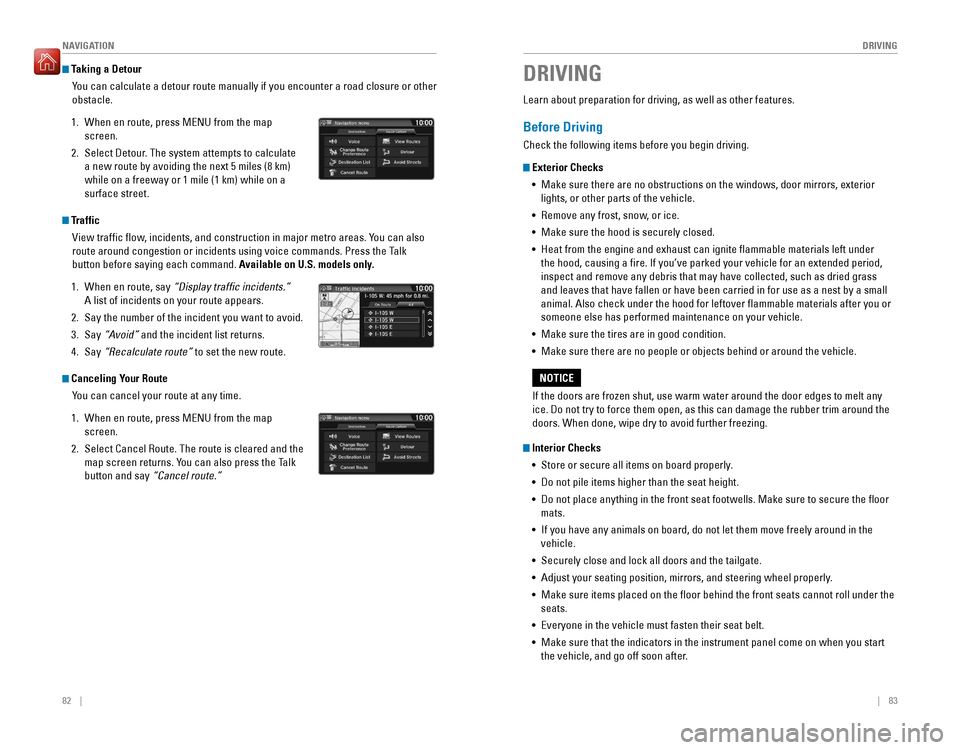
Taking a Detour
You can calculate a detour route manually if you encounter a road closure or other obstacle.
1. When en route, press MENU from the map screen.
2. Select Detour. The system attempts to calculate a new route by avoiding the next 5 miles (8 km) while on a freeway or 1 mile (1 km) while on a surface street.
Traffic
View trafc ow, incidents, and construction in major metro areas. You can also
route around congestion or incidents using voice commands. Press the Talk
button before saying each command. Available on U.S. models only.
1. When en route, say “Display trafic incidents.”
A list of incidents on your route appears.
2. Say the number of the incident you want to avoid.
3. Say “Avoid” and the incident list returns.
4. Say “Recalculate route” to set the new route.
Canceling Your Route
You can cancel your route at any time.
1. When en route, press MENU from the map screen.
2. Select Cancel Route. The route is cleared and the map screen returns. You can also press the Talk button and say “Cancel route.”
Learn about preparation for driving, as well as other features.
Before Driving
Check the following items before you begin driving.
Exterior Checks
•
Make sure there are no obstructions on the windows, door mirrors, exterior
lights, or other parts of the vehicle.
• Remove any frost, snow, or ice.
• Make sure the hood is securely closed.
• Heat from the engine and exhaust can ignite lammable materials left under
the hood, causing a ire. If you’ve parked your vehicle for an extended period,
inspect and remove any debris that may have collected, such as dried grass and leaves that have fallen or have been carried in for use as a nest by a small animal. Also check under the hood for leftover lammable materials after you or someone else has performed maintenance on your vehicle.
• Make sure the tires are in good condition.
• Make sure there are no people or objects behind or around the vehicle.
Interior Checks
• Store or secure all items on board properly.
• Do not pile items higher than the seat height.
• Do not place anything in the front seat footwells. Make sure to secure the loor mats.
• If you have any animals on board, do not let them move freely around in the
vehicle.
• Securely close and lock all doors and the tailgate.
• Adjust your seating position, mirrors, and steering wheel properly.
• Make sure items placed on the loor behind the front seats cannot roll under the
seats.
• Everyone in the vehicle must fasten their seat belt.
• Make sure that the indicators in the instrument panel come on when you start
the vehicle, and go off soon after.
DRIVING
If the doors are frozen shut, use warm water around the door edges to melt any ice. Do not try to force them open, as this can damage the rubber trim around the doors. When done, wipe dry to avoid further freezing.
NOTICE
Page 48 of 75

88 || 89
DRIVING
DRIVING
Changing the Power Mode*
Use the
ENGINE START/STOP button to cycle through power modes or start the
engine. Accessory or On mode: Press ENGINE START/STOP
once without pressing the brake pedal for Accessory mode. Press it again for On mode. Starting the engine: Press and hold the brake pedal
(and the clutch for manual transmission), then press
ENGINE START/STOP. Keep your foot irmly on the brake pedal when starting the engine.
Turning the vehicle off: Shift to Park (P) (or apply the parking brake for manual
transmission), then press ENGINE START/STOP. If you press the button and the shift lever is not in Park (P), the vehicle goes into Accessory mode.
*if equipped
Shifting
Change the shift position based on your driving needs.
Continuously Variable Transmission (CVT)*
Park (P): Used for parking or starting/stopping
the engine. Press the brake pedal, then press the release button to shift. Reverse (R): Used for reversing.
Neutral (N): Used for idling.
Drive (D): Used for normal driving.
Drive (S): Used for better acceleration, increased
engine braking, driving in hilly terrain, or when using paddle shifters*. Low (L)*: Used for stronger engine braking when driving in hilly terrain.
When you change the shift lever from D to R and vice versa, come to a complete stop and keep the brake pedal pressed. Operating the shift lever before the vehicle has come to a complete standstill can damage the transmission.
Do not operate the shift lever while pressing the accelerator pedal. You could damage the transmission.
NOTICE
Release button
Paddle Shifters*
Use the paddle shifters to change gears from 1st through 7th without removing your hands from the steering wheel.
*if equipped
When the shift lever is in D:
The vehicle goes into manual shift mode temporarily,
and the gear number appears. When you start traveling at a constant speed, manual shift mode automatically switches off, and the gear number goes off. When the shift lever is in S: The vehicle goes into manual shift mode, and the
M indicator and gear number appear. When the vehicle comes to a stop, it
automatically shifts down into 1st gear. You can pull away only in 1st gear. If the
vehicle speed increases and the engine speed approaches the tachometer’s red zone, the transmission automatically shifts up. As the vehicle speed slows down,
the transmission automatically shifts down accordingly.
To cancel manual shift mode, move the shift lever from S to D. The M indicator and gear number go off.
M indicator/gear position indicator
Shift up Normal acceleration1 to 215 mph (24 km/h)
2 to 32 5 mph (40 km/h)
3 to 440 mph (64 km/h)
4 to 54 5 mph (72 km/h)
5 to 650 mph (80 km/h)
6 to 75 5 mph (89 km/h)
Recommended shift points
(-) paddle shifter:
Pull to shift down
to a lower gear. (+) paddle shifter:
Pull to shift up to
a higher gear.
Page 49 of 75

90 || 91
DRIVING
DRIVING
Manual Transmission*
Fully press the clutch pedal to operate the shift lever and change gears.
Do not shift to Reverse (R) before the vehicle comes to a complete stop. This can damage the transmission.
NOTICE
Before downshifting, make sure the engine will not go into the tachometer’s red
zone. This can severely damage your engine.
NOTICE
Shift up Normal acceleratio n1st to 2n d16 mph (25 km/h)
2nd to 3rd 26 mph (42 km/h)
3rd to 4th35 mph (56 km/h)
4th to 5th 41 mph (66 km/h)
5th to 6th43 mph (69 km/h)
Recommended shift points
*if equipped
Braking
Slow down or stop your vehicle, and keep it from moving when parked.
Foot Brake
Press the brake pedal to slow down or stop your vehicle from moving.Brake pedal
Brake pedal
CVT
Manual transmission
Parking Brake
Keep your vehicle from moving while parked.
To apply: Fully pull up the lever without pressing the
release button.
To release: Pull up the lever slightly, and press
and hold the release button. Lower the lever down
all the way, then release the button.
The ABS may not function correctly if you use an incorrect tire type and size.
NOTICE
Brake Assist System
During hard or emergency braking, the system increases braking force. The brake
pedal may move slightly or make a noise; this is normal. Continue to hold the brake pedal rmly down.
Anti-Lock Brake System (ABS)
During hard or emergency braking, the system rapidly pumps the brakes to
prevent wheel lockup and help you maintain steering control. The brake pedal may
pulsate slightly during ABS operation; this is normal. Do not pump the brake pedal, and continue to hold it rmly down.
Release the parking brake fully before driving. The rear brakes and axle can be damaged if you drive with the parking brake applied.
NOTICE
Page 52 of 75
96 || 97
DRIVING
DRIVING
The rear camera view is restricted. You cannot see the corner ends of the bumper or what is
underneath the bumper. Its unique lens also makes objects appear closer or farther than they actually are.
Visually conirm that it is safe to drive before backing up. Certain conditions (such as weather,
lighting, and high temperatures) may also restrict the rear view. Do not rely on the rearview display, which does not give you all information about conditions at the rear of your vehicle.
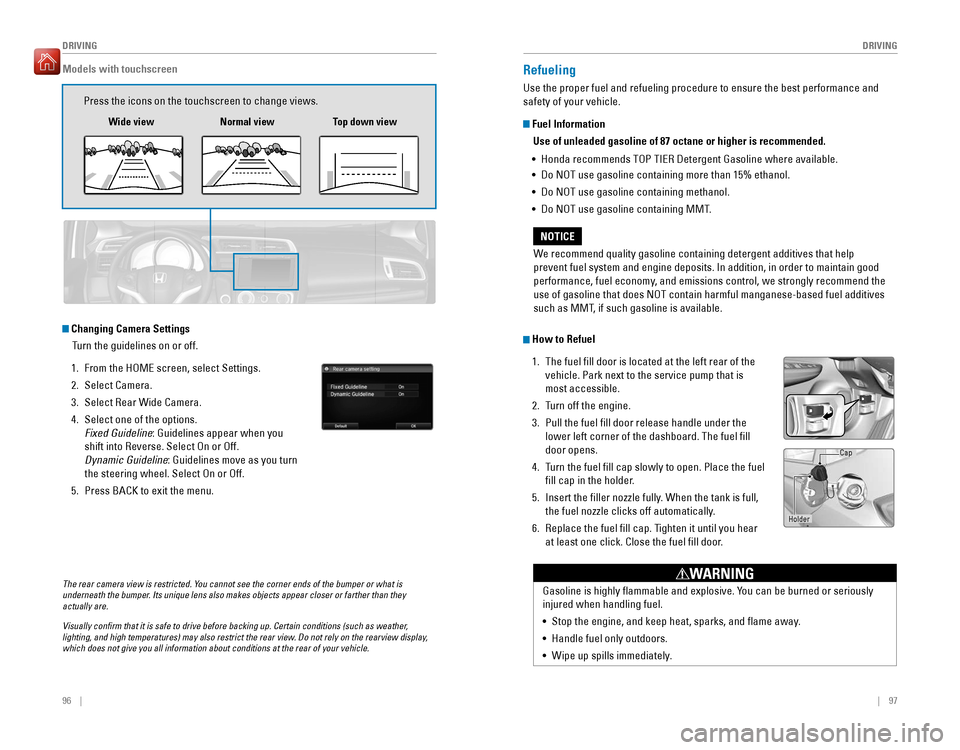
Changing Camera Settings
Turn the guidelines on or off.
1. From the HOME screen, select Settings.
2. Select Camera.
3. Select Rear Wide Camera.
4. Select one of the options. Fixed Guideline : Guidelines appear when you
shift into Reverse. Select On or Off.
Dynamic Guideline : Guidelines move as you turn
the steering wheel. Select On or Off.
5. Press BACK to exit the menu.
Models with touchscreen
Press the icons on the touchscreen to change views.
Wide view Normal view Top down view
Refueling
Use the proper fuel and refueling procedure to ensure the best performance and safety of your vehicle.
Fuel Information
Use of unleaded gasoline of 87 octane or higher is recommended.
• Honda recommends TOP TIER Detergent Gasoline where available.
• Do NOT use gasoline containing more than 15% ethanol.
• Do NOT use gasoline containing methanol.
• Do NOT use gasoline containing MMT.
How to Refuel
1. The fuel ll door is located at the left rear of the vehicle. Park next to the service pump that is most accessible.
2. Turn off the engine.
3. Pull the fuel ll door release handle under the lower left corner of the dashboard. The fuel ill door opens.
4. Turn the fuel ll cap slowly to open. Place the fuel
ll cap in the holder.
5. Insert the iller nozzle fully. When the tank is full,
the fuel nozzle clicks off automatically.
6. Replace the fuel ll cap. Tighten it until you hear at least one click. Close the fuel ll door.
We recommend quality gasoline containing detergent additives that help
prevent fuel system and engine deposits. In addition, in order to maintain good
performance, fuel economy, and emissions control, we strongly recommend the use of gasoline that does NOT contain harmful manganese-based fuel additives
such as MMT, if such gasoline is available.
NOTICE
Gasoline is highly lammable and explosive. You can be burned or seriously injured when handling fuel. •
Stop the engine, and keep heat, sparks, and ame away.
• Handle fuel only outdoors.
• Wipe up spills immediately.
WARNING
Holder Cap
Page 54 of 75

100 || 101
HANDLING THE UNEXPECTED
HANDLING THE UNEXPECTED
Overheating
If the high temperature indicator comes on, the engine suddenly loses power, or steam or spray comes out from under the hood, your engine is overheating. 1. Immediately park the vehicle in a safe place. Turn off all accessories and turn on the hazard warning lights.
2. If steam or spray is not present: Keep the engine
running and open the hood.
If steam or spray is present: Turn off the engine and
wait until it subsides. Then, open the hood.
3. Check that the cooling fan is operating and stop the engine once the high temperature indicator goes off. If the cooling fan is not operating, immediately stop the engine.
4. Once the engine has cooled down, inspect the coolant level and check the cooling system components for leaks. If the coolant level in the reserve tank
is low, add coolant until it reaches the MAX mark. If there is no coolant in the
reserve tank, make sure the radiator is cool, then cover the radiator cap with a
heavy cloth and open the cap. If necessary, add coolant up to the base of the iller neck, and put the cap back on.
Once the engine has cooled sufciently, restart it and check the high temperature
indicator. If the indicator is off, resume driving. If it stays on, contact a dealer for repairs.
Steam and spray from an overheated engine can seriously scald you. Do not open the hood if steam is coming out.
WARNING
Removing the radiator cap while the engine is hot can cause the coolant to spray out, seriously scalding you. Always let the engine and radiator cool down before removing the radiator cap.
WARNING
Continuing to drive with the temperature gauge needle at the H mark may damage the engine.
NOTICE
Emergency Engine Stop*
The ENGINE START/STOP button may be used to stop the engine due to an
emergency situation even while driving. If you must stop the engine, choose one of the following operations: • Press and hold the ENGINE START/STOP button for
two seconds, or
• Firmly press the ENGINE START/STOP button two
times.
The steering wheel will not lock. The power mode changes to ACCESSORY (or OFF
for manual transmission), unless the shift lever is in Park (P), in which case the
power mode changes to VEHICLE OFF. Because turning off the engine also disables the power assist the engine provides
to the steering and braking systems, it will require signiicantly more physical effort and time to steer and slow the vehicle. Downshift gears and use both feet on the
brake pedal, if necessary, to slow the vehicle and stop immediately in a safe place.
Do not press the button while driving unless it is absolutely necessary for the engine to be switched off.
Emergency Towing
Call a professional towing service if you need to tow your vehicle. Flat bed equipment: The operator loads your vehicle on the back of a truck. This is
the best way to transport your vehicle.
Wheel lift equipment: The tow truck uses two pivoting arms that go under the front tires and lift them off the ground. The rear tires remain on the ground. This is an
acceptable way to tow your vehicle.
Trying to lift or tow your vehicle by the bumpers will cause serious damage. The
bumpers are not designed to support the vehicle’s weight.
Improper towing such as towing behind a motorhome or other motor vehicle can damage the transmission.
NOTICE
*if equipped
Reserve tank MAX MIN