2016 HONDA FIT seats
[x] Cancel search: seatsPage 24 of 75

40 || 41
V
EHICLE CONTROLS
VEHICLE CONTROLS
Improperly positioning head restraints reduces their effectiveness and increases the likelihood of serious injury in a crash.
Make sure head restraints are in place and positioned properly before driving.
WARNING
Failure to reinstall, or correctly reinstall, the head restraints can result in severe injury during a crash. Always replace the head restraints before driving.
WARNING
Adjusting the Head Restraints
Your vehicle is equipped with head restraints in all seating positions. Head
restraints are most effective for protection against whiplash and other rear-impact crash injuries.
The center of the back of the occupant’s head should rest against the center of the restraint. The
tops of the occupant’s ears should be level with the center height of the restraint.
To raise the head restraint: Pull it upward.
To lower the head restraint: Push it down while
pressing the release button.
To remove the head restraint: Pull the restraint up as
far as it will go. Then push the release button, and pull the restraint up and out.
To reinstall a head restraint: Insert the legs back
in place, then adjust the head restraint to an appropriate height while pressing the release button. Pull up on the restraint to make sure it is locked in position. In order for the head restraint system to work properly:
• Do not hang any items on the head restraints, or from the restraint legs.
• Do not place any object between an occupant and the seat-back.
• Install each restraint in its proper location.
Rear outer seat shown
Rear Seats
Fold rear seats up or down to allow for additional storage space.
Folding Down Rear Seats
1. Store the center seat belt. Insert the latch plate into the slot on the side of the anchor buckle. Retract the seat belt into the holder on the ceiling (see page 8).
2. Lower the head restraint to its lowest position (see page 40).
3. Pull the release lever and fold down the seat-back.
Make sure all items in the cargo area or items extending to the rear seats are properly secured. Loose items can ly forward if you have to brake hard.
To return the seat to the original position, pull up the seat-back to the upright position.
Folding Up Rear Seats
1. Make sure the seat belt buckles are in their loops on the seat.
2. Pull up the rear seat cushion.
3. Fold the seat leg down while pushing the seat cushion irmly against the seat-back to lock it.
To return the seat to its original position, hold the seat cushion in the upright position, and pull up the
seat leg fully. Slowly put down the seat cushion and set the seat leg in the oor guide. A latch comes out
when the leg is set properly. Make sure the seat is irmly secured by rocking it forward and back.
Release lever
Loop
Seat leg
Seat leg Latch
Floor guide
Page 25 of 75

42 || 43
V
EHICLE CONTROLS
VEHICLE CONTROLS
Adjusting the Mirrors
Adjust the angle of the mirrors for the best visibility when you are sitting in the correct driving position.
Rearview Mirror with Day/Night Positions
Manually adjust the position to reduce headlight
glare from vehicles behind you. Flip the tab to switch between day and night positions.
Power Door Mirrors
Adjust the power door mirrors when the vehicle is on. L/R selector switch: Select the left or right mirror.
After adjusting the mirror, return the switch to the center position. Mirror position adjustment switch: Press the switch
left, right, up, or down to move the mirror.
Adjustment switch Selector switch
Adjusting the Rear Seats
Pull the release lever on the left or right side to
change the angle of the seat-back.
Release lever
Adjusting the Steering Wheel
The steering wheel height and distance from your body can be adjusted so that you can comfortably grip the steering wheel in an appropriate driving posture.
1. Pull up the steering wheel adjustment lever.
2. Move the steering wheel up or down, and in or out.
3. Push down the steering wheel adjustment lever to lock the steering wheel in position.
Adjusting the steering wheel position while driving may cause you to lose control of the vehicle and be seriously injured in a crash. Adjust the steering wheel only when the vehicle is stopped.
WARNING
To adjust To lock
Night position Ta b
DaypositionAir Conditioning System*
Manually control the front heating and cooling in your vehicle’s interior using the buttons and dials on the dashboard.
Fan control/ OFF dial
A/C button Temperature control dial
Fresh air/recirculation lever:
Recirculation mode (left side):
Recirculates air from the vehicle’s interior.
Fresh air mode (right side): Maintains
outside ventilation. Rear defogger/heated door mirror button*Mode control dial
*if equipped
Page 26 of 75

44 || 45
V
EHICLE CONTROLS
VEHICLE CONTROLS
Climate Control System*
The automatic climate control system can maintain your preferred interior temperature by selecting the proper mix of heated or cooled air and fan speed.
Touch the icons on the dashboard to control the system.
*if equipped
AUTO: Select to
maintain a set temperature. Use the temperature control to set the preferred temperature. ON/OFFA/C
Recirculation mode Rear defogger/heated door mirrors
Windshield defroster
Fan control
Mode control: Change airow location.Temperature control
Fresh air mode
Seat Heaters*
Quickly warm the front seats when the vehicle is on. Press the switch next to the parking brake to select the HI or LO setting. The indicator for the selected setting appears on the switch. In the HI setting, the seat heater cycles on and off.In the LO setting, the seat heater runs continuously and does not automatically turn off.
Heat-induced burns are possible when using seat heaters.
Persons with a diminished ability to sense temperature (e.g., persons with
diabetes, lower-limb nerve damage, or paralysis) or with sensitive skin should not use the seat heaters.
WARNING
Setting the Clock
Adjust the time using the steps described for your system type.
Using the Color Audio System*
Use this method for vehicles with color audio system. Use the selector knob to make and enter selections. 1.
Press and hold the MENU/CLOCK button.
2. Select the hour and adjust as necessary.
3. Select the minutes and adjust as necessary.
4. Select Set when complete.5. Press the Back button to exit the menu.
Using the Settings Menu*
Use this method for vehicles with touchscreen. Touch items to make selections.
1. From the HOME screen, select Settings.
2. Select System. 3. Select Clock/Info.
4. Select Clock Adjustment.
5. Adjust the hour and minute values.
6. Select OK when complete.
On vehicles with navigation, the time is automatically set using GPS signals.
*if equipped
VO L
HOME
MENU BA CK
Page 45 of 75
82 || 83
DRIVING
NAVIGATION
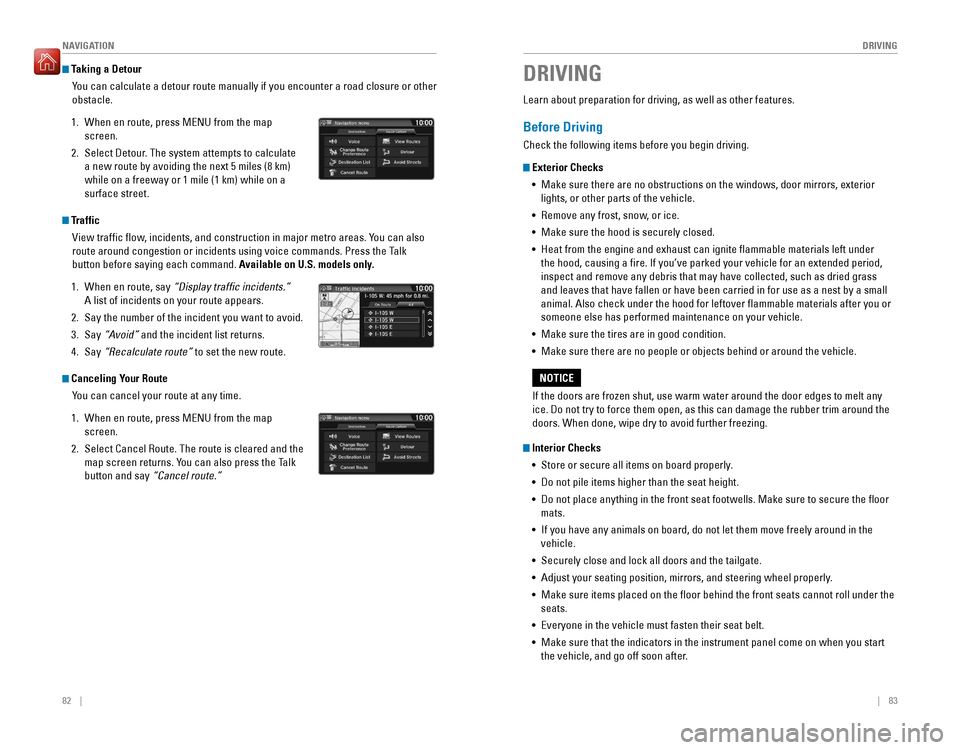
Taking a Detour
You can calculate a detour route manually if you encounter a road closure or other obstacle.
1. When en route, press MENU from the map screen.
2. Select Detour. The system attempts to calculate a new route by avoiding the next 5 miles (8 km) while on a freeway or 1 mile (1 km) while on a surface street.
Traffic
View trafc ow, incidents, and construction in major metro areas. You can also
route around congestion or incidents using voice commands. Press the Talk
button before saying each command. Available on U.S. models only.
1. When en route, say “Display trafic incidents.”
A list of incidents on your route appears.
2. Say the number of the incident you want to avoid.
3. Say “Avoid” and the incident list returns.
4. Say “Recalculate route” to set the new route.
Canceling Your Route
You can cancel your route at any time.
1. When en route, press MENU from the map screen.
2. Select Cancel Route. The route is cleared and the map screen returns. You can also press the Talk button and say “Cancel route.”
Learn about preparation for driving, as well as other features.
Before Driving
Check the following items before you begin driving.
Exterior Checks
•
Make sure there are no obstructions on the windows, door mirrors, exterior
lights, or other parts of the vehicle.
• Remove any frost, snow, or ice.
• Make sure the hood is securely closed.
• Heat from the engine and exhaust can ignite lammable materials left under
the hood, causing a ire. If you’ve parked your vehicle for an extended period,
inspect and remove any debris that may have collected, such as dried grass and leaves that have fallen or have been carried in for use as a nest by a small animal. Also check under the hood for leftover lammable materials after you or someone else has performed maintenance on your vehicle.
• Make sure the tires are in good condition.
• Make sure there are no people or objects behind or around the vehicle.
Interior Checks
• Store or secure all items on board properly.
• Do not pile items higher than the seat height.
• Do not place anything in the front seat footwells. Make sure to secure the loor mats.
• If you have any animals on board, do not let them move freely around in the
vehicle.
• Securely close and lock all doors and the tailgate.
• Adjust your seating position, mirrors, and steering wheel properly.
• Make sure items placed on the loor behind the front seats cannot roll under the
seats.
• Everyone in the vehicle must fasten their seat belt.
• Make sure that the indicators in the instrument panel come on when you start
the vehicle, and go off soon after.
DRIVING
If the doors are frozen shut, use warm water around the door edges to melt any ice. Do not try to force them open, as this can damage the rubber trim around the doors. When done, wipe dry to avoid further freezing.
NOTICE
Page 75 of 75

142 || 143
INDEX
INDEX
Emergency Towing ........................................ 101
Engine and Fuel .............................................. 130
Engine Coolant ................................................118
Engine Oil .........................................................116
ENGINE START/STOP button .........................88
Exterior lights .............................................. 27, 36
Fastening a Seat Belt ........................................ 7
Find Nearest Place .......................................... 80
Find Place Commands ...................................136
Flat Tire ........................................................... 104
Floor Mats ......................................................... 39
Fluids ........................................................... 131
FM/AM Radio .............................................. 51, 58
FM/AM Radio Commands .............................138
Fog lights ..................................................... 27, 36
Foot Brake ......................................................... 90
Frequently Asked Questions ........................132
Front Airbags (SRS) ........................................... 9
Front Door Inner Handle .................................31
Front Seats ........................................................ 38
Front Wipers ..................................................... 37
Fuel Information ............................................... 97
Fuse Locations................................................108 Hang-Up/Back button ..........................66, 69, 76
Hazards ............................................................. 27
HDMI Port ..........................................................47
HDMI Video ....................................................... 65
Headlight-Wiper Integration ..........................37
Head Restraints ................................................ 40
HFL Controls ................................................ 66, 69
High beams ....................................................... 27
High temperature ............................................. 25
Home Address .................................................. 79
HondaLink™ ...................................................... 57
HondaLink™ Assist .......................................... 73
Honda Roadside Assistance ........................134
Hood ........................................................... 115
Ignition ............................................................. 87
Immobilizer ........................................................ 27
Info Commands ...............................................140
Information Display ..........................................28
Instrument Panel .............................................. 24
Condition Indicators .................................... 26
Malfunction Indicators ................................24
On/Off Indicators .......................................... 27
Interior Lights ....................................................35
iPod ®
....................................................... 53, 61
iPod ®
Commands ........................................... 139
Jump Starting ................................................... 98
Key ............................................................. 29
LaneWatch™ .................................................... 94
Lap/Shoulder Seat Belts ...................................5
LATCH-Compatible Child Seat ........................18
Light Bulbs .......................................................130
Lights ............................................................. 35Lock Tab
............................................................. 31
Low fuel ............................................................. 26
Low oil pressure ............................................... 24
Low temperature .............................................. 25
Low tire pressure ............................................. 26
Maintenance...................................................112 Battery ......................................................... 120
Brake Fluid .................................................. 119
Engine Coolant ............................................ 118
Engine Oil ..................................................... 116
Maintenance Minder™ .......................26, 113
Safety Precautions .................................... 112
Service Codes ............................................. 114
Under the Hood .......................................... 115
Window Washer Fluid ...............................119
Wiper Blades .............................................. 121
Making a Call .............................................. 68, 72
Malfunction indicator lamp ............................25
Manual Transmission ...................................... 90
Map Display Commands ...............................135
Map Legend ...................................................... 81
Map Lights.........................................................35Master Door Lock Switch ...............................31
Maximum Load Limit........................................85Mirrors ............................................................. 42
Moonroof ........................................................... 34
Multi-View Rear Camera ................................95
Navigation ......................................................... 76
Detour ............................................................ 82
Display and Controls ....................................77
Entering a Destination .................................79
Find Nearest Place ...................................... 80
Home Address .............................................. 79
Map Legend .................................................. 81
Place Category ............................................. 80
Routing ........................................................... 81
Steering Wheel Controls .............................76
Street Address .............................................. 79
Talk Button Tips ............................................ 78
Trafc ............................................................. 82
Voice Prompt.................................................78
Navigation Commands ..................................135
One-Touch Turn Signal ....................................36
On-screen Commands...................................140Opening the Hood .......................................... 115
Overheating.....................................................100Paddle Shifters ................................................. 89
Pairing a Phone .......................................... 67, 71
Pandora® .......................................................... 64
Pandora® Commands ...................................139
Parking brake ..............................................26, 91
Passenger Airbag Off Indicator .....................12
Phone ....................................................... 67, 71
Phonebook .................................................. 68, 72
PHONE button ................................................... 66Phone Commands
.......................................... 140
Pick-Up button ............................................ 66, 69
Place Category ................................................. 80
Power Door Mirrors .........................................42
Power Mode ..................................................... 88
Power Moonroof .............................................. 34
Power Windows ............................................... 33
Radio ....................................................... 51, 58
Readiness Codes............................................129 Rear Camera ..................................................... 95
Rear Seats ......................................................... 41
Rearview Mirror ............................................... 42
Rear Wiper ........................................................ 37
Refueling............................................................97Remote Battery Strength ................................98
Remote Transmitter ......................................... 29
Reporting Safety Defects ................................23
Roadside Assistance .....................................134
Route Commands ........................................... 137
Routing ............................................................. 81
Safety Information ............................................. 3
Carbon Monoxide Gas ...................................4
Childproof Door Locks .................................31
Child Safety ................................................... 15
Reporting Safety Defects ............................23
Safety Label Locations ................................22
Safety Messages ........................................... 3
Seat Belts ............................................................ 5
Fastening a Seat Belt ....................................7
Lap/Shoulder Seat Belts ...............................5
Seat Belt Inspection ...................................... 6
Seat belt reminder ....................................... 26
Seat Belt with Detachable Anchor .............8
Shoulder Anchor ............................................ 7
Seat Heaters ..................................................... 44
Seats ............................................................. 38
Front Seats .................................................... 38
Rear Seats ..................................................... 41
Selector knob ....................................................66
Select/reset knob ............................................. 28
Service Codes.................................................114Settings ............................................................. 46
Setting the Clock .............................................. 45
Shifting ............................................................. 88
Shift Lever Does Not Move ............................99
Shoulder Anchor ................................................ 7
Side Airbags ......................................................10
Side Curtain Airbags ........................................10
Siri Eyes Free .................................................... 75
SiriusXM ®
Radio ............................................... 59
SiriusXM ®
Radio Commands ........................138
Smart Entry system .................................... 25, 30
SMS Text Messaging ...................................... 74
Song By Voice™ Commands ........................138
Sound ............................................................. 49Specications
................................................. 130
Speed Dial ................................................... 68, 73
Starter system .................................................. 25
Steering Wheel.................................................43Steering Wheel and Nearby Controls ............1
Steering Wheel Controls...........................48, 76
Street Address..................................................79Supplemental Restraint System (SRS) ...11, 24
Tailgate ....................................................... 30, 32
Talk button ............................................. 66, 69, 76
Talk Button Tips .......................................... 70, 78
Text Messaging ................................................ 74
Tire Information .............................................. 123
DOT Tire Quality Grading ..........................127
Inlation Guidelines .................................... 123
Tire and Loading Information Label ........124
Tire and Wheel Replacement ...................124
Tire Chains ................................................... 125
Tire Identiication Number (TIN) ..............126
Tire Labeling ................................................ 126
Tire Service Life .......................................... 125
Tire Terminology ......................................... 126
Wear Indicators ......................................... 123
Winter Tires ................................................. 125
Tire Pressure Monitoring System (TPMS) ....................................... 25, 102
Tires ........................................................... 130
Touchscreen Operation ..................................56
Towing ........................................................... 101
Trafc ............................................................. 82
Troubleshooting .............................................. 132
Turn Signal .................................................. 27, 36
Under the Hood .............................................. 115
USB Commands..............................................139USB Flash Drive ..........................................54, 62
USB Port ............................................................ 47
Vehicle ........................................................... 130
Vehicle Controls ............................................... 29
Vehicle Stability Assist (VSA ®
) .......... 25, 27, 92
Visual Index .........................................................1
Voice Command Index ..................................135
Voice Prompt .................................................... 78
Warranty Coverages ..................................... 134
Washer uid level ............................................ 26
Wear Indicators ............................................. 123
Window Washer Fluid ...................................119
Windows............................................................33
Winter Tires ..................................................... 125
Wiper Blades .................................................. 121
Wiper Operation ............................................... 37