2016 HONDA CR-Z remote control
[x] Cancel search: remote controlPage 160 of 409

159
Features
This chapter describes how to operate technology features.
Audio System
About Your Audio System ................ 160
USB Ports ......................................... 161
HDMI
TM Port ..................................... 162
Audio System Theft Protection ......... 163
Audio Remote Controls .................... 164
Audio System Basic Operation Audio/Information Screen ................ 168
Adjusting the Sound ........................ 173
Display Setup ................................... 174
Playing AM/FM Radio ....................... 175
Playing a CD .................................... 178 Playing Internet Radio ...................... 184
Playing a USB Flash Drive ................. 186
Playing
Bluetooth ® Audio................. 189
Playing a Video Using the HDMITM.... 191
Smartphone Apps ............................ 193
Siri ® Eyes Free .................................. 194
Audio Error Messages ...................... 195
CD Player ......................................... 195
iPod/USB Flash Drive ........................ 196
Pandora ®......................................... 197 General Information on the Audio
System ............................................. 199
Recommended CDs ......................... 199
Compatible iPod, iP hone and USB Flash
Drives ............................................ 201
Customized Features Defaulting All the Settings ............... 212
Bluetooth ® HandsFreeLink®
Using HFL ........................................ 213
HFL Menus ...................................... 215
16 CR-Z-31SZT6500.book 159 ページ 2015年9月11日 金曜日 午前11時47分
Page 161 of 409

160
Features
Audio System
About Your Audio System
The audio system features AM/FM radio. It can also play audio CDs, WMA/MP3/AAC
files, USB flash drives, and iPod, iPhone, and Bluetooth® devices.
You can operate the audio system from the buttons and switches on the panel, or
the remote controls on the steering wheel.1About Your Audio System
Video CDs, DVDs, and 3-inch (8-cm) mini CDs are not
supported.
iPod, iPhone and iTunes are trademarks of Apple Inc.
State or local laws may pr ohibit the operation of
handheld electronic devi ces while operating a
vehicle.
Remote
Controls
iPod
USB Flash
Drive
HDMI
16 CR-Z-31SZT6500.book 160 ページ 2015年9月11日 金曜日 午前11時47分
Page 165 of 409
164
uuAudio System uAudio Remote Controls
Features
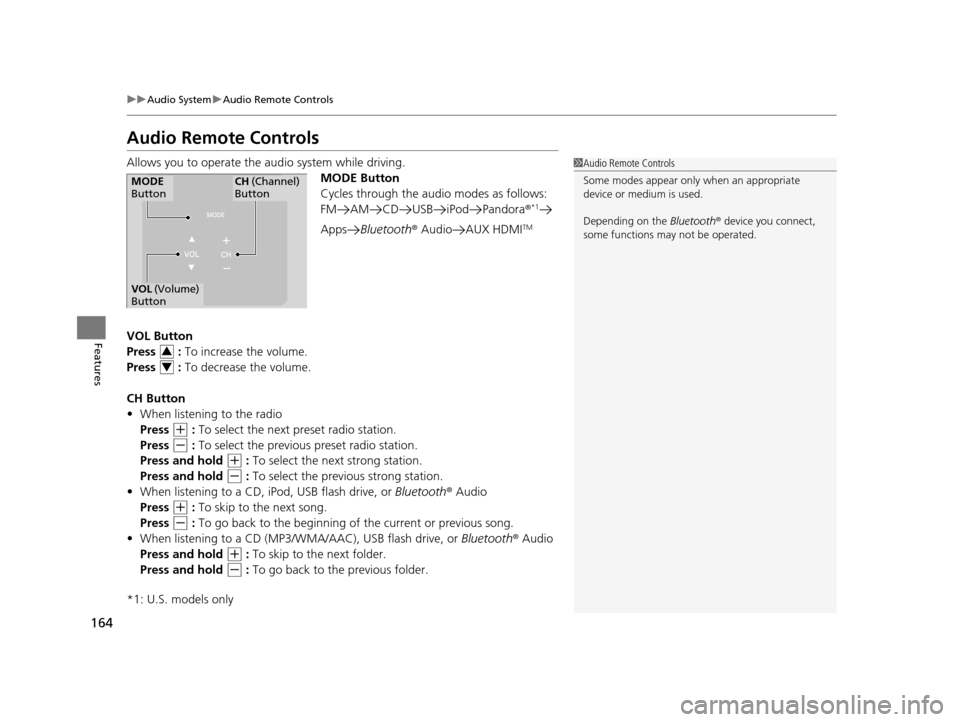
Audio Remote Controls
Allows you to operate the audio system while driving.
MODE Button
Cycles through the audio modes as follows:
FM AM CD USB iPod Pandora ®
*1
AppsBluetooth ® Audio AUX HDMITM
VOL Button
Press : To increase the volume.
Press : To decrease the volume.
CH Button
• When listening to the radio
Press
(+ : To select the next preset radio station.
Press
(- : To select the previous preset radio station.
Press and hold
(+ : To select the next strong station.
Press and hold
(- : To select the previous strong station.
• When listening to a CD, iPod, USB flash drive, or Bluetooth® Audio
Press
(+ : To skip to the next song.
Press
(- : To go back to the beginning of the current or previous song.
• When listening to a CD (MP3/W MA/AAC), USB flash drive, or Bluetooth® Audio
Press and hold
(+ : To skip to the next folder.
Press and hold
(- : To go back to the previous folder.
*1: U.S. models only
1 Audio Remote Controls
Some modes appear only when an appropriate
device or medium is used.
Depending on the Bluetooth® device you connect,
some functions ma y not be operated.
MODE
ButtonCH (Channel)
Button
VOL (Volume)
Button
3
4
16 CR-Z-31SZT6500.book 164 ページ 2015年9月11日 金曜日 午前11時47分
Page 166 of 409

165
uuAudio System uAudio Remote Controls
Features
• When listening to Pandora®
Press
(+ : To skip to the next song.
Press and hold
(+ : To select the next station.
Press and hold
(- : To select the previous station.
U.S. models
Compatible phones only
16 CR-Z-31SZT6500.book 165 ページ 2015年9月11日 金曜日 午前11時47分
Page 177 of 409

uuAudio System Basic Operation uPlaying AM/FM Radio
176
Features
To store a station:
1. Tune to the selected station.
2. Press the button.
3. Select Save Preset .
4. Select the preset number for the station you want to store.
You can also store a preset station by the following procedure.
1. Select the open/close icon to display a channel list.
2. Select the Preset tab.
3. Select and hold the preset nu mber for the station you want to store until you hear
a beep.
Lists the strongest stations on the selected band.
1. Press the button.
2. Select Station List .
3. Select the station.
■Manual update
Updates your available station list at any time.
1. Press the button.
2. Select Station List .
3. Select Refresh .
■Preset Memory
■Station List
1Playing AM/FM Radio
The ST indicator appears on the display indicating
stereo FM broadcasts.
Stereo reproduction in AM is not available.
Switching the Audio Mode
Press the SOURCE button on the steering wheel or
select SOURCE on the list.
2 Audio Remote Controls P. 164
You can also switch the mode by selecting Change
Source on the Audio menu screen.
You can store 6 AM stations and 12 FM stations into
the preset memory.
16 CR-Z-31SZT6500.book 176 ページ 2015年9月11日 金曜日 午前11時47分
Page 214 of 409

213Continued
Features
Bluetooth® HandsFreeLink ®
See the Navigation System Manual for how to operate the Bluetooth® HandsFreeLink® .
Bluetooth ® HandsFreeLink ® (HFL) allows you to place and receive phone calls using
your vehicle's audio system, without handling your cell phone.
Using HFL
(Pick-up) button: Press to go directly to the p hone screen, or to answer an
incoming call. (Hang-up/Back) button: Press to end a call, go back to the previous
command, or to cancel a command.
(Talk) button: Press to call a number with a st ored voice tag, a phonebook,
name, or a number.
■HFL Buttons
Models with navigation system
Models without navigation system
1 Using HFL
To use HFL, you need a Bluetooth-compatible cell
phone. For a list of compatible phones, pairing
procedures, and special feature capabilities:
•U.S.: Visit www.handsfreelink.honda.com , or call
1-888-528-7876.
•Canada: Visit www.handsfreelink.ca , or call 1-888-
528-7876.
To use HFL, the Bluetooth On/Off Status setting
must be in On.
2 Customized Features P. 202
Voice control tips
•Aim the vents away from the bottom part of the
audio/information screen and close the windows,
as noise coming from them may interfere with the
microphones.
•Press the button when you want to call a
number using a stored voice tag, a phonebook,
name or a number. Speak clearly and naturally
after the beep.
•If the microphones pick up vo ices other than yours,
the command may be misinterpreted.
•To change the volume level, use the audio system's
VOL (Volume) or use the remote audio controls on
the steering wheel.
State or local laws may pr ohibit the operation of
handheld electronic devi ces while operating a
vehicle.
Place your phone where y ou can get good reception.Microphones
(Pick-up) Button (Hang-up/Back) Button
Volume up
(Talk) Button
Volume down
(Menu) Button
(Home) Button
16 CR-Z-31SZT6500.book 213 ページ 2015年9月11日 金曜日 午前11時47分
Page 300 of 409

299
Maintenance
This chapter discusses basic maintenance.
Before Performing MaintenanceInspection and Maintenance ............ 300
Safety When Performing Maintenance .... 301Parts and Fluids Used in Maintenance Service ........................................... 302
Maintenance Minder
TM..................... 303
Maintenance Under the Hood
Maintenance Items Under the Hood ..... 307Opening the Hood ........................... 308
Recommended Engine Oil ................ 309
Oil Check ......................................... 310
Adding Engine Oil ............................ 311
Changing the Engine Oil and Oil Filter .. 312
Engine Coolant ................................ 314
Transmission Fluid ............................ 316
Brake/Clutch Fluid ............................ 318
Refilling Window Washer Fluid......... 319
Replacing Light Bulbs ....................... 320
Checking and Maintaining Wiper
Blades .......................................... 328
Checking and Maintaining Tires
Checking Tires ................................. 331
Tire and Loading Information Label .. 332
Tire Labeling .................................... 332
DOT Tire Quality Grading (U.S. Vehicles) .. 334Wear Indicators................................ 336 Tire Service Life ................................ 336
Tire and Wheel Replacement ........... 337
Tire Rotation .................................... 338
Winter Tires ..................................... 339
12-Volt Battery ................................. 340
Remote Transmitter Care
Replacing the Button Battery ........... 342
Climate Control System Maintenance ...... 343Cleaning
Interior Care .................................... 344
Exterior Care.................................... 346
16 CR-Z-31SZT6500.book 299 ページ 2015年9月11日 金曜日 午前11時47分
Page 400 of 409

Index
399
Index
Index
Numbers
12 Volt Battery Charging System Indicator ................................................... 72
3-Mode Drive System ............................... 270
ECON Mode Indicator ............................... 81
NORMAL Mode Indicator .......................... 81
SPORT Mode Indicator .............................. 81
7-Speed Manual Shift Mode ................... 258
A
ABS (Anti-lock Brake System) .................. 288
Accessories and Modifications ................ 297
Accessory Power Socket ........................... 149
Active Head Restraints ............................. 145
Additives
Coolant .................................................. 314
Engine Oil ............................................... 309
Washer ................................................... 319
Additives, Engine Oil ............................... 309
Adjusting
Clock ...................................................... 108
Headlights .............................................. 320
Mirrors.................................................... 139
Seats....................................................... 141
Steering Wheel ....................................... 138
Adjusting the Sound ................................ 173
Air Conditioning System (Climate Control System) .................................................... 155
Changing the Mode................................ 155 Defrosting the Windshield and
Windows ............................................... 156
Dust and Pollen Filter ............................... 343
Recirculation/Fresh Air Mode ................... 155
Sensors .................................................... 157
Using Automatic Climate Control ............ 155
Air Pressure ............................................... 331
Airbags ........................................................ 43
Advanced Airbags ..................................... 49
After a Collision ......................................... 57
Airbag Care ............................................... 57
Event Data Recorders ................................... 0
Front Airbags (SRS) .................................... 46
Indicator ........................................ 54, 74, 78
Passenger Airbag Off Indicator .................. 55
Sensors ...................................................... 49
Side Airbag Cutoff System ......................... 52
Side Airbag Off Indicator ........................... 52
Side Airbags .............................................. 50
Side Curtain Airbags .................................. 53
AM/FM Radio ............................................ 175
Anti-lock Brake System (ABS) .................. 288
Indicator .................................................... 74
ASST Indicator ............................................. 90
Audio Remote Controls ............................ 164
Audio System ............................................ 160
Adjusting the Sound ................................ 173
Error Messages ........................................ 195
General Information ................................ 199
HDMI
TM Port ............................................ 162
iPhone ..................................................... 201 iPod ........................................................ 181
MP3/WMA/AAC .............................. 178, 186
Reactivating ............................................ 163
Recommended CDs ................................. 199
Recommended Devices............................ 201
Security Code .......................................... 163
Theft Protection ...................................... 163
USB Flash Drives ...................................... 201
USB Ports ................................................ 161
Audio/Information Screen ....................... 168
Authorized Manuals ................................ 397
Auto Door Locking/Unlocking ................. 118
Customize ................................................. 98
Auto Idle Stop
Continuously Variable Transmission ......... 264
Manual Transmission ............................... 267
Auto Idle Stop Indicator ............................ 80
Automatic Lighting .................................. 131
Average Fuel Economy .............................. 96
Average Fuel Economy Records ................ 96
Average Speed ........................................... 93
B
Back-Up Light........................................... 325
Battery ...................................................... 340
Charging System Indicator................. 72, 373
Jump Starting .......................................... 366
Maintenance (Checking the 12 Volt Battery) ................................................. 340
16 CR-Z-31SZT6500.book 399 ページ 2015年9月11日 金曜日 午前11時47分