Page 100 of 409
99
uuGauges and Multi-Information Display uMulti-Information Display
Continued
Instrument Panel
■Customization flow
Press the button.
DEFAULT ALL
EXIT
ADJUST OUTSIDE TEMP. DISPLAY
TRIP A RESET with REFUEL
ELAPSED TIME RESET
DOOR UNLOCK MODE
KEYLESS ACCESS BEEP
LANGUAGE SELECTIONSEL/RESET
SEL/RESET
SEL/RESET
SEL/RESET
METER SETUP
KEYLESS ACCESS
SETUP
CHG SETTING
CUSTOMIZE SETTINGS
HOLD ECON MODE
METER COLOR CHANGE
DISPLAY KM/MILES
4
3
4
3
4
3
4
3
4
3
4
3
TPMS CALIBRATION
4
3
KEYLESS ACCESS LIGHT FLASH
4
34
3
16 CR-Z-31SZT6500.book 99 ページ 2015年9月11日 金曜日 午前11時47分
Page 101 of 409
100
uuGauges and Multi-Information Display uMulti-Information Display
Instrument Panel
DOOR SETUP
INTERIOR LIGHT DIMMING TIME
AUTO LIGHT SENSITIVITY*
AUTO DOOR UNLOCK
DOOR LOCK MODE
KEYLESS LOCK ACKNOWLEDGMENT
SECURITY RELOCK TIMER
AUTO DOOR LOCK
SEL/RESET
SEL/RESET
LIGHTING SETUP
EXIT
4
3
4
3
4
3
4
3
SEL/RESET
* Not available on all models
16 CR-Z-31SZT6500.book 100 ページ 2015年9月11日 金曜日 午前11時47分
Page 102 of 409
101
uuGauges and Multi-Information Display uMulti-Information Display
Continued
Instrument Panel
■List of customizable options
*1: Default Setting Setup Group Customizable Features
Description Selectable settings
TPMS
CalibrationCalibrates the TPMS.CANCEL, CALIBRATE
Meter Setup
Language SelectionChanges the displayed language.English*1, French , Spanish
Adjust Outside Temp.
DisplayAdjusts the temperature r eading by a few degrees.-5°F ~ ±0°F*1 ~ +5°F
-3°C ~ ±0°C*1 ~ +3°C
Trip A Reset with RefuelSets Trip A and the average fuel economy to reset
when you refuel.ON , OFF*1
Elapsed Time ResetChanges the resetting conditions of the elapsed
time.IGN OFF*1, Trip A , Trip B
Hold ECON ModeMaintains ECON mode.ON , OFF*1
Meter Color ChangeTurns the ambient meter feature on and off.ON*1, OFF
Display Km/MilesChanges the displayed m easurement on the multi-
information display.AUTO*1, KM , MILES
16 CR-Z-31SZT6500.book 101 ページ 2015年9月11日 金曜日 午前11時47分
Page 105 of 409
104
uuGauges and Multi-Information Display uMulti-Information Display
Instrument Panel
■Example of customizing settings
The steps for changing TRIP A RESET with REFUEL setting to ON are shown below.
The default setting for TRIP A RESET with REFUEL is OFF.
1. Press the button until CUSTOMIZE
SETTINGS appears on the display, then
press the SEL/RESET button.
2. Press the SEL/RESET button.
3. Press the SEL/RESET button again.
16 CR-Z-31SZT6500.book 104 ページ 2015年9月11日 金曜日 午前11時47分
Page 106 of 409
105
uuGauges and Multi-Information Display uMulti-Information Display
Instrument Panel
4. Press the button until TRIP A
RESET with REFUEL appears on the
display, then press the SEL/RESET button.
5. Press the button and select ON,
then press the SEL/RESET button.
6. Press the button until EXIT
appears in the display, then press the SEL/
RESET button.
7. Repeat step 6 until you return to the normal
screen.
16 CR-Z-31SZT6500.book 105 ページ 2015年9月11日 金曜日 午前11時47分
Page 165 of 409
164
uuAudio System uAudio Remote Controls
Features
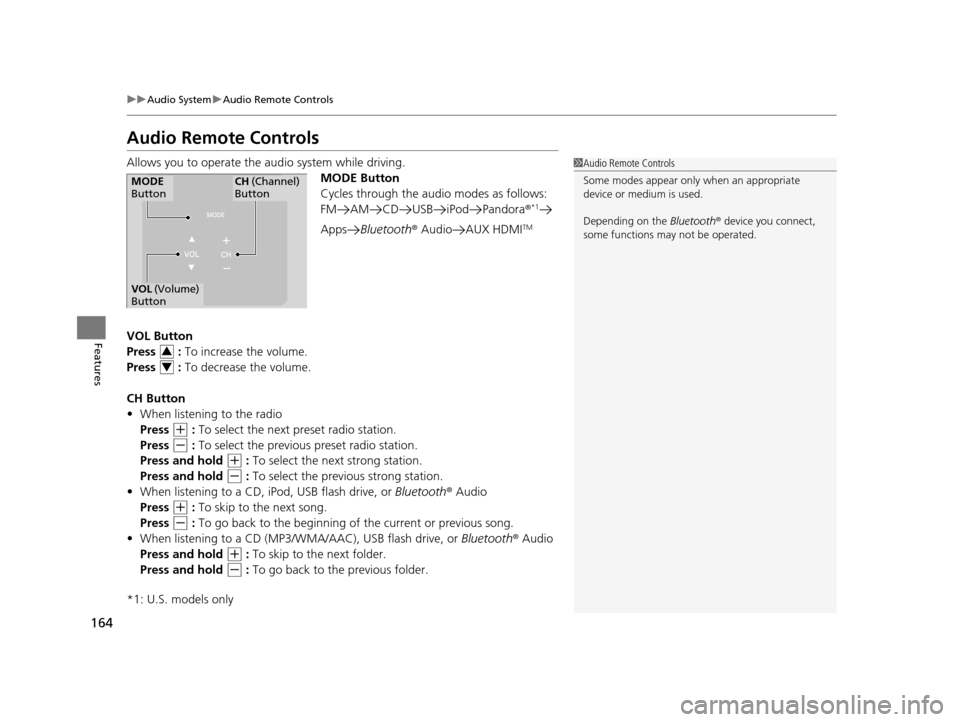
Audio Remote Controls
Allows you to operate the audio system while driving.
MODE Button
Cycles through the audio modes as follows:
FM AM CD USB iPod Pandora ®
*1
AppsBluetooth ® Audio AUX HDMITM
VOL Button
Press : To increase the volume.
Press : To decrease the volume.
CH Button
• When listening to the radio
Press
(+ : To select the next preset radio station.
Press
(- : To select the previous preset radio station.
Press and hold
(+ : To select the next strong station.
Press and hold
(- : To select the previous strong station.
• When listening to a CD, iPod, USB flash drive, or Bluetooth® Audio
Press
(+ : To skip to the next song.
Press
(- : To go back to the beginning of the current or previous song.
• When listening to a CD (MP3/W MA/AAC), USB flash drive, or Bluetooth® Audio
Press and hold
(+ : To skip to the next folder.
Press and hold
(- : To go back to the previous folder.
*1: U.S. models only
1 Audio Remote Controls
Some modes appear only when an appropriate
device or medium is used.
Depending on the Bluetooth® device you connect,
some functions ma y not be operated.
MODE
ButtonCH (Channel)
Button
VOL (Volume)
Button
3
4
16 CR-Z-31SZT6500.book 164 ページ 2015年9月11日 金曜日 午前11時47分
Page 167 of 409

166
Features
Audio System Basic Operation
To use the audio system function, the power mode must be in ACCESSORY or ON.
(Home) button: Press to go to the home
screen.
2 Switching the Display P. 168
(Menu) button: Press to select any
mode.
The available mode includes Change Source,
Station List , Save Preset , View Radio Text ,
Music Search, Sound, and play modes. Play
modes can be also selected from Scan,
Random/Repeat , and so on.
(Back) button: Press to go back to the
previous display when it is displayed.
button: Press to change the audio/
information screen brightness.
Press once and select
(- or (+ to make
an adjustment. u Each time you press , the mode
switches between the daytime mode,
nighttime mode and OFF mode.
1Audio System Basic Operation
Audio Menu Items
2 Station List P. 177
2 Music Search P. 179, 182, 187, 190
2 Random/Repeat P. 180, 188
2 Scan P. 177, 180, 188
Button
(Home) Button
(Menu) Button
(Back) Button
16 CR-Z-31SZT6500.book 166 ページ 2015年9月11日 金曜日 午前11時47分
Page 176 of 409
175
uuAudio System Basic Operation uPlaying AM/FM Radio
Continued
Features
Playing AM/FM Radio
*1:Some or all of the lists may not be displayed.
VOL (Volume) Buttons
Press to adjust the volume.
(Back) Button
Press to go back to the previous
display.
Seek Icons
Select or to search up
and down the selected band for a
station with a strong signal.
(Power) Button
Press to turn the audio system
on and off.
Open/Close Icon*1
Displays/hides the detailed
information.
(Menu) Button
Press to display the menu items.
Tune Icons
Select or to tune the radio
frequency.
Audio/Information Screen
Scan
Select to scan each station with
a strong signal. Preset Icons
Tune the radio frequency for preset
memory.
Select and hold the preset icon to
store that station.
Select to display preset 7
onwards.
16 CR-Z-31SZT6500.book 175 ページ 2015年9月11日 金曜日 午前11時47分


