2016 HONDA CR-Z clock
[x] Cancel search: clockPage 204 of 409

203
uuCustomized Features u
Continued
Features
■Customization Flow
Press the button.
Select Settings .
HomeHome Screen Edit Order
Background Color
DisplayDisplay Settings
Beep Volume
Sound/BeepVolume
Volume
Voice RecogVoice Prompt
Automatic Phone Sync
Phonebook Phonetic Modification
Default
Factory Data Reset
Clock Format
ClockClock/Wallpaper TypeClock
Wallpaper
Clock Adjustment
Clock Display
Clock Location
Clock Reset
Keyboard Layout
OthersLanguage
Remember Last Screen
Voice Command Tips
System
16 CR-Z-31SZT6500.book 203 ページ 2015年9月11日 金曜日 午前11時47分
Page 205 of 409
![HONDA CR-Z 2016 1.G Owners Manual 204
uuCustomized Features u
Features
*1:May change depending on your currently selected source.
Sound
Color
Tint
Audio
Audio Source Pop-Up
[Your selected media] Cover Art*1
Color
Display Adjustment*1](/manual-img/13/5820/w960_5820-204.png "HONDA CR-Z 2016 1.G Owners Manual 204
uuCustomized Features u
Features
*1:May change depending on your currently selected source.
Sound
Color
Tint
Audio
Audio Source Pop-Up
[Your selected media] Cover Art*1
Color
Display Adjustment*1")
204
uuCustomized Features u
Features
*1:May change depending on your currently selected source.
Sound
Color
Tint
Audio
Audio Source Pop-Up
[Your selected media] Cover Art*1
Color
Display Adjustment*1DisplayBrightness
Contrast
Black Level
Aspect Ratio Adjustment*1
Bluetooth Device List*1
Change Bluetooth Audio Device*1
Default
RDS INFO*1
Clock Format
ClockClock/Wallpaper TypeClock
Wallpaper
Clock Adjustment
Clock Display
Clock Location
Clock Reset
Default
InfoInfo Screen Preference
Clock/Info
16 CR-Z-31SZT6500.book 204 ページ 2015年9月11日 金曜日 午前11時47分
Page 208 of 409

207
uuCustomized Features u
Continued
Features
*1:Default Setting
Setup
GroupCustomizable FeaturesDescriptionSelectable Settings
System
Clock
Clock/
Wallpaper
Type
ClockChanges the clock display type.Analog /Digital*1/ Small
Digital /Off
Wallpaper
●Changes the wallpaper type.●Imports an image file for a new wallpaper.●Deletes an image file for a wallpaper.
2 Wallpaper Setup P. 171
Blank/Galaxy*1/Metallic
Clock AdjustmentAdjusts Clock.
2 Clock P. 108—
Clock FormatSelects the digital clock display from 12H to
24H.12H*1/24H
Clock DisplaySelects whether the clock display comes on.On*1/ Off
Clock LocationChanges the clock display layout.Upper Right*1/Upper Left /
Lower Right/ Lower Left/Off
Clock ResetCancels/Resets all customized items for clock
display as default.Yes /No
Others
LanguageChanges the display language.English*1/Français /Español
Keyboard LayoutSelects the on-screen keyboard type.Alphabet/ QWERTY*1
Voice Command Tips
Alerts you when manual control of the system
is disabled to prevent distraction while driving.
Only voice commands are available.
On*1/Off
Remember Last ScreenSelects whether the device remembers the last
screen.On /Off*1
Factory Data ResetResets all the settings to their factory default.
2 Defaulting All the Settings P. 212Yes/No
16 CR-Z-31SZT6500.book 207 ページ 2015年9月11日 金曜日 午前11時47分
Page 210 of 409

209
uuCustomized Features u
Continued
Features
*1:Default Setting
Setup
GroupCustomizable FeaturesDescriptionSelectable Settings
Audio Aspect Ratio Adjustment
Changes the aspect ratio and zoom settings of
the audio/information screen.
Normal/Full
*1/Zoom
Bluetooth Device List Pairs a new phone to HFL, edits or deletes a
paired phone.
2
Phone Setup P. 220
—
Change Bluetooth Audio Device Connects, disconnects or pairs a
Bluetooth®
Audio device to HFL. —
Default Cancels/Resets all customized items in the
Audio
group as default. Yes
/No
Clock/Info
Clock
Clock/
Wallpaper
TypeClock
2 System P. 206
Wallpaper
Clock Adjustment
Clock Format
Clock Display
Clock Location
Clock Reset
InfoInfo Screen PreferenceChanges the information screen type.Info Top /Info Menu/ Off*1
DefaultCancels/Resets all customized items in the
Clock/Info group as default.Yes/No
HDMITM mode
iPod, Pandora ® or Bluetooth® Audio mode
iPod, Pandora ® or Bluetooth® Audio mode
16 CR-Z-31SZT6500.book 209 ページ 2015年9月11日 金曜日 午前11時47分
Page 316 of 409
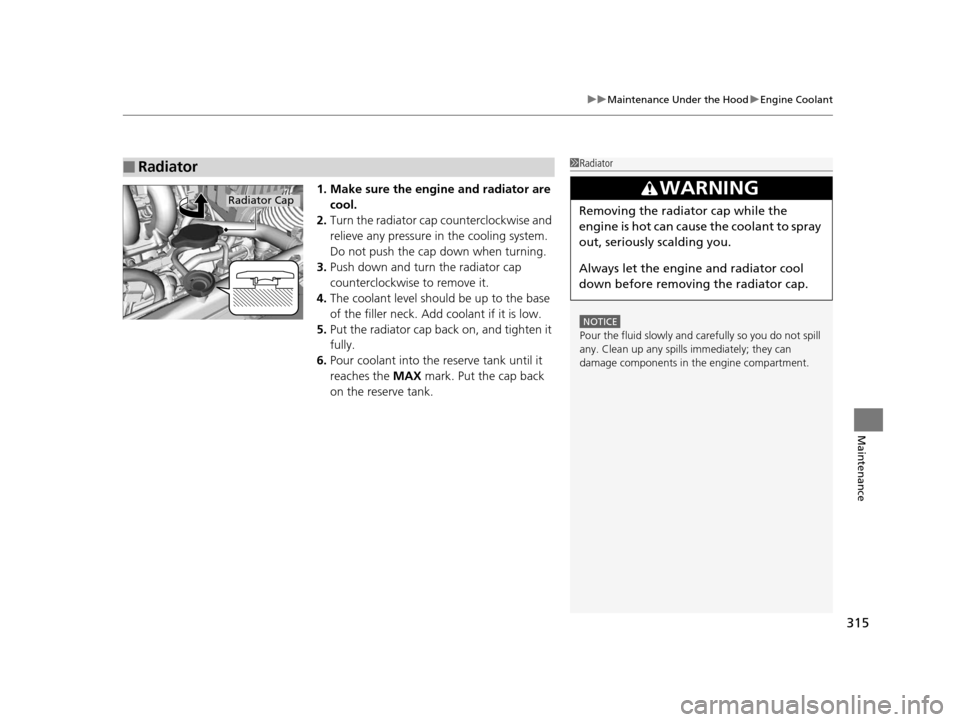
315
uuMaintenance Under the Hood uEngine Coolant
Maintenance
1. Make sure the engine and radiator are
cool.
2. Turn the radiator cap counterclockwise and
relieve any pressure in the cooling system.
Do not push the cap down when turning.
3. Push down and turn the radiator cap
counterclockwise to remove it.
4. The coolant level should be up to the base
of the filler neck. Add coolant if it is low.
5. Put the radiator cap back on, and tighten it
fully.
6. Pour coolant into the reserve tank until it
reaches the MAX mark. Put the cap back
on the reserve tank.
■Radiator1 Radiator
NOTICE
Pour the fluid slowly and ca refully so you do not spill
any. Clean up any spills immediately; they can
damage components in the engine compartment.
3WARNING
Removing the radiator cap while the
engine is hot can cause the coolant to spray
out, seriously scalding you.
Always let the engine and radiator cool
down before removing the radiator cap.Radiator Cap
16 CR-Z-31SZT6500.book 315 ページ 2015年9月11日 金曜日 午前11時47分
Page 341 of 409

340
Maintenance
12-Volt Battery
Checking the 12-Volt Battery
Check the battery condition monthly. Look at
the test indicator window and check the
terminals for corrosion.
If your vehicle's battery is disconnected or goes dead:
• The audio system is disabled.
2 Reactivating the audio system P. 163
•The clock resets.
2 Clock P. 108
•The navigation system* is disabled. A PIN code will be required.
2 Refer to the navigation system manual
112-Volt Battery
WARNING: Battery post, terminals,
and related accessories contain lead
and lead compounds.
Wash your hands after handling.
The test indicator's color information is on the
battery.
3WARNING
The battery gives off explosive hydrogen
gas during normal operation.
A spark or flame can cause the battery to
explode with enough force to kill or
seriously hurt you.
When conducting any battery
maintenance, wear prot ective clothing and
a face shield, or have a skilled technician do
it.
Test Indicator Window
* Not available on all models
16 CR-Z-31SZT6500.book 340 ページ 2015年9月11日 金曜日 午前11時47分
Page 362 of 409

361
uuIf a Tire Goes Flat uTemporarily Repairing a Flat Tire
Handling the Unexpected
1. Place the jack under the jacking point
closest to the tire to be changed.
2. Turn the end bracket (as shown in the
image) clockwise until the top of the jack
contacts the jacking point.
u Make sure that the jacking point tab is
resting in the jack notch.
3. Raise the vehicle, using the jack handle bar
and the jack handle, until the tire is off the
ground.
■How to Set Up the Jack1How to Set Up the Jack
Do not use the jack with people or luggage in the
vehicle.
Use the jack provided in your vehicle.
Other jacks may not support the weight (“load”) or
their shape may not match.
The following instructions must be followed to use
the jack safely.
•Do not use while the engine is running.
•Use only where the ground is firm and level.
•Use only at the jacking points.•Do not get in the vehicl e while using the jack.
•Do not put anything on top of or underneath the
jack.
3WARNING
The vehicle can easily roll off the jack,
seriously injuring anyone underneath.
Follow the directions for changing a tire
exactly, and never get under the vehicle
when it is supported only by the jack.
Jack
Handle
Bar Wheel Nut
Wrench as Jack Handle
16 CR-Z-31SZT6500.book 361 ページ 2015年9月11日 金曜日 午前11時47分
Page 400 of 409

Index
399
Index
Index
Numbers
12 Volt Battery Charging System Indicator ................................................... 72
3-Mode Drive System ............................... 270
ECON Mode Indicator ............................... 81
NORMAL Mode Indicator .......................... 81
SPORT Mode Indicator .............................. 81
7-Speed Manual Shift Mode ................... 258
A
ABS (Anti-lock Brake System) .................. 288
Accessories and Modifications ................ 297
Accessory Power Socket ........................... 149
Active Head Restraints ............................. 145
Additives
Coolant .................................................. 314
Engine Oil ............................................... 309
Washer ................................................... 319
Additives, Engine Oil ............................... 309
Adjusting
Clock ...................................................... 108
Headlights .............................................. 320
Mirrors.................................................... 139
Seats....................................................... 141
Steering Wheel ....................................... 138
Adjusting the Sound ................................ 173
Air Conditioning System (Climate Control System) .................................................... 155
Changing the Mode................................ 155 Defrosting the Windshield and
Windows ............................................... 156
Dust and Pollen Filter ............................... 343
Recirculation/Fresh Air Mode ................... 155
Sensors .................................................... 157
Using Automatic Climate Control ............ 155
Air Pressure ............................................... 331
Airbags ........................................................ 43
Advanced Airbags ..................................... 49
After a Collision ......................................... 57
Airbag Care ............................................... 57
Event Data Recorders ................................... 0
Front Airbags (SRS) .................................... 46
Indicator ........................................ 54, 74, 78
Passenger Airbag Off Indicator .................. 55
Sensors ...................................................... 49
Side Airbag Cutoff System ......................... 52
Side Airbag Off Indicator ........................... 52
Side Airbags .............................................. 50
Side Curtain Airbags .................................. 53
AM/FM Radio ............................................ 175
Anti-lock Brake System (ABS) .................. 288
Indicator .................................................... 74
ASST Indicator ............................................. 90
Audio Remote Controls ............................ 164
Audio System ............................................ 160
Adjusting the Sound ................................ 173
Error Messages ........................................ 195
General Information ................................ 199
HDMI
TM Port ............................................ 162
iPhone ..................................................... 201 iPod ........................................................ 181
MP3/WMA/AAC .............................. 178, 186
Reactivating ............................................ 163
Recommended CDs ................................. 199
Recommended Devices............................ 201
Security Code .......................................... 163
Theft Protection ...................................... 163
USB Flash Drives ...................................... 201
USB Ports ................................................ 161
Audio/Information Screen ....................... 168
Authorized Manuals ................................ 397
Auto Door Locking/Unlocking ................. 118
Customize ................................................. 98
Auto Idle Stop
Continuously Variable Transmission ......... 264
Manual Transmission ............................... 267
Auto Idle Stop Indicator ............................ 80
Automatic Lighting .................................. 131
Average Fuel Economy .............................. 96
Average Fuel Economy Records ................ 96
Average Speed ........................................... 93
B
Back-Up Light........................................... 325
Battery ...................................................... 340
Charging System Indicator................. 72, 373
Jump Starting .......................................... 366
Maintenance (Checking the 12 Volt Battery) ................................................. 340
16 CR-Z-31SZT6500.book 399 ページ 2015年9月11日 金曜日 午前11時47分