Page 190 of 532
Continued189
uuInterior Lights/Interior Convenience Items uInterior Convenience Items
Controls
The accessory power so ckets can be used when the i gnition switch is in ACCESSORY
(q or ON (w*1.
■Accessory power socket on the console
panel
Open the cover to use it.
*1: Models with the smart entry system have an ENGINE START/STOP button
instead of an ignition switch.
■Accessory Power Sockets1 Accessory Power Sockets
NOTICE
Do not insert an automotive type cigarette lighter
element.
This can overheat the power socket.
The accessory power socket is designed to supply
power for 12 volt DC access ories that are rated 180
watts or less (15 amps).
To prevent battery drain, only use the power socket
with the engine running.
15 CR-V-31T0A6300.book 189 ページ 2015年2月2日 月曜日 午前10時35分
Page 211 of 532
210
uuAudio System uAudio System Theft Protection
Features
Audio System Theft Protection
The audio system is disabled when it is di sconnected from the power source, such as
when the battery is disconnected or goes dead. In certain conditions, the system
may display ENTER CODE
*1/Enter Code*2.
■Reactivating the audio system
1. Turn the ignition switch to ON
(w*3.
2. Turn on the audio system.
3. Press and hold the audio system power button for more than two seconds.
u The audio system is reac tivated when the audio co ntrol unit establishes a
connection with the vehicle control unit. If the control unit fails to recognize
the audio unit, you must go to a dealer and have the audio unit checked.
*1: Models with one display
*2: Models with two displays
*3: Models with the smart entry system have an ENGINE START/STOP button
instead of an ignition switch.
15 CR-V-31T0A6300.book 210 ページ 2015年2月2日 月曜日 午前10時35分
Page 214 of 532

213
Features
Audio System Basic Operation
To use the audio system, the ignition switch must be in ACCESSORY (q or ON (w.
Use the selector knob or SETUP button to
access some audio functions.
Press to switch between the normal and
extended display fo r some functions.
Selector knob: Rotate left or right to scroll
through the available ch oices. Press to set
your selection.
SETUP button: Press to select any mode such
as the Auto Select , RDS Information ,
Sound Settings , Play Mode , Resume/
Pause , or Adjust Clock .
button: Press to go back to the
previous display.
Models with one display1 Audio System Basic Operation
These indications are used to show how to operate
the selector knob.
Rotate to select.
Press to enter.
Press the SOURCE ,
(+, ( -, or button on the
steering wheel to cha nge any audio setting.
2 Audio Remote Controls P. 211
Setup menu items 2 Auto Select P. 216
2 RDS information P. 217
2 Sound Settings P. 214
2 Play Mode P. 220
2 Resume/Pause P. 230
2 Adjust Clock P. 128
Button
Selector
Knob
SETUP
Button
Menu Display
15 CR-V-31T0A6300.book 213 ページ 2015年2月2日 月曜日 午前10時35分
Page 287 of 532
286
uuBluetooth ® HandsFreeLink ®u HFL Menus
Features
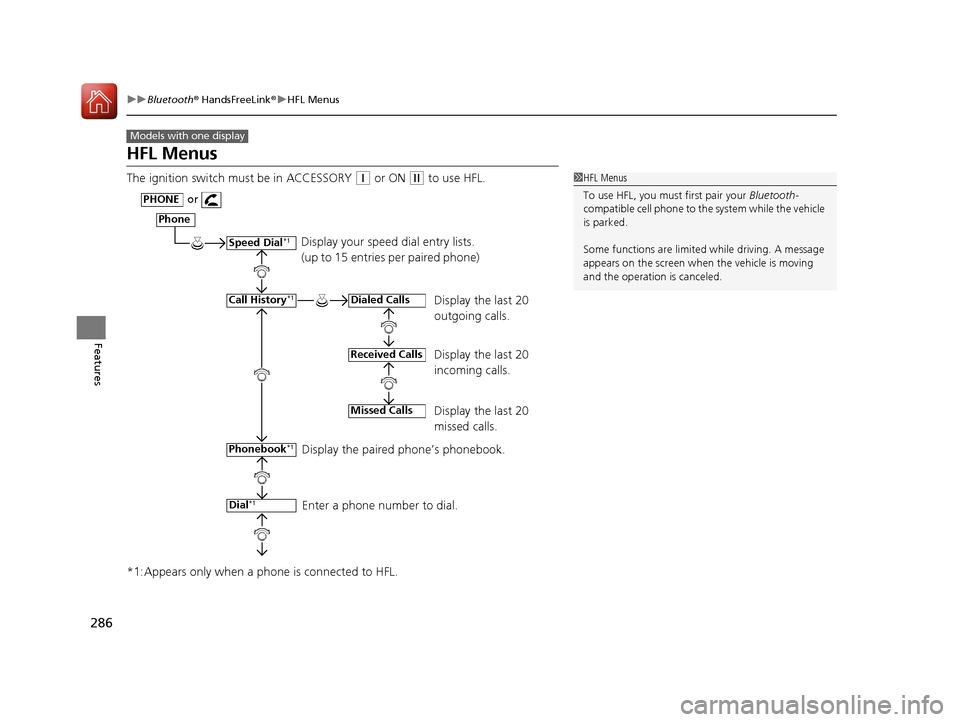
HFL Menus
The ignition switch must be in ACCESSORY (q or ON (w to use HFL.
*1:Appears only when a ph one is connected to HFL.
Models with one display
1HFL Menus
To use HFL, you must first pair your Bluetooth-
compatible cell phone to th e system while the vehicle
is parked.
Some functions are limited while driving. A message
appears on the screen when the vehicle is moving
and the operation is canceled.
Display your speed dial entry lists.
(up to 15 entries per paired phone)
Display the last 20
outgoing calls.
Display the last 20
incoming calls.
Display the last 20
missed calls.
Display the paired phone’s phonebook.
Enter a phone number to dial.
Phone
Speed Dial*1
Call History*1
PHONEor
Phonebook
*1
Dial*1
Dialed Calls
Received Calls
Missed Calls
15 CR-V-31T0A6300.book 286 ページ 2015年2月2日 月曜日 午前10時35分
Page 343 of 532

342
Features
Compass
When you turn the ignition switch to ON (w*1, the compass self-calibrates, and the
compass display appears.
Compass Calibration
If the compass indicates the wrong direction, or the CAL indicator blinks, you need
to manually calibrate the system.
1.Turn the ignition switch to ON
(w.
2. Press and hold the SETUP button until the
display shows the compass setting menu.
3. Rotate to select Calibration, then press
.
4. When the display changes to Calibration
Start, press .
5. Drive the vehicle slowly in two circles.
u The compass starts to show a direction
after the calibration. The CAL indicator
goes off.
*1: Models with the smart entry system have an ENGINE START/STOP button
instead of an ignition switch.
1 Compass
Compass operation can be affected under the
following conditions:
•Driving near power lines or stations•Crossing a bridge
•Passing a large vehicle, or driving near a large
object that can cause a magnetic disturbance
•When accessories such as antennas and roof racks
are mounted by magnetsModels with one display
Compass Setting Menu Items
1 Compass Calibration
Calibrate the compass in an open area.
While setting the compass:
•The button returns to the previous screen.•The SETUP button cancels the setting mode.
Models with one display
15 CR-V-31T0A6300.book 342 ページ 2015年2月2日 月曜日 午前10時35分
Page 345 of 532
344
uuCompass uCompass Zone Selection
Features
Compass Zone Selection
1. Turn the ignition switch to ON (w.
2. Press and hold the SETUP button until the
display shows the compass setting menu.
3. Rotate to select Zone, then press .
The display shows the current zone
number.
4. Rotate to select the zone number of
your area (See Zone Map), then press .
1. Press the button.
2. Select Settings .
3. Select System .
4. Select Compass .
5. Select Zone.
6. Select the zone number of your area (See
Zone Map), then select OK .
Models with one display
Zone Number
Models with two displays
Zone Number
1Compass Zone Selection
The zone selection is done to compensate the
variation between magneti c north and true north.
If the calibration starts while the audio system is in
use, the display returns to normal after the calibration
is completed.
15 CR-V-31T0A6300.book 344 ページ 2015年2月2日 月曜日 午前10時35分
Page 361 of 532

360
Driving
When Driving
Starting the Engine
1.Make sure the parking brake is applied.
2. Check that the shift lever is in
(P, then
depress the brake pedal.
u Although it is possibl e to start the vehicle
in
(N, it is safer to start it in (P.
3. Turn the ignition switch to START
(e
without depressing the accelerator pedal.
Models without smart entry system
1 Starting the Engine
Keep your foot firmly on the brake pedal when
starting the engine.
The engine is harder to st art in cold weather and in
thinner air found at altitudes above 8,000 feet (2,400
meters).
When starting the engine in cold weather, turn off all
electrical accessories such as the lights, heating and
cooling system
*/climate control system*, and rear
defogger in order to reduce battery drain.
If you live in a region where winter is extremely cold,
an engine block heater will improve starting and
warming of the engine. If temperatures consistently
below −22°F (−30°C) are expected, the coolant
mixture should be changed to a higher concentration
to prevent freezing. Cons ult a dealer for details.
If the exhaust system sounds abnormal or you can
smell exhaust gas inside the vehicle, have your vehicle
checked by a dealer. There may be a problem with
the engine or exhaust system.
Brake Pedal
* Not available on all models
15 CR-V-31T0A6300.book 360 ページ 2015年2月2日 月曜日 午前10時35分
Page 368 of 532

367
uuWhen Driving uContinuously Variable Transmission
Driving
Continuously Variable Transmission
The engine runs at a higher id le speed and creeping increases.
Keep the brake pedal firmly depressed when stopped.
Quickly depressing the accelerator peda l while driving uphill may cause the
transmission to drop to a lower gear, unex pectedly increasing vehicle speed. Depress
the accelerator pedal carefully, especi ally on slippery roads and curves.
■Creeping
■Kickdown
1Precautions While Driving
If the ignition switch is turned to ACCESSORY
(q or
LOCK ( 0*1 while driving, the e ngine will shut down
and all steering and brake pow er assist functions will
stop, making it difficult to control the vehicle.
Do not put the shift lever in
( N, as you will lose
engine braking (and acce leration) performance.
During the first 600 miles (1,000 km) of operation,
avoid sudden acceleration or full throttle operation so
as to not damage the engine or powertrain.
Avoid hard braking for the first 200 miles (300 km).
You should also follow this when the brake pads are
replaced.
*1: Models with the smart entry system have an
ENGINE START/STOP button instead of an ignition
switch.
1 Driving Guidelines for Your Utility Vehicle
Failure to operate your vehi cle correctly might result
in a crash or a rollover. 2 Important Handling Information P. 30
2 Precautions While Driving P. 366
15 CR-V-31T0A6300.book 367 ページ 2015年2月2日 月曜日 午前10時35分