2016 HONDA CR-V wipers
[x] Cancel search: wipersPage 387 of 532

386
uuWhen Driving uLane Departure Warning (LDW)*
Driving
Lane Departure Warning (LDW)*
Alerts you when the system determines a po ssibility of your vehicle unintentionally
crossing over detected lane markings.
If your vehicle is getting too close to detected
left or right side lane markings without a turn
signal activated, LDW will give audible and
visual alerts.
The beeper sounds and the Lane Departure
message appears on the multi-information
display, letting you know that you need to
take appropriate action.
The system begins to search for lane mark ings when all the following conditions are
met:
• The vehicle is traveling between 45 and 90 mph (72 and 145 km/h).
• The vehicle is on a straight or slightly curved road.
• The turn signals are off.
• The brake pedal is not depressed.
• The wipers are not in continuous operation.
■How the System Works
1Lane Departure Warning (LDW)*
Important Safety Reminder
Like all assistance systems, LDW has limitations.
Over-reliance on LDW may result in a collision. It is
always your respons ibility to keep the vehicle within
your driving lane.
LDW only alerts you when lane drift is detected
without a turn signal in us e. LDW may not detect all
lane markings or lane departures; a ccuracy will vary
based on weather, speed and lane marker condition.
It is always your responsibility to safely operate the
vehicle and avoid collisions.
You can read about handling information for the
camera equipped with this system. 2 Front Sensor Camera
* P. 374
■How the System Activates1How the System Activates
LDW may automatically shut off and the LDW
indicator comes and stays on.
2 Indicators P. 85
* Not available on all models
15 CR-V-31T0A6300.book 386 ページ 2015年2月2日 月曜日 午前10時35分
Page 392 of 532

Continued391
uuWhen Driving uLane Keeping Assist System (LKAS)*
Driving
The system can be used when th e following conditions are met.
• The lane in which you are driving has detectable lane markers on both sides, and
your vehicle is in the center of the lane.
• The vehicle speed is between about 45 and 90 mph (72 and 145 km/h).
• You are driving on a straight or slightly curved road.
• The turn signals are off.
• The brake pedal is not depressed.
• The wipers are not in continuous operation.
■How to activate the system
1.Press the MAIN button.
u The LKAS is on in the multi-information
display.
The system is ready to use.
2. Press the LKAS button.
u Lane outlines appear on the multi-
information display.
The system is activated.
■When the System can be Used1Lane Keeping Assist System (LKAS)*
You can read about handling information for the
camera equipped with this system.
2 Front Sensor Camera
* P. 374
If the vehicle drifts toward ei ther left or right lane line
due to the system applying torque, turn off the LKAS
and have your vehicle checked by a dealer.
MAIN Button
LKAS Button
* Not available on all models
15 CR-V-31T0A6300.book 391 ページ 2015年2月2日 月曜日 午前10時35分
Page 394 of 532

393
uuWhen Driving uLane Keeping Assist System (LKAS)*
Continued
Driving
■The system operation is suspended if
you:
• Set the wipers to continuous operation.
u Turning the wipers off resumes the
LKAS.
• Decrease the vehicle speed to about 40
mph (64 km/h) or less.
u Increasing the vehicle speed to about 45
mph (72 km/h) or more resumes the
LKAS.
• Depress the brake pedal.
u The LKAS resumes and starts detecting
the lane lines again once you release the
brake pedal.
■The LKAS may automatica lly be suspended when:
• The system fails to detect lane lines.
• The steering wheel is quickly turned.
• You fail to steer the vehicle.
• The vehicle runs on a curved road over the speed limit.
Once these conditions no longer exist, the LKAS automatically resumes.
■The LKAS may automatically be canceled when:
• The camera temperature gets too high.
• The camera behind the rearview mirror, or the area around the camera, including
the windshield, gets dirty.
When the LKAS is suspended,
the lane lines on the multi-
information disp lay change to
contour lines.
15 CR-V-31T0A6300.book 393 ページ 2015年2月2日 月曜日 午前10時35分
Page 442 of 532
441
uuMaintenance Under the Hood uOpening the Hood
Maintenance
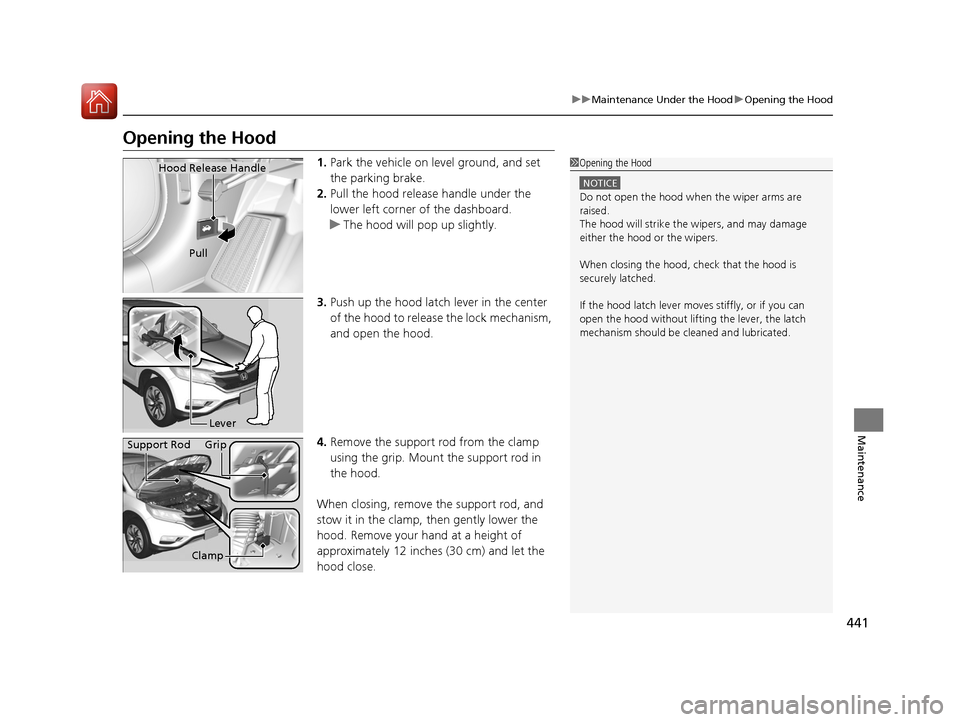
Opening the Hood
1. Park the vehicle on le vel ground, and set
the parking brake.
2. Pull the hood release handle under the
lower left corner of the dashboard.
u The hood will pop up slightly.
3. Push up the hood latch lever in the center
of the hood to release the lock mechanism,
and open the hood.
4. Remove the support rod from the clamp
using the grip. Mount the support rod in
the hood.
When closing, remove the support rod, and
stow it in the clamp, then gently lower the
hood. Remove your hand at a height of
approximately 12 inches (30 cm) and let the
hood close.1 Opening the Hood
NOTICE
Do not open the hood when the wiper arms are
raised.
The hood will strike the wipers, and may damage
either the hood or the wipers.
When closing the hood, check that the hood is
securely latched.
If the hood latch lever moves stiffly, or if you can
open the hood without lifti ng the lever, the latch
mechanism should be cl eaned and lubricated.
Hood Release Handle
Pull
Lever
Support Rod Grip
Clamp
15 CR-V-31T0A6300.book 441 ページ 2015年2月2日 月曜日 午前10時35分
Page 481 of 532

480
uuCleaning uExterior Care
Maintenance
Exterior Care
Dust off the vehicle body after you drive.
Regularly inspect your vehi cle for scratches on painted surfaces. A scratch on a
painted surface can result in body rust. If you find a scratch, promptly repair it.
Wash the vehicle regularly. Wash more frequently when driving in the following
conditions:
• If driving on roads with road salt.
• If driving in coastal areas.
• If tar, soot, bird droppings, insects, or tree sap are stuck to painted surfaces.
• Remove the audio antenna.
2 Audio Antenna P. 209
•Fold in the door mirrors.
• Turn off the automatic intermittent wipers*.
Make sure to follow the instructions indicated on the automated car wash.
• Keep sufficient distance between the cleaning nozzl e and the vehicle body.
• Take particular care around the windows. Standing too close may cause water to
enter the vehicle interior.
• Do not spray high pressure water directly into the engine compartment. Instead,
use low pressure water and a mild detergent.
■Washing the Vehicle
■Using an Automated Car Wash
■Using High Pressure Cleaners
1 Washing the Vehicle
Do not spray water into the air intake vents. It can
cause a malfunction.
Air Intake Vents
* Not available on all models
15 CR-V-31T0A6300.book 480 ページ 2015年2月2日 月曜日 午前10時35分
Page 523 of 532

Index
522
Index
Index
Numbers
4WD........................................................... 400
A
ABS (Anti-lock Brake System) ................... 407
Accessories and Modifications ................. 424
Accessory Power Sockets .......................... 189
Adaptive Cruise Control (ACC) ................. 375
Indicator .................................................... 82
Additives Coolant ................................................... 447
Engine Oil ................................................ 442
Washer .................................................... 451
Additives, Engine Oil ................................ 442
Adjusting
Armrest ................................................... 184
Front Seats .............................................. 175
Head Restraints........................................ 178
Mirrors .................................................... 173
Rear Seat Back ......................................... 183
Rear Seats................................................ 182
Steering Wheel ........................................ 172
Adjusting the Sound ................................. 237
Air Conditioning System (Climate Control System) .................................................... 200
Changing the Mode ................................ 200
Defrosting the Windshield and Windows ............................................... 201
Dust and Pollen Filter ............................... 477
Recirculation/Fresh Air Mode ................... 200 Sensors ................................................... 203
Synchronized Mode................................. 202
Using Automatic Climate Control ............ 200
Air Conditioning System (Heating and Cooling System) ...................................... 197
Cooling ................................................... 199
Defrosting the Windshield and Windows ............................................... 199
Dust and Pollen Filter............................... 477
Heating ................................................... 198
Air Pressure ....................................... 466, 511
Airbags ........................................................ 41
Advanced Airbags ..................................... 47
Airbag Care............................................... 53
Event Data Recorder .................................... 0
Front Airbags (SRS) .................................... 44
Indicator.............................................. 51, 73
Passenger Airbag Off Indicator .................. 52
Sensors ..................................................... 41
Side Airbags .............................................. 48
Side Curtain Airbags.................................. 50
All-Wheel Drive (AWD) ............................ 400
AM/FM Radio ............................................ 215
Anti-lock Brake System (ABS) .................. 407
Indicator.................................................... 73
Armrest ..................................................... 184
Audio Antenna ......................................... 209
Audio System ............................................ 206
Adjusting the Sound................................ 214
Auxiliary Input Jack.................................. 207
Error Messages ........................................ 262 General Information................................ 267
Internet Radio ......................................... 224
iPhone .................................................... 270
iPod ........................................................ 221
MP3/WMA/AAC ..................... 218, 226, 253
Pandora
®................................................ 224
Reactivating ............................................ 210
Recommended CDs ................................ 268
Recommended Devices ........................... 270
Security Code ......................................... 210
Theft Protection ...................................... 210
USB Adapter Cable ................................. 207
USB Flash Drives...................................... 270
USB Port(s) .............................................. 208
Audio/Information Screen ....................... 233
Authorized Manuals ................................ 519
Auto Door Locking/Unlocking ................ 139
Customize .............................................. 122
Automatic Intermittent Wipers .............. 165
Automatic Lighting .................................. 160
Auxiliary Input Jack ................................. 207
Average Fuel Economy ...................... 94, 112
Average Speed ......................................... 112
AWD (All-Wheel Drive) ............................ 400
B
Battery...................................................... 474
Charging System Indicator ................ 71, 499
Jump Starting ......................................... 494
Maintenance (Checking the Battery) ....... 474
15 CR-V-31T0A6300.book 522 ページ 2015年2月2日 月曜日 午前10時35分
Page 531 of 532

530
Index
Warning Labels........................................... 68
Warranties (Warranty Manual provided
separately) ............................................... 517
Watts ......................................................... 510
Wear Indicators (Tire) ............................... 470
Wheel Nut Wrench (Jack Handle) ............ 488
Window Washers ...................................... 164
Adding/Refilling Fluid ............................... 451
Switch ..................................................... 164
Windows (Opening and Closing) ............. 150
Windshield ................................................ 164
Cleaning .................................................. 481
Defrosting/Defogging ...................... 199, 201
Washer Fluid............................................ 451
Wiper Blades ........................................... 461
Wipers and Washers ................................ 164
Winter Tires............................................... 473
Snow Tires ............................................... 473
Tire Chains .............................................. 473
Wipers and Washers ................................. 164
Automatic Intermittent Wipers................. 165
Checking and Replacing Wiper Blades ..... 461
Front ....................................................... 164
Rear......................................................... 166
WMA ......................................... 218, 226, 253
Worn Tires ................................................. 465
X
XM® Radio ................................................. 242
15 CR-V-31T0A6300.book 530 ページ 2015年2月2日 月曜日 午前10時35分