2016 HONDA CR-V mount
[x] Cancel search: mountPage 268 of 532

267
Features
General Information on the Audio System
SiriusXM® Radio Service*
1.You need your radio ID ready before regist ering for subscription. To see the ID in
the display: Select Channel List.
2. Have your radio ID and credit card numb er ready, and either call or visit the
SiriusXM ® website to subscribe.
Switch to the SiriusXM® mode by using the SOURCE button on the steering wheel,
or through the audio/information screen, and stay in this mode for about 30
minutes until the service is activated. Make su re your vehicle is in an open area with
good reception.
Loading:
SiriusXM ® is loading the audio or program information.
Channel off air:
The channel is not currently broadcasting.
Channel unauthorized:
SiriusXM ® radio is receiving informat ion update from the network.
No Signal:
The signal is too weak in the current location.
Channel unavailable:
No such channel exists, the channel is not part of your subscription, or the artist or
title information is unavailable.
Check antenna:
There is a problem with the SiriusXM ® antenna. Contact a dealer.
■Subscribing to SiriusXM® Radio
■Receiving SiriusXM ® Radio
■SiriusXM ® Radio Display Messages
1 Subscribing to SiriusXM ® Radio
Contact Information for SiriusXM ® Radio:
US: SiriusXM ® Radio at www.siriusxm.com or 1-800-
852-9696
Canada: SiriusXM ® Canada at www.xmradio.ca , or
1-877-209-0079
1 Receiving SiriusXM ® Radio
The SiriusXM ® satellites are in orbit over the equator;
therefore, objects south of the vehicle may cause
satellite rece ption interruptions. Sa tellite signals are
more likely to be blocked by tall buildings and
mountains the farther north you travel from the
equator.
You may experience rece ption problems under the
following circumstances:
•In a location with an obstruction to the south of
your vehicle.
•In tunnels
•On the lower level of a multi-tiered road•Large items carried on the roof rack
* Not available on all models
15 CR-V-31T0A6300.book 267 ページ 2015年2月2日 月曜日 午前10時35分
Page 343 of 532

342
Features
Compass
When you turn the ignition switch to ON (w*1, the compass self-calibrates, and the
compass display appears.
Compass Calibration
If the compass indicates the wrong direction, or the CAL indicator blinks, you need
to manually calibrate the system.
1.Turn the ignition switch to ON
(w.
2. Press and hold the SETUP button until the
display shows the compass setting menu.
3. Rotate to select Calibration, then press
.
4. When the display changes to Calibration
Start, press .
5. Drive the vehicle slowly in two circles.
u The compass starts to show a direction
after the calibration. The CAL indicator
goes off.
*1: Models with the smart entry system have an ENGINE START/STOP button
instead of an ignition switch.
1 Compass
Compass operation can be affected under the
following conditions:
•Driving near power lines or stations•Crossing a bridge
•Passing a large vehicle, or driving near a large
object that can cause a magnetic disturbance
•When accessories such as antennas and roof racks
are mounted by magnetsModels with one display
Compass Setting Menu Items
1 Compass Calibration
Calibrate the compass in an open area.
While setting the compass:
•The button returns to the previous screen.•The SETUP button cancels the setting mode.
Models with one display
15 CR-V-31T0A6300.book 342 ページ 2015年2月2日 月曜日 午前10時35分
Page 352 of 532

351
uuBefore Driving uMaximum Load Limit
Continued
Driving
Maximum Load Limit
The maximum load for your ve hicle is 850 lbs (385 kg).
See Tire and Loading Information label attached to the driver's doorjamb.
This figure includes the total weig ht of all occupants, cargo, and
accessories, and the tongue load if you are towing a trailer.
Steps for Determining Correct Load Limit -
(1) Locate the statement “The comb ined weight of occupants and
cargo should never exceed XXX kg or XXX lbs.” on your
vehicle’s placard.
(2) Determine the combined weight of the driver and passengers
that will be riding in your vehicle.
(3) Subtract the combined weight of the driver and passengers
from XXX kg or XXX lbs.
(4) The resulting figure equals the available amount of cargo and
luggage load capacity. For example, if the “XXX” amount
equals 1,400 lbs. and there will be five 150 lb. passengers in
your vehicle, the am ount of available cargo and luggage load
capacity is 650 lbs.
(1,400 - 750 (5 x 150) = 650 lbs.)1 Maximum Load Limit
Gross Vehicle Weight Rating (GVWR):
The maximum allowable weight of the vehicle, all
occupants, all a ccessories, all cargo, and the tongue
load. 2 Specifications P. 510
Gross Axle Weight Rating (GAWR):
The maximum allowable weight of the vehicle axle. 2 Specifications P. 510
3WARNING
Overloading or improper loading
can affect handling and stability
and cause a crash in which you
can be hurt or killed.
Follow all load limits and other
loading guidelines in this manual.Label Example
15 CR-V-31T0A6300.book 351 ページ 2015年2月2日 月曜日 午前10時35分
Page 385 of 532

uuWhen Driving uAdaptive Cruise Control (ACC)*
384
Driving
To cancel adaptive cruise control, do any of
the following:
• Press the CANCEL button.
• Press the MAIN button.
• Depress the brake pedal.
■Automatic cancellation
The beeper sounds and a message appears on the multi-information display when
ACC is automatically canceled. Any of these conditions may cause the ACC
cancellation:
• Your vehicle speed slows down to 22 mph (35 km/h) and below.
• Bad weather (rain, fog, snow, etc.).
• When the radar sensor inside the front grille gets dirty.
• The vehicle ahead of you cannot be detected.
• An abnormal tire condition is detected, or the tires are skidding.
• Driving on a mountainous road, or driving off road for extended periods.
• Abrupt steering wheel movement.
• When the ABS or VSA ® is activated.
• When the ABS or VSA ® system indicator comes on.
■To Cancel1To Cancel
Resuming the prior set speed: After you have
canceled adaptive cruise c ontrol, you can resume the
prior set speed while it is still displayed. Press the
RES/+ button when driving at a speed of at least 25
mph (40 km/h) or more.
You cannot set or resume in the following situations:
•When vehicle speed is less than 25 mph (40km/h).•When the MAIN button is turned off.
CANCEL
Button
MAIN
Button
1 Automatic cancellation
Even though adaptive crui se control has been
automatically canceled, you can still resume the prior
set speed. Wait until the condition that caused ACC
to cancel improves, then press the RES/+ button.
15 CR-V-31T0A6300.book 384 ページ 2015年2月2日 月曜日 午前10時35分
Page 436 of 532

435
uuMaintenance MinderTMuTo Use Maintenance MinderTM
Continued
Maintenance
*1: If a message SERVICE does not appear more than 12 months after the display is reset, change the
engine oil every year.
# : See information on maintenance and emissions warranty.
CODEMaintenance Main Items
A
●Replace engine oil*1
B●Replace engine oil*1 and oil filter●Inspect front and rear brakes●Check parking brake adjustment●Inspect tie rod ends, steering gearbox, and boots●Inspect suspension components●Inspect driveshaft boots●Inspect brake hoses and li nes (Including ABS/VSA)●Inspect all fluid levels and condition of fluids●Inspect exhaust system#
●Inspect fuel lines and connections#*2: If you drive in dusty conditions, replace the air cleaner element every 15,000 miles (24,000 km).
*3: If you drive primarily in urban areas that have high concentrations of soot in the air from industry and
from diesel-powered vehicles, replace the dust and pollen filter every 15,000 miles (24,000 km).
*4: Driving in mountainous areas at very low vehicle speeds or trailer towing results in higher transmission temperatures. This requires transmission fluid changes more frequently than recommended by the
Maintenance Minder. If you regularly drive your vehicle under these conditions, have the transmission
fluid changed every 25,000 miles (40,000 km).
CODEMaintenance Sub Items
1
●Rotate tires
2●Replace air cleaner element*2
●Replace dust and pollen filter*3
●Inspect drive belt
3
●Replace transmission fluid*4
4●Replace spark plugs●Inspect valve clearance
5
●Replace engine coolant
6●Replace rear differential fluid*
* Not available on all models
15 CR-V-31T0A6300.book 435 ページ 2015年2月2日 月曜日 午前10時35分
Page 442 of 532
441
uuMaintenance Under the Hood uOpening the Hood
Maintenance
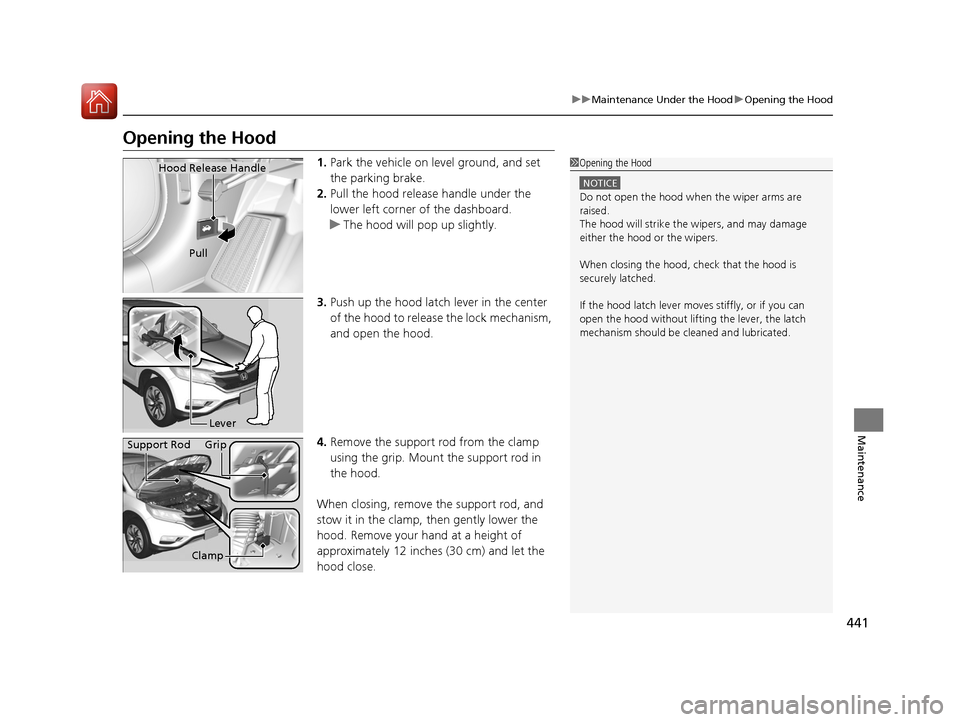
Opening the Hood
1. Park the vehicle on le vel ground, and set
the parking brake.
2. Pull the hood release handle under the
lower left corner of the dashboard.
u The hood will pop up slightly.
3. Push up the hood latch lever in the center
of the hood to release the lock mechanism,
and open the hood.
4. Remove the support rod from the clamp
using the grip. Mount the support rod in
the hood.
When closing, remove the support rod, and
stow it in the clamp, then gently lower the
hood. Remove your hand at a height of
approximately 12 inches (30 cm) and let the
hood close.1 Opening the Hood
NOTICE
Do not open the hood when the wiper arms are
raised.
The hood will strike the wipers, and may damage
either the hood or the wipers.
When closing the hood, check that the hood is
securely latched.
If the hood latch lever moves stiffly, or if you can
open the hood without lifti ng the lever, the latch
mechanism should be cl eaned and lubricated.
Hood Release Handle
Pull
Lever
Support Rod Grip
Clamp
15 CR-V-31T0A6300.book 441 ページ 2015年2月2日 月曜日 午前10時35分
Page 448 of 532

447
uuMaintenance Under the Hood uEngine Coolant
Continued
Maintenance
Engine Coolant
This coolant is premixed with 50% an tifreeze and 50% water. Do not add any
straight antifreeze or water.
We recommend you check the engine coolant level every time you refuel. Check the
reserve tank first. If it is completely empty, also check the coolant level in the
radiator. Add the engine coolant accordingly.
1.Check the amount of coolant in the reserve
tank.
2. If the coolant level is below the MIN mark,
add the specified coolant until it reaches
the MAX mark.
3. Inspect the cooling system for leaks.
Specified coolant: Ho nda Long Life Antifreeze/Coolant Type 2
■Reserve Tank
1Engine Coolant
If Honda antifreeze /coolant is not available, you may
use another major brand non- silicate coolant as a
temporary replacement. Check that it is a high quality
coolant recommended for aluminum engines.
Continued use of any non-Honda coolant can result
in corrosion, causing the cooling system to
malfunction or fail. Have the cooling system flushed
and refilled with Honda anti freeze/coolant as soon as
possible.
Do not add rust inhibitors or other additives to your
vehicle's cooling system. They may not be compatible
with the coolant or with the engine components.
Reserve
Tank
MAX
MIN
15 CR-V-31T0A6300.book 447 ページ 2015年2月2日 月曜日 午前10時35分
Page 452 of 532

451
uuMaintenance Under the Hood uRefilling Window Washer Fluid
Maintenance
Refilling Window Washer Fluid
Check the amount of window washer fluid by looking at the reservoir.
If the level is low, fill the washer reservoir.
If the washer fluid is low, the washer level indicator comes on.
If the washer fluid is low, a message appears on the multi-information display.
Pour the washer fluid carefully. Do not overflow the reservoir.1Refilling Window Washer Fluid
NOTICE
Do not use engine antifreeze or a vinegar/water
solution in the windshield washer reservoir.
Antifreeze can damage y our vehicle's paint. A
vinegar/water solution ca n damage the windshield
washer pump.
Canadian models with information display
Canadian models with mu lti-information display
15 CR-V-31T0A6300.book 451 ページ 2015年2月2日 月曜日 午前10時35分