Page 130 of 532

129
uuClock uAdjusting the Clock
Controls
■Using the SETUP button
1. Press the SETUP button.
2. Rotate to select Adjust Clock, then press .
3. Rotate to select the item you want to change (12/24 hour mode, hour,
minute). Then press .
4. Rotate to make the adjustment.
5. Press to enter your selection. The display returns to Adjust Clock. Repeat steps
4 to 6 to adjust other items.
6. To enter the selection, Rotate and select Set, then press .
7. Press the SETUP button to go back to the normal display.
■Using the audio wi th touch screen
1.Press the (Home) button, then select
Settings .
2. Select Clock/Info , then Clock
Adjustment .
3. Adjust the hours and minutes by selecting
/.
4. Select OK to set the time.
1Using the SETUP button
These indications are used to show how to operate
the selector knob.
Rotate to select.
Press to enter.
To set the time to the nearest hour:
Press and hold the CLOCK button until the clock
display begins to blink, then press the
( 6 (Reset)
button.
Depending on the displayed time, the clock sets
forward or backward.
Example:
1:06 will reset to 1:00
1:53 will reset to 2:00
Models with one display
Models with two displays
(Home) Button
34
1 Using the audio with touch screen
You can customize the clock display to show the 12
hour clock or 24 hour clock.
2 Customized Features P. 271
15 CR-V-31T0A6300.book 129 ページ 2015年2月2日 月曜日 午前10時35分
Page 214 of 532

213
Features
Audio System Basic Operation
To use the audio system, the ignition switch must be in ACCESSORY (q or ON (w.
Use the selector knob or SETUP button to
access some audio functions.
Press to switch between the normal and
extended display fo r some functions.
Selector knob: Rotate left or right to scroll
through the available ch oices. Press to set
your selection.
SETUP button: Press to select any mode such
as the Auto Select , RDS Information ,
Sound Settings , Play Mode , Resume/
Pause , or Adjust Clock .
button: Press to go back to the
previous display.
Models with one display1 Audio System Basic Operation
These indications are used to show how to operate
the selector knob.
Rotate to select.
Press to enter.
Press the SOURCE ,
(+, ( -, or button on the
steering wheel to cha nge any audio setting.
2 Audio Remote Controls P. 211
Setup menu items 2 Auto Select P. 216
2 RDS information P. 217
2 Sound Settings P. 214
2 Play Mode P. 220
2 Resume/Pause P. 230
2 Adjust Clock P. 128
Button
Selector
Knob
SETUP
Button
Menu Display
15 CR-V-31T0A6300.book 213 ページ 2015年2月2日 月曜日 午前10時35分
Page 235 of 532
234
uuAudio System Basic Operation uAudio/Information Screen
Features
■Info
Shows the Trip Computer , Clock/Wallpaper , Voice Info, or System/Device
Information .
■Audio
Shows the current audio information.
■Settings
Enters the customiz ing menu screen.
2Customized Features P. 271
■Connect Apps
Connects with your smartphone*1 to play personalized music, information, and
social media streams.
2 Smartphone Apps P. 260
1.Press the button.
2. Select Settings to go to the settings screen.
3. Select System .
4. Select the Home tab.
5. Select Home Screen Edit Order.
6. Select and hold the icon then, drag it to the
desired position.
*1: Available on specific phones only. Check handsfreelink.honda.com for
compatible phones and hondalink.com for feature details.
■Changing the Home screen icon Layout
15 CR-V-31T0A6300.book 234 ページ 2015年2月2日 月曜日 午前10時35分
Page 236 of 532

Continued235
uuAudio System Basic Operation uAudio/Information Screen
Features
You can change, store, and delete the wa llpaper on the audio/information screen.
■Import wallpaper
You can import up to five images, one at a time, for wallpaper from a USB flash
drive.
1.Connect the USB flash drive to the USB
port.
2 USB Port(s)* P. 208
2.Select Settings to go to the settings screen.
3. Select Clock/Info .
4. Select Clock/Wallpaper Type , then the
Wallpaper tab.
5. Select Add New .
u The picture name is displayed on the list.
6. Select a desired picture.
u The preview is displayed on the left side
on the screen.
7. Select Start Import to save the data.
u Then the display will return to the
wallpaper list.
■Wallpaper Setup1Wallpaper Setup
•When importing wallpaper files, the image must be
in the USB flash drive’s root directory. Images in a
folder cannot be imported.
•The file name must be fewer than 256 characters.•The file format of the im age that can be imported
is BMP (bmp) or JPEG (jpg).
•The individual file size limit is 5 MB.•The maximum image size is 4,096 x 4,096 pixels. If
the image size is less than 800 x 480 pixels, the
image is displayed in the middle of the screen with
the extra area appearing in black.
•If the USB flash drive doe s not have any pictures,
the No files detected message appears.
* Not available on all models
15 CR-V-31T0A6300.book 235 ページ 2015年2月2日 月曜日 午前10時35分
Page 237 of 532

uuAudio System Basic Operation uAudio/Information Screen
236
Features
■Select wallpaper
1. Select Settings to go to the settings screen.
2. Select Clock/Info .
3. Select Clock/Wallpaper Type , then the Wallpaper tab.
u The screen changes to the wallpaper list.
4. Select a desired wallpaper.
u The preview is displayed on the left side on the screen.
u The pop-up menu appears on the screen.
5. Select Set.
u The display will return to the wallpaper list.
■Delete wallpaper
1. Select Settings to go to the settings screen.
2. Select Clock/Info .
3. Select Clock/Wallpaper Type , then the Wallpaper tab.
u The screen changes to the wallpaper list.
4. Select a wallpaper that you want to delete.
u The preview is displayed on the left side on the screen.
u The pop-up menu appears on the screen.
5. Select Delete.
u The confirmation message will appear.
6. Select Yes to delete completely.
u The display will return to the wallpaper list.
1Wallpaper Setup
From the pop-up menu, select Preview to see a
preview at full-size screen.
To go back to the previous screen, select OK, or press
the BACK button.
When the file size is large, it takes a while to be
previewed.
To delete all wallpapers you add, select Delete All,
then Yes.
15 CR-V-31T0A6300.book 236 ページ 2015年2月2日 月曜日 午前10時35分
Page 273 of 532
272
uuCustomized Features u
Features
■Customization Flow
Models with two displays
Press the button.
Select Settings .
HomeHome Screen Edit Order
Background Color
DisplayDisplay SettingsBrightness
Contrast
Black Level
Beep Volume
Sound/BeepVolume
Volume
Voice Recog.Voice Prompt
Automatic Phone Sync
Phonebook Phonetic Modification
Default
Factory Data Reset
Clock Format
ClockClock/Wallpaper TypeClock
Wallpaper
Clock Adjustment
Clock Display
Clock Location
Clock Reset
Keyboard Layout
OthersLanguage
Remember Last Screen
Voice Command Tips
System
Compass Setting
15 CR-V-31T0A6300.book 272 ページ 2015年2月2日 月曜日 午前10時35分
Page 274 of 532
273
uuCustomized Features u
Continued
Features
*1:May change depending on your currently selected source.
Sound
Color
Tint
Audio
Audio Source Pop-Up
[Your selected media] Cover Art*1
Color
Display Adjustment*1DisplayBrightness
Contrast
Black Level
Aspect Ratio Adjustment*1
Bluetooth Device List*1
Change Bluetooth Audio Device*1
Default
RDS INFO*1
Clock Format
ClockClock/Wallpaper TypeClock
Wallpaper
Clock Adjustment
Clock Display
Clock Location
Clock Reset
Default
InfoInfo Screen Preference
Clock/Info
15 CR-V-31T0A6300.book 273 ページ 2015年2月2日 月曜日 午前10時35分
Page 277 of 532
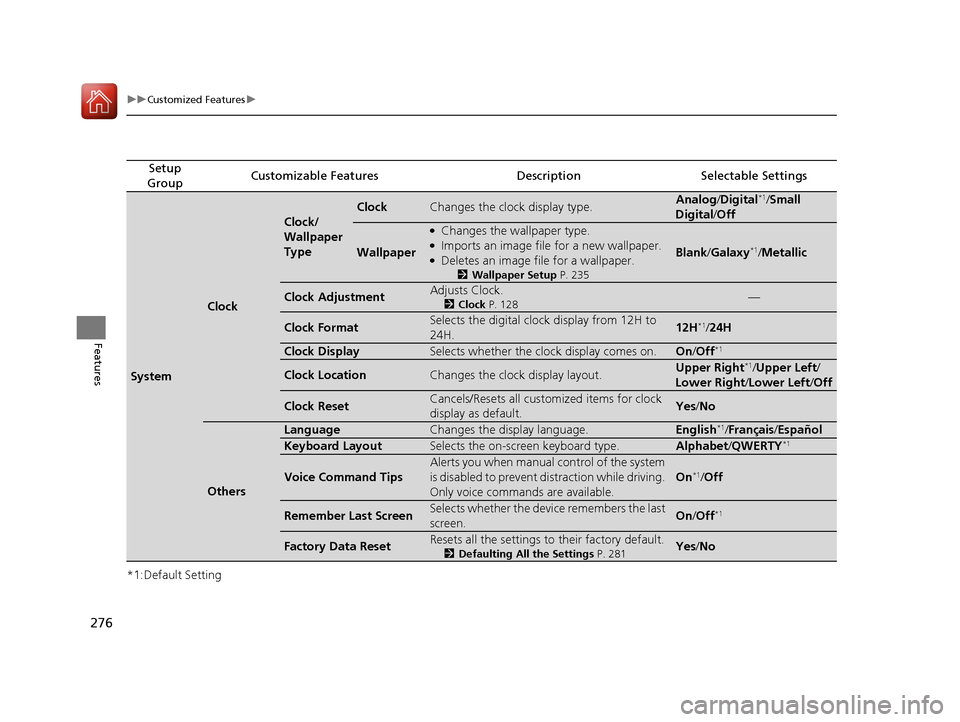
276
uuCustomized Features u
Features
*1:Default Setting
Setup
GroupCustomizable FeaturesDescriptionSelectable Settings
System
Clock
Clock/
Wallpaper
Type
ClockChanges the clock display type.Analog /Digital*1/Small
Digital /Off
Wallpaper
●Changes the wallpaper type.●Imports an image file for a new wallpaper.●Deletes an image file for a wallpaper.
2 Wallpaper Setup P. 235
Blank/Galaxy*1/ Metallic
Clock AdjustmentAdjusts Clock.
2 Clock P. 128—
Clock FormatSelects the digital clock display from 12H to
24H.12H*1/24H
Clock DisplaySelects whether the clock display comes on.On /Off*1
Clock LocationChanges the clock display layout.Upper Right*1/Upper Left /
Lower Right /Lower Left/ Off
Clock ResetCancels/Resets all customized items for clock
display as default.Yes/No
Others
LanguageChanges the display language.English*1/Français /Español
Keyboard LayoutSelects the on-screen keyboard type.Alphabet /QWERTY*1
Voice Command Tips
Alerts you when manual control of the system
is disabled to prevent distraction while driving.
Only voice commands are available.
On*1/ Off
Remember Last ScreenSelects whether the device remembers the last
screen.On /Off*1
Factory Data ResetResets all the settings to their factory default.
2 Defaulting All the Settings P. 281Yes/No
15 CR-V-31T0A6300.book 276 ページ 2015年2月2日 月曜日 午前10時35分


![HONDA CR-V 2016 RM1, RM3, RM4 / 4.G Owners Manual 273
uuCustomized Features u
Continued
Features
*1:May change depending on your currently selected source.
Sound
Color
Tint
Audio
Audio Source Pop-Up
[Your selected media] Cover Art*1
Color
Display Adj](/manual-img/13/5804/w960_5804-273.png "HONDA CR-V 2016 RM1, RM3, RM4 / 4.G Owners Manual 273
uuCustomized Features u
Continued
Features
*1:May change depending on your currently selected source.
Sound
Color
Tint
Audio
Audio Source Pop-Up
[Your selected media] Cover Art*1
Color
Display Adj")